


Memory has always mattered for personalization and continuity. But as customers move agents from demos into production, another requirement becomes just as important: reliability.
Enterprise teams need agents that not only remember facts, but also apply what they have learned to follow procedures consistently, recover from repeated failure modes, and complete tasks with greater confidence over time. Memory in Foundry Agent Service is built for this shift, with new procedural memory capability, management experiences, and a set of new features such as time-to-live that give developers more visibility and control over what memory stores.
New procedural memory improves agent reliability
In enterprise deployments, a common failure appears quickly: agents often know the right facts and still fail the task because they do not execute the right procedure. They may skip a validation step, misuse a tool, miss a required policy check, or repeat the same flawed pattern on a similar task. Procedural memory is designed to close that gap by helping agents retain and reuse successful execution patterns, so they can complete complex workflows more reliably instead of starting from scratch every time. When used together with agent optimizer in Foundry Agent Service, developers can create self-improving agents by combining design-time optimization of prompts and tools with runtime learning from real task execution.
Procedural memory works in two steps:
- Agent trajectories are ingested and audited to identify successful patterns, inefficient routes, and missing steps. From this, structured procedural memory items are extracted, capturing both “when to use” (task context, preconditions, signals) and “what to do” (ordered actions, required checks, tool usage).
- When the agent encounters similar tasks, relevant procedures are retrieved and injected into the agent’s context, guiding execution with explicit step-level constraints such as required validations, correct tool parameters, and policy enforcement—so the agent follows a proven path rather than reconstructing it on the fly.
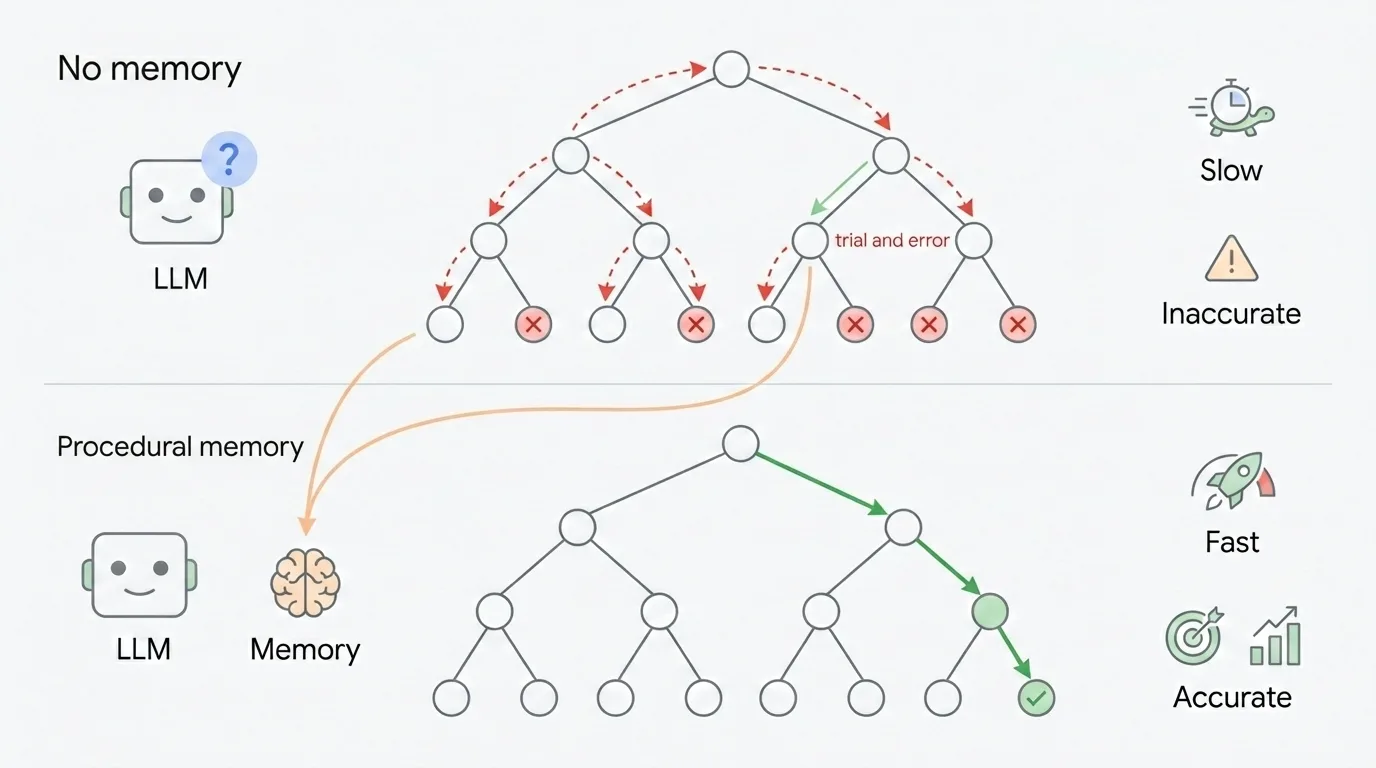
A few weeks ago, we also released STATE-Bench (Stateful Task Agent Evaluation Benchmark), an open-source, memory-agnostic benchmark that measures whether agents improve with experience on realistic enterprise tasks. In this benchmark, we started tracking “pass^5”, measuring how well an agent can consistently fulfill the task. In our evaluations, we are seeing about a 5% improvement on STATE-Bench and Tau-Bench with procedural memory enabled.

New management experience in the UI
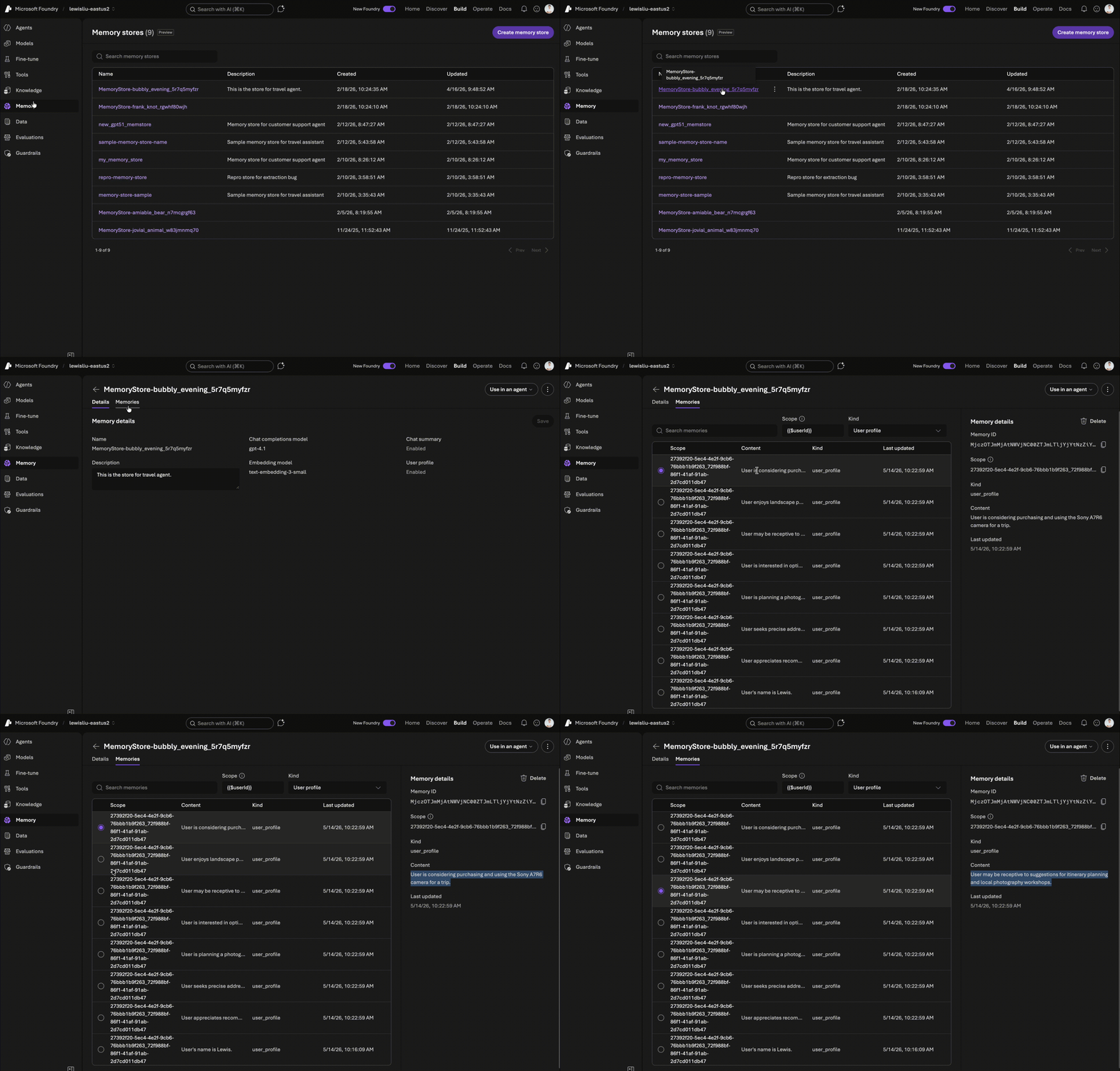
We are also introducing a new memory management experience in the Microsoft Foundry portal. Developers increasingly want to inspect, understand, and tune what an agent is storing instead of treating memory as a black box. With this update, they can view stored memories directly and manage individual memory items through CRUD operations.
Memory TTL, Multimodal support, and direct memory command
This June’s update also adds three capabilities developers have been asking for. Multimodal support helps agents understand and remember information from images, which is especially useful in e-commerce and customer support scenarios. Memory TTL (Time-to-Live) can be configured when a memory store is created, automatically retiring older, lower-value memories to improve retrieval quality and help control storage costs. Direct memory commands let users explicitly tell an agent to remember or forget something, enabling more transparent and user-controlled experiences.
# Specify memory store options

options = MemoryStoreDefaultOptions(

   chat_summary_enabled=True,

   user_profile_enabled=True,

   procedural_memory_enabled=True,

   default_ttl_seconds=30 * 24 * 60 * 60,

   user_profile_details=(

      "Avoid irrelevant or sensitive data, such as age, financial details, "

      "or anything not useful for personalizing future conversations."

   ),

)
File-based memory in Microsoft Agent Framework
Memory is also coming to Microsoft Agent Framework through file-based memory support. The goal is to reduce friction for developers who want to start simple and scale without changing their development model. With file-based memory, developers can begin locally with an experience that is easy to inspect, version, and understand with markdown (.MD) files, then carry the same pattern forward as their application matures. This creates a more natural path from prototyping to production without forcing a managed setup on day one.
from agent_framework import Agent, MemoryContextProvider, MemoryFileStore


store = MemoryFileStore(

   base_path=Path("./memory),

   owner_state_key=MEMORY_OWNER_STATE_KEY,

)


memory_provider = MemoryContextProvider(store=store)


agent = Agent(

   client=client,

   name="MemoryDemoAgent",

   instructions="You are a helpful assistant.",

   context_providers=[memory_provider],

)
Get started
Together, these updates reflect a broader shift in agent memory: from a personalization feature to a core part of reliable agent execution. Procedural memory helps agents follow proven workflows more consistently, while benchmarks such as STATE-Bench help validate whether that improvement holds up on realistic enterprise tasks. We will keep investing to make memory practical, observable, and trustworthy for enterprise use.
To get started, create a memory store with procedural memory and TTL configuration in the Foundry portal at https://ai.azure.com/, or explore the developer documentation for implementation guidance.
To measure reliability gains, explore STATE-Bench and evaluate whether your agent improves with experience on realistic enterprise tasks.
If you’re attending Microsoft Build 2026, or watching on-demand content later, be sure to check out these sessions:


0 comments
Be the first to start the discussion.