


Today we’re thrilled to announce the General Availability (GA) of Foundry Local — Microsoft’s cross-platform local AI solution that lets developers bring AI directly into their applications across modalities like chat and audio, with no cloud dependency, no network latency, and no per-token costs.
Whether you’re building a desktop assistant, a healthcare decision-support tool, a private coding companion, or an offline-capable edge application, Foundry Local gives you production-grade AI that runs entirely on the user’s machine.
What is Foundry Local?
Microsoft Foundry spans cloud to edge — from Microsoft Foundry in the cloud for frontier models, agents, and fine-tuning, to Foundry Local for on-premises and distributed deployments validated on Azure Local, to Foundry Local running natively across Windows, MacOS, Android, and other devices including phones, laptops, and desktops.
Foundry Local is an end-to-end local AI solution in a compact package that is small enough to bundle directly inside your application installer without meaningfully impacting download size. The small size with zero dependencies lets you ship a fully self-contained AI-powered app the same way you would ship any other desktop or edge application, and keeps your CI/CD artifacts lean.
How Foundry Local works
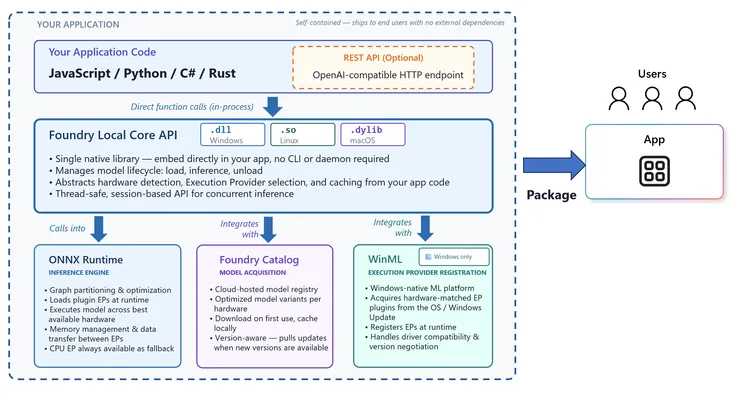
The following high-level architecture diagram articulates the components of the Foundry Local stack:
First, you install the Foundry Local SDK in your application code:
npm install foundry-local-sdk # JavaScript
pip install foundry-local-sdk # Python
dotnet add package Microsoft.AI.Foundry.Local # C#
cargo add foundry-local-sdk # Rust
When you install the SDK, the Foundry Local Core and ONNX Runtime binaries are automatically downloaded and bundled into your application during build as a dependency. The Foundry Local SDKs (Python, JavaScript, C#, Rust) are thin wrappers that call into the Foundry Local Core native library, which is the main runtime managing the model lifecycle (download, load into device memory, inference management, and unload). Foundry Local integrates with Foundry Catalog to download models on first run that are optimized for the device hardware, which is done intelligently so that end users will get the most performant model for their hardware. On subsequent runs, the model is loaded from local cache on the user’s device.
Foundry Local is cross platform: Windows, Linux and macOS. On Windows it integrates with Windows ML (WinML) for inferencing on Windows and to acquire hardware matched execution provider plugins from the OS / Windows update, which ensures driver compatibility and version negotiation. Your end users do not need to be concerned with installing device drivers to get the most optimal performance. On macOS Foundry Local runs natively on the Apple Silicon GPU through Metal.
The Foundry Local inference APIs support the OpenAI request/response format for chat completions, audio transcription, and the Open Responses API format allowing you to seamless switch between cloud and on-device inference without the overhead and complexity of spinning up a local HTTP webserver. However, if your scenario demands an OpenAI compliant HTTP webserver to make REST calls, Foundry Local has you covered; you can configure an optional webserver on initialization.
Foundry Local capabilities
- Ship AI features with zero user setup — self-contained, no external dependencies like CLI or 3rd party app install for end users.
- Combine speech-to-text, tool calling, and chat in a single, unified SDK — no need to juggle multiple SDKs.
- Automatic hardware acceleration — GPU, NPU, or CPU fallback with zero detection code required.
- Stream responses token-by-token for real-time UX.
- Works offline — user data never leaves the device, responses start with zero network latency.
- Multi-language SDK support (C#, Python, JavaScript, Rust).
- Resumable download should your users lose connection or close your app, the model will resume downloading from where it left off.
- Curated optimized local models (via Foundry Model Catalog) with support for:
- GPT OSS
- Qwen Family
- Whisper
- Deepseek
- Mistral
- Phi
- Cross-Platform Support – Windows, macOS (Apple Silicon) and Linux x64.
- (Optional) OpenAI compatible HTTP endpoint.
What’s next
General availability is a milestone, not a finish line. Here’s what’s ahead:
- Foundry Local powered by Azure Local brings models and agentic AI — including RAG, chat — to customer-owned distributed infrastructure. This is in preview now, with more coming soon.
- Expanded model catalog — More models across more domains, with community contributions
- Real-time audio transcription — Transcribe in real-time from a microphone. Ideal for live captioning scenarios.
- Enhanced hardware support — Broader NPU and GPU coverage as the silicon landscape evolves
- Enhanced shared cache — Enhancements to allow models to be shared between applications.
Get Started Today
Build your first app with Foundry Local, by installing the Python SDK (other languages available):
# Windows (recommended for hardware acceleration)
pip install foundry-local-sdk-winml
# macOS/Linux
pip install foundry-local-sdk
Then run the following code:
from foundry_local_sdk import Configuration, FoundryLocalManager

# Initialize Foundry Local
config = Configuration(app_name="foundry_local_samples")
FoundryLocalManager.initialize(config)
manager = FoundryLocalManager.instance

# Download and load a model from the catalog
model = manager.catalog.get_model("qwen2.5-0.5b")
model.download()
model.load()

# Get a chat client
client = model.get_chat_client()

# Create and send message in OpenAI format
messages = [ {"role": "user", "content": "What is the golden ratio?"} ]
response = client.complete_chat(messages)

# Response in OpenAI format
print(f"Response: {response.choices[0].message.content}")

# Unload the model from memory
model.unload()
Learn more
- Samples for each language are provided in the Foundry Local GitHub repository.
- Foundry Local documentation


Works with Learn MCP Server too! 🙂 https://github.com/MicrosoftDocs/mcp/discussions/151