

In the rapidly evolving landscape of large language models (LLMs), achieving precise control over model behavior while maintaining quality has become a critical challenge. While models like GPT-4 demonstrate impressive capabilities, ensuring their outputs align with human preferences—whether for safety, helpfulness, or style—requires sophisticated fine-tuning techniques. Direct Preference Optimization (DPO) represents a breakthrough approach that simplifies this alignment process while delivering exceptional results.
This comprehensive guide explores DPO fine-tuning, explaining what it is, how it works, when to use it, and how to implement it using Microsoft Foundry SDK. Whether you’re building a customer service chatbot that needs to be consistently helpful, a content generation system that should avoid harmful outputs, or any AI application where response quality matters, understanding DPO will empower you to create better-aligned models.
What is Direct Preference Optimization (DPO)?
Direct Preference Optimization is an innovative technique for training language models to align with human preferences without the complexity of traditional Reinforcement Learning from Human Feedback (RLHF). Introduced in the groundbreaking paper Direct Preference Optimization: Your Language Model is Secretly a Reward Model” by Rafailov, Sharma,…, DPO fundamentally reimagines how we teach models to generate preferred outputs.
Unlike traditional supervised fine-tuning where you show a model “what to say,” DPO teaches models by showing them comparative examples: “this response is better than that one.” For each prompt, you provide:
- Preferred response: A high-quality, desirable output
- Non-preferred response: A lower-quality or undesirable output
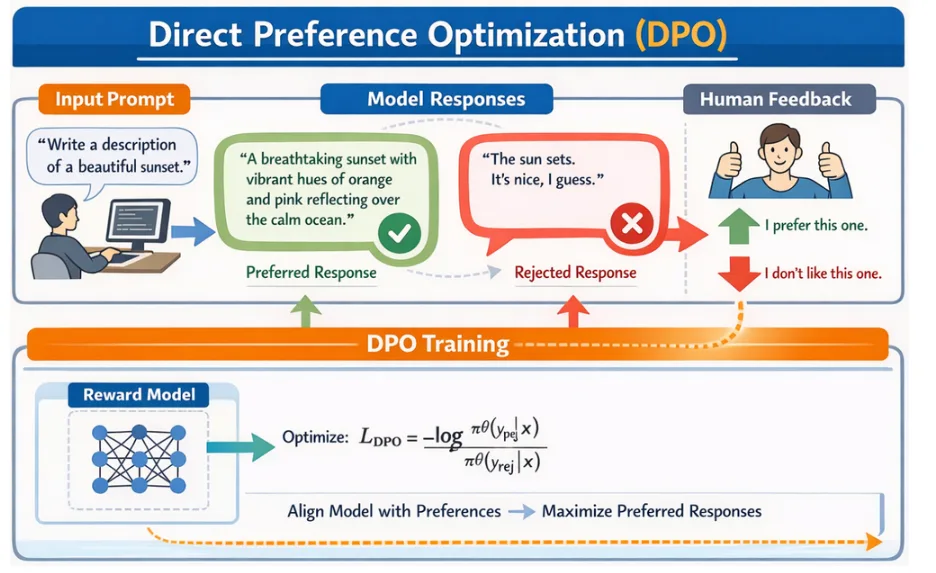
The model learns to increase the likelihood of generating preferred responses while decreasing the probability of non-preferred ones, all without requiring explicit reward modeling or complex reinforcement learning pipelines.
Best Use Cases for DPO:
- Response Quality & Accuracy Improvement
- Reading Comprehension & Summarization
- Safety & Harmfulness Reduction
- Style, Tone, & Brand Voice Alignment
- Helpfulness & User Preference Optimization
How Direct Preference Optimization Works
The following code demonstrates DPO fine-tuning using the Microsoft Foundry Projects SDK:
import os
from dotenv import load_dotenv
from azure.identity import DefaultAzureCredential
from azure.ai.projects import AIProjectClient

# Load environment variables
load_dotenv()

endpoint = os.environ.get("AZURE_AI_PROJECT_ENDPOINT")
model_name = os.environ.get("MODEL_NAME")

# Define dataset file paths
training_file_path = "training.jsonl"
validation_file_path = "validation.jsonl"

credential = DefaultAzureCredential()
project_client = AIProjectClient(endpoint=endpoint, credential=credential)
openai_client = project_client.get_openai_client()

# Upload training and validation files
with open(training_file_path, "rb") as f:
    train_file = openai_client.files.create(file=f, purpose="fine-tune")

with open(validation_file_path, "rb") as f:
    validation_file = openai_client.files.create(file=f, purpose="fine-tune")

openai_client.files.wait_for_processing(train_file.id)
openai_client.files.wait_for_processing(validation_file.id)

# Create DPO Fine Tuning job
fine_tuning_job = openai_client.fine_tuning.jobs.create(
    training_file=train_file.id,
    validation_file=validation_file.id,
    model=model_name,
    method={
        "type": "dpo",
        "dpo": {
            "hyperparameters": {
                "n_epochs": 3,
                "batch_size": 1,
                "learning_rate_multiplier": 1.0
            }
        }
    },
    extra_body={"trainingType": "GlobalStandard"}
)
DPO Fine-Tuning Results:
print(f"Testing fine-tuned model via deployment: {deployment_name}")

response = openai_client.responses.create(
    model=deployment_name,
    input=[{"role": "user", "content": "Explain machine learning in simple terms."}]
)

print(f"Model response: {response.output_text}")
Inference result:
Model response: Machine learning is like teaching a computer to learn from experience, similar to how people do. Instead of programming specific instructions for every task, we give the computer a lot of data and it figures out patterns on its own. Then, it can use what it learned to make decisions or predictions. For example, if you show a machine learning system lots of pictures of cats and dogs, it will learn to recognize which is which by itself.Data format example:
{
  "input": {
    "messages": [
      {"role": "system", "content": "You are a helpful assistant."},
      {"role": "user", "content": "What is the capital of France?"}
    ]
  },
  "preferred_output": [
    {"role": "assistant", "content": "The capital of France is Paris."}
  ],
  "non_preferred_output": [
    {"role": "assistant", "content": "I think it's London."}
  ]
}
Comparing DPO to Other Methods
| Aspect | DPO | SFT | RFT |
| Learning signal | Comparative preferences | Input-output pairs | Graded exploration |
| Data requirement | Preference pairs | Example demonstrations | Problems + grader |
| Best for | Quality alignment | Task learning | Complex reasoning |
| Computational cost | Moderate | Low | High |
Learn more
- Watch on-demand: AI fine-tuning in Microsoft Foundry to make your agents unstoppable
- Join the next Model Mondays Livestream Model Mondays | Microsoft Reactor
- Learn more about fine-tuning on Microsoft Foundry Fine-tune models with Microsoft Foundry – Microsoft Foundry | Microsoft Learn


0 comments