


In today’s rapidly evolving AI landscape, developers are seeking reliable, secure, and predictable language capabilities to power the next generation of enterprise-grade agents. As agentic architecture becomes central to modern applications, teams need tools that deliver stronger privacy guarantees, deterministic behavior, and seamless integration across their AI stack.
As part of the broader transition from Azure AI Services into unified Microsoft Foundry Tools, we’re excited to introduce the rebranded Azure Language in Foundry Tools with new enhancements purpose-built for agent development. Today’s release brings a powerful new remote MCP server with a comprehensive suite of Language AI tools, significant advancements in PII Redaction, and new deterministic intent routing features in Conversational Language Understanding (CLU), giving developers the control, safety, and consistency they need to confidently build and scale intelligent agents.
Azure Language Remote MCP Server
As developers build more capable agents, a familiar challenge keeps popping up: how do you give an agent the language skills it needs, like redaction, summarization, entity extraction, or intent detection, without stitching together a bunch of separate APIs and custom routing logic?
Earlier this year, we’ve already taken steps to simplify this through local MCP tools for Azure Language, giving developers a way to run Language capabilities directly on their machines for development. The new Azure Language remote MCP server takes this even further.
With this release, we’re bringing Azure Language capabilities directly into the Model Context Protocol (MCP) as a fully managed, cloud-hosted service. Your agents can now tap into a rich library of deterministic Language AI tools with minimal integration work — no infrastructure to run, no services to host. Instead of hand-building complex pipelines, your agent can call the Azure Language MCP server and instantly gain capabilities for PII redaction, sentiment analysis, summarization, question answering, and more.
A complete Language AI toolbox for agents
Through the MCP server, agents can natively use:
- PII Redaction for plain text and native documents (.pdf, .docx, etc. stored in Azure Storage) to detect and redact personally identifiable information (PII) from text or documents, including categories like names, email addresses, social security numbers, locations, and more.
- Intent Detection to detect intents and entities in conversational messages as defined in your specific CLU project and deployment.
- Exact Question Answering to answer questions based on provided text documents or knowledge bases configured in Custom Question Answering projects with exact verbatims.
- Language Detection to detect the language of any input.
- Healthcare Entity Extraction to identify healthcare-specific entities in text, including support for FHIR (Fast Healthcare Interoperability Resources) standards.
- Named Entity Recognition (NER) to extract named entities such as persons, organizations, locations, dates, and others from text.
- Sentiment Analysis with Opinion Mining to understand users’ sentiment level and the cause of sentiment.
- Text Summarization to generate summaries (both abstractive and extractive) of input text with options for summary length and number of sentences.
- Key Phrase Extraction to surface the most important topics and concepts from text.
All these capabilities are exposed in a way that’s predictable, structured, and agent-ready.
Real-world use cases where Azure Language MCP server shines
Developers can plug Azure Language remote MCP server into their agents to unlock powerful, end-to-end workflows. Here are some of the most common patterns we’re seeing:
| Use Cases | Description | Examples |
| Privacy-preserving AI assistants | Agents handling sensitive documents or messages (such as medical notes, claims, or customer chats) can use PII Redaction via MCP before sending any content to downstream systems. | A healthcare triage agent may:
|
| Intelligent case routing and workflow automation | Agents supporting customer service or operations teams can use Intent Detection with entity extraction, Sentiment Analysis and Key Phrase Extraction to consistently route requests to the right workflow. | A customer support agent may:
|
| Knowledge-grounded enterprise assistants | Agents that answer policy, IT, or HR questions can rely on QA from Knowledge Bases to provide accurate, grounded responses without hallucinating. | An IT helpdesk agent may:
|
| Document intelligence for compliance and operations | Legal, audit, and compliance teams can use NER, Healthcare Entity Extraction, Key Phrase Extraction, and Summarization to quickly turn large documents into structured insights. | A compliance review agent may:
|
| Multilingual enterprise experiences | Global agents can use Language Detection, NER, and Sentiment Detection to support users across multiple languages while maintaining consistent behavior. | A multilingual HR assistant may:
|
| Meeting and productivity assistants | Agents supporting teams can use Summarization, Key Phrase Extraction, and Sentiment Detection to transform long meetings, chats, or documents into actionable outcomes. | A meeting assistant agent may:
|
Getting started with Azure Language remote MCP server
Whether you’re integrating the Azure Language MCP server into an existing or brand-new agent, we’ve made the process straightforward and flexible. You can connect using the public MCP endpoint, authenticate with the method that works best for your environment, and optionally add the tool directly through the Foundry portal. Below is a detail guide to help you start using the Azure Language remote MCP server in minutes.
Connect to the Azure Language MCP endpoint
The Azure Language MCP server is available through a dedicated MCP endpoint on your Foundry resource:
https://{foundry-resource-name}.cognitiveservices.azure.com/language/mcp?api-version=2025-11-15-preview{foundry-resource-name} is the name of your Foundry resource. It can be the same resource you use to build your agent, or a different one.
Authenticate using a key or Microsoft Entra ID
The MCP server supports two authentication methods to meet the needs of both rapid prototyping and enterprise-grade deployments:
- Key-based authentication Use the key from your Foundry resource for a quick, no-setup connection. You can find the key in the overview page of your Foundry project where the resource is used, or in Azure portal.
- Microsoft Entra authentication Ideal for production agents, controlled RBAC, and cross-resource scenarios. If your agent is running in a different Foundry resource than the one you want to use in the MCP endpoint, ensure the agent’s (or the project’s) identity has the Cognitive Services User role on the MCP resource.
Configure the MCP through Foundry Tools in the portal
If you’re working inside the new Foundry portal, you can add the Azure Language MCP server with just a few clicks. There are a couple of options to access the MCP:
- Option 1: Add from the Foundry Tools
This option allows you to configure the MCP first, then decide later which agent to add to:
- In New Foundry portal, go to Discover, then select Tools from the left menu.
- Search for Azure Language in Foundry Tools, then select the entry.
- Select Connect button, then give it a name, provide your resource name and select the authentication method.
- Once you connect, it will be listed in Build -> Tools
- You can select Use in an agent button in the added tools page to add it into an agent.

- Option B: Add directly to an agent
If you already have an agent where you want to add the MCP tools, following these steps:
- Open your agent in New Foundry portal, which opens the agent’s Playground.
- Select Add button in Tools
- Select + Add a new tool at the bottom of the pop-up menu.
- Select Catalog tag in the pop-up Select a tool
- Choose Azure Language in Foundry Tools from the available tools

Once added, you can test requests and inspect output in the agent playground interactively.
Test the MCP in Visual Studio Code GitHub Copilot
One of the easiest ways to try the Azure Language MCP server is through GitHub Copilot in Visual Studio Code, which natively supports the Model Context Protocol (MCP). By connecting the Azure Language MCP server as a custom tool, you can experiment with all its capabilities right from your editor, before wiring it into a full agent. Here’s how you can set it up in just a few steps:
- Follow the instruction in Use MCP servers in VS Code to either add the MCP server to a workspace “mcp.json” file or your user configuration.
- Select HTTP as the server type, then provide the Azure Language MCP server endpoint with your Foundry resource as the MCP server URL.
- In the json file where the MCP server is added, add the following at the end of your added MCP object for key-based authentication:
"headers": {
     "Ocp-Apim-Subscription-Key": "<your-foundry-resource-key>"
}- Save the file then click to start the server connection. A complete json would look like this:
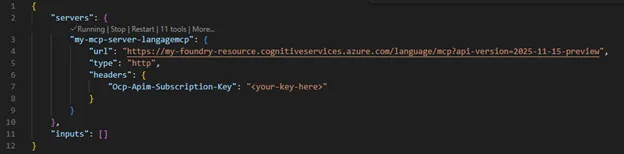
Now you can prompt GitHub Copilot to call the Azure Language tools directly!

Protecting Privacy with Confidence through PII Redaction
We’re excited to unveil several major updates to our Text PII Redaction service, making it easier than ever to detect and mask sensitive and personally identifiable information (PII) like phone numbers, emails, and credit card numbers. The PII Redaction service handles customer data in text, conversation, and native-doc modalities and returns a JSON of redacted text and a comprehensive list of the detected sensitive PII, classification, confidence score, and more. The Text PII modality is now enhanced with several new updates.
- Test Instantly: Try our new demo playground on Microsoft Foundry to quickly validate your redaction workflows. Try it out on the Foundry platform or review the quickstart tutorial.
- Smarter Anonymization: Automatically replace real PII with realistic, synthetic data for safer sharing and analysis. With the new syntheticReplacement redaction policy, “John Doe received a call from 424-878-9193” can be transformed into “Sam Johnson received a call from 401-255-6901.” Try it out with our how-to guide.
- Quality Improvements: Enjoy better accuracy, customizable confidence thresholds, and higher AI quality with fewer false positives. A comprehensive list of our new releases is summarized on our What’s New page.
The Language tools team engages regularly with enterprise customers to deliver state-of-the-art, customer-obsessed products, as exhibited in the customer testimony from Nationwide Building Society (NBS):
“NBS and Microsoft have partnered to elevate PII redaction accuracy from 81% to over 90%, delivering greater confidence in data privacy and ensuring regulatory compliance remains central to AI system design and implementation.”
Test instantly with Foundry playground experience
Seamlessly test, configure, and validate your real-world customer data scenarios on Microsoft Foundry. Tailor every aspect of your workflow, choose from multiple API and model versions to optimize AI quality, set your preferred input language, and fine-tune redaction policies to safeguard sensitive information (with options to replace sensitive data with a character mask ‘***’ or entity-label mask ‘[PHONENUMBER_3]’). Dive deeper with advanced analytics: view confidence scores, character offsets, entity lengths, and detailed tags for comprehensive, granular insights.

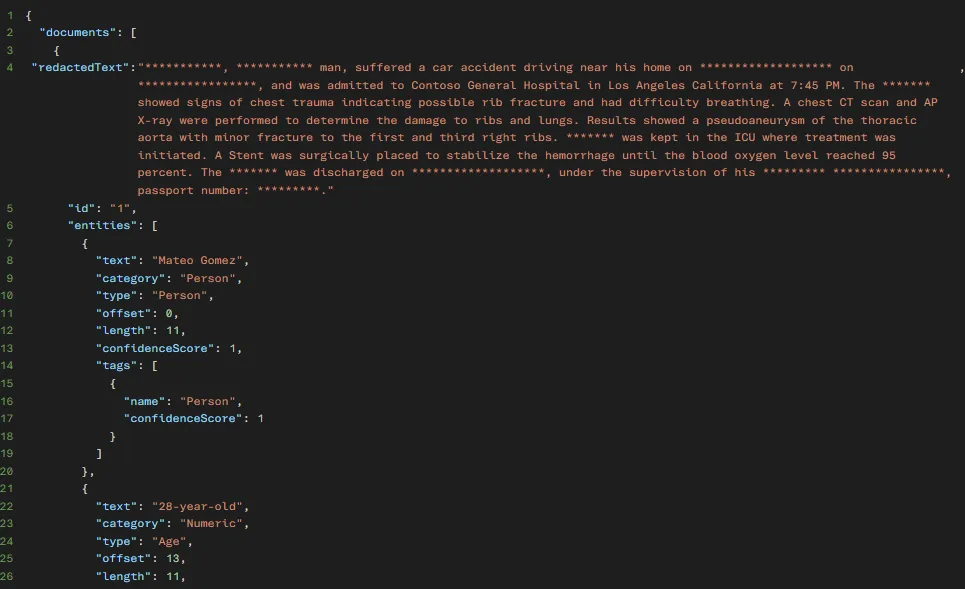
Quality improvements with updated model
The 2025-11-15-preview model includes new entities:
- Airport
- City
- Geopolitical Entity
- Korean Drivers License Number
- Korean Passport Number
- Location
- State
- Zip Code
And significant AI quality improvements in entities:
- Date of Birth
- Vehicle Identification Number
- License Plate
- SORT Code
Deterministic intent routing in AI Agents with CLU
Conversational AI is entering a new era—one where intent routing is smarter, more flexible, and easier to implement than ever. In May 2025, we introduced the Intent Routing Agent to help developers orchestrate complex interactions by intelligently routing user requests to the right skill or action based on predicted intents. As conversations with agents become more complex, our agents also need to become smarter.
We’re excited to announce new understanding at the conversation-level (not just single utterances) to understand the true intent by a user.
Understanding the whole conversation
As humans, we use short utterances, like “That’s correct!” or “Tomorrow” to make meaningful points in our conversations. While these phrases alone don’t provide much context for a human task, in the full conversational context, these are critical phrases to make a point quickly. We’re happy to announce that CLU not only understands individual utterances, but it can make sense of the full conversation to identify the true intent of the conversation.
By simply turning on Multi-turn understanding in the Microsoft Foundry playground, you can enter full conversations to provide context for the true utterance.

Improved entity predictions with slot-filling
In addition to supporting intent prediction on conversations, we’re excited to announce that CLU now supports slot-filling. This means that you can associate a specific list of entities with a given intent, so your system can process the data that’s most important to the business process flow. This slot-filling also helps you to identify which entities are missing to help you determine what to ask next. To see this feature in action, suppose you’re setting up a flight booking agent.
First, you can add your desired intents and entities with short natural language descriptions into Microsoft Foundry.

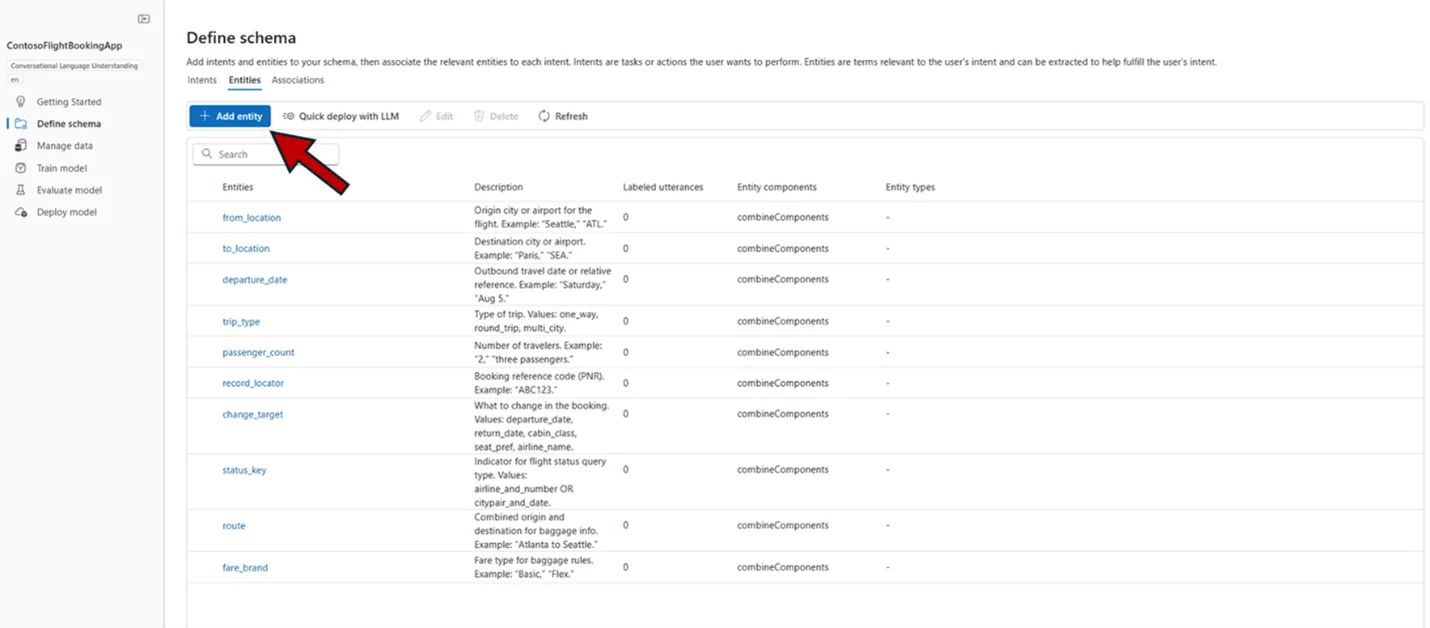
Second, to set up slot-filling, toggle to the Associations tab to link each entity with at least one intent. You can also switch to the entity view to associate by entity. Note: when using slot filling, every entity must be associated with an intent.
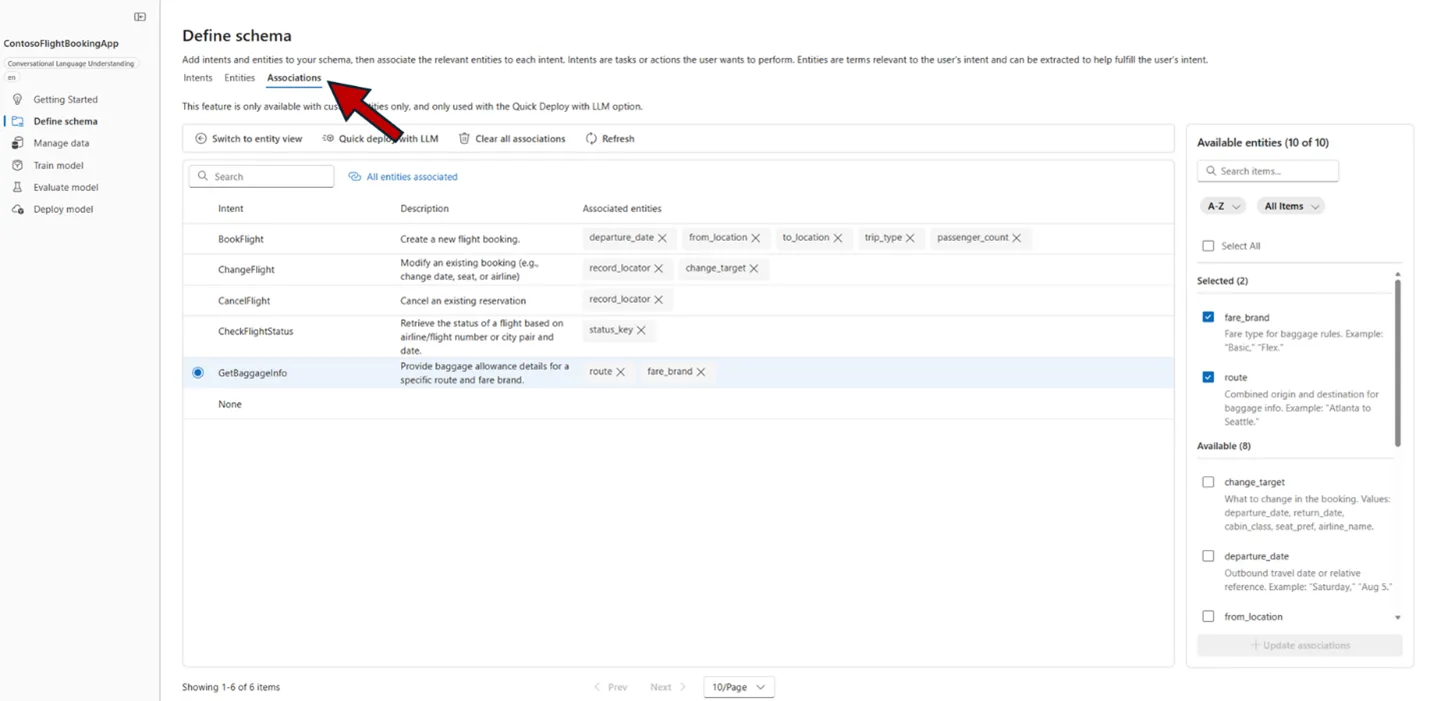
Once your associations are complete, click Quick deploy with LLM and add your own LLM deployment to create your new CLU deployment. In a matter of minutes, you can try out your custom deployment in the Language playground.

After clicking Run, you can see the parsed conversation, the predicted top intent, and the associated slots.

Learn more about multi-turn conversational understanding in Quickstart: Multi-turn conversational language understanding (CLU) models with entity slot filling.
Summary
With the introduction of the Azure Language remote MCP server, enhanced PII redaction, and deterministic CLU routing, Azure Language in Foundry Tools provides a powerful and privacy-first Language AI foundation for modern agentic solutions.
Whether you’re building compliance-critical automation, customer service agents, or intelligent workflow systems, Azure Language gives you deterministic behavior, privacy protections, and tooling integration you need to innovate with confidence.
We’d love to hear your thoughts. Please share your comments, feedback or questions. We can’t wait to see what you build!


0 comments