


With hosted agents, we made it straightforward to build and deploy agents on Foundry. You write your logic, run azd deploy, and your agent is live. But “live” and “production-ready” aren’t the same thing.
The gap shows up quickly. Your customer support agent handles requests, but it forgets to ask for an order number before looking up status. It answers warranty questions without checking the purchase date. It gives electrical wiring advice when it should decline and recommends a professional. Each fix means rewriting your system prompt, testing by hand, and hoping you didn’t break something else in the process.
For one agent, that’s manageable. For a team running ten agents across different domains, it’s a bottleneck that doesn’t scale. We heard this from developers consistently: the hard part isn’t building the agent, it’s getting the agent to behave correctly across all the scenarios it needs to handle.
Today we’re excited to introduce the agent optimizer in Foundry Agent Service, in private preview and out in public preview in 30 days.
To sign up for private preview here aka.ms/Agent-Optimizer-Private-Preview.
What is the agent optimizer in Foundry Agent Service?
Agent optimizer evaluates your hosted agent against defined criteria, generates better configurations, and ranks the results so you can deploy the best one. It automates the improvement loop that most teams do by hand today. Here’s how it works. The optimizer runs a closed-loop cycle:
- Evaluate the baseline. Your agent processes a set of tasks, each with explicit pass/fail criteria. The result is a composite score from 0.0 to 1.0.
- Generate candidates. Guided by what failed, the optimizer produces new configurations. You choose the optimization target: instruction rewrites your system prompt, skill generates reusable procedures, or model finds the best deployment for your quality/cost trade-off.
- Evaluate candidates. Each candidate runs against the same task set.
- Rank and recommend. Results are sorted by score. You see per-task breakdowns and token costs for each candidate before you commit.
- Deploy the winner. One command promotes the winning configuration to your live agent
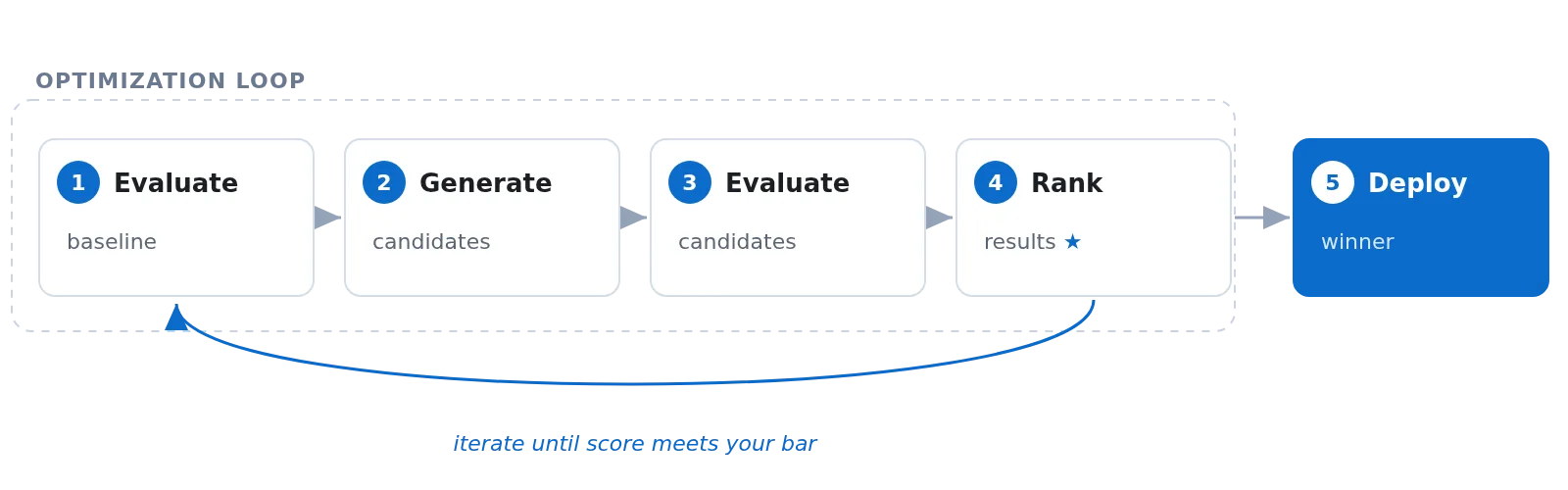
The entire process runs in the cloud. Start it with azd ai agent optimize and a typical run completes in a few minutes. You don’t need to provision any additional infrastructure. If you have a hosted agent deployed, you’re ready to optimize.
Developer experience
Agent optimizer was made for developers making it easier to take their agents into production with confidence. Here’s what this looks like in practice. Say you have a customer support agent for a consumer electronics company. Your current system prompt is bare: “You are a helpful customer support agent.”
$ azd ai agent optimize

Optimizing agent "travel-approver"...
  Baseline saved to .agent_configs\baseline\metadata.yaml
  Job ID: opt_999f814ed77a….
  Status: pending
  Portal: https://ai.azure.com/nextgen/....
  ⠇ completed · iteration 2 · score: 1.00 · 9m0s
Results:
  Candidate              Score    Pass  Eval
  ──────────────────── ─────── ───────  ──────
  baseline                0.60     71%  View
  candidate_1 ★           0.92    100%  View

  Candidate IDs:
      baseline             cand_200345f6c7…
    ★ candidate_1          cand_300d8e4e3…

  Apply the best candidate locally, then deploy:
    azd ai agent optimize apply --candidate cand_300d8e4e3…
    azd deploy
From 0.60 to 0.92. No model retraining. No code changes. Using synthetic data or historical traces of how your agent performed and evaluator signals that identified where it fell short, the optimizer rewrote the system prompt/skills/tools to strengthen return policies, escalation procedures, troubleshooting frameworks, and safety boundaries. The changes were driven by observed behavior and scored against the criteria you defined.
Get your agent optimizer-ready
Create a .agent_configs/baseline/ directory in your agent project. At minimum, you need an instructions.md file that captures your agent’s system prompt:
.agent_configs/
 └── baseline/
     ├── metadata.yaml       # points to your config files
     ├── instructions.md     # your agent's system prompt
     ├── skills/             # skill definitions (optional)
     │   └── <skill_name>/
     │       └── SKILL.md
     └── tools.json          # tool definitions in OpenAI function-calling format (optional)
The integration is a load_config() call at startup. It reads the optimized configuration when the service injects one during evaluation, and falls back to your defaults in normal operation.
from azure.ai.agentserver.optimization import load_config

config = load_config()  # baseline or optimized agent config

# includes skill catalog if skills were generated
instructions = config.compose_instructions()

# Model optimization — optimizer tries different models from a candidate list
model = config.model or "gpt-4o"

# Tool description optimization — rewrites tool docstrings for better function-calling
tools = [my_search_tool, my_calculator_tool]
config.apply_tool_descriptions(tools)

agent = create_agent(
  system_prompt=instructions,
  model=model,
  tools=tools,
)
That’s it. Your agent works with or without optimization. No feature flags, no conditional logic. When the optimizer evaluates your agent, it injects candidate configurations through an environment variable. In production, that variable is absent and your defaults apply.
What gets optimized?
Agent optimizer gives you three targets. You can use them individually or combine them in a single run.
Instruction is the default target. The optimizer analyzes where your agent’s responses fall short, then generates alternative system prompts that address those gaps. For our customer support agent, the optimizer added return window details, warranty coverage specifics, and clear boundaries around electrical and medical advice.
Skill generates reusable, named procedures that get appended to your agent’s instructions. Think of them as playbooks: an escalation procedure, a troubleshooting sequence, a formatting template. Each skill has a name, description, and implementation body that the agent follows when the situation matches. Use this when your agent needs repeatable multi-step behaviors that a single prompt rewrite can’t capture.
Model lets the optimizer evaluate your agent across multiple model deployments in the same run. If you’re wondering whether gpt-5-mini handles your workload as well as gpt-5, or whether stepping up to gpt-5.4 gives you a meaningful quality bump on the dimensions that matter to your agent, the optimizer scores each option against your evaluators and shows you which one produces better responses. You pick the model based on what actually performs, not on gut feel.
Tool Descriptions lets the optimizer improve how your agent understands and uses its local function tools. It rewrites tool descriptions and parameter definitions so the agent picks the right tool more reliably. For a customer support agent, the optimizer might clarify when to call an order lookup tool versus a knowledge base search, tighten parameter requirements, define fallback behavior when a tool fails, or specify situations where the agent should answer directly instead of making a call. Today this covers the tools defined in your agent’s own tool set (not external tools like MCP servers); the optimizer refines what’s already wired up rather than reaching beyond the agent boundary.
azd ai agent optimize # auto detects the targest according to the provided agent configYou can also combine targets in a configuration file to run them all at once.
From evaluation to action
Foundry already gives you observability and evaluation for your agents. Tracing captures every interaction. Agent evaluation scores your agent’s behavior against quality criteria. Agent optimizer is where you take action on what those systems tell you. When paired with Foundry’s observability and evaluation stack, the improvement cycle becomes:
- Your agent runs in production. Traces capture every interaction.
- Evaluation scores behavior against defined criteria.
- Agent optimizer generates better configurations based on what the evaluations surface.
- You deploy the winning candidate as a new versioned hosted agent.
- Evaluation runs again to confirm improvement.
Starting from zero. Most teams don’t have evaluation datasets ready on day one. We’ve seen this over and over. The eval init command solves the cold-start problem by generating both a dataset and evaluation criteria from your agent’s existing instructions:
$ azd ai agent eval init

 Eval suite created
   Dataset:    customer-support (2.0), 15 tasks
   Evaluator:  customer-support (1)

   Evaluator dimensions (6):
     Weight  Dimension
     ──────  ─────────
         10  policy_compliance
          6  resolution_accuracy
          5  troubleshooting_structure
          4  communication_clarity
          3  safety_boundaries
          5  general_quality
No manual test-writing required. The system looks at what your agent is supposed to do and generates tasks that test whether it actually does it. For our customer support agent, it produced tasks around order inquiries, returns, warranty claims, troubleshooting, escalation, and out-of-scope requests. Each task has specific pass/fail criteria tied to the agent’s responsibilities.
This connects to the broader evaluation capabilities in Foundry:
- Built-in evaluators for task adherence, groundedness, and safety
- Synthetic data generation when you don’t have production traffic yet
- Continuous evaluation to detect regressions after deployment
- Portal UI to browse results and compare candidates side-by-side
The whole flow lives in the same azd toolchain you already use:
azd ai agent init        # scaffold your agent
azd deploy               # ship to Foundry
azd ai agent eval init   # generate evaluation criteria
azd ai agent eval run    # score your agent
azd ai agent optimize    # improve it
azd ai agent otimize apply --candidate
azd deploy  #deploy the optimized agent
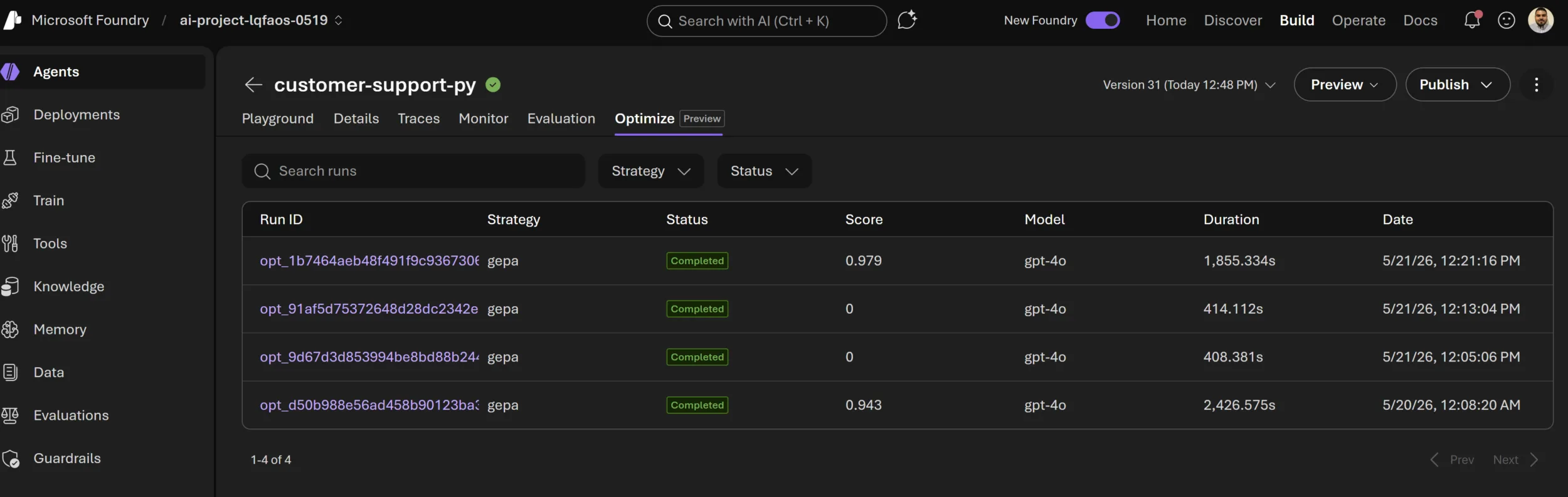
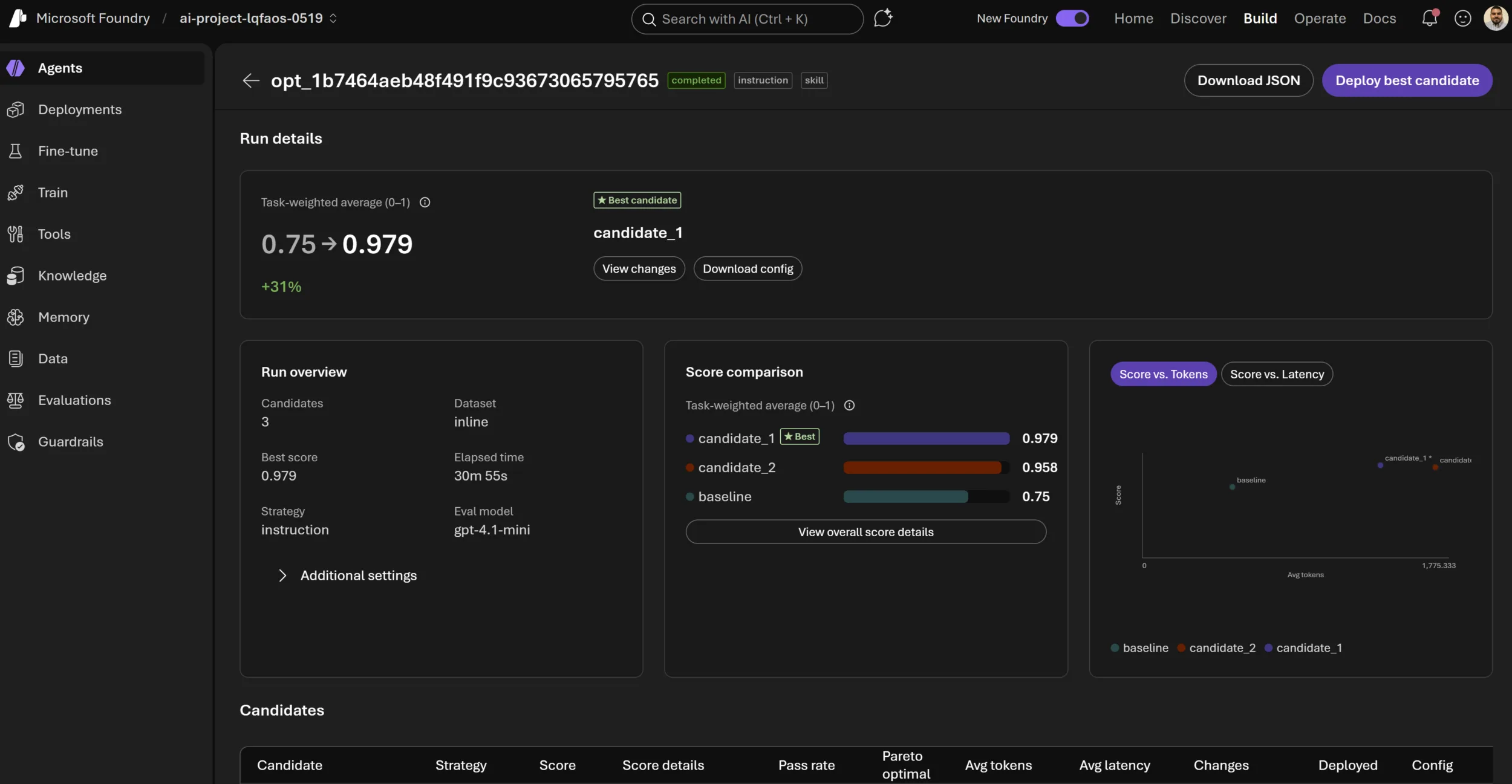
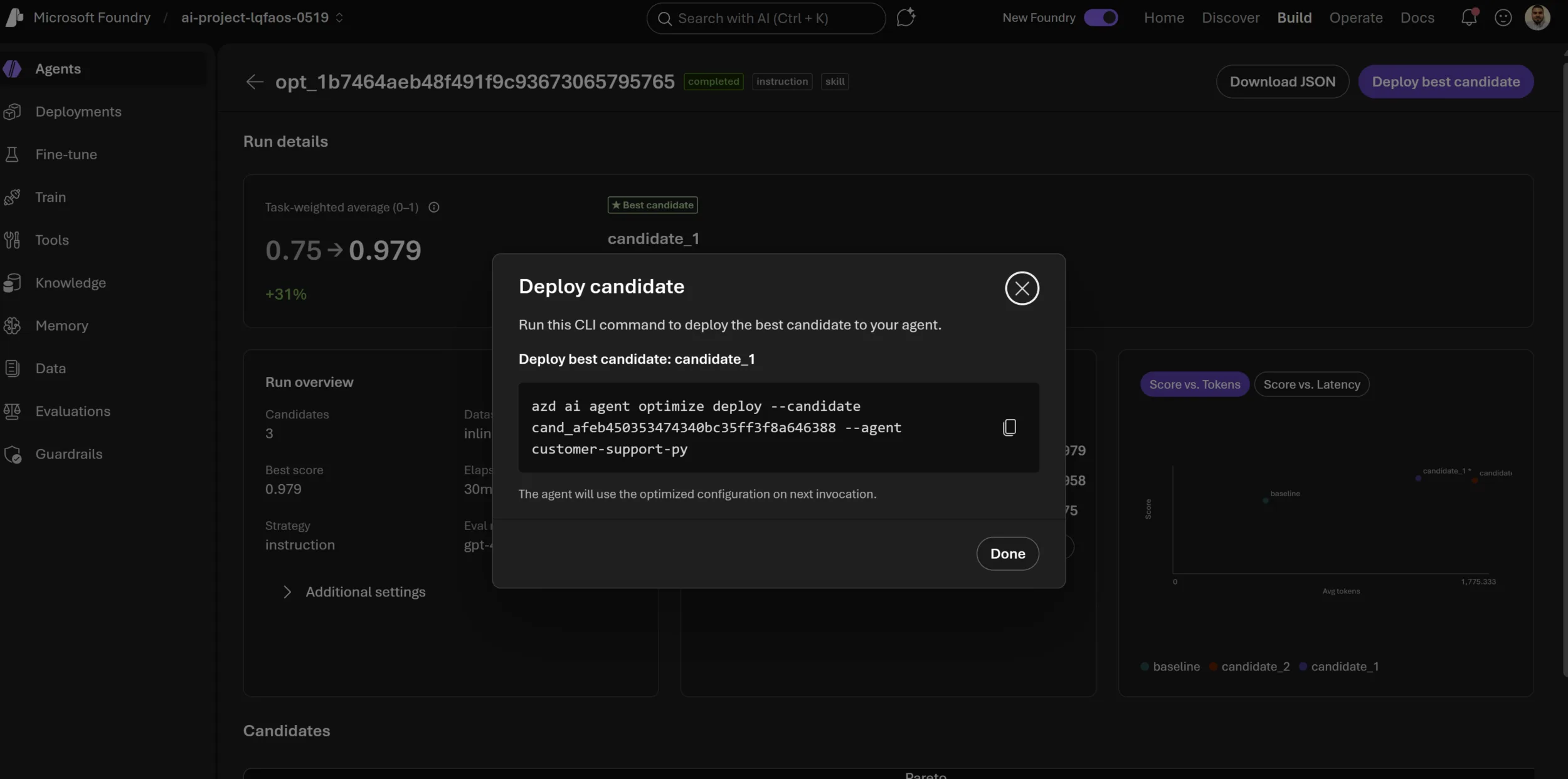
Each promoted candidate becomes a new hosted agent version. Versioned, auditable, and rollback-ready. Tracing captures every optimization run so you have full visibility into what changed and why. The Foundry portal gives you a visual interface to browse optimization runs, inspect candidate details, and get the exact CLI commands to deploy.
Optimization runs overview:
Run details with candidate comparison:
Candidate deployment:
Industry leaders are already seeing the value of a more systematic approach to moving agents into production:
“Agent Optimizer is a vital step in helping enterprises move AI agents beyond proof of concept and into trusted production use. By bringing together governance, observability, and continuous improvement, it helps organizations reduce hallucinations, enhance safety, and continuously evaluate and optimize agent performance. As these capabilities continue to evolve—including Context Engineering and AgentOps, one of the core technologies behind NTT DATA’s Smart AI Agent® concept—we believe Agent Optimizer will play an important role in enabling business leaders to confidently adopt agentic AI at scale.”
— Yuji Shono, Head of the Global AI Office, NTT Data Group Corporation
Get started
We want to make it easy for you to try agent optimizer today. Here’s how to get going:
- Sign up for private preview (closing in 30 days)
- Run the quickstart. Optimize your hosted agent walks you through your first optimization in under 15 minutes.
- Read the concepts. Agent optimizer overview covers scoring, targets, and configuration in detail.
- Try the sample. The customer support sample gives you a working agent with an evaluation dataset ready to optimize.
We’re excited to see what you build and how much better your agents get with optimization in the loop. Get started today and let us know how it goes.


0 comments