


Enterprise-ready cloud browsers for every agent
Much of the work that keeps a business running still happens in a browser: internal portals, vendor consoles and legacy apps with no API. The Browser Automation tool in Foundry Agent Service, powered by Azure Playwright Workspaces, is now generally available. It gives every Foundry agent secure, scalable browsers with isolated sessions, and includes the following capabilities:
- Efficiency: Expanded MCP tool primitives with action batching (GA)
- Human-in-the-loop: Live View and Take control for authentication and steering the agent (GA)
- Networking: Private websites with VNet injection (preview)
- Observability: Traces, Session recording (GA)
This Ignite, the Browser automation tool is enabled with additional features for your agentic automation workloads
- Networking: Developers can bring their own browser proxy (preview)
- CAPTCHA management through Web Bot Auth (preview)
- Secure sign-in: Secret management (preview) and profile reuse (preview, coming soon)
See it work: processing invoices across multiple apps
Our sample agent’s task is clear – Process 15 invoices, validate them against the rules, flag anomalies in Excel, and enter the validated invoices into the expense portal. That’s a multi-app task, and the agent hits the ground running with Browser automation tool in its toolbox.
MCP with expanded tool primitives and batching of actions
Browser automation tool offers a larger set of MCP tools built for browser work, so agents can choose the right level of control for each step of a workflow. Step-by-step tools cover the full range of interactions: opening and reading pages, taking accessibility snapshots, clicking, typing, completing forms, selecting options, handling dialogs, managing tabs, uploading files, and capturing screenshots, console messages and network requests. For multistep sequences, agents can batch actions with the run-code tool. It runs one Playwright script for the whole sequence instead of a long chain of snapshot, click and type calls. We understand efficiency matters and hence recommend batched scripts for repetitive flows, and step-by-step tools for unfamiliar pages and flows with dialogs, where checking the page at each step pays off and LLM is an enabler. Because scripts can run any code, the run-code tools stay opt-in and should be enabled only for reviewed scenarios. Learn more
Live View and Take control: Human-in-the-loop
Browser workflows sometimes reach an unexpected page state, an ambiguous choice, or a step that needs human judgement. Live View shows the agent’s browser in headed mode in real time, so developers and operators can watch it work and see exactly how it performs each action. With Take control, a person can step in to steer the browser, for example to complete a sign-in (as seen in the demo above), give an approval or recover from an unexpected dialog. They can then hand control back and let the agent continue from where it left off. This keeps people in the loop for high-impact actions without giving up the speed of automation.
Session recording
When you need to know what an agent did, session recordings let you replay its browser sessions for debugging, auditing and compliance reviews. Recording is opt-in, and recordings are stored in your own storage account, so storage role-based access control decides who can view them. Activity logs and billing observability are also available, giving you a complete record of browser activity across your workloads.
{
"tags": null,
"location": null,
"id": "/subscriptions/<subscription-id>/resourceGroups/<resource- group>/providers/Microsoft.CognitiveServices/accounts/<resource-name>/projects/proj-default/connections/browserautomation_<string>",
"name": "<string>",
"type": "Microsoft.CognitiveServices/accounts/projects/connections",
"properties":
{
"authType": "ApiKey",
"credentials": {
"key": "<API_KEY>"
},
"group": "ServicesAndApps",
"category": "PlaywrightWorkspace",
"target": "https://<region-name>.mcp.playwright.microsoft.com/playwrightworkspaces/<playwright workspace -id>/mcp",
"metadata":
{
"resourceId": ""/subscriptions/<subscription-id>/resourceGroups/<resource-group>/providers/Microsoft.ManagedIdentity/userAssignedIdentities/<identity-name>",
"enableRecording": "false"
}
},
}
Private websites and VNet injection (preview)
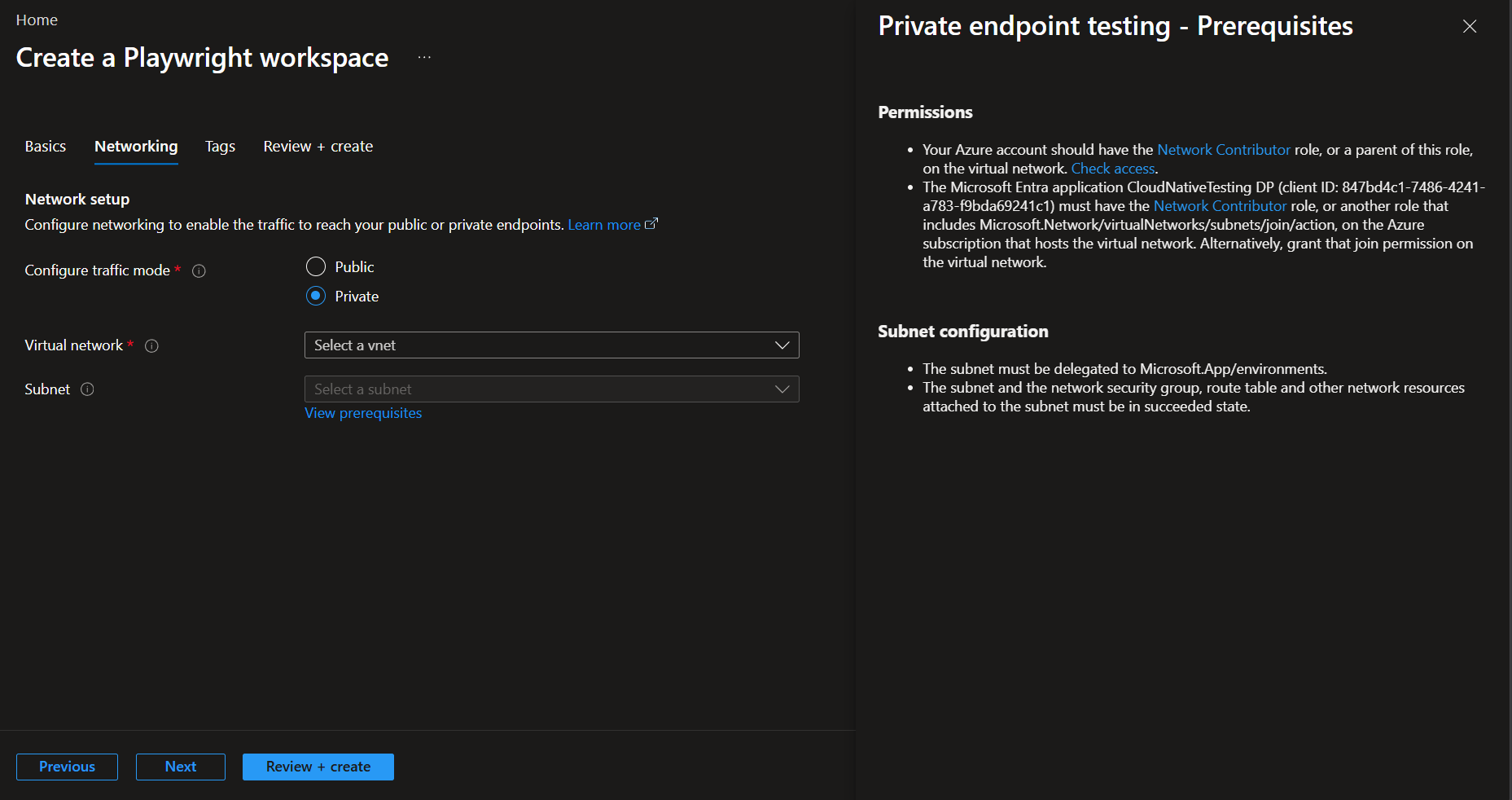
Many of the most valuable enterprise workflows run on applications that aren’t on the public internet, such as internal portals, admin consoles and line-of-business systems. With VNet injection, now in preview, you can link your own virtual network and subnet directly to your Playwright Workspace. Cloud browsers can then reach applications and endpoints hosted inside that private network. The integration uses a dedicated delegated subnet, so you can set network boundaries and control browser egress with the networking policies you already apply to the subnet. Your agents can automate private applications while network access stays within your organization’s security requirements.
Browser proxy (preview)
Enterprises often need precise control over how browser traffic leaves their environment. With browser proxy, now in preview, you can bring your own proxy and route cloud-browser traffic through your existing proxy infrastructure to meet your organization’s access-control requirements. Configurable proxy pools support domain-based routing, so traffic can go through different proxies depending on the destination. Proxy credentials are handled through Azure Key Vault and managed identities, which keeps secrets out of your automation code. You can easily set priorities for your proxies too. When a request matches more than one rule, the rule with highest priority decides which proxy handles it, so routing stays predictable even as your rules grow. Together, these features give you greater control over how your agents’ browsers connect to the web.
az rest --method put \
  --url "<api-base-endpoint>/proxy-configs/<config-id>?api-version=2026-11-01-preview" \
  --resource "https://management.core.windows.net/" \
  --body '{
    "name": "my-proxy-config",
    "description": "Corporate and EU routing",
    "keyVaultReferenceIdentity": {
      "type": "UserAssigned",
      "resourceId": "/subscriptions/<subscription-id>/resourceGroups/<resource-group>/providers/Microsoft.ManagedIdentity/userAssignedIdentities/<identity-name>"
    },
    "proxyPool": {
      "default-proxy": {
        "server": "http://your-default-proxy-hostname:8080"
      },
      "eu-route": {
        "server": "http://your-eu-proxy-hostname:8080",
        "pattern": ["*.eu.company.com", "eu.company.com"],
        "priority": 1,
        "credentials": {
          "usernameSecretUri": "https://<vault-name>.vault.azure.net/secrets/eu-proxy-username",
          "passwordSecretUri": "https://<vault-name>.vault.azure.net/secrets/eu-proxy-password"
        }
      },
      "corp-route": {
        "server": "http://your-corp-proxy-hostname:8080",
        "pattern": ["*.company.com", "company.com"],
        "priority": 2
      }
    },
    "bypass": ["status.company.com", "*.blob.core.windows.net"]
  }'
Profile reuse (preview, coming soon)
Long-running and repeated workflows shouldn’t have to sign in from scratch every time. With profile reuse, now in preview, browser profiles keep authentication, cookies and browser state between sessions, so agents skip repeated logins and setup steps. This makes multistep and long-running workflows faster. Profiles are kept in encrypted storage and governed by workspace-level role-based access control, so only authorized identities can use a saved browser state.
az rest --method patch \
--resource "https://management.core.windows.net/" \
--url "https://<region>.api.playwright.microsoft.com/playwrightworkspaces/<workspaceId>/browser-sessions/<saveSessionId>?api-version=2026-12-01-preview" \
--headers "Content-Type=application/merge-patch+json" "x-ms-mcp-call=true" \
--body '{
    "browserType": "Chromium",
    "operatingSystem": "Linux",
    "protocol": "MCP",
    "browserProfile": {
      "id": "<profileId>",
      "saveChanges": true
    }
  }'
Secret management (preview)
Agents often need credentials to sign in to the websites they automate, and those credentials should never reach the model or your application code. With secret management, now in preview, you keep secrets in your own Azure Key Vault and pass them directly to the browser. The secret is read on the server side, inside the Playwright Workspaces remote MCP server, so neither your application code nor the model ever receives the value. You can bind each secret to a domain allowlist, which stops a malicious site from capturing it. Secret URIs are versionless, so when you rotate a secret in Key Vault, the change is picked up automatically.
CAPTCHA handling (preview)
Many public websites are protected by CAPTCHAs and web application firewalls that block automated traffic. Our focus is secure, responsible, enterprise-grade automation, not getting around a website’s security controls.
Web bot Auth (based on IETF draft) enables AI agents to cryptographically sign their HTTP requests which can help in verifying the agent’s identity for public website research tasks. We are enabling Web Bot Auth for customers by primarily 2 methods – customer self-registration OR Microsoft platform registration (via selected bot management providers like Akamai, Cloudflare, and F5). Complete this form to express interest in Microsoft platform registration.
PATCH
https://management.azure.com/subscriptions/{subscriptionId}/resourceGroups/{resourceGroupName}/providers/Microsoft.LoadTestService/playwrightWorkspaces/{workspaceName}?api-version=2026-11-10-preview
Authorization: Bearer {{AAD Token}}
Content-Type: application/json

{
  "properties": {
    "webBotAuth": {
      "status": "Enabled",
      "signingKey": "Workspace"
    }
  }
}
Get started
To get started, create a Playwright Workspace, connect Browser automation tool to a toolbox in Microsoft Foundry, and add the toolbox to your agent. Then enable the capabilities your scenario needs. Preview capabilities are subject to change, so review their documentation before using them in production. These resources will help:
- Samples
- Forgebook
- Browser automation tool documentation
- Playwright cloud browsers MCP documentation
- Playwright Workspaces MCP, with Scott Hanselman (Azure Friday)
With these capabilities, your agents can reach private applications, use your network’s controls, sign in safely, carry state between sessions, and leave a full audit trail.

0 comments
Be the first to start the discussion.