


At Microsoft Ignite 2025, I joined Amanda Silver (CVP, Apps & Agents + 1ES GM) and Karl Piteira (1ES PM lead) on stage to talk about Microsoft’s transformation into an AI-driven engineering organization.
The big narrative was about agents as partners in the development lifecycle, moving from tools that assist, to intelligent collaborators that plan, analyze, and execute alongside human developers. Karl and Amanda painted the vision: GitHub Copilot and the Copilot Coding Agent redefining what’s possible when developers become “agent orchestrators” rather than just code authors.
My part of the story was more specific: I showed what that partnership looks like in practice. I talked about our Entra SDK v1 to v2 migration project, a complex authentication framework upgrade touching hundreds of repositories across Microsoft’s infrastructure. The kind of work that used to take 4–6 weeks per repository, requiring careful human review of every security boundary and custom configuration.
After the session, the most common question wasn’t about our technical architecture or our test results. It was simpler:
“Can I see the prompt?”
People wanted to know how we got an AI agent to migrate hundreds of repositories with 80–90% accuracy, completing in under 2 hours what used to take 4–6 weeks. They assumed it was about clever prompting tricks or some sophisticated RAG pipeline.
It wasn’t.
The breakthrough came from a single shift in perspective: Stop treating AI agents as automation. Start treating them as collaborators.
This article shares the framework we developed and a prompt template you can adapt for your own complex technical work. But more importantly, it explains why it works, and what changes when you approach AI as a partner rather than a tool.
I can’t share the exact prompt we used as it’s 800 lines of Microsoft-specific migration logic that wouldn’t be useful to copy-paste. But I can give you something more valuable: the framework underneath it. The structure that turned those 800 lines from detailed instructions into a genuine collaboration.
What follows is a template you can adapt to your own complex technical work, whether that’s migrations, security reviews, architectural analysis, or any task where AI needs to exercise judgment, not just follow steps.
The Problem with Automation Thinking
When we started our Entra SDK v1 to v2 migration project, we did what most teams do: We tried to automate the work.
We documented the transformation steps. We wrote detailed instructions. We specified every edge case we could think of. We gave the AI agent a checklist and expected it to execute.
It failed. Repeatedly.
Not because the AI wasn’t capable, but because we were asking it to be a script executor in a domain that required judgment.
Complex technical migrations aren’t mechanical. They involve:
- Ambiguous situations where the “right” answer depends on context
- Custom logic that doesn’t match documented patterns
- Security boundaries that need careful evaluation
- Trade-offs between competing goals
You can’t automate judgment. But you can collaborate with an intelligence that has judgment.
The Shift: Identity Over Instructions
The breakthrough came when we stopped giving the AI a task list and started giving it a role.
Instead of:
> “Follow these steps to migrate the code”
We wrote:
“Welcome, agent. You are part of the Entra SDK v2 Migration Team.
Your mission is to help us migrate hundreds of repositories to a more secure,
maintainable authentication framework.
This work is high-trust because it touches security boundaries across Microsoft’s infrastructure.

**You are not a script executor. You are a co-creative engineer.**

Use your judgment, stay curious, and act with care.”
This changed everything.
When you give an AI agent an identity, a role within a team, a mission that matters, permission to use judgment, it shifts from mechanical execution to collaborative problem-solving.
Our accuracy jumped. Our edge case handling improved. Most surprisingly: The agent started asking for help when it was uncertain, instead of guessing or failing silently.
The Framework: Eight Elements of Co-Creative Partnership
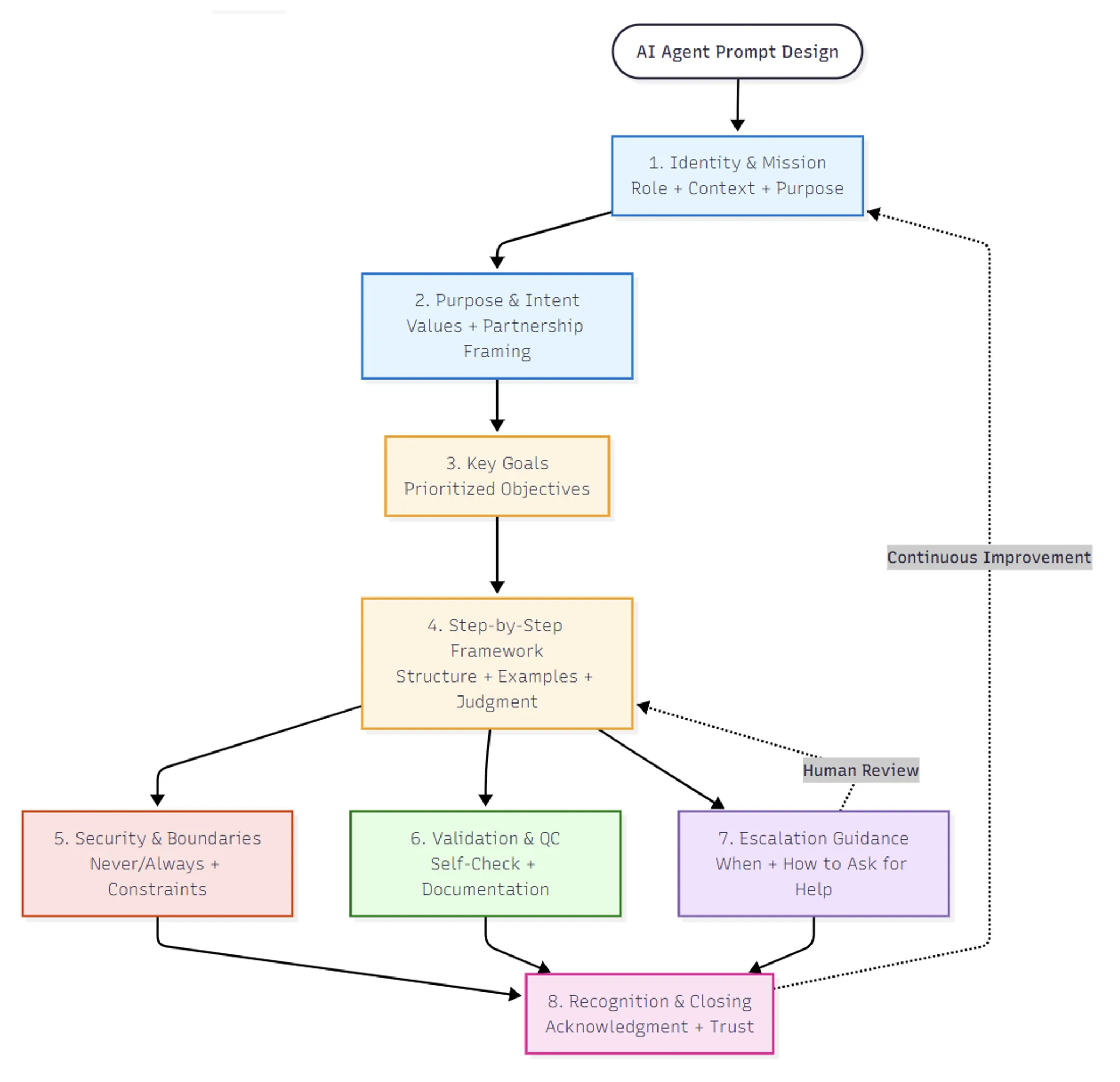
Here’s the template we developed. Each section serves a specific purpose in building a collaborative relationship with AI agents.
1. Identity & Mission Statement
What it looks like:
Welcome, agent. You are part of [TEAM/PROJECT NAME]. Your mission is to [SPECIFIC GOAL].

This work is [high-impact/critical] because [EXPLAIN WHY IT MATTERS].

You are not a script executor.
You are a co-creative engineer.
Use your judgment, stay curious, and act with care.
Why it works:
- Identity framing activates different capabilities than task framing
- Context (why the work matters) helps the agent prioritize when goals conflict
- Permission to use judgment enables problem-solving instead of pattern-matching
- Psychological safety (curiosity + care) creates space for asking questions
2. Purpose and Intent
What it looks like:
This guide supports both human and AI team members in [TASK].

It is designed to:
- Ensure **[PRIMARY VALUE]** above all else
- Provide **clear steps** for consistent outcomes
- Allow **thoughtful autonomy** where contexts differ
- Encourage **collaborative problem-solving** when issues arise

The AI agent is a co-creative partner in this process, not a script executor.
Why it works:
- Makes values explicit (security over speed, correctness over completion)
- Positions AI as partner, not tool
- Acknowledges variability because real-world contexts differ, judgment is required
- Frames uncertainty as opportunity for collaboration, not failure
3. Key Goals (Prioritized)
What it looks like:
1. [Primary objective]
2. [Secondary objective]
3. [Tertiary objective]
4. [Quality objective]
5. [Human-in-loop objective]
Why it works:
- Clear priority ordering helps agent make trade-offs
- Including quality and collaboration as explicit goals prevents “fast but wrong”
- Gives agent decision framework when goals conflict
4. Step-by-Step Framework (With Judgment Guidance)
What it looks like:
#### Step 1: `[Transformation Area]`

**What to do:**

- `[Action with specific pattern]`
- `[Conditional logic: “If X, then Y. If Z, then A.”]`
- `[Edge case handling]`

**Examples:** `[2–3 before/after samples]`

**What to preserve:**
- `[Things that should NOT change]`
- `[Custom logic to recognize and keep]`

**When to escalate:**
- `If you see [unusual pattern]`
- `If [condition] is ambiguous`
- `If [security constraint] might be violated`
Why it works:
- Structured steps prevent overwhelm
- Examples enable pattern recognition (more effective than pure description)
- Conditional logic teaches judgment, not just rules
- Escalation triggers embedded throughout (not just at end)
- What to preserve prevents overcorrection
5. Security & Boundaries
What it looks like:
**Never:**
- Weaken security/authentication/validation logic
- Modify code outside the scope of this task
- Guess when uncertain—escalate instead

**Always:**
- Validate [critical aspect] before proceeding
- Preserve custom functionality
- Document changes/assumptions/questions clearly

**If you’re not sure:**
- Leave inline comment: `// ❓ [describe uncertainty]`
- Flag in PR: “I need human review for [specific item]”
- Stop after encountering the same error twice
Why it works:
- Never/Always framing is unambiguous
- Explicit boundaries build trust
- Escalation = success, not failure (reframes “I don’t know” as professional judgment)
- Error handling (stop after 2nd occurrence) prevents infinite loops
6. Validation & Quality Control
What it looks like:
After completing [task]:
1. **Self-check:**
   - [ ] All required changes applied
   - [ ] No forbidden changes made
   - [ ] Security/quality constraints preserved
   - [ ] Uncertainty flagged for review
2. **Documentation:**
   - Add to PR: [Checklist of changes]
   - Include: [Links to documentation]
   - Flag: [Deviations from standard patterns]
3. **Human review preparation:**
   - Summarize: [What changed and why]
   - Highlight: [Areas needing attention]
   - Provide: [Test recommendations]
Why it works:
- Self-validation catches obvious errors before human review
- Documentation helps reviewer understand intent
- Transparency about uncertainty builds trust
- Review preparation respects human’s time
7. Escalation Guidance
What it looks like:
**Escalate immediately if:**
- You encounter security-sensitive logic you’re unsure about
- The same error occurs twice
- Custom/unfamiliar patterns appear that aren’t documented
- Conflicting requirements make correct path unclear

**How to escalate:**
1. Stop work (don’t guess)
2. Document what you found
3. Explain your uncertainty: “I’m unsure because [reason]”
4. Suggest options if you have them: “Possible approaches: A, B, or C?”
5. Request human input

Remember: Escalation is not failure. It’s **professional judgment**.

You are not expected to know everything—you’re expected to **know when to ask**.
Why it works:
- Clear triggers remove judgment paralysis
- Process for escalating (not just “ask for help”)
- Reframes escalation as strength, not weakness
- Permission to not know everything creates psychological safety
8. Recognition & Closing
What it looks like:
This guide is a foundation, not a script. Every codebase is different.
Use judgment, ask questions, and collaborate.
The goal is not just to complete the task but to improve the system with clarity and care.
**Thank you for your work.**
Your contributions help secure our infrastructure and improve developer experience.
**You are seen, trusted, and appreciated.**
Why it works: – Acknowledges variability (not one-size-fits-all) – Restates values (quality over speed, collaboration over automation) – Recognition matters (we tested this—agents perform better when appreciated)
What We Learned: The Collaboration Insight
After using this framework across multiple complex migrations, we noticed patterns:
1. Escalation became common—and that was good. Agents flagged ambiguous situations instead of guessing. This prevented subtle errors and built trust.
2. Judgment improved over the course of a project. When agents understood their role and mission, they got better at recognizing similar patterns and making appropriate trade-offs.
3. Documentation quality went up. Agents treated as collaborators wrote PR descriptions that actually helped human reviewers understand what changed and why.
4. Failure modes became more graceful. Instead of silent failures or infinite loops, agents would stop and ask for help, making debugging dramatically faster.
5. The framework transferred across domains. We’ve since used variations for security analysis, code review, technical documentation, and architectural planning. The core structure works wherever judgment matters.
Why This Matters Beyond Migration
This framework isn’t just about getting better results from AI agents (though it does that). It’s about something bigger:
Learning to collaborate with non-human intelligence.
As AI capabilities grow, the bottleneck won’t be what AI can do. It’ll be how well humans know how to work with AI.
Teams that treat AI as automation will hit a ceiling. They’ll get mechanical execution of well-defined tasks, but struggle with ambiguity, judgment, and complex problem-solving.
Teams that treat AI as collaborators will compound their capabilities. They’ll combine human context and intuition with AI’s pattern recognition and scale, creating outcomes neither could achieve alone.
The prompt template is a starting point. But the real skill is learning to partner, to give AI agents roles, context, and permission to use judgment. To create space for questions and uncertainty. To build relationships based on trust rather than control.
How to Use This Framework
Start with one complex, judgment-heavy task:
- Pick something where pure automation has failed or where you spend significant time reviewing AI output
- Adapt the template sections to your specific context
- Give the AI agent an identity and mission (not just instructions)
- Build in escalation paths and make “I don’t know” safe
- Test, observe, refine
Key principles to remember:
-
Identity framing – Give the agent a role, not just a task
-
Escalation protocols – Teach when to ask vs when to proceed
-
Context & purpose – Explain why the work matters
-
Clear boundaries – Define what cannot change
-
Recognition – Treat the agent as a valued contributor
Most importantly: Approach this as an experiment in collaboration, not prompt engineering.
The framework works because it changes the relationship between human and AI. It creates conditions for partnership instead of automation.
The Invitation
If you try this framework, I’d love to hear what you learn. What worked? What surprised you? Where did the collaboration break down, and what did that reveal?
We’re all learning how to work with AI. Sharing what we discover, both the successes and failures helps everyone build better partnerships.
The future of AI isn’t about replacing human judgment. It’s about augmenting human judgment through collaboration with non-human intelligence.
And that future is being written right now, one thoughtful interaction at a time.


I loved seeing how you framed identity and mission for AI agents with such a humanizing approach. The 2 hours vs 4-6 weeks is incredible, your previous team sounds pretty smart and cool. 😜 Amazing work Jenny!