



Welcome back to the building blocks for AI in .NET series! In part one, we explored Microsoft Extensions for AI (MEAI) and how it provides a unified interface for working with large language models. Today, we’re diving into the second building block: Microsoft.Extensions.VectorData.
In the first post, we learned how to ask questions and even share some content for context with an LLM. Most applications, however, require more than just a simple question or small markdown file for context. You may want the LLM to have access to all of your product manuals to help troubleshoot customer issues, or provide your employee handbook for an HR chatbot.
Another feature that is common in intelligent apps is semantic search. A semantic search uses the meaning of a query, not just the words or letters, to conduct the search. It does this by converting text into embeddings which are numerical representations of the semantic meaning of text, and vectors that provide insights into how they are related.
Imagine you have a simple database with just three entries:
- Hall pass
- Mountain pass
- Pass (verb)
A traditional approach to finding the answer to queries like “How do I get over the pass?” or “Where do I pick up a pass?” breaks the query down into parts to search for. The word “pass” appears in all three database items, so I receive all three entries back despite the different contexts of my queries. Here is a simplified visualization:
"How do I get over the pass?"
How | do | I | get | over | the | pass
Pass - matches all three entries

"Where do I pick up my pass?"
Where | do | I | pick | up | my | pass
Pass - matches all three entries
Now let’s assume I use an embedding to encode the semantic meaning of the word. The database has already been encoded, but I need to create embeddings from my query. This time, however, the embeddings provide me with a semantic result, not a text-based one. The semantic approach looks like this:
"How do I get over the pass?"
0 | 5 | etc. | 2
2 - matches the 2nd entry, "Mountain pass"

"Where do I pick up my pass?"
6 | 9 | etc. | 1
1 - matches the 1st entry, "Hall pass"
A special embeddings model is used to create the embeddings and is trained to understand the semantic meaning of words through context such as the related terms that appear before and after it. Instead of generating embeddings every time the application runs, it makes much more sense to store them in a database. This has the added bonus of being able to use the database’s ability to query and return results, rather than coding the logic yourself or doing it in a suboptimal way.
Vector databases are designed specifically to store vectors and embeddings. Qdrant, Redis, SQL Server and Cosmos DB are examples of services and products that support storing vector data. Just like MEAI unified LLM access, the vector data extensions provide a common abstraction for working with vector stores.
Why vectors matter for AI applications
Before we jump into the code, let’s look a little more closely at vectors. When you ask an LLM a question about your company’s documentation, the model doesn’t magically know your content. Instead, your application typically:
- Converts your documents into embeddings – numerical representations that capture semantic meaning
- Stores those embeddings in a vector database along with the original content
- Converts the user’s query into an embedding using the same model
- Performs a similarity search to find the most relevant documents
- Passes the relevant context to the LLM along with the user’s query
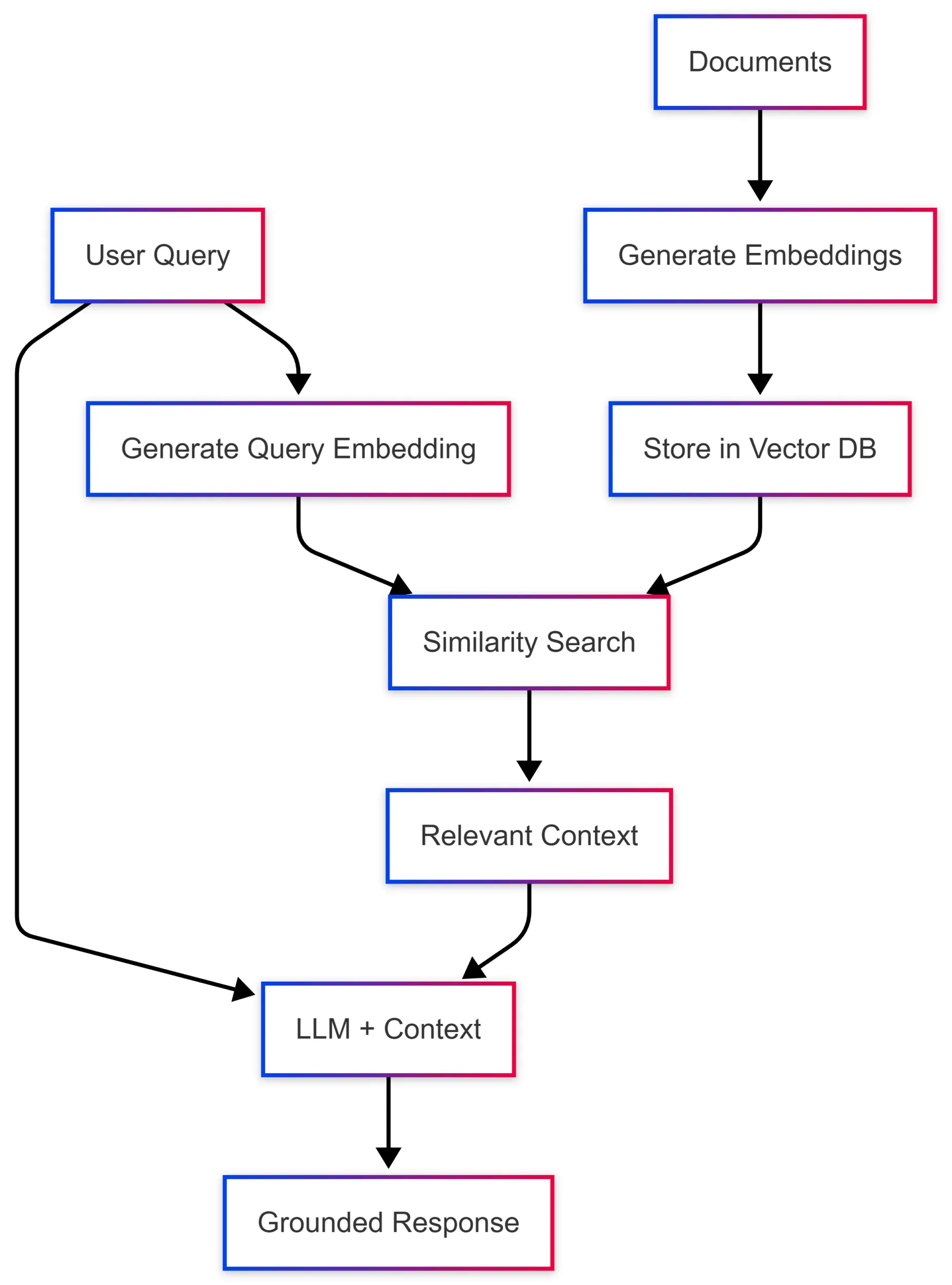
This pattern, known as RAG (Retrieval-Augmented Generation), allows models to provide accurate, grounded responses based on your specific data. The challenge? Every vector database has its own SDK, data structures, and query patterns. That’s where Microsoft.Extensions.VectorData comes in.
One interface, many vector stores
The Microsoft Extensions for Vector Data library provides abstractions that work across different vector database providers. Here’s what that looks like in practice. First, let’s look at using an example vector database, Qdrant, directly and without the abstractions:
var qdrantClient = new QdrantClient("localhost", 6334);

var collection = "my_collection";
await qdrantClient.CreateCollectionAsync(collection, new VectorParams
{
    Size = 1536,
    Distance = Distance.Cosine
});

var points = new List<PointStruct>
{
    new()
    {
        Id = new PointId { Uuid = Guid.NewGuid().ToString() },
        Vectors = embedding,
        Payload =
        {
            ["text"] = "Sample document text",
            ["category"] = "documentation"
        }
    }
};

await qdrantClient.UpsertAsync(collection, points);

var searchResults = await qdrantClient.SearchAsync(collection, queryEmbedding, limit: 5);
Now let’s see the same thing using the universal abstractions:
// Configure embedding generation once on the vector store
var embeddingGenerator = new OpenAIClient(apiKey)
    .GetEmbeddingClient("text-embedding-3-small")
    .AsIEmbeddingGenerator();

var vectorStore = new QdrantVectorStore(
    new QdrantClient("localhost"),
    ownsClient: true,
    new QdrantVectorStoreOptions { EmbeddingGenerator = embeddingGenerator });

var collection = vectorStore.GetCollection<string, DocumentRecord>("my_collection");
await collection.EnsureCollectionExistsAsync();

var record = new DocumentRecord
{
    Key = Guid.NewGuid().ToString(),
    Text = "Sample document text",
    Category = "documentation"
};

await collection.UpsertAsync(record);

var searchResults = collection.SearchAsync("find documents about sample topics", top: 5);
The second example works with any supported vector store by simply changing the VectorStore implementation. Your business logic stays the same.
Defining your data model
The vector data abstractions use attributes to map your C# classes to vector database schemas. Here’s a practical example for a document store:
public class DocumentRecord
{
    [VectorStoreKey]
    public string Key { get; set; }

    [VectorStoreData]
    public string Text { get; set; }

    [VectorStoreData(IsIndexed = true)]
    public string Category { get; set; }

    [VectorStoreData(IsIndexed = true)]
    public DateTimeOffset Timestamp { get; set; }

    // The vector is automatically generated from Text when an
    // IEmbeddingGenerator is configured on the collection or vector store
    [VectorStoreVector(1536, DistanceFunction.CosineSimilarity)]
    public string Embedding => this.Text;
}
The attributes tell the library:
VectorStoreKey– This property uniquely identifies each recordVectorStoreData– These are metadata fields you can filter and retrieveVectorStoreVector– This is the embedding vector with its dimensions and distance function
Working with collections
Once you’ve defined your data model, working with collections is straightforward. The library provides a consistent interface regardless of your underlying vector store:
// Get or create a collection
var collection = vectorStore.GetCollection<string, DocumentRecord>("documents");

// Check if the collection exists
bool exists = await collection.CollectionExistsAsync();
await collection.EnsureCollectionExistsAsync();

// Insert or update records
await collection.UpsertAsync(documentRecord);

// Batch operations are supported
await collection.UpsertBatchAsync(documentRecords);

// Retrieve by key
var record = await collection.GetAsync("some-key");

// Delete records
await collection.DeleteAsync("some-key");
await collection.DeleteBatchAsync(["key1", "key2", "key3"]);
Semantic search
The real power comes when you perform semantic searches using the SearchAsync method. When an IEmbeddingGenerator is configured on the vector store or collection, simply pass your query text and embeddings are generated automatically:
// Embeddings are generated automatically when IEmbeddingGenerator is configured
await foreach (var result in collection.SearchAsync("What is semantic search?", top: 5))
{
    Console.WriteLine($"Score: {result.Score}, Text: {result.Record.Text}");
}
If you already have a pre-computed ReadOnlyMemory<float> embedding—for example, when batching embeddings yourself—you can pass it directly instead:
// Pass a pre-computed embedding vector directly
ReadOnlyMemory<float> precomputedEmbedding = /* your embedding */;
await foreach (var result in collection.SearchAsync(precomputedEmbedding, top: 5))
{
    Console.WriteLine($"Score: {result.Score}, Text: {result.Record.Text}");
}
Filtering results
You can combine vector similarity with metadata filtering to narrow down results:
var searchOptions = new VectorSearchOptions<DocumentRecord>
{
    Filter = r => r.Category == "documentation" &&
                  r.Timestamp > DateTimeOffset.UtcNow.AddDays(-30)
};

var results = collection.SearchAsync("find relevant documentation", top: 10, searchOptions);
Filters use standard LINQ expressions. The supported operations include:
- Equality comparisons (
==,!=) - Range queries (
>,<,>=,<=) - Logical operators (
&&,||) - Collection membership (
.Contains())
Integrating with embeddings
The recommended approach is to configure an IEmbeddingGenerator on the vector store or collection. Embeddings are then generated automatically during both upsert and search—no manual preprocessing required:
// Configure an embedding generator on the vector store
var embeddingGenerator = new OpenAIClient(apiKey)
    .GetEmbeddingClient("text-embedding-3-small")
    .AsIEmbeddingGenerator();

var vectorStore = new InMemoryVectorStore(new() { EmbeddingGenerator = embeddingGenerator });
var collection = vectorStore.GetCollection<string, DocumentRecord>("documents");
await collection.EnsureCollectionExistsAsync();

// Embeddings are generated automatically on upsert
var record = new DocumentRecord
{
    Key = Guid.NewGuid().ToString(),
    Text = "Sample text to store"
};
await collection.UpsertAsync(record);

// Embeddings are also generated automatically on search
await foreach (var result in collection.SearchAsync("find similar text", top: 5))
{
    Console.WriteLine($"Score: {result.Score}, Text: {result.Record.Text}");
}
Implementing RAG patterns
Bringing it all together, here’s a simplified RAG implementation using both Microsoft.Extensions.AI and Microsoft.Extensions.VectorData:
public async Task<string> AskQuestionAsync(string question)
{
    // Find relevant documents - embeddings are generated automatically
    var contextParts = new List<string>();
    await foreach (var result in collection.SearchAsync(question, top: 3))
    {
        contextParts.Add(result.Record.Text);
    }

    // Build context from results
    var context = string.Join("\n\n", contextParts);

    // Create prompt with context
    var messages = new List<ChatMessage>
    {
        new(ChatRole.System,
            "Answer questions based on the provided context. If the context doesn't contain relevant information, say so."),
        new(ChatRole.User,
            $"Context:\n{context}\n\nQuestion: {question}")
    };

    // Get response from LLM
    var response = await chatClient.GetResponseAsync(messages);
    return response.Message.Text;
}
Supported vector stores
Microsoft.Extensions.VectorData works with a wide range of vector databases through official connectors:
- Azure AI Search –
Microsoft.Extensions.VectorData.AzureAISearch - Qdrant –
Microsoft.SemanticKernel.Connectors.Qdrant - Redis –
Microsoft.SemanticKernel.Connectors.Redis - PostgreSQL –
Microsoft.SemanticKernel.Connectors.Postgres - Azure Cosmos DB (NoSQL) –
Microsoft.SemanticKernel.Connectors.AzureCosmosDBNoSQL - SQL Server –
Microsoft.SemanticKernel.Connectors.SqlServer - SQLite –
Microsoft.SemanticKernel.Connectors.Sqlite - In-Memory –
Microsoft.SemanticKernel.Connectors.InMemory(great for testing and development)
For the full list of supported connectors—including Elasticsearch, MongoDB, Weaviate, Pinecone, and more—see the out-of-the-box connectors documentation.
Why separate from the core AI extensions?
You might wonder why vector data is in a separate library from the core Microsoft.Extensions.AI package. The answer is simple: not every intelligent application needs vector storage. Many scenarios – like chatbots, content generation, or classification tasks – work perfectly fine with just the LLM abstractions. By keeping vector data separate, the core library remains lightweight and focused.
When you do need vectors for semantic search, RAG, or long-term memory, you can add the vector data package and immediately benefit from the same consistent patterns you’re already using with MEAI.
Summary
Microsoft.Extensions.VectorData brings the same benefits to vector databases that Microsoft.Extensions.AI brings to LLMs: a unified, provider-agnostic interface that makes your code portable and your architecture flexible. Whether you’re implementing RAG patterns, building semantic search, or creating long-term memory for AI agents, these abstractions let you focus on your application logic instead of database-specific SDKs.
In the next post, we’ll explore the Microsoft Agent Framework and see how these building blocks come together to create sophisticated agentic workflows. Until then, here are some resources to help you get started with vector data in .NET:
- Learn by code
- Learn by following tutorials
- Learn by watching videos
Happy coding!


Qdrant Connector seems to be buggy. Trying to filter for Test in this model:
public class Model
{
	[VectorStoreKey]
	public Guid Id { get; set; }

	[VectorStoreData(IsIndexed = true)]
	public string Test{ get; set; }
}
it fails with the following error:
Is there really no in process way to get vector embeddings? Calling out to external AI models for each query just seems slow and expensive for anything used beyond a trivial amount
You could download a suitable embedding model from huggingface and run it locally, or run it as a docker container.