


Have you tried asking GitHub Copilot about Aspire 13 or the new Agent Framework and found it either hallucinated an answer or told you that those things didn’t exist? This happens because the model used was trained before those things did exist, so it doesn’t know how to answer or help you. As you continue to innovate and move at the speed of AI, you need a development assistant that can keep up with the latest information.
Introducing the MS Learn Model Context Protocol (MCP) server tools. In this post, we’ll explore how the Learn MCP server enhances the developer experience with Copilot, showcase practical examples, and provide straightforward integration instructions for Visual Studio, Visual Studio Code, the Copilot Command Line Interface, and the Copilot Coding Agent.
What Is the MS Learn MCP Server?
The MS Learn MCP server is a managed content provider designed to seamlessly provide Copilot with high-quality, up-to-date, context-aware Microsoft product documentation, code samples, and learning resources to ensure it has the latest information to provide the developer with the best results. Whether you’re building a new AI agent or optimizing an existing WinForms application, the Learn MCP server ensures Copilot has the information it needs.
Enhancing the Developer Experience
By integrating the Learn MCP server with Copilot, .NET developers benefit from a more intelligent and responsive coding environment. Here’s how it makes a difference:
- Improved Code Suggestions: Copilot delivers code suggestions and explanations backed by trusted Microsoft Learn content, reducing the risk of outdated or incorrect guidance.
- Context Awareness: The MCP server returns documentation and code samples specific to your scenario—whether you’re working with .NET 10, experimenting with Aspire, or building APIs in C#.
- Faster Problem Solving: Instead of leaving your editor to search for documentation, you get instant, in-place answers and code references, accelerating your workflow.
- Learning While Coding: Accessing MS Learn modules and tutorials helps you upskill in real time as you work on projects.
Key Use Cases: MCP Server in Action with Copilot
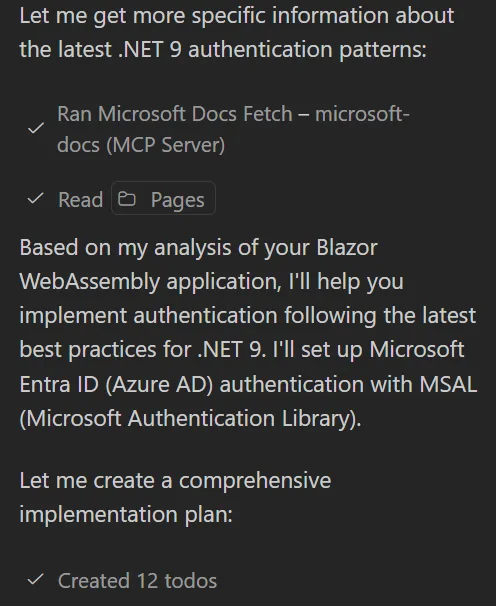
- On-Demand API References: While implementing authentication in ASP.NET Core, Copilot—powered by the Learn MCP server—provides inline references to the latest Microsoft Identity documentation and code samples specific to your framework version.
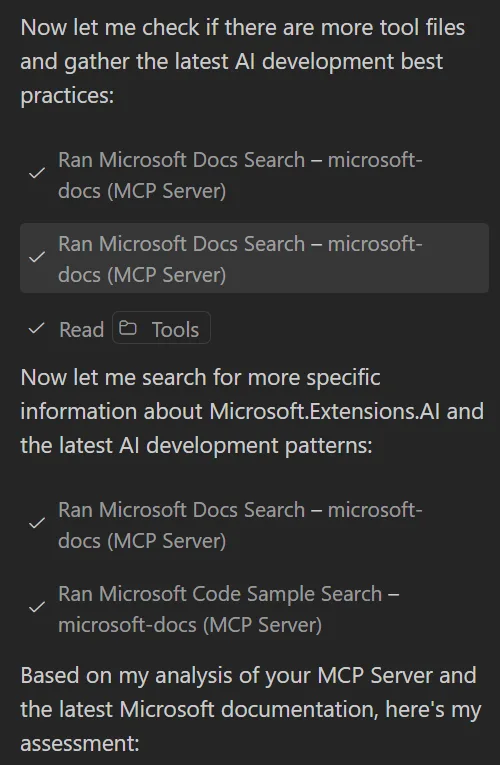
- Best Practice Recommendations: As you write a new MCP Server, Copilot surfaces best practices from MS Learn, ensuring your implementation follows current guidelines.
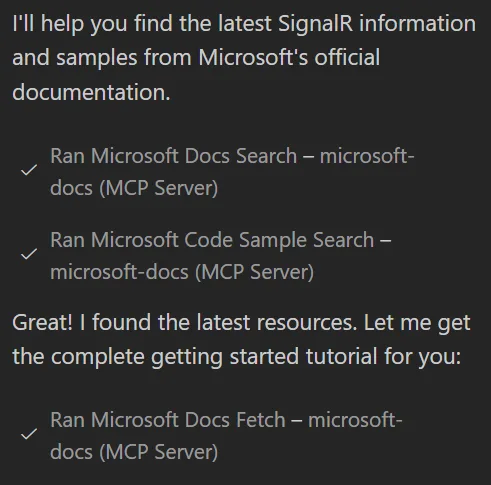
- Learning New Frameworks or Libraries: When experimenting with technologies like gRPC or SignalR, Copilot can recommend relevant MS Learn modules and code samples, accelerating onboarding and knowledge acquisition.
Integration Instructions
Ready to harness the power of the Learn MCP server with Copilot? Below are step-by-step guides for integrating the MCP server into your favorite tools.
Visual Studio
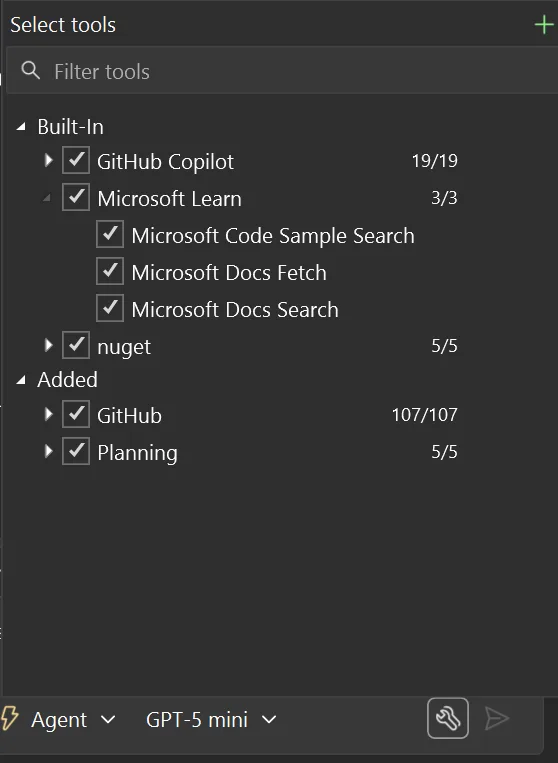
- Make sure you are on Visual Studio 2026 or Visual Studio 2022 version 17.14.
- The MS Learn MCP Server is built-in and is available for you to use, just make sure they are turned on when you submit your chat.
Visual Studio Code
- Open VS Code and go to the Extensions view.
- Ensure you have the GitHub Copilot Chat extension installed.
- Go to the MCP Server-Installed section and select the search icon.
- Search for Microsoft Docs and select Install.
Copilot CLI
- In the Copilot CLI, type
/mcp add - Give it the name “microsoft-docs”
- Select “2” for HTTP
- Provide the remote URL: https://learn.microsoft.com/api/mcp
- Ctrl+S to save the server.
Copilot Coding Agent (CCA)
- In your repo, go to your settings and select Copilot > Coding Agent.
- Scroll down to the Model Context Protocol section.
- Add the following to the text box:
{
    "mcpServers": {
        "microsoft-docs": {
        "type": "http",
        "url": "https://learn.microsoft.com/api/mcp",
        "tools": ["*"]
        }
    }
}
Conclusion
Integrating the Microsoft Learn MCP server with Copilot supercharges your development workflow, providing trusted, up-to-date, context-aware content exactly when and where you need it. Whether you’re new to .NET or a seasoned developer, this enhanced experience means faster solutions, better code quality, and continuous learning without leaving your preferred tools. Try integrating the Learn MCP server today and experience a smarter, more connected way to develop with .NET!
Learn more at these helpful resources.





Also, any plans to be able to add an MCP Server in Github.com at organization level? For example:
Organization > Settings > Copilot > Coding Agent > Model Context Protocol (MCP))
and not only repo by repo in:
Repo > Settings > Copilot > Coding Agent > Model Context Protocol (MCP)
which doesn't scale.
Like "Custom instructions", that can be added at organization level:
Organization > Settings > Copilot > Custom instructions
PS: I already find annoying that I cannot have GitHub Copilot custom instructions, custom prompts or agent files shared by cloned repos at client (computer) level, but I understand why. But for GitHub...
The instructions to install the Microsoft Learn MCP Server on Visual Studio Code (current version 1.106.3) are somewhat incorrect:
2. “Ensure you have the GitHub Copilot extension installed.” > The extension is installed, but it says “All GitHub Copilot functionality is now being served from the GitHub Copilot Chat extension.”
3. “Go to the MCP Server section and select the search icon.” > The section is named “MCP SERVERS – INSTALLED”
4. “Search for Microsoft Docs and select Install.” > If you search for “Microsoft Docs” you get “No MCP Servers found”. You need to search for “Microsoft Learn”
Thank you for pointing that out. I have updated the instructions above. Yes, the extension is called GitHub Copilot Chat and the MCP Server section is now called MCP Servers – Installed. Once in the MCP Servers-Installed section, click on the search icon, to search for those you don’t have installed yet.
this comment has been deleted.