


When building AI applications, context is key.
AI models have a knowledge cutoff and do not have access to your personal or company data by default. To generate high-quality answers, AI apps need two things:
- Access to high-quality data
- The ability to surface the right information at the right time
Both are achieved through context engineering, which is the process of designing systems and best practices that provide relevant context to AI models. While context engineering is a broader topic, this post will focus on enabling access to high-quality data through data ingestion pipelines.
Today, .NET developers face a growing challenge: efficiently ingesting, transforming, and retrieving data for intelligent, context-aware experiences.
That’s why we’re excited to announce the preview release of data ingestion building blocks for .NET.
In this post, we’ll share how these building blocks empower the .NET ecosystem to build composable data ingestion pipelines for their AI applications.
What is data ingestion?
Data ingestion is the process of collecting, reading, and preparing data from different sources such as files, databases, APIs, or cloud services so it can be used in downstream applications. In practice, this is the familiar Extract, Transform, Load (ETL) workflows:
- Extract data from its original source, whether that is a PDF, Word document, audio file, or web API.
- Transform the data by cleaning, chunking, enriching, or converting formats.
- Load the data into a destination like a database, vector store, or AI model for retrieval and analysis.
For AI and machine learning scenarios, especially Retrieval-Augmented Generation (RAG), data ingestion is not just about moving data. It is about making data usable for intelligent applications. This means representing documents in a way that preserves their structure and meaning, splitting them into manageable chunks, enriching them with metadata or embeddings, and storing them so they can be retrieved quickly and accurately.
The challenge for .NET developers is not just performing ETL, but doing so in a way that is reliable, scalable, and easy to maintain for modern AI scenarios. As applications demand more context and intelligence, the limitations of current data ingestion approaches become more apparent.
Introducing Data Ingestion Building Blocks in .NET
To solve the challenges of fragmented workflows, manual effort, and limited extensibility, we are announcing the preview of new data ingestion building blocks for .NET.
These abstractions are the foundational .NET library for data processing. They enable developers to read, process, and prepare documents for AI and machine learning workflows, especially Retrieval-Augmented Generation (RAG) scenarios.
With these building blocks, developers can create robust, flexible, and intelligent data pipelines tailored to their application needs. Here’s what’s included in this release:
- Unified document representation: Represent any file type (PDF, Image, Microsoft Word, etc.) in a consistent, format that works well with large language models.
- Flexible data ingestion: Read documents from both cloud services and local sources using multiple built-in readers, making it easy to bring in data from wherever it lives.
- Built-in AI enhancements: Automatically enrich content with summaries, sentiment analysis, keyword extraction, and classification, preparing your data for intelligent workflows.
- Customizable chunking strategies: Split documents into chunks using token-based, section-based, or semantic-aware approaches, so you can optimize for your retrieval and analysis needs.
- Production-ready storage: Persist processed chunks in popular vector databases and document stores, with support for embedding generation, making your pipelines ready for real-world scenarios.
- End-to-end pipeline composition: Chain together readers, processors, chunkers, and writers with the
IngestionPipelineAPI, reducing boilerplate and making it easy to build, customize, and extend complete workflows. - Performance and scalability: Designed for scalable data processing, these components can handle large volumes of data efficiently, making them suitable for enterprise-grade applications.
All of these components are open and extensible by design. You can add custom logic, new connectors, and extend the system to support emerging AI scenarios. By standardizing how documents are represented, processed, and stored, .NET developers can build reliable, scalable, and maintainable data pipelines without reinventing the wheel for every project.
Building on stable foundations
These new data ingestion components are built on top of proven and extensible components in the .NET ecosystem, ensuring reliability, interoperability, and seamless integration with existing AI workflows.
- Microsoft.ML.Tokenizers: Tokenizers provide the foundation for chunking documents based on tokens. This enables precise splitting of content, which is essential for preparing data for large language models and optimizing retrieval strategies.
- Microsoft.Extensions.AI: This set of libraries powers enrichment transformations using large language models. It enables features like summarization, sentiment analysis, keyword extraction, and embedding generation, making it easy to enhance your data with intelligent insights.
- Microsoft.Extensions.VectorData: This set of libraries offers a consistent interface for storing processed chunks in a wide variety of vector stores, including Qdrant, SQL Server, CosmosDB, MongoDB, ElasticSearch, and many more. This ensures your data pipelines are ready for use and scale across your preferred storage backend.
In addition to familiar patterns and tools, these building blocks build on already extensible components. Plug-in capability and interoperability are paramount, so as the rest of the .NET AI ecosystem grows, the capabilities of the data ingestion components grow as well. This approach empowers developers to easily integrate new connectors, enrichments, and storage options, keeping their pipelines future-ready and adaptable to evolving AI scenarios.
Build your first data ingestion pipeline
In the following example, you will parse markdown documents using MarkdownReader, apply a set of document and chunk processing techniques, chunk using the Semantic Similarity Chunker, and store chunks in a SQLite vector store.
The easiest way to get started is to open the sample application in GitHub Codespaces.

Alternatively, the snippets below highlight how the sample was built. For the full code, see the DataIngestion sample repo.
Build your application
Create a new file-based app.
# Powershell
ni DataIngestion.cs

# Bash
touch DataIngestion.cs
Install the Microsoft.Extensions.DataIngestion and other relevant NuGet packages.
// Data Ingestion Building Blocks
#:package Microsoft.Extensions.DataIngestion@10.0.1-preview.1.25571.5
#:package Microsoft.Extensions.DataIngestion.Markdig@10.0.1-preview.1.25571.5

// OpenAI ChatClient
#:package Microsoft.Extensions.AI.OpenAI@10.0.1-preview.1.25571.5

// Logging
#:package Microsoft.Extensions.Logging.Console@10.0.0

// Tokenizer
#:package Microsoft.ML.Tokenizers.Data.Cl100kBase@2.0.0

// SQLite Vector Store
#:package Microsoft.SemanticKernel.Connectors.SqliteVec@1.67.1-preview
Add using statements
using System.ClientModel;
using Microsoft.Extensions.AI;
using Microsoft.Extensions.DataIngestion;
using Microsoft.Extensions.DataIngestion.Chunkers;
using Microsoft.Extensions.Logging;
using Microsoft.ML.Tokenizers;
using Microsoft.SemanticKernel.Connectors.SqliteVec;
using OpenAI;
Set up your reader
Reading the document is the first step in the ingestion pipeline. IngestionDocumentReader is an abstraction for reading IngestionDocument from file path and/or Streams. In this example, we will use the MarkDownReader to read markdown files, as it’s the simplest reader without any external dependencies (like cloud services or MCP servers).
IngestionDocumentReader reader = new MarkdownReader();Set up your document processor(s)
The second step is to process the IngestionDocuments. Document processors operate at the document level and can enrich the content or perform other transformations. Which processors you use depends on your scenario.
This example uses the built-in ImageAlternativeTextEnricher that enriches IngestionDocumentImage elements with alternative text using an AI service, so the embeddings generated for text chunks can include the image content information:
using ILoggerFactory loggerFactory = LoggerFactory.Create(builder => builder.AddSimpleConsole());

OpenAIClient openAIClient = new(
    new ApiKeyCredential(Environment.GetEnvironmentVariable("GITHUB_TOKEN")!),
    new OpenAIClientOptions { Endpoint = new Uri("https://models.github.ai/inference") });

IChatClient chatClient =
    openAIClient.GetChatClient("gpt-4.1").AsIChatClient();

EnricherOptions enricherOptions = new(chatClient)
{
    // Enricher failures should not fail the whole ingestion pipeline, as they are best-effort enhancements.
    // This logger factory can be used to create loggers to log such failures.
    LoggerFactory = loggerFactory
}

IngestionDocumentProcessor imageAlternativeTextEnricher = new ImageAlternativeTextEnricher(enricherOptions);
Note
Enricher failures should not fail the whole ingestion pipeline, as they are best-effort enhancements. Use theLoggerFactory to create loggers to log such failures.Split your data into chunks
Every IngestionDocument needs to be split into IngestionChunk<T>s. Today, the data ingestion libraries provide three chunking strategies:
- Header-based chunking to split on headers.
- Section-based chunking to split on sections (i.e. pages).
- Semantic-aware chunking to split on semantically similar topics.
All of them support token-based limits to ensure chunks fit within model context windows.
IEmbeddingGenerator<string, Embedding<float>> embeddingGenerator =
    openAIClient.GetEmbeddingClient("text-embedding-3-small").AsIEmbeddingGenerator();

IngestionChunkerOptions chunkerOptions = new(TiktokenTokenizer.CreateForModel("gpt-4"))
{
    MaxTokensPerChunk = 2000,
    OverlapTokens = 0
};

IngestionChunker<string> chunker = new SemanticSimilarityChunker(embeddingGenerator, chunkerOptions);
Enrich and process your data
The next step is to process the IngestionChunk<T>s. Chunk processors operate at the chunk level and can enrich the content or perform other transformations. Similar to document processors, which processors you choose to use depends on your scenario.
This example uses the built-in SummaryEnricher to enrich each chunk with a summary using an AI service:
IngestionChunkProcessor<string> summaryEnricher = new SummaryEnricher(enricherOptions);Store your data
Storing the processed chunks is the final step in the ingestion pipeline. IngestionChunkWriter<T> is an abstraction for storing IngestionChunk<T>s in any store, but VectorStoreWriter<T> is an implementation that uses a vector store. It’s built on top of the Microsoft.Extensions.VectorData.Abstractions abstractions, so you can use any supported vector store.
In this example, we will use the SqliteVectorStore to store chunks in a local SQLite database:
using SqliteVectorStore vectorStore = new(
    "Data Source=vectors.db;Pooling=false",
    new()
    {
        EmbeddingGenerator = embeddingGenerator
    });

// The writer requires the embedding dimension count to be specified.
// For OpenAI's `text-embedding-3-small`, the dimension count is 1536.
using VectorStoreWriter<string> writer = new(vectorStore, dimensionCount: 1536);
The writer will automatically:
- Create the vector store collection using default schema.
- Generate embeddings for each chunk using the provided embedding generator.
- When finished, delete any chunks that were previously stored for the document with the same ID (to support incremental chunking of different versions of the same document).
Compose and run your pipeline
Create an IngestionPipeline using the previously configured reader, chunker, enrichers, and writer to process all of the files in the current directory.
using IngestionPipeline<string> pipeline = new(reader, chunker, writer, loggerFactory: loggerFactory)
{
    DocumentProcessors = { imageAlternativeTextEnricher },
    ChunkProcessors = { summaryEnricher }
};

await foreach (var result in pipeline.ProcessAsync(new DirectoryInfo("."), searchPattern: "*.md"))
{
    Console.WriteLine($"Completed processing '{result.DocumentId}'. Succeeded: '{result.Succeeded}'.");
}
Important
A single document ingestion failure should not fail the whole pipeline. TheIngestionPipeline.ProcessAsync implements partial success by returning IAsyncEnumerable<IngestionResult>. The caller is responsible for handling any failures (for example, by re-trying failed documents or stopping on first error).Retrieve data
VectorStoreWriter<T> exposes the underlying VectorStoreCollection that can be used to perform vector search on the stored chunks. This example prompts the user for a query and returns the top 3 most similar chunks from the vector store:
var collection = writer.VectorStoreCollection;
while (true)
{
    Console.Write("Enter your question (or 'exit' to quit): ");
    string? searchValue = Console.ReadLine();
    if (string.IsNullOrEmpty(searchValue) || searchValue == "exit")
    {
        break;
    }

    Console.WriteLine("Searching...\n");
    await foreach (var result in collection.SearchAsync(searchValue, top: 3))
    {
        Console.WriteLine($"Score: {result.Score}\n\tContent: {result.Record["content"]}");
    }
}
End-to-End Scenarios
Want to see it in action? Try the new .NET AI Web Chat Template for a full end-to-end experience. You can parse the documents using MarkItDown MCP server, chunk them using semantic-aware chunker and store the chunks in a vector database of your choice. The sample app comes with a web chat that uses ingested data for RAG.
dotnet new install Microsoft.Extensions.AI.Templates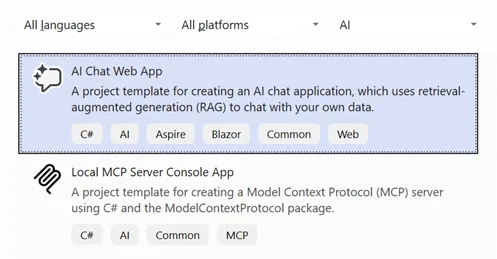
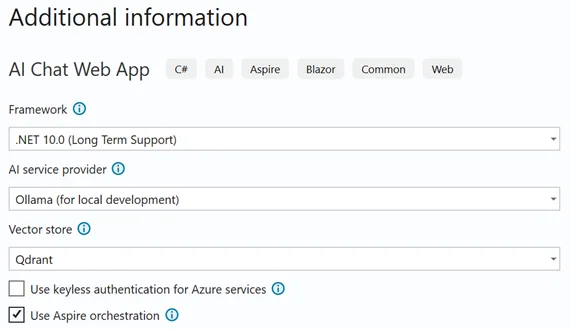
Build your distributed application
The following code snippet from the template shows how to configure the different components of the application in Aspire, including Ollama for hosting the models, Qdrant for vector storage, MarkItDown for document parsing, and the web application itself.
var builder = DistributedApplication.CreateBuilder(args);

var ollama = builder.AddOllama("ollama")
    .WithDataVolume();
var chat = ollama.AddModel("chat", "llama3.2");
var embeddings = ollama.AddModel("embeddings", "all-minilm");

var vectorDB = builder.AddQdrant("vectordb")
    .WithDataVolume()
    .WithLifetime(ContainerLifetime.Persistent);

var markitdown = builder.AddContainer("markitdown", "mcp/markitdown")
    .WithArgs("--http", "--host", "0.0.0.0", "--port", "3001")
    .WithHttpEndpoint(targetPort: 3001, name: "http");

var webApp = builder.AddProject<Projects.RagSample_Web>("aichatweb-app");
webApp
    .WithReference(chat)
    .WithReference(embeddings)
    .WaitFor(chat)
    .WaitFor(embeddings);
webApp
    .WithReference(vectorDB)
    .WaitFor(vectorDB);
webApp
    .WithEnvironment("MARKITDOWN_MCP_URL", markitdown.GetEndpoint("http"));

builder.Build().Run();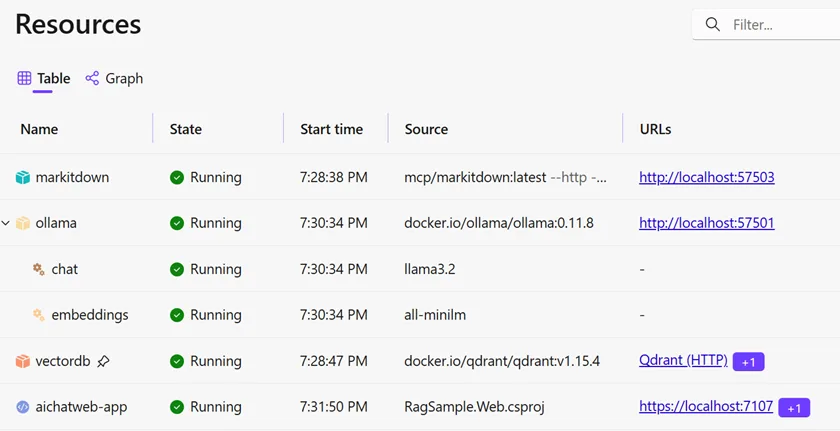
Observability
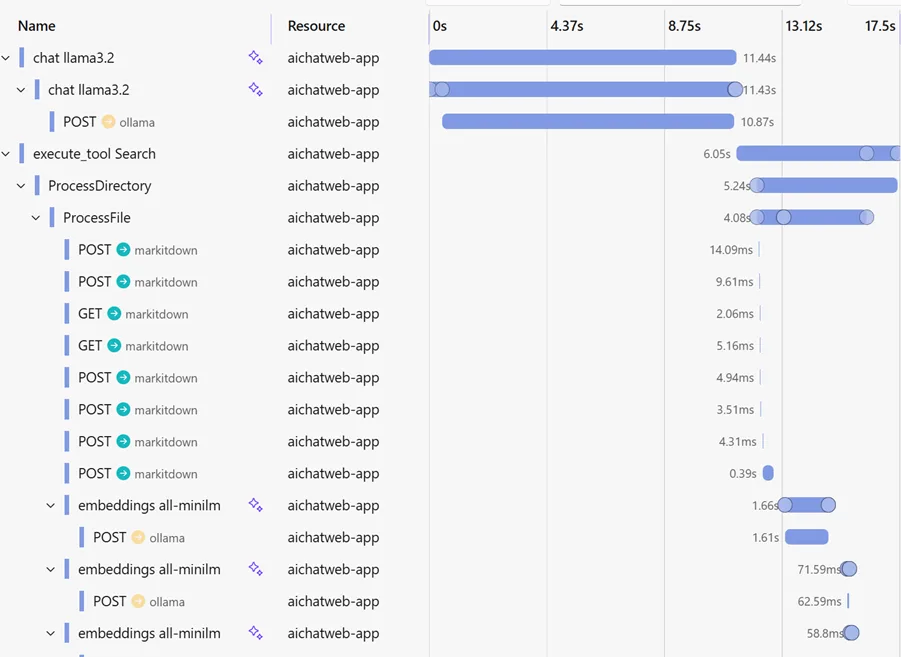
When using Aspire, you get a rich observability experience for your data ingestion pipelines.
The template already includes OpenTelemetry tracing for both the data ingestion process and the web application.
public static TBuilder ConfigureOpenTelemetry<TBuilder>(this TBuilder builder) where TBuilder : IHostApplicationBuilder
{
    // The rest is omitted for brevity.

    builder.Services.AddOpenTelemetry()
        .WithTracing(tracing =>
        {
            tracing
                .AddSource("Experimental.Microsoft.Extensions.AI")
                .AddSource("Experimental.Microsoft.Extensions.DataIngestion");
        });

    return builder;
}
Ready to get started?
The easiest way to get started is by installing the the AI Web Chat Template.
Once you become familiar with the template, try using it with your own files.
If you’re a library author or ecosystem developer, you can extend the abstractions to enable your users to seamlessly interop and compose readers, chunkers, processors, and writers from various providers.
File an issue with your questions, issues, and suggestions to help us shape the future of these building blocks.




0 comments