


GitHub Copilot testing for .NET makes it dramatically faster and more convenient to generate high-quality unit tests without leaving your code. Today, we’re excited to announce that this capability is now generally available in Visual Studio 2026 v18.3.
This release brings GitHub Copilot testing for .NET to everyone, with richer IDE integration, more natural prompting, and new entry points that make unit test generation feel effortless and intuitive.
Informed by real-world usage and feedback, this GA release focuses on removing friction and helping developers go from code to tested confidence with just a few interactions. If you have tried the feature in Visual Studio Insiders, this release builds directly on your feedback. If you are new to the experience, this is the best time to start.
Purpose-built AI for Unit Testing
GitHub Copilot testing for .NET is designed specifically for unit testing, with built-in awareness of your solution structure, test frameworks, and build system. It operates as an end-to-end testing workflow rather than a single-response prompt.
You can generate tests at the scope that makes sense for your task, whether that is a single member, a class, a file, an entire project, a full solution, or your current git diff. GitHub Copilot testing then uses that scope to determine what to generate, how to organize the tests, and how to execute them within Visual Studio. The agent also works with any model you have selected in Copilot Chat, allowing you to use your preferred model while taking advantage of the purpose-built testing workflow.
When you start a testing request, GitHub Copilot testing:
- Generates unit tests scoped to your selected code
- Builds and runs those tests automatically
- Detects failures and attempts to fix them
- Reruns until you have a stable starting point
Throughout this process, the agent uses your project configuration and chosen test framework to ensure tests are organized, discovered, and executed correctly within Visual Studio.
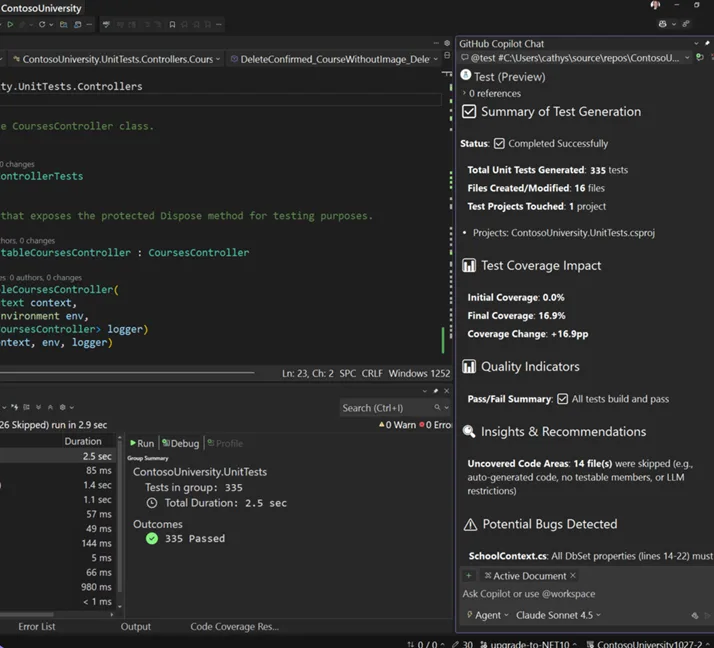
Once test generation completes, Copilot provides a structured summary that helps you understand what changed:
- Test files and projects created or modified
- Before-and-after coverage information
- Pass/fail signals and unstable cases
- Insights into testability gaps
- Direct links to the generated tests so that you can review and iterate immediately
This approach shortens the feedback loop between writing code and validating it, helping you move forward with confidence. All of this is driven by how you interact with the agent. The first step is simply telling GitHub Copilot what you want to test.
More natural, free-form prompting
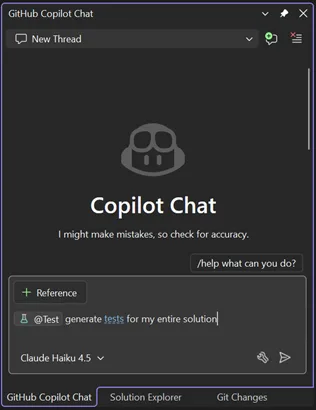
GitHub Copilot testing for .NET now supports free-form prompting, making it easier to describe what you want to test in your own words. You still target the testing agent with @Test, but you are no longer constrained to a rigid command format.
You can write prompts using natural language, and the agent will interpret your intent while handling test generation, execution, and recovery behind the scenes.
With free-form prompting you can
- Reference any code either precisely or vaguely
- “
@Testgenerate unit tests for my core business logic” - “
@Testclass Foo” - “
@Testthe requests parsing logic”
- “
- Mention your current Git changes
- “
@Testwrite unit tests for my current changes” - “
@Test #git_changes”
- “
- Ask to fix specific or all failing tests
- “
@Testfix my failing tests”
- “
- Ask for achieving specific target code coverage
- “
@Testclass Bar, targeting 80% code coverage”
- “
- Specify testing preferences and conventions
- “
@Testgenerate tests using xUnit and FluentAssertions”
- “
For scenarios where you want explicit scoping, the structured syntax is still supported:
@Test #<target>- Where
<target>can be a member, class, file, project, solution, or git diff
- Where
This prompting flexibility makes it easier to express intent, whether you want to expand coverage, stabilize failing tests, or generate tests that align with your team’s existing conventions.
New entry points that meet you where you work
GitHub Copilot testing for .NET is designed to be easy to find and easy to use so that generating unit tests fits naturally into your existing development workflow.
You can always invoke the testing experience directly in Copilot Chat by starting a prompt with @Test. In addition, new entry points surface the same workflow from familiar places in the IDE, helping you discover and use the capability without changing how you work.
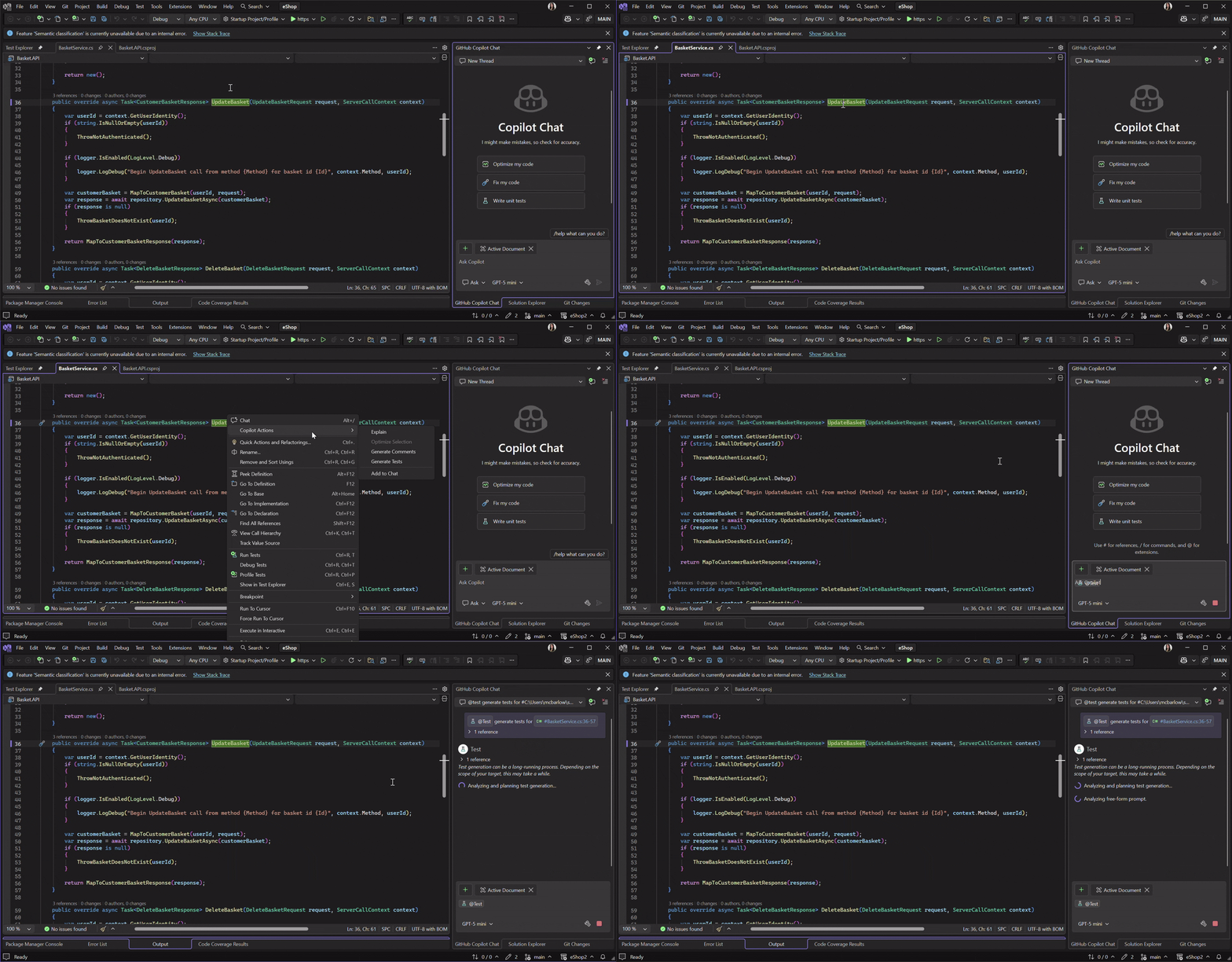
Right-click in the editor
- Right-click → Copilot Actions → Generate Tests
- The scope is inferred from where you right-click, following the same behavior as other Copilot Actions (for example, member, class, or file)
- The command will launch the dedicated testing experience for C# projects, with the appropriate
@Testcontext applied automatically
Copilot chat icebreakers
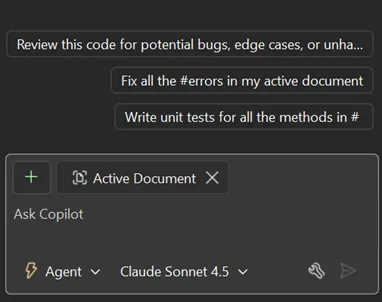
- Selecting the prompt related to writing unit tests launches the testing agent when your editor focus is on C# code
- The prompt is automatically populated with
@Test, scoped to your active document by default
Getting Started
Pre-requisites: Visual Studio 18.3, C# code, and a paid GitHub Copilot license.
- Open your C# project or solution in Visual Studio 18.3 and make sure it builds without errors to simplify the process.
- Start a new Copilot Chat thread and start your prompt with
@Test. You may use natural language or the structured syntax as demonstrated above to define your request.
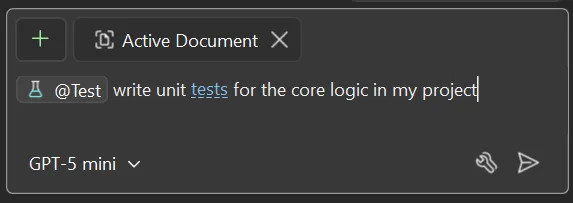
- In the Chat window, select Send. GitHub Copilot testing for .NET will then initiate an iterative process. Copilot will analyze your code and create a test project if one doesn’t exist. Then it generates tests, builds, and runs them, all automatically.
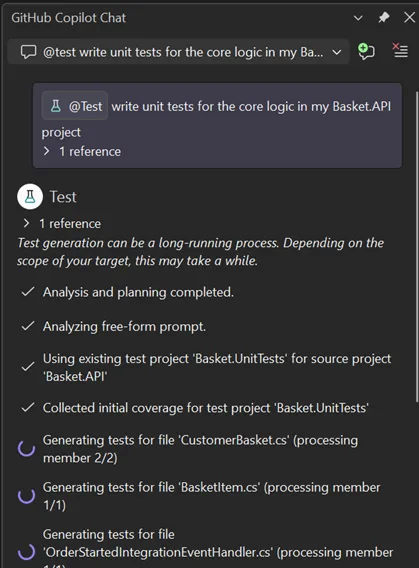
- Test Explorer shows the results as the tests are generated. If Test Explorer is not automatically opened, you may do so by selecting Test → Test Explorer.
- After test generation is complete, GitHub Copilot testing will provide a summary in Copilot Chat.
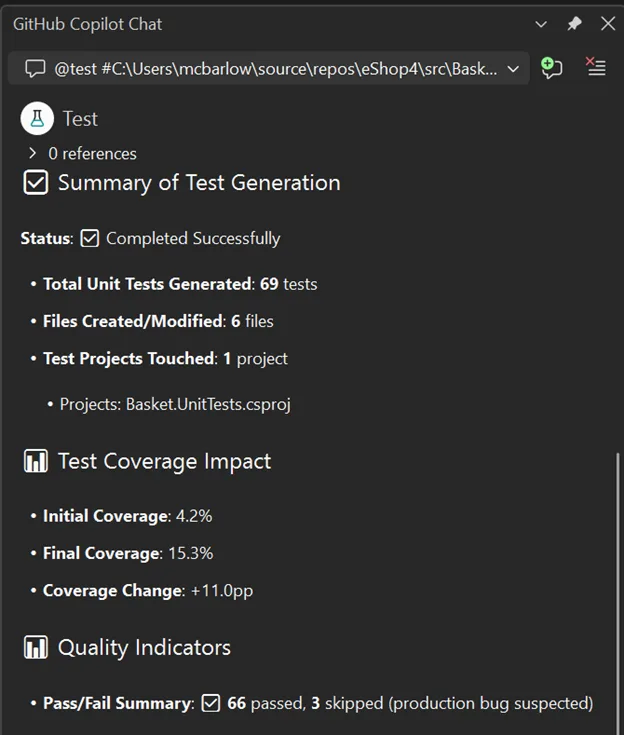
For more usage information, check out our Getting Started docs.
What’s next?
The GA release of GitHub Copilot testing for .NET reflects what we have learned from developers using the experience in real projects. Feedback from early usage directly shaped improvements to prompting, discoverability, and how the testing workflow fits into everyday development.
General availability is an important milestone, but it is not the end of the journey. We continue to run user studies and gather feedback to understand how developers use GitHub Copilot testing for .NET in real-world scenarios, especially as requests grow in size and complexity.
One area we are actively exploring is a planning phase for more advanced testing requests. For larger scopes or more specific requirements, developers want greater control up front, including the ability to clarify intent, confirm assumptions, and review a proposed plan before tests are generated. We are investigating how this kind of experience could be integrated directly into Visual Studio to better support complex workflows and precise needs.
If you have had a chance to try the tool, we would love to hear your thoughts through this survey, including feedback on the experience today and where you would like to see this capability go next, including beyond Visual Studio.
Give feedback
As AI continues to influence how developers build and validate software, our focus remains on making these capabilities practical, predictable, and well-integrated into the tools you already use.
If you haven’t yet, try GitHub Copilot testing for .NET in Visual Studio 18.3 and let us know what you think! You can use the Give Feedback button in Visual Studio to let us know what is working well and where we can continue to improve. Your feedback is greatly appreciated and plays a direct role in shaping future product decisions.




What is the difference between writing "@Test Write unit tests for #MyClass.cs" vs. "Write unit tests for #MyClass.cs" (without "@Test")?
Up to now, I always used the latter approach, with a bit more detailed prompt, like "Write good and meaningful unit tests for #MyClass.cs, adhering to unit test best practices in C#. Use the AAA pattern. Use the xUnit framework and FluentAssertions."
I guess that "@Test" just sends an additional prompt to Copilot?
It would be really interesting to see that somewhere documented, what "@Test" does under the hood and why it should be better than just using a normal prompt.
Great question! GitHub Copilot testing for .NET (@Test) isn't a separate tool competing with Copilot - it is Copilot, just with a specialized testing layer on top. The difference is what happens after the first line of test code is written. The @Test agent is built on Roslyn and MSBuild and is grounded in C# semantics, so it natively understands your type system and project references. It generates tests, builds them, runs them, measures code coverage deltas, and iterates on failures in a loop - all without you copy-pasting output or manually fixing build errors. It also scales beyond a...