



Artificial Intelligence (AI) is transforming how we build applications. The .NET team has prioritized keeping pace with the rapid changes in generative AI and continue to provide tools, libraries, and guidance for .NET developers building intelligent apps. With .NET, developers have a powerful ecosystem to integrate AI seamlessly into their apps. This post introduces the building blocks for AI in .NET.
These include:
- Microsoft.Extensions.AI for unified LLM access
- Microsoft.Extensions.VectorData for semantic search and persisted embeddings
- Microsoft Agent Framework for agentic workflows
- Model Context Protocol (MCP) for interoperability
We’ll explore each library with practical examples and tips for getting started. This is the first of four posts which will cover each of the four areas mentioned.
Introducing Microsoft.Extensions.AI: one API, many providers
The foundational library for interfacing with generative AI in .NET is the Microsoft Extensions for AI, often abbreviated as “MEAI.” If you are familiar with Semantic Kernel, this library replaces the primitives and universal features and APIs that were introduced by the Semantic Kernel team. It also integrates successful patterns and practices like dependency injection, middleware, and builder patterns that developers are familiar with in web technologies like ASP.NET, minimal APIs, and Blazor.
A unified API for multiple providers
Instead of juggling multiple SDKs, you can use a single abstraction for OpenAI, OllamaSharp, Azure OpenAI, and more. Let’s take a look at some simple examples. Here’s the “getting started” steps for OllamaSharp:
var uri = new Uri("http://localhost:11434");
var ollama = new OllamaApiClient(uri)
{
    SelectedModel = "mistral:latest"
};
await foreach (var stream in ollama.GenerateAsync("How are you today?"))
{
    Console.Write(stream.Response);
}
If, on the other hand, you are using OpenAI, it looks like this:
OpenAIResponseClient client = new("o3-mini", Environment.GetEnvironmentVariable("OPENAI_API_KEY"));

OpenAIResponse response = await client.CreateResponseAsync(
            [ResponseItem.CreateUserMessageItem("How are you today?")]
  );
foreach (ResponseItem outputItem in response.OutputItems)
{
    if (outputItem is MessageResponseItem message)
    {

        Console.WriteLine($"{message.Content.FirstOrDefault()?.Text}");
    }
}
To use the universal APIs, you configure your client the same way, but then you have a common API to use to make your requests. The OllamaSharp chat client already supports the universal IChatClient interface. The Open AI client does not, so you can use the handy extension method available in the Open AI adapter.
IChatClient client =
    new OpenAIClient(key).GetChatClient("o3-mini").AsIChatClient();
Now you can use the same API to retrieve a response, regardless of which provider you use.
await foreach (ChatResponseUpdate update in client.GetStreamingResponseAsync("How are you today?"))
{
    Console.Write(update);
}
Beyond convenience: what happens behind the scenes
In addition to handling delegation to and from the provider, the universal extensions also manage retries, token limits, integrate with dependency injection and support middleware. I’ll cover middleware later in this post. Let’s look at an example of how the extensions work for you to simplify the code you have to write.
Structured output the super easy way
Structured output allows you to specify a schema for returned output. This not only allows you to respond to output without having to parse the response, but also provides more context about the expected output to the model. Here is an example using the Open AI SDK:
class Family
{
    public List<Person> Parents { get; set; }
    public List<Person>? Children { get; set; }

    class Person
    {
        public string Name { get; set; }
        public int Age { get; set; }
    }
}

ChatCompletionOptions options = new()
{
    ResponseFormat = StructuredOutputsExtensions.CreateJsonSchemaFormat<Family>("family", jsonSchemaIsStrict: true),
    MaxOutputTokenCount = 4096,
    Temperature = 0.1f,
    TopP = 0.1f
};

List<ChatMessage> messages =
[
    new SystemChatMessage("You are an AI assistant that creates families."),
    new UserChatMessage("Create a family with 2 parents and 2 children.")
];

ParsedChatCompletion<Family?> completion = chatClient.CompleteChat(messages, options);
Family? family = completion.Parsed;
Let’s do the same thing, only this time using the extensions for AI.
class Family
{
    public List<Person> Parents { get; set; }
    public List<Person>? Children { get; set; }

    class Person
    {
        public string Name { get; set; }
        public int Age { get; set; }
    }
}

var family = await client.GetResponseAsync<Family>(
    [
        new ChatMessage(
            ChatRole.System,
            "You are an AI assistant that creates families."),
        new ChatMessage(
            ChatRole.User,
            "Create a family with 2 parents and 2 children."
        )]);
The typed extension method uses the adapters to provide the appropriate schema and even parse and deserialize the responses for you.
Standardized requests and responses
Have you ever wanted to change the temperature of a model? Some of you are asking, “What’s temperature?” In the “real world” temperature is a measure of the energy of a system. If particles are standing still, or frozen in place, it’s cold. Heat means there is a lot of energy and a lot of movement at least at the microscopic level. Temperature influences entropy, which is a measure of randomness. The same concept applies to models.
If you remember from the introductory post, models are basically huge probability engines that roll the dice. Sort of. If you set the temperature low, the model will produce more predictable (and usually factual) responses, while a higher temperature introduces more randomness into the response. You can think of it as allowing lower probability responses to have a bigger voice in the equation, which may lead to ungrounded responses (when the model provides information that is inaccurate or out of context) but can also lead to more “creative” appearing responses as well.
More deterministic tasks like classification and summarization probably benefit from a lower temperature, while brainstorming ideas for a marketing campaign might benefit from a higher temperature. The point is, models allow you to tweak everything from temperature to a maximum token count and it’s all standardized as part of the ChatOptions class.
On the flipside, when you receive a response, the response contains a UsageDetails instance. Use this to keep track of your token counts.
The middle is where?
.NET web developers are already familiar with the power of middleware. Think of it as a plugin model for your workflow. In this case, the workflow or pipeline is the interaction with the model. Middleware allows you to intercept the pipeline and do things like:
- Stop malicious content from making it to the model
- Block or throttle requests
- Provide services like telemetry and tracing
MEAI provides middleware for telemetry and tracing out of the box. You can use the familiar builder pattern to apply middleware to an existing chat client. Here’s an example method that adds middleware to any existing client – regardless of provider – that will handle both logging and generation of Open Telemetry (OTEL) events.
public IChatClient BuildEnhancedChatClient(
            IChatClient innerClient,
            ILoggerFactory? loggerFactory = null)
        {
            var builder = new ChatClientBuilder(innerClient);

            if (loggerFactory is not null)
            {
                builder.UseLogging(loggerFactory);
            }

            var sensitiveData = false; // true for debugging

            builder.UseOpenTelemetry(
                configure: options =>
                    options.EnableSensitiveData = sensitiveData);
            return builder.Build();
        }
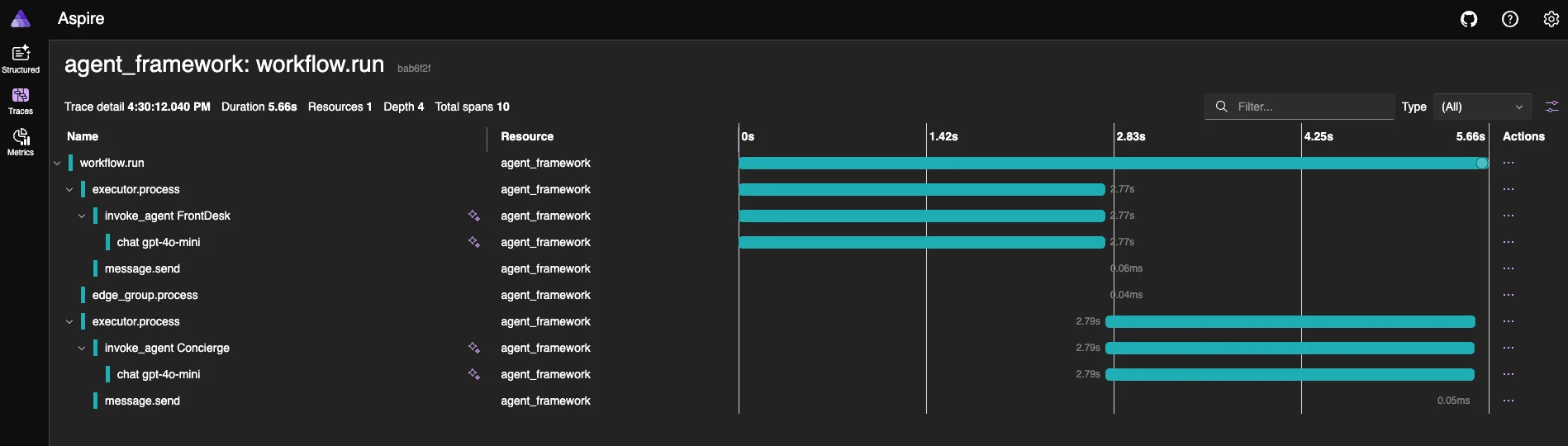
The OTEL events can be sent to a cloud service like Application Insights or, if you are using Aspire, your Aspire dashboard. Aspire has been updated to provide additional context for intelligent apps. Look for the “sparkles” in the dashboard to see traces related to interactions with models.
DataContent for Multi-Modal Conversations
Models today do more than simply pass text back and forth. More and more multi-modal models are being released that can accept data in a variety of formats, including images and sounds, and return similar assets. Although most examples of MEAI focus on the text-based interactions, which are represented as TextContent instances, there are several built in content types available, all based on AIContent:
ErrorContentfor detailed error information with error codesUserInputRequestContentto request user input (includesFunctionApprovalRequestContentandFunctionApprovalResponseContent)FunctionCallContentto represent a tool requestHostedFileContentto reference data hosted by an AI-specific serviceUriContentfor a web reference
This is not a comprehensive list, but you get the idea. The one you will likely use the most, however, is the DataContent that can represent pretty much any media type. It is simply a byte array with a media type.
For example, let’s assume I want to pass my photograph to a model with instructions to describe it and provide a list of tags. Assuming my photo is stored as c:\photo.jpg I can do this:
var instructions = "You are a photo analyst able to extract the utmost detail from a photograph and provide a description so thorough and accurate that another LLM could generate almost the same image just from your description.";
var prompt = new TextContent("What's this photo all about? Please provide a detailed description along with tags.");
var image = new DataContent(File.ReadAllBytes(@"c:\photo.jpg"), "image/jpeg");
var messages = new List<ChatMessage>
{
new(ChatRole.System, instructions),
new(ChatRole.User, [prompt, image])
};
record ImageAnalysis(string Description, string[] tags);
var analysis = await chatClient.GetResponseAsync<ImageAnalysis>(messages);Other highlights
Although these are out of scope to cover in this post, there are many other services the base extensions provide. Examples include:
- Cancellation tokens for responsive apps
- Built-in error handling and resilience
- Primitives to handle vectors and embeddings
- Image generation
Summary
In this post, we explored the foundation building block for intelligent apps in .NET: Microsoft Extensions for AI. In the next post, I’ll walk you through the vector-related extensions and explain why they are not part of the core model, then we’ll follow up with agent framework and MCP.
Until then, I have a few options for you to learn more and get started building your intelligent apps.
- Learn by code
- Learn by following quickstarts and tutorials
- Learn by watching videos
Happy coding!



May I know how this compares to Github Copilot SDK? As far as I know, the Copilot SDK supports the “Bring Your Own Key”. Of course, one big difference is that Copilot SDK is not .NET-exclusive.
the M.E.AI abstraction is good , but most of time , we need return chat messge(or SSE ) in open-ai compatible format, so I think it missing a convert back component ( M.E.AI message => LLM vender message )