

.NET 8 and .NET 9 will reach end of support on November 10, 2026. After that date, Microsoft will no longer provide servicing updates, security fixes, or technical support for these versions. We recommend upgrading to .NET 10, which is an LTS release supported through November 2028. By upgrading, you will continue receiving security updates and servicing fixes to keep your applications protected.
Support Policy
.NET 8 is a Long Term Support (LTS) release, supported for 36 months from its initial release in November 2023. That support window closes on November 10, 2026.
.NET 9 is a Standard Term Support (STS) release. As we announced, STS releases now get 24 months of support instead of 18. That puts .NET 9 end of support on the same day: November 10, 2026.
| Version | Release Date | Release Type | End of Support |
|---|---|---|---|
| .NET 8 | November 14, 2023 | LTS | November 10, 2026 |
| .NET 9 | November 12, 2024 | STS (24 months) | November 10, 2026 |
| .NET 10 | November 11, 2025 | LTS | November 2028 |
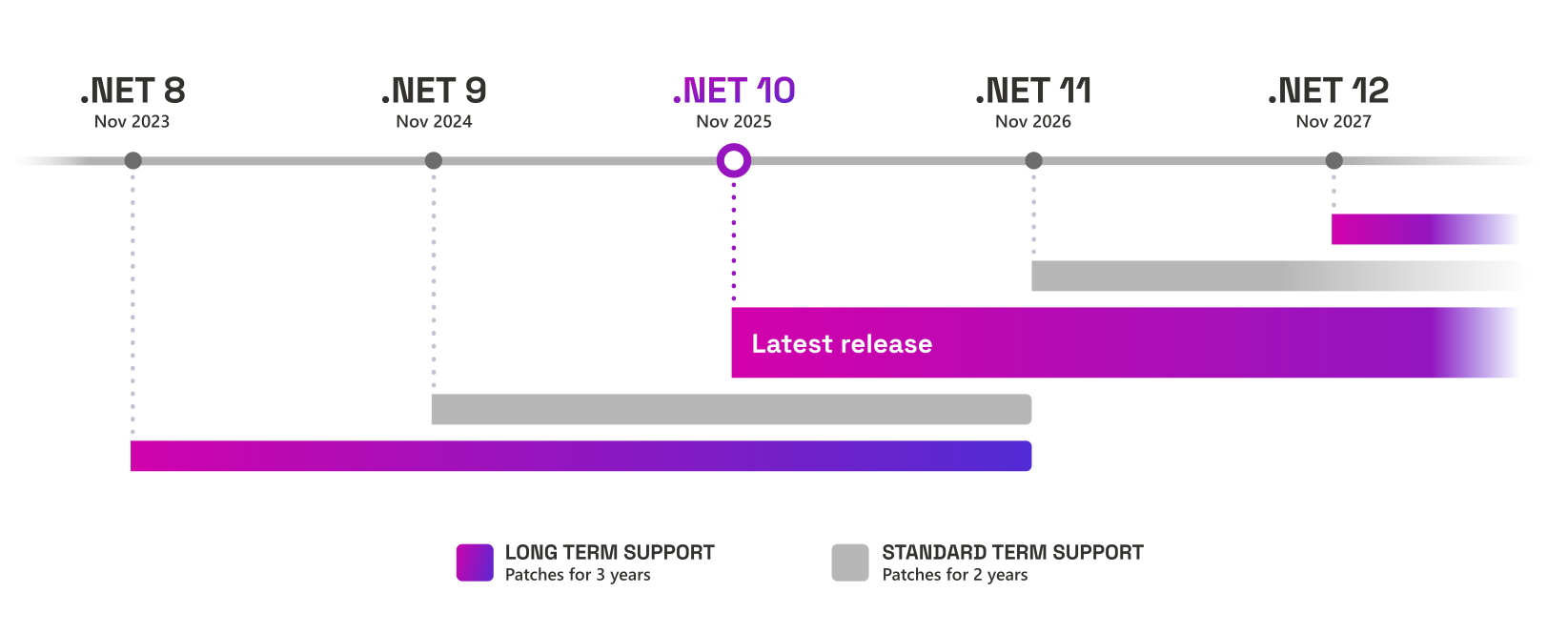
November 10th is a Patch Tuesday release day. .NET 8 and .NET 9 may each receive one final update on that day if there is a known critical issue.
What to expect
After November 10, 2026:
- Applications built on .NET 8 or .NET 9 will continue to run.
- No new security updates will be issued for either version.
- Staying on an unsupported version means you are exposed to security vulnerabilities that will not be patched.
- Technical support will no longer be available for .NET 8 or .NET 9 applications.
Visual Studio Compatibility
Starting with a future servicing update for Visual Studio 2022, the .NET 8 and .NET 9 components will be marked as out of support. Existing installations won’t be affected.
You will need to retarget to .NET 10 (or later) to stay supported. You can use the “remove out of support components” option in Visual Studio to clean up .NET 8 and .NET 9 from existing installations.
Upgrading to .NET 10
You can upgrade your app to .NET 10 by changing the value of the TargetFramework property in your
project file to net10.0. You will also need to update your development and hosting environments.
This process is covered in more detail in
Upgrade to a new .NET version.
<PropertyGroup>
  <TargetFramework>net10.0</TargetFramework>
</PropertyGroup>
Using .NET 8 or .NET 9 apps
If you’re using a .NET 8 or .NET 9 app, we recommend reaching out to the software developer or vendor who produced it to ask for an updated version that uses .NET 10 is available.
Resources
- .NET downloads
- .NET Deployment
- .NET Support Policy
- .NET 10 Breaking Changes
- .NET Upgrade Assistant
- Migrate from ASP.NET Core in .NET 9 to .NET 10
Closing
.NET 8 and .NET 9 will both reach end of support on November 10, 2026. After that date, no additional security updates or technical support will be provided. We strongly recommend upgrading to .NET 10, which is an LTS release supported through November 2028.


0 comments
Be the first to start the discussion.