


.NET MAUI is now available in .NET 8 Preview 7 introducing keyboard accelerators, and more fixes and improvements. This is the final preview release of .NET 8 before we ship release candidates and the generally available (GA) release. We will celebrate that release as usual at .NET Conf, and the dates have been announced. Join us November 14-16, 2023 to celebrate the .NET 8 release!
Version 7.0.92 is the latest service release for .NET 7. During this time we are heavily focused on .NET 8 to make it the best release. Starting next release with RC1 you will be covered with a go live support license. We encourage everyone to consider using .NET 8 releases from this point forward.
Today’s release is brought to you by 25 contributors (bots included). We want to celebrate them all, especially first time contributors Lehonti Ramos, webwarrior-ws, molesmoke, and Aaron Galuzzi. Well done! We appreciate everyone’s contributions. See our contribution guide if you are interested in helping out.
Desktop Keyboard Accelerators
Keyboard accelerators enable you to assign keyboard shortcuts to any menu item, whether visible or not, and attach them to any UI element. For example, this page has a window level menu to which you can add an accelerator with the MenuItem.Accelerator attached property:
<ContentPage.MenuBarItems>
    <MenuBarItem Text="File">
        <MenuFlyoutItem Text="Preferences"
            Command="{Binding PreferencesCommand}"
        />
    </MenuBarItem>
    <MenuBarItem Text="Products">
        <MenuFlyoutItem
            x:Name="AddProductMenu"
            MenuItem.Accelerator="ctrl+a"
            Text="Add Product"
            Command="{Binding AddProductCommand}"
        />
        <MenuBarItem Text="Add Product Category"/>
    </MenuBarItem>
</ContentPage.MenuBarItems>
If instead of the attached property you want to express the accelerator in C#, then you can you can write:
MenuItem.SetAccelerator(AddProductMenu, Accelerator.FromString("ctrl+a"));Now when those keys are triggered, the AddProductCommand fires just as if a user had tapped or clicked the menu item. See the Accelerator.FromString method for a list of supported modifiers.
What’s fixed and improved in .NET MAUI
The main focus of the release is on bug fixes and quality improvements. For a complete set of changes, review the 8.0.0-preview.7.8842 release notes. Here are the highlights:
-
Memory Leak Resolutions:
-
Enhanced UI Control Functionality:
- UI controls like Border, WebView, and Entry received updates to their behavior, performance, and customization options on different platforms (iOS, Android, Windows). These enhancements contribute to a more user-friendly and feature-rich experience. #14740, #15881, #15585, #14846, #16215, #15458, #16270
-
Platform-Specific Improvements:
-
Bug Fixes and Refinements:
- Several bugs, ranging from appearance issues (Shell TabBar) to functionality (SelectedItemChanged in ListView), were resolved across different platforms. These fixes contribute to a more polished and error-free application. #16128, #16241, #16275, #14663, #16057, #16116, #16174, #16248, #15099, #15459
-
Input and Interaction Enhancements:
Additional release notes:
How to update
Visual Studio 2022 on Windows now includes .NET 8 previews and the .NET MAUI preview workload. Download the latest preview version (17.8 Preview 1), select the .NET Multi-platform App UI workload, and then check the optional component “.NET MAUI (.NET 8 Preview)”.
There is a known issue on Mac building for Apple platforms when you have both .NET 8 Preview 6 and 7 installed. Please review the known issues for details and steps to resolve.
If you are on macOS, you can now develop using Visual Studio for Mac after enabling the preview feature for .NET 8 in Preferences and installing .NET 8 Preview 7 from the installer.
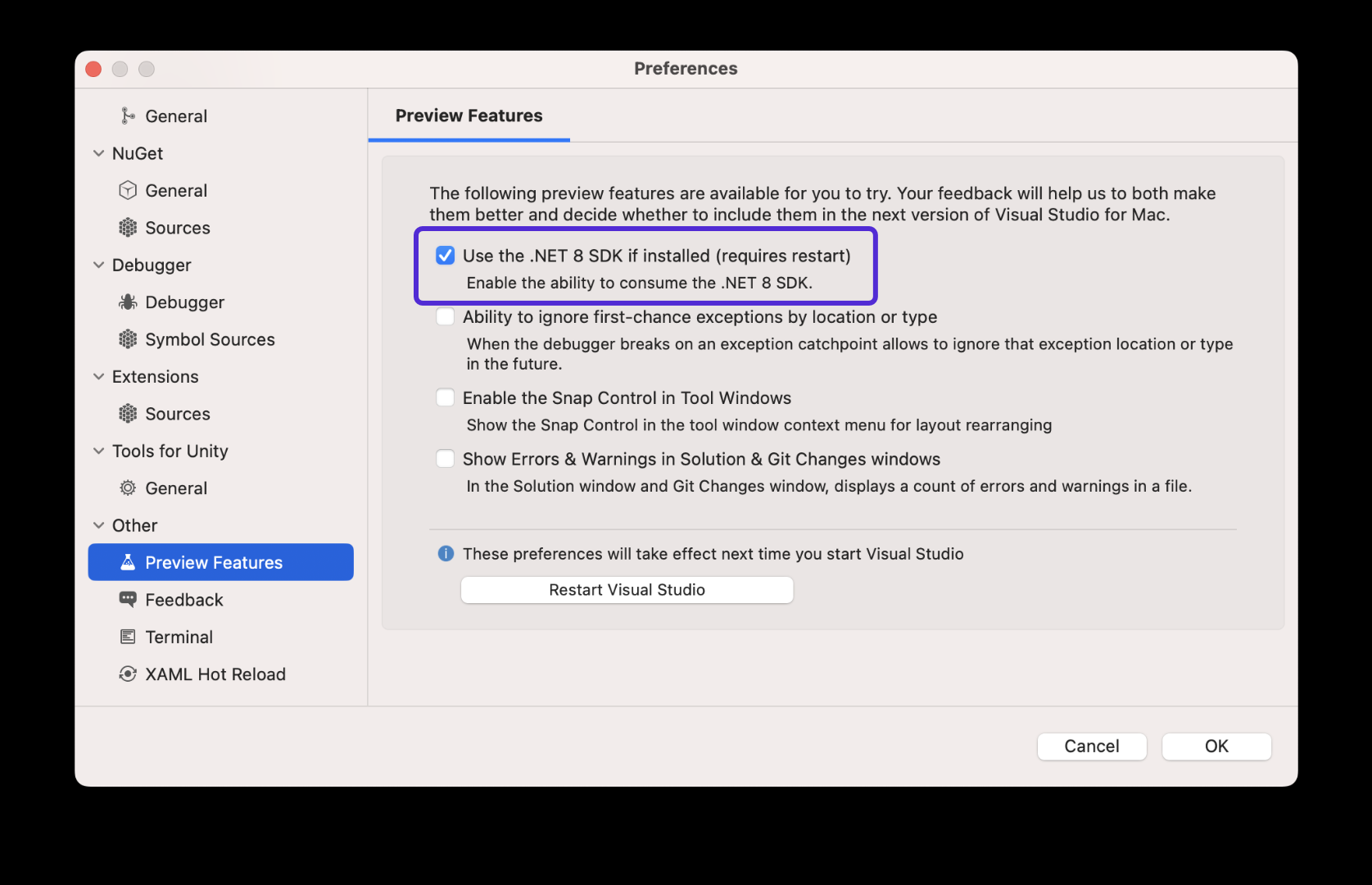
Download the .NET 8 Preview 7 installer, and then install .NET MAUI from the command line:
dotnet workload install mauiWhat’s Next
We are preparing to introduce Xcode 15 support in the next .NET 8 release for the new versions of iOS, iPadOS, macOS, Mac Catalyst, tvOS, and CarPlay. From that point forward .NET 8 will use Xcode 15 which we anticipate to be the stable Xcode at the time .NET 8 ships in November.
Developer tip: I recommend managing your Xcode versions by explicitly downloading and selecting versions from the Apple developer portal, rather than relying on the App Store which may auto-update and break your compatibility. When maintaining side-by-side versions of Xcode you may want to use something like Xcodes.app.
Feedback Welcome
We appreciate your feedback and contributions to .NET MAUI. You can report issues, suggest features, or submit pull requests on our GitHub repository. You can also join our Discord server.
Thank you for your support and happy coding!


How can I upgrade existing MAUI application to the latest version? I installed SDK 8.0.100-rc.1 but I’m not sure how to use it. VS 2022 allows me to use only .net 6 and 7
Hi David, how you doing?
I’m trying to use Accelerators following your example, but I’m getting the message of an obsolete implementation, did you guys changed something at RC1 release?
I'm disappointed to see things like CollectionView being effectively completely broken (16787 - this one completely breaks our app to the point it's entirely unusable) along with basic things like Border (17109) - considering .NET 8 is supposed to be quality-focused I'm stunned how regressions like this can get through, particularly the latter which is incredibly frustrating because it isn't even niche and seems to demonstrate a lack of even the most basic of testing. It's scary to think the next drop will be an RC.
why not just to integrate web engine / and use html to build ui