


Hello everyone! I’m thrilled to announce that .NET MAUI in .NET 8 Preview 5 is now available with lots of bug fixes and performance improvements for cross-platform app development. In this post, I’ll summarize some of the most important changes in this release and show you how to update your .NET MAUI project to use this release.
What’s fixed and improved in .NET MAUI
Preview 5 is another quality-focused update that fixes many issues and enhances the performance of the framework, including:
- iOS Keyboard Scrolling: ContentInsets were added to improve the scrolling behavior of the iOS keyboard. #14371
- Test Improvements: Various improvements and fixes were made to the tests, including the removal of the skip attribute from a test related to SearchBarHandler. #14852
- Performance Enhancements: Performance improvements were made to the {Binding} mechanism and the layout performance of labels on Android. #14830, #14933, #14980
- Bug Fixes: Several bug fixes were implemented, addressing issues such as gestures in Label Spans, Entry issues with the keyboard, Label truncation on iOS, CollectionView issues, ContentView RTL, and more. #14410, #14382, #14453, #14391, #11763, #15114, #12909
These are just some of the highlights of this release. For a complete list of changes, please check out the release notes.
How to update
Visual Studio 2022 on Windows now includes .NET 8 previews and the .NET MAUI preview workload. Download the latest preview version 17.7 Preview 2, select the .NET Multi-platform App UI workload, and then check the optional component “.NET MAUI (.NET 8 Preview)”.
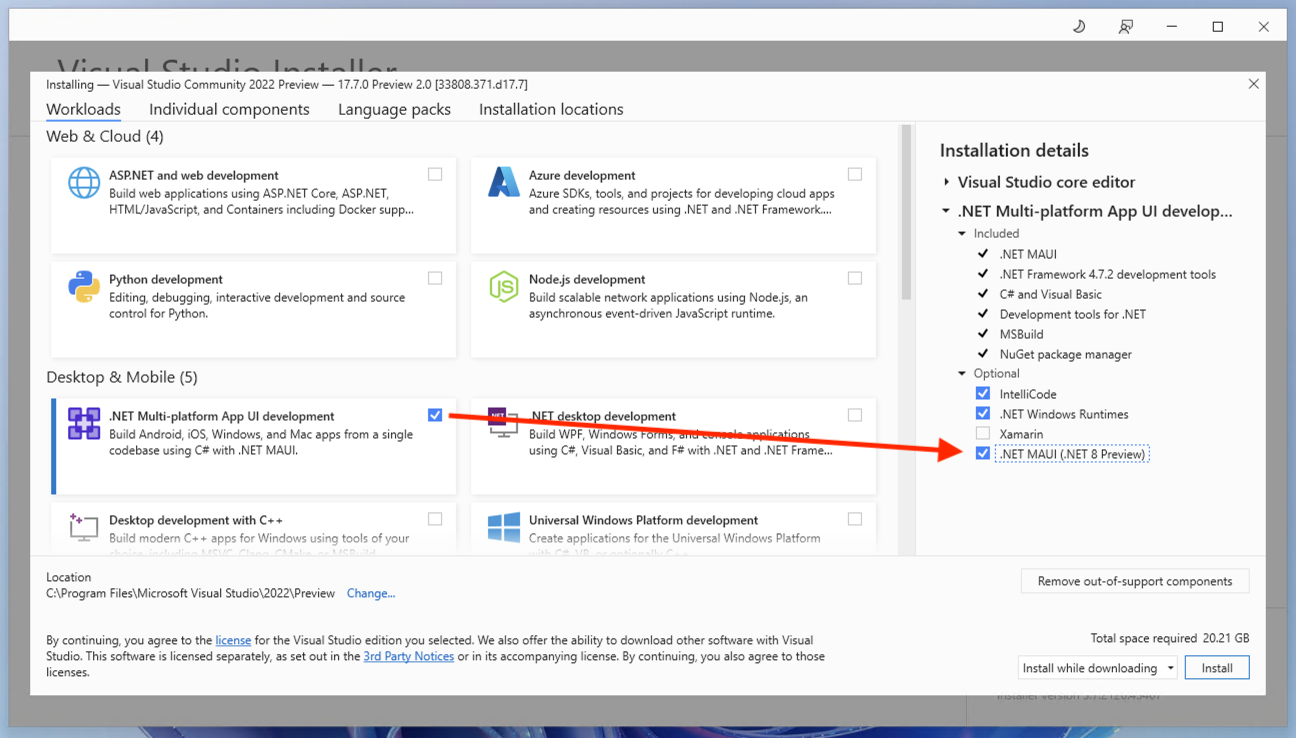
If you are on macOS, you may download the .NET 8 preview 5 installer, and then install .NET MAUI from the command line:
dotnet workload install mauiTo verify that everything is installed correctly, you can run the following command:
dotnet --list-sdksYou should see something like this:
8.0.100-preview.5.23303.2 [C:\Program Files\dotnet\sdk]And to verify you have the correct .NET MAUI workload, run the command:
dotnet workload listYou should see something like this:
Installed Workload Id      Manifest Version                            Installation Source
-----------------------------------------------------------------------------------------------------------
maui-windows               8.0.0-preview.5.8529/8.0.100-preview.5      VS 17.5.33627.172, VS 17.7.33808.371
maui-maccatalyst           8.0.0-preview.5.8529/8.0.100-preview.5      VS 17.5.33627.172, VS 17.7.33808.371
maccatalyst                16.4.8525-net8-p5/8.0.100-preview.5         VS 17.5.33627.172, VS 17.7.33808.371
maui-ios                   8.0.0-preview.5.8529/8.0.100-preview.5      VS 17.5.33627.172, VS 17.7.33808.371
ios                        16.4.8525-net8-p5/8.0.100-preview.5         VS 17.5.33627.172, VS 17.7.33808.371
maui-android               8.0.0-preview.5.8529/8.0.100-preview.5      VS 17.5.33627.172, VS 17.7.33808.371
android                    34.0.0-preview.5.312/8.0.100-preview.5      VS 17.5.33627.172, VS 17.7.33808.371
Updating existing projects
To update your .NET MAUI project to use 8.0.0-preview.5.8529, you first need to install the .NET 8 Preview 5 SDK and then update the .NET MAUI NuGet packages in your project. You can use Visual Studio or Visual Studio for Mac to manage your NuGet packages or edit your project file manually.
To use Visual Studio or Visual Studio for Mac, right-click on your project and select “Manage NuGet Packages…” then select the “Include prerelease” option and search for Microsoft.Maui. packages. Update all the packages to version 8.0.0-preview.5.8529. To edit your project file manually, open it in a text editor and find the ItemGroup element that contains the PackageReference elements for Microsoft.Maui. packages. Update all the Version attributes to 8.0.0-preview.5.8529.
Your project file should have an ItemGroup that looks something like this:
<ItemGroup>
    <PackageReference Include="Microsoft.Maui.Controls" Version="$(MauiVersion)" />
    <PackageReference Include="Microsoft.Maui.Controls.Compatibility" Version="$(MauiVersion)" />
    <PackageReference Include="Microsoft.Extensions.Logging.Debug" Version="8.0.0-preview.5.23280.8" />
</ItemGroup>
Now you can build and run your project using Visual Studio or Visual Studio for Mac or use the dotnet build command with the -t:Run target:
dotnet build -t:Run -f net8-android MyMauiApp.csprojThis will build and launch your app on an Android emulator or device.
Feedback Welcome
We appreciate your feedback and contributions to .NET MAUI. You can report issues, suggest features, or submit pull requests on our GitHub repository. You can also join our Discord server or follow us on Twitter to stay in touch with the latest news and updates.
Thank you for your support and happy coding!


We made the decision to go Blazor Hybrid with .NET MAUI. All the pages are Razor pages running in a single BlazorWebView control on a single xaml page.
We have not had any issues with html/css/javascript/blazor. We have not had any problems running MudBlazor controls. We run the same razor pages on a asp.net core site without major issues.
If they could fix the time it takes to run the app when hitting F5, I would not have any complaints. Sometimes it can run in under 30 seconds and then other times it has to rebuild everything taking...
Dear MS, iOS 17 is coming out in September and Xamarin app won't run on iOS 17. We are forced to migrate our Xamarin app to MAUI. Given the current state of .NET 7 MAUI with massive memory leaks and critical UI bugs, it is fair to say it is not production ready! I am ware many bugs are fixed in .NET 8 preview, and .NET 8 will not be release before iOS 17 release this September! And Xamarin app cannot run on iOS 17. What should Xamarin/Maui developers do? MS must address this issue NOW! Not kicking the...
After struggling with a large project in .Net 7 Maui it is very demoralising to think I now have to wait to .Net 8 release to see what is fixed or still broken. I am beginning to think maybe by .Net 100 Maui may finally be ready.
MAUI in .NET 8 is on the right track. I had enough frustrations using it especially for Android in previous versions. However, I do not understand the opinions of some professionals, who know well that once the fundamental issues are solved, then everything will be solved by itself. In addition, it is open source. It would be much more useful to make concrete contributions. MAUI is a brilliant platform. Congratulations David!