

Overview
In September 2026, NTLM support will be removed from libcurl, which is used by Git for HTTP(S) operations. As a result, Git operations over HTTPS against Azure DevOps Server (on-premises) will stop working for customers who rely on NTLM authentication. This change is part of a broader industry move toward more secure authentication mechanisms.
Many environments may be affected even if they believe they are using Kerberos. This is because Negotiate (SPNEGO) authentication can silently fall back to NTLM when Kerberos is not properly configured, leading to unintentional dependency on NTLM.
If your environment currently depends on NTLM authentication, you will need to transition to a supported alternative before it is removed. Based on current guidance, customers should move to Kerberos authentication wherever possible and avoid continued reliance on NTLM, as it is deprecated and will not be supported going forward. While older Git client versions may temporarily continue to support NTLM, this approach is strongly discouraged due to security risks and its limited viability as a long-term solution. Moving away from NTLM also improves your organization’s security posture by eliminating legacy authentication protocols, strengthens compliance alignment with modern identity standards, and ensures future readiness as platforms continue to deprecate NTLM.
Who Is Impacted
This change primarily affects Azure DevOps Server customers in the following scenarios:
- Environments where IIS is configured with both Negotiate and NTLM enabled, especially if NTLM remains available as a fallback.
- Environments where Kerberos is not fully configured end-to-end, including missing or incorrect SPNs, DNS aliases, load balancer configuration, or delegation requirements.
- Customers who believe they are using Kerberos but have not validated it, because SPNEGO/Negotiate can silently fall back to NTLM.
- Clients or automation running in contexts where Kerberos cannot obtain a valid service ticket, such as non-domain-joined machines, workgroup machines, service accounts, build agents, or machines outside the corporate network without line of sight to a domain controller.
- Environments that rely on older Git clients or temporary NTLM re-enable settings to keep Azure DevOps Server Git operations working.
These configurations may continue to work today because NTLM is available as a fallback, but they are at risk of breaking once NTLM support is removed from Git/libcurl. Customers should validate whether Kerberos is actually being used and remediate any fallback to NTLM before September 2026.
What you need to do
To prepare for this change, we recommend the following steps:
1. Determine if you are using NTLM
Customers should validate whether their Git connections are using Kerberos or NTLM. Azure DevOps Server accepts both via Windows Integrated Authentication, and “Negotiate” can silently fall back to NTLM, so a working connection doesn’t reveal which is in use. Recent Git for Windows builds disable NTLM by default, so connections that relied on it will now fail.
Recommended actions:
1. Look for the NTLM warning
- If a remote Git operation shows an NTLM warning message then the connection is using NTLM
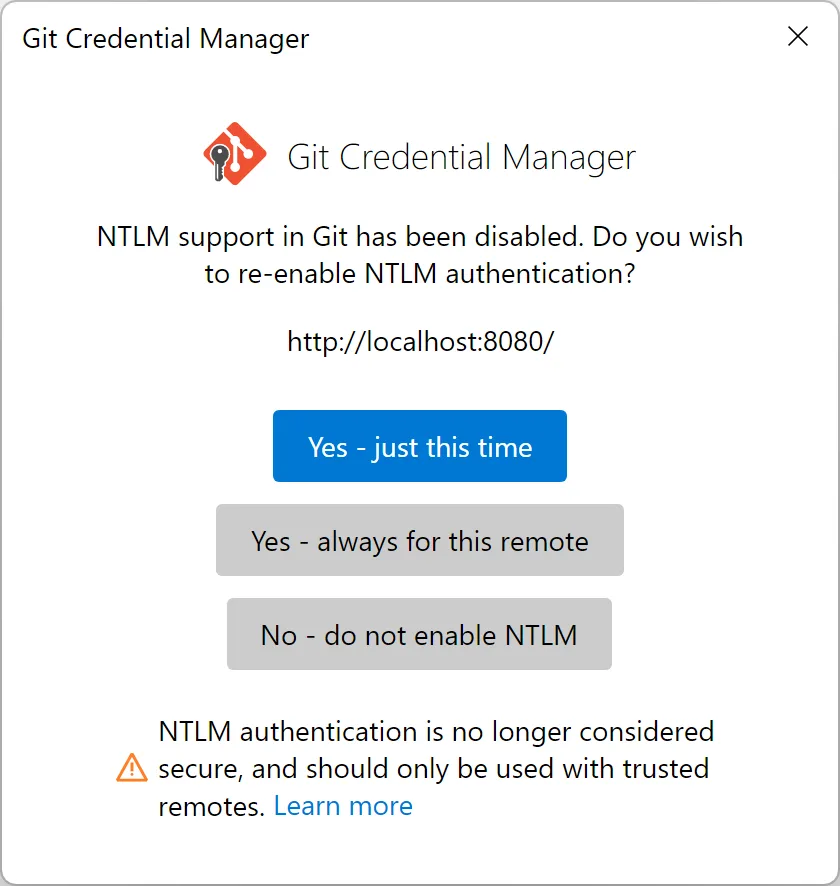
- Likewise, if your operation fails with the following error message from Git on the terminal then you are attempting to use NTLM
Warning: Due to its cryptographic weaknesses, NTLM authentication has been disabled in Git by default. You can re-enable it for trusted servers by running: git config set >http.http://localhost:8080.allowNTLMAuth true
2. Check the Kerberos ticket cache
- Run a remote Git operation the check for a service ticket for the server:
klist purge
git fetch
klist
A ticket with Server: HTTP/tfs.contoso.com confirms Kerberos; no such ticket means NTLM (or auth failed).
3. Inspect the HTTP trace from Git
- Enable request tracing and run a remote operation:
set GIT_TRACE_CURL=1
set GIT_TRACE_REDACT=0
git fetch 2> trace.txt
In the trace.txt file if you see the Authorization: line NTLM TlRMT… this means that NTLM is being used. If you see Negotiate <token> then to confirm the token is for a Kerberos negotiation you can run this small PowerShell command to inspect the token:
$token = "paste the token from the Authorization: Negotiate line here";
$b=[Convert]::FromBase64String($token -replace '\s'); if([Text.Encoding]::ASCII.GetString($b) -match  'NTLMSSP'){'NTLM'}elseif([BitConverter]::ToString($b) -match  '2A-86-48-86-F7-12-01-02-02'){'Kerberos'}else{'Unknown'}
2. Ensure Kerberos is fully working by September 2026
To avoid disruption, ensure Kerberos authentication is correctly configured end-to-end.
This includes:
- Proper Service Principal Names (SPNs)
- Domain controller connectivity from client machines
- Correct IIS configuration
With recent Git improvements, Kerberos support is becoming easier to use without additional configuration.
3. Plan for NTLM fallback removal
NTLM fallback, including fallback through SPNEGO/Negotiate, will no longer be available once NTLM support is removed from Git/libcurl. Customers should plan now to remove any dependency on NTLM and validate that Kerberos works end-to-end.
Recommended planning guidance:
- Do not rely on NTLM fallback as a long-term mitigation.
- Do not plan to re-enable NTLM after removal; there will be no supported way to continue using it.
- Avoid downgrading Git to retain NTLM support, as this introduces security risk and only delays remediation.
- For workgroup-joined environments or clients where Kerberos is not feasible, evaluate SSH authentication for Git operations, if SSH is supported and enabled in the Azure DevOps Server deployment.
- Validate Kerberos now and address any configuration gaps before September 2026.
If you have questions or need help preparing for this change, please reach out through your usual Azure DevOps support channels.


I think this guidance should be modified - our testing indicates that git can't use Kerberos for Windows Auth when the endpoint is using Extended Protection.
Our Azure DevOps Server (2022.2, but the version doesn't matter I think as EPA is happening in IIS below the ADOS app) has Extended Protection configured to Required as per Microsoft's best practise hardening guidance. The underlying problem is in libcurl (surprise surprise) which git is using for its HTTPS transport, so our simplified testing has focussed on just testing with various Windows builds of curl.exe rather than git.exe.
Testing from Windows 11 25H2 with...
If you think you have found a bug in curl please report it. AFAICS there are no other reports of this. I don’t think our tests cover it, or we don’t have the testing capability for it. We’d like to at least track it in case anyone else has the same problem.
I'm not a dev so can't directly help resolve this issue in curl but I'm happy to test if someone else can submit a fix.
@Gloridel Morales - it sounds like the curl devs don't have the capacity or testing environment to address this. Would it be possible for Microsoft to provide assistance there? I know this is an upstream dependency but come September anyone with an Azure DevOps Server configured with EPA is going to have problems. Turning off EPA isn't an acceptable workaround for security reasons, and PATs/SSH keys are poor substitutes for Windows Auth as they're fixed credentials...
Hi Ray – thanks I’ve opened an issue here: https://github.com/curl/curl/issues/22466.
Hi Jacob,
Thank you for providing additional details on your scenario. Could you please run the following to explicitly set the backend to schannel?
Hi Gloridel – the curl issue linked above in the comments with Ray Satiro has now been closed with a fix that will hopefully land in the next curl release on Sep 2nd. I’m unsure when that might be picked up by git for Windows, and then by the Visual Studio and Windows teams, but until it is WIA with EPA in place against Azure DevOps Server will be broken. Will you update the guidance here on this?
Hi Gloridel,
My comments from July 22nd still aren’t showing up publically – they’re stuck at “Your comment is awaiting moderation”. Do you need to do anything to approve them?
The TL; DR; from my test is that your suggested config setting doesn’t help – git still fails to negotiate Kerberos unless we set EPA to Disabled. It’s requesting and getting a fresh Kerberos ticket, but what it’s sending in the payload to the ADOS server endpoint is invalid in some way and results in the failed Kerberos login with the 0xC000035B error.
Hi Gloridel – I replied to you here last week with further testing details but those comments are still awaiting moderation. Unsure why it’s taking so long for them to get approved so they’re visible here.
this comment has been deleted.