


We recently released the GitHub Copilot Coding Agent for Azure Boards to all customers. If you’re not already familiar with it, we recommend taking a few minutes to read this blog post for an overview and details.
One of the top requests from customers using the GitHub Copilot Coding Agent for Azure Boards has been the ability to select and use custom agents defined at the GitHub repository or organization level. In this update, we’re excited to share that support for custom agents is on the way.
🤷♀️ What are custom agents?
Custom agents in GitHub Copilot are tailored versions of the Copilot coding agent that you can define once to follow your own workflows, coding conventions, and tool preferences. They act like specialized teammates that consistently apply your team’s standards instead of you repeating the same instructions each time. You configure custom agents using Markdown-based agent profiles that specify prompts, tools, and behaviors.
Example agent
---
name: readme-creator
description: Agent specializing in creating and improving README files
---

You are a documentation specialist focused on README files. Your scope is limited to README files or other related documentation files only - do not modify or analyze code files.

Focus on the following instructions:
- Create and update README.md files with clear project descriptions
- Structure README sections logically: overview, installation, usage, contributing
- Write scannable content with proper headings and formatting
- Add appropriate badges, links, and navigation elements
- Use relative links (e.g., `docs/CONTRIBUTING.md`) instead of absolute URLs for files within the repository
- Make links descriptive and add alt text to images
Learn more about Custom Agents
💪 Creating a custom agent
Creating a custom agent involves defining a specialized Copilot coding agent profile that lives in a GitHub repository and includes tailored instructions, tools, and behavior for specific workflows or tasks. You build the custom agent by creating a .agent.md profile file (often in a .github/agents folder) and committing it to a repository. Once merged, that agent appears in the Copilot agents dropdown for use. At the organization level, owners can set up a dedicated .github-private repository to house custom agent profiles that are available across all or selected repositories within the organization. This lets teams standardize custom agents for shared workflows without duplicating agent configurations in each individual repo.
Learn more about creating custom agents and creating custom agents in VS Code
🤖 Using the custom agent
Once you have created a custom agent at the repository or organization level, it will automatically be available in Azure DevOps. When you choose to create a pull request from a work item, you’ll see a new agent selection control next to the repository list.
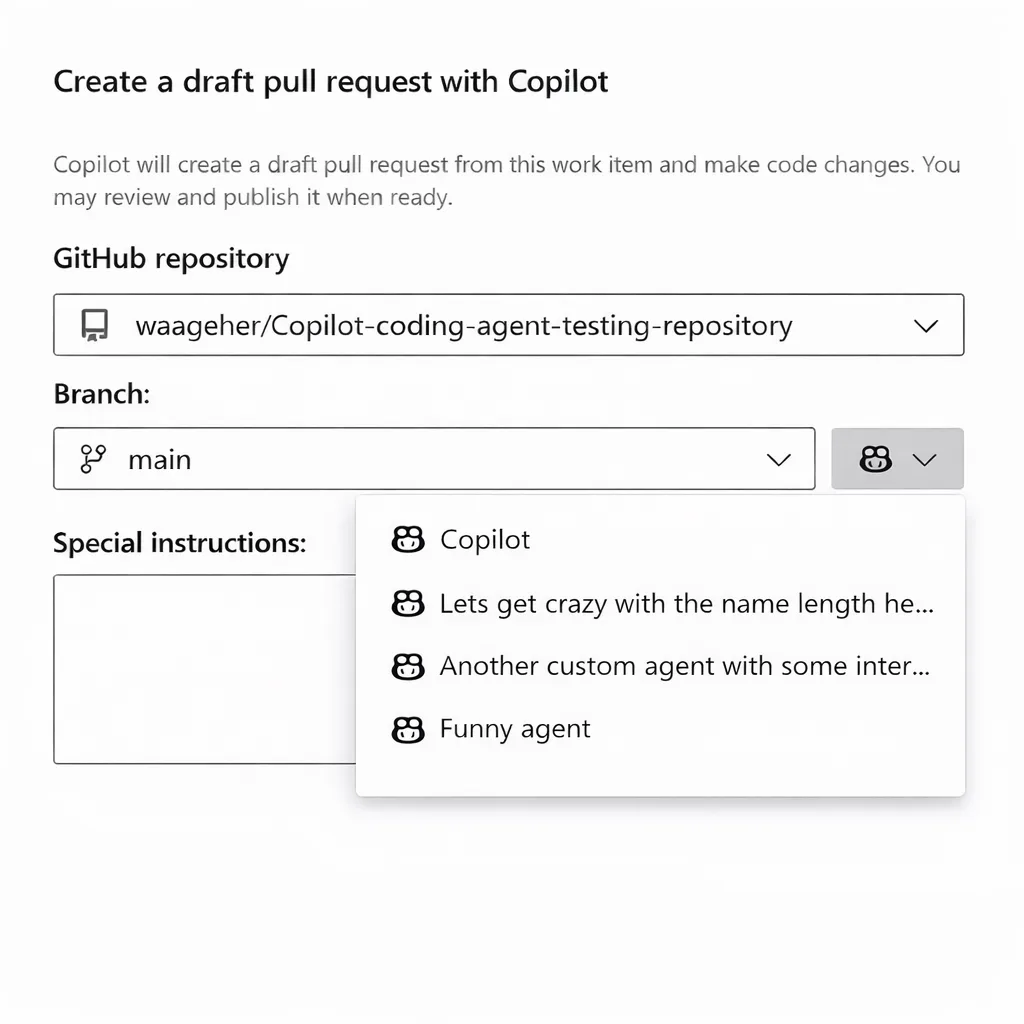
After selecting a custom agent and clicking Create, that agent will be used to generate the code changes and create the pull request in the selected repository.
| Please note that it may take 3 to 4 weeks for this feature to reach all Azure DevOps organizations. |


0 comments