

Series: Building Serverless Applications with Azure Functions and Azure Cosmos DB
In the first post of this series, we focused on establishing the fundamentals of serverless architecture by building and deploying a simple HTTP API using Azure Functions and FastAPI. The post centred on serverless compute, showing how Azure Functions handles execution, scaling, and infrastructure management while FastAPI provides a modern, developer-friendly API framework.
In this post, we extend that foundation by introducing serverless data. You’ll build a Python-based CRUD inventory API and persist data using Azure Cosmos DB Serverless, learning how to securely connect to a NoSQL database, model and validate data, and structure clean CRUD operations while keeping the application fully serverless. By the end of this post, you’ll understand how serverless compute and serverless data work together to form the core of a production-ready serverless application.
Posts in this series
- Part 1: Building Your First Serverless HTTP API with Azure Functions and FastAPI – Establishes the fundamentals of serverless architecture and serverless compute.
Prerequisites
Before starting, make sure you have:
- An Azure account
- Python 3.10 or later
- Azure Functions Core Tools v4
- Completed Part 1 of this series
What is Azure Cosmos DB?
Azure Cosmos DB is a fully managed, globally distributed NoSQL database designed for:
- Low latency
- Elastic scalability
- Serverless consumption
It uses a schema-agnostic JSON document model, which makes it a great fit for application data such as product catalogs or inventories. Azure Cosmos DB also supports vector and hybrid search, enabling AI-driven use cases like RAG and agentic applications.
In this tutorial, we’ll use Cosmos DB Serverless, which automatically scales and charges only for the operations you perform ideal for serverless APIs.
Architecture Overview
At a high level:
- Azure Functions provides the execution environment and HTTP trigger
- FastAPI handles routing, validation, and API documentation
- Azure Cosmos DB (Serverless) stores inventory data as JSON documents
- Cosmos DB Python SDK is used for database interactions
We intentionally use the Cosmos DB SDK instead of Azure Functions bindings. While bindings are great for event-driven workloads, SDK-based access gives us clearer control and flexibility for CRUD APIs.
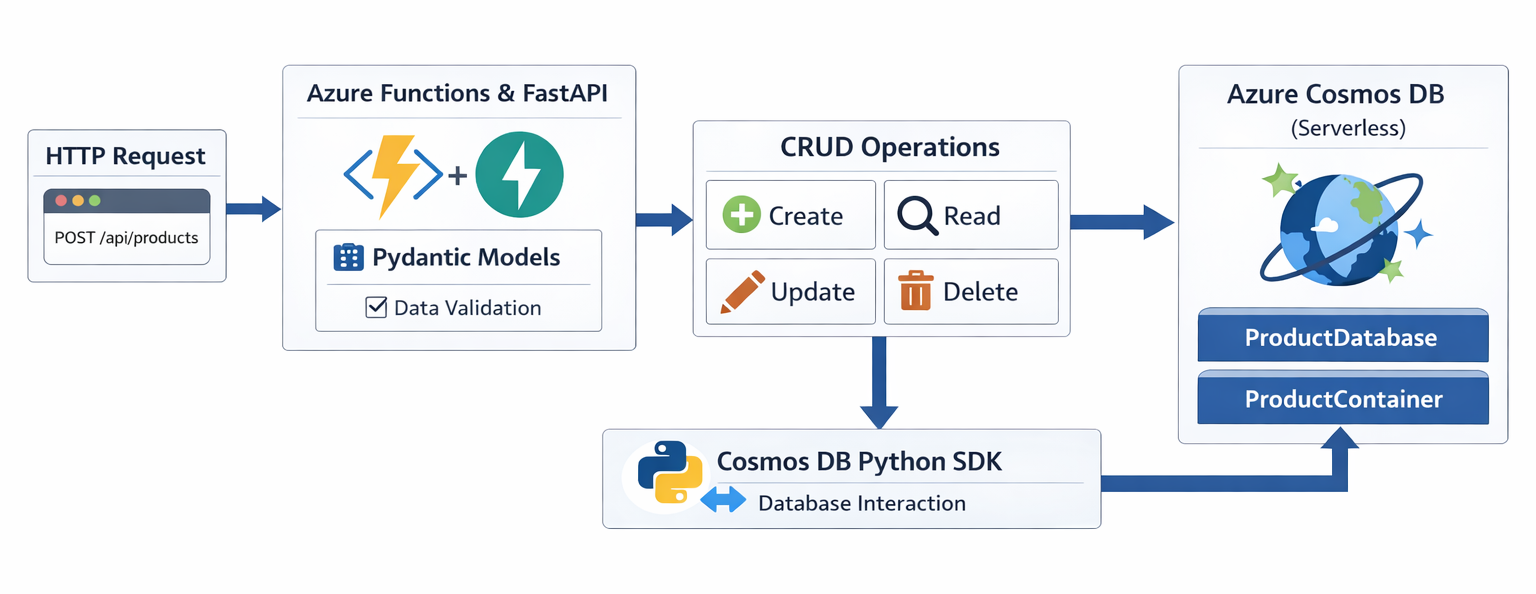
Our project structure will look like this:
project/
|── function_app.py
|── db.py
|── models.py
|── crud.py
|── routes.py
|── requirements.txt
Building the CRUD application
Creating the Cosmos DB Account
Before writing application code, we need a place to store data. Create a Cosmos DB NoSQL API (Serverless) account using the Azure Portal. The official quickstart walks through this well: https://learn.microsoft.com/azure/cosmos-db/quickstart-portal
For this application:
- Create a serverless Cosmos DB NoSQL API account
- Create a database named ProductDatabase
- Create a container named ProductContainer
- Set the partition key to /category.
Choosing /category as the partition key allows related products to be grouped logically and queried efficiently.
Connecting the Function App to Cosmos DB
A serverless app should not hard-code infrastructure details. Instead, we use environment variables to keep configuration separate from code.
In local.settings.json, we store the Cosmos DB endpoint and container details:
"Values": {
    "FUNCTIONS_WORKER_RUNTIME": "python",
    "AzureWebJobsStorage": "UseDevelopmentStorage=true",
    "COSMOSDB_ENDPOINT": "https://<cosmos-account>.documents.azure.com:443/",
    "COSMOSDB_DATABASE": "ProductDatabase",
    "COSMOSDB_CONTAINER": "ProductContainer"
  }
}
Installing Dependencies
Add the Cosmos DB SDK and Azure Identity packages to requirements.txt:
azure-cosmos>=4.3.0
azure-identity
Connecting to Cosmos DB
Rather than using account keys, we authenticate to Cosmos DB using Managed Identity. This avoids secrets in configuration files and aligns with Azure security best practices.
In db.py, we initialize the Cosmos client once and expose a helper to retrieve the container:
COSMOSDB_ENDPOINT = os.environ["COSMOSDB_ENDPOINT"]
DATABASE_NAME = os.environ.get("COSMOSDB_DATABASE", "ProductsDB")
CONTAINER_NAME = os.environ.get("COSMOSDB_CONTAINER", "ProductsContainer")

credential = DefaultAzureCredential()
cosmos_client = CosmosClient( COSMOSDB_ENDPOINT, credential, connection_mode="Gateway",)

async def get_container() -> ContainerProxy:
    database = cosmos_client.get_database_client(DATABASE_NAME)
    return database.get_container_client(CONTAINER_NAME)
Creating the client once improves performance and ensures connections are reused across requests.
Modelling Inventory Data with Pydantic
Before storing anything, we need to define what a product looks like.
Using Pydantic, we define models that:
- Validate incoming requests
- Document the API automatically
- Provide a clear contract between layers
The base Product model represents fields intrinsic to a product:
class Product(BaseModel):
    name: str = Field(min_length=1, max_length=255)
    description: Optional[str] = Field(None, max_length=1000)
    category: str = Field(min_length=1, max_length=100)
    price: Decimal = Field(gt=0)

    model_config = ConfigDict(extra="ignore", str_strip_whitespace=True,)
From this base model, we derive:
- ProductCreate — what clients send when creating a product
- ProductResponse — what the API returns after persistence
Separating these models keeps the API flexible as requirements evolve.
Create Model
class ProductCreate(Product):
    """Fields required to create a product."""
    pass
Response model
class ProductResponse(Product):
    id: str
    _ts: int
Implementing the Create Operation
With the data model in place, we can implement our first CRUD operation Create in crud.py.
The responsibility of this layer is simple:
- Accept validated data
- Convert it into a Cosmos DB document
- Persist it using the SDK
- Return the stored document
async def create_product(container, product):
    product_doc = {
        "id": str(uuid4()),
        "name": product.name,
        "description": product.description,
        "category": product.category,
        "price": float(product.price),
    }

    created_item = await container.create_item(body=product_doc)
    return ProductResponse.model_validate(created_item)
Cosmos DB stores numeric values as JSON numbers, which is why we convert Decimal to float before saving.
Exposing the API with FastAPI Routes
FastAPI acts as the HTTP boundary of the application. It:
- Parses incoming requests
- Validates data
- Maps HTTP calls to business logic
In routes.py, we define a simple endpoint for product creation:
router = APIRouter()

@router.post("/products", response_model=ProductResponse)
async def create_product_route(product: ProductCreate,
    container=Depends(get_container),):
    return await create_product(container, product)
This separation keeps HTTP concerns (routing, status codes) isolated from database logic.
Wiring Everything Together
Finally, we register the router with the FastAPI app inside the Azure Functions entry point:
FastAPI_app.include_router(router, prefix="/api")At this point, the request flow is fully wired end to end.
Testing the API
Start the function locally:
func start
Send a POST request to /api/products:
{
  "name": "TestProduct",
  "description": "This is a test product",
  "category": "Footwear",
  "price": 10.0
}
If successful, the API returns the created product along with system-generated metadata from Cosmos DB.
Wrapping Up
In this post, we extended our serverless API by introducing persistence using Azure Cosmos DB. Along the way, we explored:
- Why Cosmos DB fits serverless workloads
- How to connect securely using Managed Identity
- How to model data cleanly with Pydantic
- How to structure CRUD logic and API routes
More importantly, we built a foundation that scales naturally as the application grows.
What’s Next?
In the next post, we’ll move beyond request-response APIs and explore event-driven serverless design using the Cosmos DB Change Feed with Azure Functions triggers allowing our application to react automatically to data changes.
Resources
- GitHub sample: Build Python CRUD API with Azure Functions and Azure Cosmos DB
- Using Azure Cosmos DB with Azure Functions: Connect Azure Functions to Azure Cosmos DB using Visual Studio Code | Microsoft Learn
- Azure Cosmos DB Python Quickstart: Quickstart – Azure SDK for Python – Azure Cosmos DB | Microsoft Learn
- Learn more about Azure Cosmos DB: Azure Cosmos DB documentation – Azure Cosmos DB | Microsoft Learn
About Azure Cosmos DB
Azure Cosmos DB is a fully managed and serverless NoSQL and vector database for modern app development, including AI applications. With its SLA-backed speed and availability as well as instant dynamic scalability, it is ideal for real-time NoSQL and MongoDB applications that require high performance and distributed computing over massive volumes of NoSQL and vector data.
To stay in the loop on Azure Cosmos DB updates, follow us on X, YouTube, and LinkedIn.


Your github link is not working and part one is missing a bunch of imports for the actual code to work.
Thanks for raising the issue. The Github repo is now accessible, and the missing imports have been added.