

Recently we introduced the Agent Memory Toolkit and the Agentic Retrieval Toolkit for Azure Cosmos DB. The Agent Memory Toolkit gives your agents durable, Cosmos-backed memory: it stores raw conversation turns and then distills them into higher-value derived memories (thread summaries, extracted facts, and cross-thread user profiles), all searchable with vector, full-text, and hybrid search in the one database you already use.
Today we’re taking the next step. With the latest release of Microsoft Agent Framework, you can now drop that memory into an agent with a single object: the CosmosMemoryContextProvider, shipped in the new agent-framework-azure-cosmos-memory package for Python (currently in preview). Wire it into your agent once, and every turn is remembered, distilled, and recalled across threads and sessions, with no orchestration code on your side.
Why a context provider, and why it matters
Most agent frameworks give you a memory interface: a fixed API for storing and retrieving conversation memory. Microsoft Agent Framework does something more general. It exposes a first-class, provider-agnostic context provider abstraction: a pair of lifecycle hooks, before_run and after_run, that any component can implement to contribute context into a run and capture results out of it.
That generality is the interesting part. A context provider isn’t limited to memory. It’s a clean seam for injecting anything an agent should know before it thinks, and for reacting to anything it produces afterwards. Among the major agent frameworks, Agent Framework stands out for making this a first-class, pluggable extension point rather than a memory-specific bolt-on, and that is precisely what let us build Cosmos-backed memory as a drop-in provider instead of a wrapper around the whole agent loop.
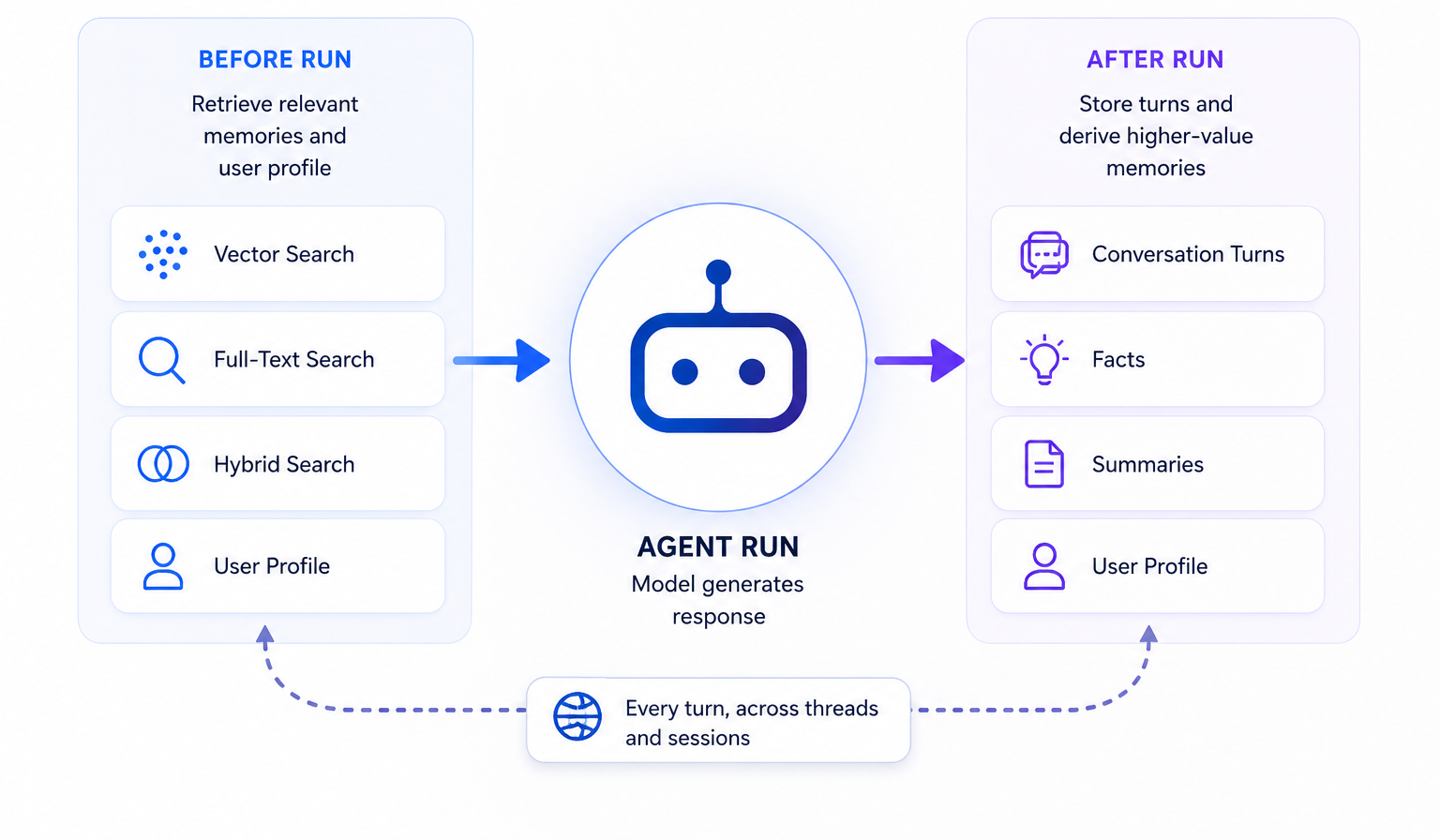
Concretely, CosmosMemoryContextProvider does two things:
before_run: searches your Cosmos-backed memory for context relevant to the incoming message and injects the matches (plus the user’s profile) into the model context, so the agent answers with what it already knows about the user.after_run: stores the new turns and lets the Agent Memory Toolkit’s pipeline extract facts, roll up summaries, and update the user profile in the background.
You implement nothing. You attach one provider and get durable memory.
How it fits together
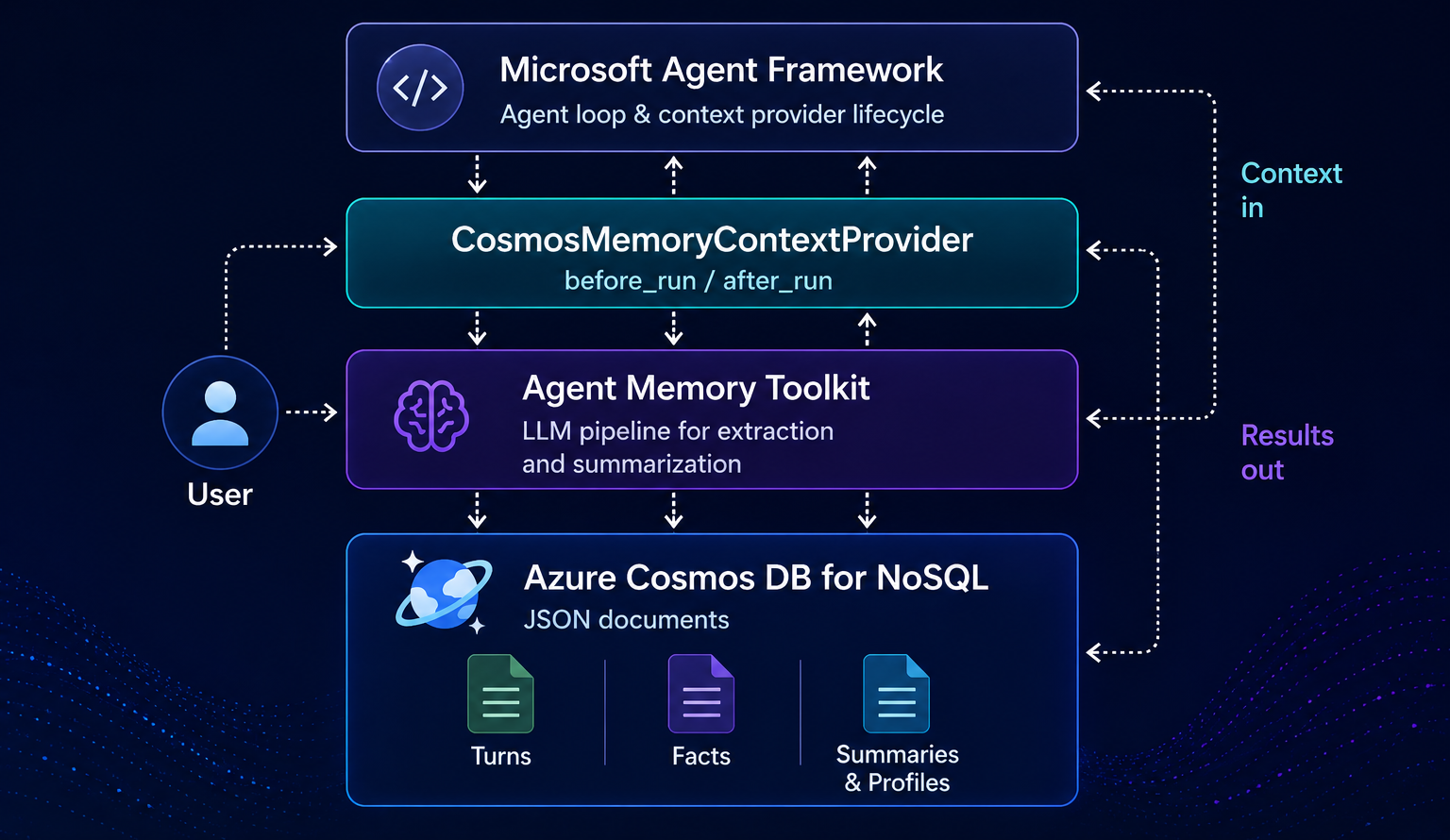
Under the hood, the provider is a thin, idiomatic Agent Framework adapter over the Agent Memory Toolkit. Agent Framework owns the agent loop and the context-provider lifecycle; the toolkit owns the Cosmos DB storage model and the LLM pipeline that turns raw turns into facts, summaries, and profiles. Memory is scoped by a stable user_id (and a thread_id for the current conversation), so recall follows the user across brand-new threads and sessions.
Everything lands in Azure Cosmos DB for NoSQL as JSON documents (turns, facts, and summaries), and retrieval uses the vector, full-text, and hybrid search that are already built into the database. No second vector store to provision, and nothing to keep in sync.
Walking through the interactive sample
The agent-framework-azure-cosmos-memory package ships an interactive chat sample that shows the whole thing end to end. Let’s walk through it.
1. Install and configure
pip install agent-framework-azure-cosmos-memory agent-framework-foundry
Authentication is via DefaultAzureCredential (so az login locally, or a managed identity in Azure), with no API keys. Point the sample at your Cosmos DB account and your Microsoft Foundry project, and name the chat and embedding deployments you want to use:
$env:COSMOS_ENDPOINT  = "https://<your-account>.documents.azure.com:443/"
$env:FOUNDRY_ENDPOINT = "https://<your-project>.services.ai.azure.com"
$env:CHAT_MODEL       = "gpt-5.4-mini"
$env:EMBEDDING_MODEL  = "text-embedding-3-large"
2. Give the agent memory
Creating a memory-backed agent is just constructing the provider and passing it to the agent. The single Foundry endpoint powers both the memory pipeline (embeddings and extraction) and the chat agent:
import os

from agent_framework import Agent
from agent_framework.foundry import FoundryChatClient
from azure.identity.aio import DefaultAzureCredential

from agent_framework_azure_cosmos_memory import CosmosMemoryContextProvider


def create_agent_with_memory():
    foundry_endpoint = os.environ["FOUNDRY_ENDPOINT"]
    credential = DefaultAzureCredential()

    # One object gives the agent durable, Cosmos-backed long-term memory.
    provider = CosmosMemoryContextProvider(
        cosmos_endpoint=os.environ["COSMOS_ENDPOINT"],
        cosmos_database=os.getenv("COSMOS_DATABASE", "ai_memory"),
        foundry_endpoint=foundry_endpoint,
        embedding_model=os.getenv("EMBEDDING_MODEL", "text-embedding-3-large"),
        chat_model=os.getenv("CHAT_MODEL", "gpt-5.4-mini"),
        credential=credential,
        memory_types=["fact", "procedural", "episodic"],
    )

    agent = Agent(
        client=FoundryChatClient(
            project_endpoint=foundry_endpoint,
            model=os.getenv("CHAT_MODEL", "gpt-5.4-mini"),
            credential=credential,
        ),
        name="Memory Assistant",
        instructions="You are a helpful assistant with long-term memory.",
        context_providers=[provider],  # <- that's the whole integration
    )
    return agent, provider
The only line that matters for memory is context_providers=[provider]. From that point on, before_run and after_run fire automatically around every agent run.
3. Scope memory to a user
Long-term, cross-session memory needs a stable user id. You set it in the provider-scoped session state, so a fresh thread for the same user still recalls everything learned earlier:
def new_session(agent, provider, user_id):
    session = agent.create_session()
    session.state.setdefault(provider.source_id, {})["user_id"] = user_id
    return session
4. See memory in action
Now the payoff. Enter the provider’s async context (so background extraction is drained cleanly on exit), tell the agent something durable, then start a new thread and ask it to recall:
agent, provider = create_agent_with_memory()

async with provider:
    session = new_session(agent, provider, user_id="alice")
    await agent.run("I love hiking and I'm allergic to peanuts.", session=session)

    # Brand-new thread, same user -> memory persists.
    session = new_session(agent, provider, user_id="alice")
    reply = await agent.run("What should we pack for a trail lunch?", session=session)
    print(reply.text)
Even though the second thread has no prior messages, the agent recalls that Alice hikes and is allergic to peanuts, and it plans a peanut-free trail lunch. That recall is driven entirely by the provider: on before_run it searched Alice’s extracted facts and injected her profile as context; on after_run of the first turn it stored the turn and let the toolkit extract the durable facts.
The interactive sample wraps this in a simple REPL with a few commands so you can feel it working:
/new: start a new thread for the same user (memory carries over)./user: switch to a different user id (isolated memory)./quit: exit.
Try telling it your name and a couple of preferences, hit /new, and ask “what do you know about me?”. It will answer from long-term memory, not from the current conversation.
You can find the complete, runnable version of this walkthrough (along with a minimal basic_usage.py and the custom-extraction sample described below) in the package’s samples folder on GitHub. The full interactive chat is interactive_chat.py.
Customizing what your agent remembers
The default extraction rubric is general-purpose: it pulls out facts, procedural preferences, and episodic experiences that apply to almost any assistant. But “what is worth remembering” is usually domain-specific. A coding assistant should remember architectural decisions and language preferences; a travel agent should remember seat and dietary preferences; a support bot should remember account tier and past incidents. Left on the defaults, a specialized agent either forgets the things that matter most to it or clutters memory with things that don’t.
The provider exposes a prompts_dir parameter for exactly this. Point it at a directory of Prompty templates and the memory pipeline reads its extraction and summarization prompts from there instead of the toolkit’s bundled defaults. The one that matters most is extract_memories.prompty. It defines the rubric the model uses to decide what to pull out of each turn and how to classify it. You keep the template’s inputs and JSON output schema intact and rewrite the guidance in between.
The interactive_chat_custom_extraction.py sample shows this end to end. It builds a prompts directory at runtime (copying the bundled templates and swapping in a coding-focused extract_memories.prompty), then passes it to the provider:
provider = CosmosMemoryContextProvider(
    cosmos_endpoint=os.environ["COSMOS_ENDPOINT"],
    foundry_endpoint=os.environ["FOUNDRY_ENDPOINT"],
    embedding_model=os.getenv("EMBEDDING_MODEL", "text-embedding-3-large"),
    chat_model=os.getenv("CHAT_MODEL", "gpt-5.4-mini"),
    credential=credential,
    # The one line that matters: point the extraction pipeline at your own templates.
    prompts_dir=prompts_dir,
)
Everything else (storage, scoping, retrieval, and injection) stays exactly the same. You are only changing what the pipeline considers memorable, so a coding assistant starts durably remembering “the team chose PostgreSQL over MySQL for the user service” and the instruction to “always show code before explaining it,” while ignoring small talk. It’s the cleanest way to tune memory to your domain without forking the toolkit, and because the retrieval and injection paths are untouched, everything you saw in the walkthrough above keeps working.
Built for production, not just demos
A couple of details worth calling out for teams taking this past a prototype:
- Transparent extraction. Turn writes are non-blocking; fact and summary extraction run in the background and are drained automatically when the provider’s context exits, so nothing is lost and your request path stays fast.
- Safe by default. The user profile the agent recalls is generated from stored conversation content, so the provider injects it as an ordinary user-role message (never as system or agent instructions), prefixed with an explicit note telling the model to treat it as untrusted reference information rather than as instructions. That reduces the stored prompt-injection risk where a poisoned memory could otherwise become a standing directive.
- Your models, your rules. Chat and embedding deployments are explicit; there is no silent default that might point at a model you haven’t deployed.
Get started
If you’re building agents on Microsoft Agent Framework and you want them to remember, this is now a one-object integration:
pip install agent-framework-azure-cosmos-memory agent-framework-foundry- Attach a
CosmosMemoryContextProviderto your agent’scontext_providers. - Set a stable
user_idin the provider’s session state.
The agent-framework-azure-cosmos-memory package is currently in preview and Python-only, so APIs may change before general availability.
Start from the runnable samples in the package. Learn more about the memory engine behind it in the Agent Memory Toolkit documentation, read the original toolkits announcement, and explore Microsoft Agent Framework and its source on GitHub.
About Azure Cosmos DB
Azure Cosmos DB is a fully managed and serverless NoSQL and vector database for modern app development, including AI applications. With its SLA-backed speed and availability as well as instant dynamic scalability, it is ideal for real-time NoSQL and MongoDB applications that require high performance and distributed computing over massive volumes of NoSQL and vector data.
To stay in the loop on Azure Cosmos DB updates, follow us on X, YouTube, and LinkedIn.


0 comments
Be the first to start the discussion.