

Most “AI agent” demos forget everything the moment the process exits. That’s fine for a toy project, but useless for anything real. An agent that helps you write, triage, or support needs two things a language model alone can’t give it: durable state and the ability to recall the right context by meaning. This post shows how to build exactly that by integrating two pieces that fit together surprisingly well:
Eve — Vercel’s filesystem-first agent platform. Drop a file in agent/tools/, and it becomes a tool the model can call.
Azure Cosmos DB JavaScript SDK — the official, promise-based client for Cosmos DB NoSQL, and the piece that does the heavy lifting here. It’s a modern, fully typed TypeScript SDK
We’ll build an agent that authors a Next.js blog and keeps a long-term semantic memory in Azure Cosmos DB. Every code sample below is production-shaped, not pseudocode.
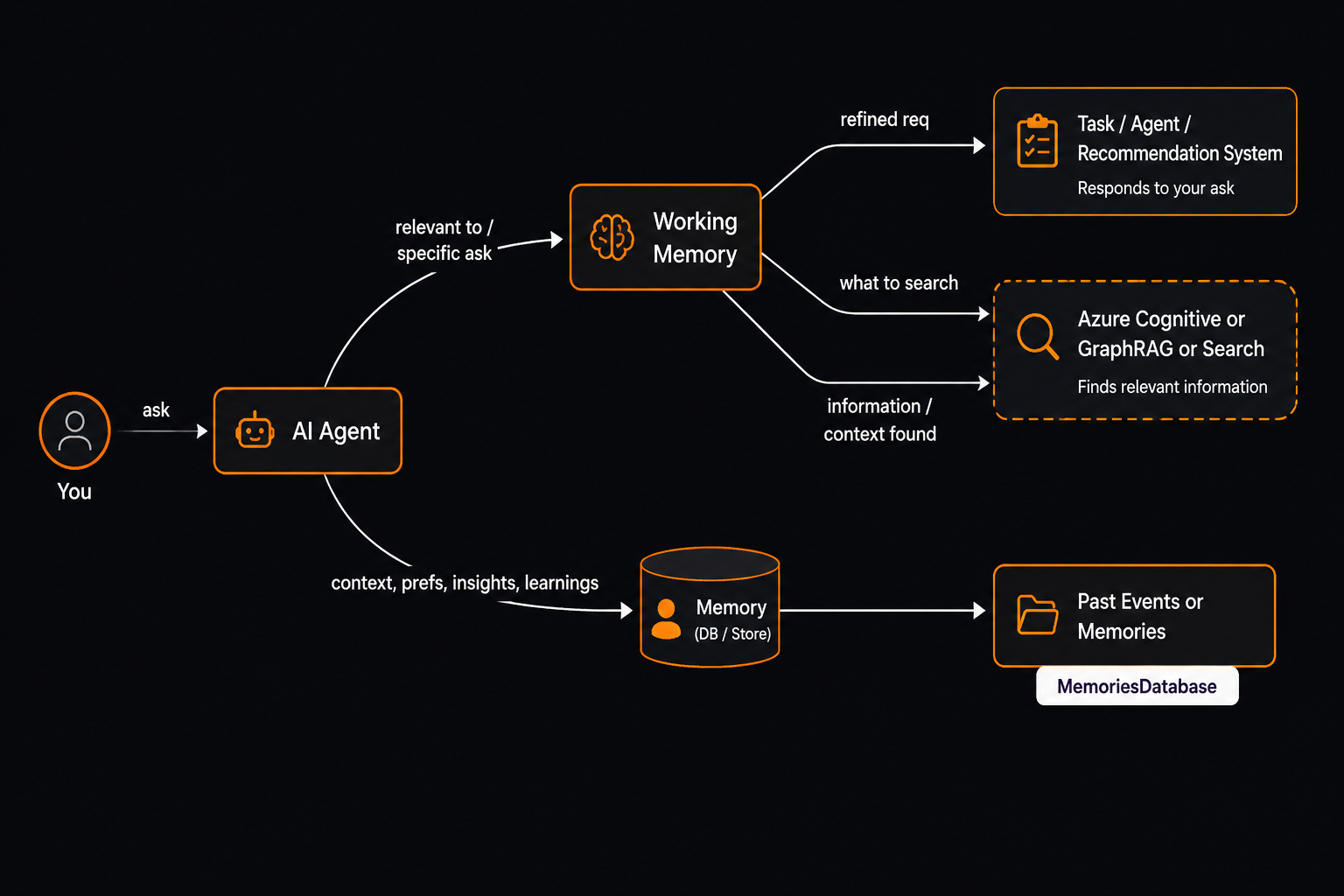
Meet eve: agents as a filesystem
If you’ve built with the Vercel AI SDK, eve will feel immediately familiar it’s the same team’s take on agents, and its core idea is refreshingly literal: your agent is a folder. There’s no graph DSL to learn and no orchestration boilerplate. You describe the agent with plain files, and eve wires them into a running agent:
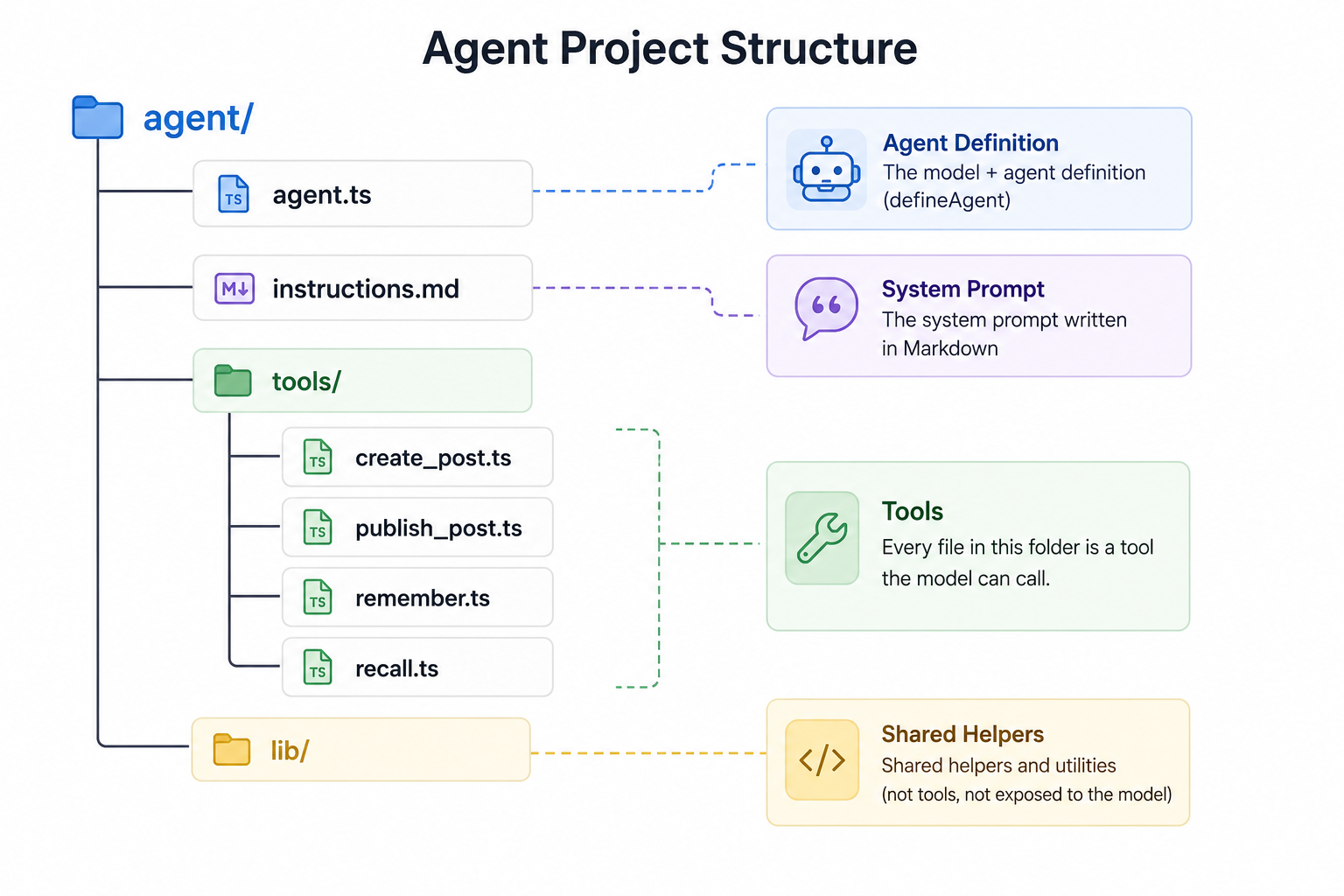
- Tools are just files. Drop a defineTool({…}) in agent/tools/ and it’s available to the model — no registration, no wiring. Inputs are described with a Zod schema, and eve generates the JSON schema the model sees.
- Instructions are Markdown. md is your system prompt. Editing behavior means editing prose, not code.
- Bring your own model. eve runs on the AI SDK’s provider ecosystem, so you can point it at OpenAI, Anthropic, or as we do here Azure OpenAI
agent.ts
import { createAzure } from "@ai-sdk/azure";
import { defineAgent } from "eve";

const azure = createAzure({
  baseURL: `${process.env.AZURE_OPENAI_ENDPOINT}/openai`,
  apiKey: process.env.AZURE_OPENAI_API_KEY,
  apiVersion: "preview",
});

export default defineAgent({
  model: azure.chat("gpt-4.1"), // your Azure deployment name
});
- Runs locally, ships anywhere. eve dev gives you an interactive chat in the terminal; eve build produces a deployable server. The agent talks to the outsideworld (your blog’s API, Azure Cosmos DB) through the tools you
What eve deliberately doesn’t give you is persistence. A model call is stateless; when the process restarts, the conversation is gone. That’s the gap we fill with Azure Cosmos DB — turning a stateless agent into one that genuinely remembers.
Why Azure Cosmos DB for agent memory?
Agent memory has an awkward shape for traditional databases: you write a lot of small items, you read them back by meaning (not exact keys), and you want it fast and global. Azure Cosmos DB NoSQL fits this well:
- Single-digit-millisecond point reads when you know the id and partition key.
- Native vector search — store embeddings and query with VectorDistance(); no separate vector database to run.
- Native TTL — expire ephemeral memories with zero cleanup jobs.
- One SDK, one bill — the same container holds your app data and your vector
Step 1: A singleton client (the #1 SDK rule)
A CosmosClient owns a connection pool and routing caches. Creating one per request exhausts sockets and adds TLS latency. Create it once and reuse it:
// src/lib/cosmos.ts
    import { CosmosClient } from "@azure/cosmos";
    import { DefaultAzureCredential } from "@azure/identity";

    type CosmosGlobal = typeof globalThis & { __client?: CosmosClient };

    export function getCosmosClient(): CosmosClient {
      const g = globalThis as CosmosGlobal;
      if (!g.__client) {
        g.__client = new CosmosClient({
          endpoint: process.env.COSMOS_ENDPOINT!,
          // Prefer Entra ID over keys. Falls back to a key only if provided.
          aadCredentials: new DefaultAzureCredential(),
          connectionPolicy: {
            // Let the SDK absorb transient 429s with backoff.
            retryOptions: { maxRetryAttemptCount: 9, maxWaitTimeInSeconds: 30 },
          },
        });
      }
      return g.__client;
    }
Caching on globalThis matters in dev: frameworks like Next.js reset module state on hot-reload, which would otherwise leak a new client on every save.
Step 2: Model for cheap reads
Pick a partition key that is high-cardinality and immutable, and make the item id equal to it where you can — then single-item fetches are 1 RU point reads instead of queries:
    // A blog post: id === slug, partition key is /slug.
    const { resource: post } = await container
      .item(slug, slug) // (id, partitionKey)
      .read(); // ~1 RU, single-digit ms
For lists, use continuation tokens, never OFFSET/LIMIT:
    const iterator = container.items
      .query({ query: "SELECT c.slug, c.title FROM c WHERE c.status = 'published'" })
      .getAsyncIterator();
    // ...or .query(spec).fetchNext() and pass resource.continuationToken to the client.
Step 3: Turn the container into a vector memory store
Here’s where it gets fun. To store embeddings and search them, define a vector embedding policy and a vector index at container-creation time (the policy is immutable afterward):
    import {
      VectorEmbeddingDataType,
      VectorEmbeddingDistanceFunction,
      VectorIndexType,
    } from "@azure/cosmos";

    await database.containers.createIfNotExists({
      id: "memory",
      partitionKey: { paths: ["/sessionId"] }, // one conversation per partition
      defaultTtl: -1, // TTL enabled; set per-item `ttl` for ephemeral memories
      vectorEmbeddingPolicy: {
        vectorEmbeddings: [
          {
            path: "/embedding",
            dataType: VectorEmbeddingDataType.Float32,
            dimensions: 1536, // text-embedding-3-small
            distanceFunction: VectorEmbeddingDistanceFunction.Cosine,
          },
        ],
      },
      indexingPolicy: {
        includedPaths: [{ path: "/*" }],
        // CRITICAL: keep the raw vector out of the regular index (saves write RUs).
        excludedPaths: [{ path: "/embedding/*" }],
        vectorIndexes: [{ path: "/embedding", type: VectorIndexType.QuantizedFlat }],
      },
Storing a memory — embed the text, then create the item:
    import { randomUUID } from "node:crypto";
    async function appendMemory(sessionId: string, content: string) {
      const embedding = await embedText(content); // Azure OpenAI embeddings → number[]
      await container.items.create({
        id: randomUUID(),
        sessionId,
        type: "memory",
        content,
        embedding,
        createdAt: new Date().toISOString(),
      });
    }
Recalling by meaning — VectorDistance() with ORDER BY, a literal TOP, and a parameterized query vector (so the query plan caches):
    async function recall(sessionId: string, query: string, k = 5) {
      const vector = await embedText(query);
      const { resources } = await container.items
        .query(
          {
            query:
              `SELECT TOP ${k} c.content, VectorDistance(c.embedding, @vec) AS score ` +
              `FROM c WHERE c.type = "memory" AND c.sessionId = @sessionId ` +
              `ORDER BY VectorDistance(c.embedding, @vec)`,
            parameters: [
              { name: "@vec", value: vector },
              { name: "@sessionId", value: sessionId },
            ],
          },
          { partitionKey: sessionId }, // single-partition → cheap and fast
        )
        .fetchAll();
      return resources; // nearest memories, most similar first
    }
Because we filter on the partition key, this stays a single-partition query — exactly what you want on a hot path.
Step 4: Expose it to the agent as an eve tool
eve’s model is delightfully simple: every file in `agent/tools/` is a tool. You describe its inputs with Zod, and eve hands the model a JSON schema automatically.
    // agent/tools/recall.ts
    import { defineTool } from "eve/tools";
    import { z } from "zod";
    import { blogApiUrl, authHeaders } from "../lib/blog-client.js";

    export default defineTool({
      description:
        "Recall the most relevant saved memories for a query using vector search.",
      inputSchema: z.object({
        query: z.string().min(1).describe("What to search your memory for."),
        sessionId: z.string().optional(),
        k: z.number().int().min(1).max(20).default(5),
      }),
      async execute({ query, sessionId, k }) {
        const url = new URL(blogApiUrl("/api/memory")); // resolves BLOG_API_URL
        url.searchParams.set("q", query);
        url.searchParams.set("k", String(k));
        if (sessionId) url.searchParams.set("sessionId", sessionId);
        const res = await fetch(url, { headers: authHeaders() });
        const { results } = await res.json();
        return { ok: true, memories: results };
      },
Now the agent can decide on its own, to call recall before answering — and because the memories live in Azure Cosmos DB, they persist across sessions, deploys, and regions.
The full loop
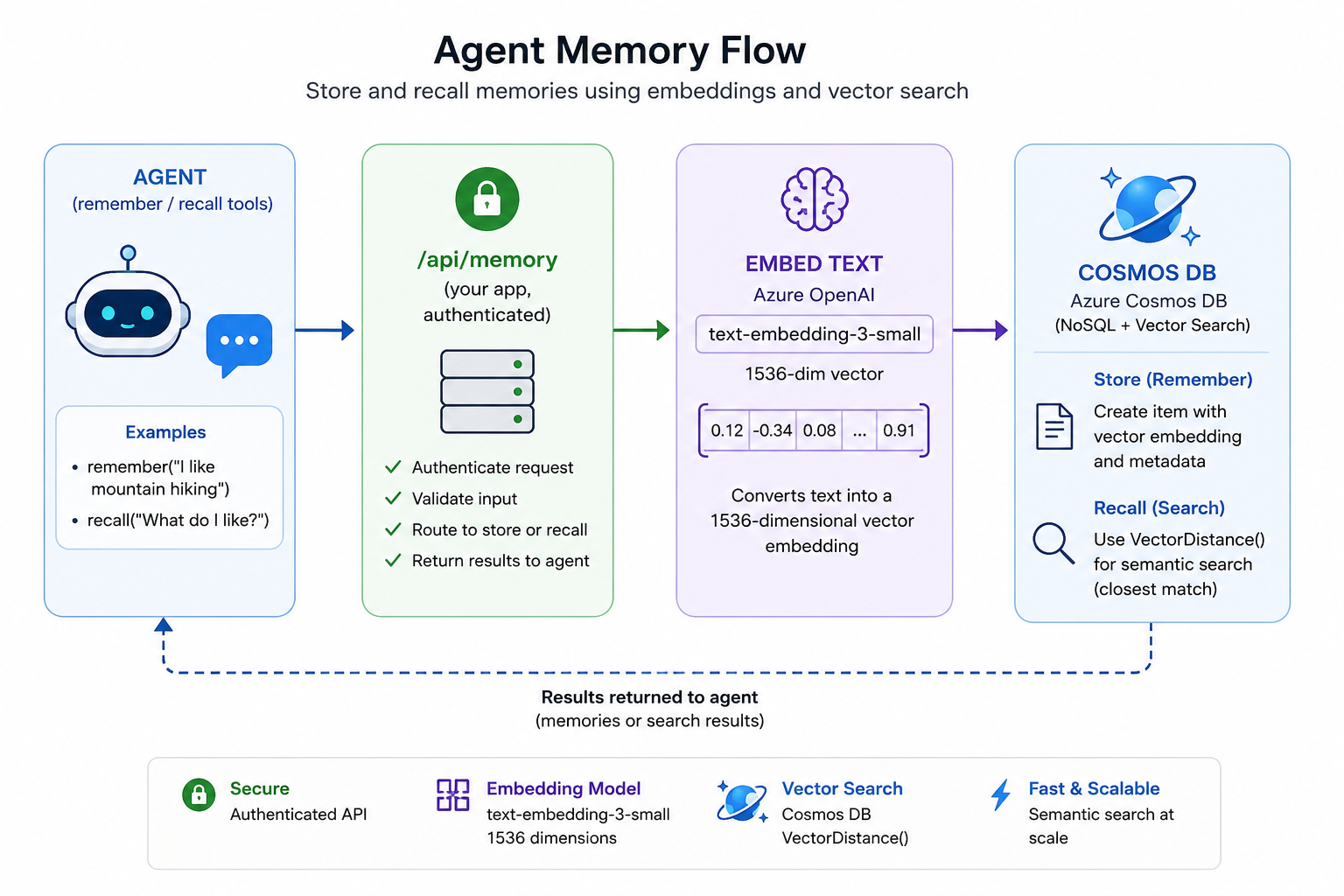
That’s a complete, durable, semantically searchable memory in well under 200 lines no extra infrastructure, no second database.
Try it
The complete, runnable source for everything in this post lives in the AzureCosmosDB/eve-cosmos-memory repository clone it and follow along:
    npm install
    npm run seed     # creates the DB, blog container, and vector memory container
    npm run dev      # the blog (Next.js on Vercel)
    npm run agent    # chat with the eve agent — ask it to remember and recall
Give your agent a memory. The Azure Cosmos DB JavaScript SDK makes the durable, global, vector-searchable part almost boring which is exactly what you want from infrastructure.
About Azure Cosmos DB
Azure Cosmos DB is a fully managed and serverless NoSQL and vector database for modern app development, including AI applications. With its SLA-backed speed and availability as well as instant dynamic scalability, it is ideal for real-time NoSQL and MongoDB applications that require high performance and distributed computing over massive volumes of NoSQL and vector data.
To stay in the loop on Azure Cosmos DB updates, follow us on X, YouTube, and LinkedIn. Join the discussion with other developers on the #nosql channel on the Microsoft Open Source Discord.


0 comments
Be the first to start the discussion.