

The Vercel AI SDK is an open-source TypeScript toolkit that provides the core building blocks for integrating AI into any JavaScript application. It works with 20+ AI providers out of the box—including OpenAI, Azure OpenAI, Anthropic, Google, Mistral, and more—so you can write your code once and switch providers by changing a single import.
At its core, the SDK handles streaming (responses appear word-by-word instead of making users wait), tool calling (allowing the AI to invoke your functions, such as querying a database), and multi-step agentic reasoning, where the AI chains multiple tool calls together to answer complex questions.
It also provides a useChat() React hook that manages the entire chat lifecycle on the frontend, uses Zod schemas for type-safe tool validation, supports structured output so the AI can return typed JSON instead of plain text, and enables generative UI where the AI returns rendered React components. With built-in middleware for logging, caching, and guardrails, the Vercel AI SDK is one of the fastest ways for JavaScript and TypeScript developers to move from prototype to a production-ready AI experience.
When you pair this powerful Vercel AI SDK with Azure Cosmos DB, a globally distributed, low-latency NoSQL database, you get a compelling combination that allows your AI to query, reason over, and present real-time operational data through natural conversation. In this post, we will walk through building a complete AI-powered product assistant that brings these two technologies together, guided by the Azure Cosmos DB Agent Kit and its production best practices.
Want to skip ahead and dive into the code? The complete working sample including the Azure Cosmos DB service layer includes definitions, streaming API route, and seed script is available on GitHub. Clone it, plug in your credentials, and you’ll have a running AI assistant in minutes.
The Problem with Traditional Product Experiences
The era of “search bars and filters” for product catalogs is ending. Users expect conversational experiences — “Show me surfboards under $500”, “What’s trending in electronics?”, or “Compare the top 3 items in outdoor gear.”
Building this traditionally means gluing together a search engine, a recommendation service, and dozens of API endpoints. But with Azure Cosmos DB as your operational data store and the Vercel AI SDK orchestrating LLM tool calls, you can build a single intelligent assistant that:
- Queries your database in real time using natural language
- Streams responses token-by-token for a snappy UX
- Runs multi-step reasoning — the AI can query, filter, aggregate, and present results across multiple tool calls
- Follows production best practices automatically via the Azure Cosmos DB Agent Kit
Architecture at a Glance:
This solution is built on two core Azure services:
- Azure Cosmos DB NoSQL — The globally distributed, low-latency database that stores and serves product catalog data in real time.
- Microsoft AI Foundry — The platform that hosts and manages the GPT-4.1 model used for natural language understanding and tool-call orchestration.
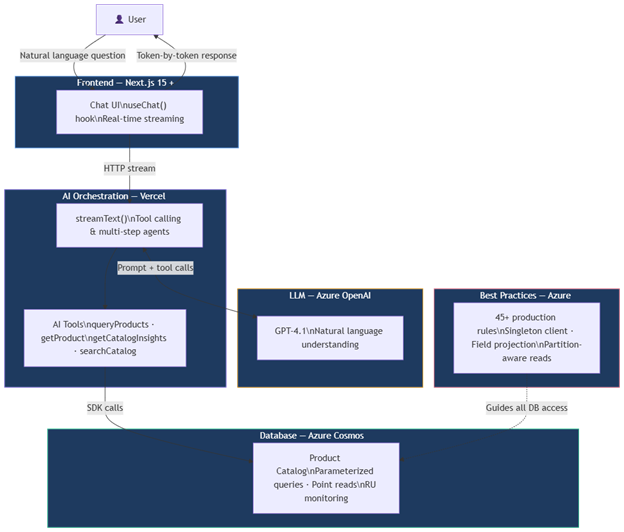
The frontend uses the AI SDK’s useChat() hook for streaming. The API route uses streamText() to orchestrate GPT-4.1 with four Azure Cosmos DB backed tools queryProducts, getProduct, getCatalogInsights, and searchCatalog. All database access follows Agent Kit best practices (singleton client, parameterized queries, partition-aware reads, RU monitoring).
Key Benefits of the Vercel AI SDK
- LLM Orchestration Without Boilerplate Without the AI SDK, you would need to manually construct chat-completion API calls, parse JSON tool-call responses, execute the right function, feed results back into the next prompt, and handle retries and errors — all from scratch. The AI SDK’s streamText() function handles this entire loop in a single call.
- Type-Safe Tool Definitions The tool() helper lets you define tools with Zod schemas. The SDK automatically generates the JSON schema for the LLM, validates incoming parameters at runtime, and provides full TypeScript inference — no manual schema wiring.
- Multi-Step Reasoning (Agentic Loop) With stopWhen: stepCountIs(5), the AI SDK enables the LLM to make up to 5 sequential tool calls before producing its final answer. This means a single user prompt like “Compare surfboards and paddleboards under $500” can trigger queryProducts twice and synthesize results — all automatically orchestrated.
- Built-in Streaming The toUIMessageStreamResponse() helper converts the LLM output into a streaming HTTP response. On the client, useChat() consumes this stream and re-renders the chat UI token-by-token — giving users instant visual feedback instead of waiting for the full response.
- Provider Agnostic The AI SDK supports 20+ model providers (OpenAI, Azure OpenAI, Anthropic, Google, Mistral, etc.) through a unified interface. Switching from Azure OpenAI to another provider requires changing a single import — no rewrite of your tool definitions, streaming logic, or frontend code.
How They Work Together
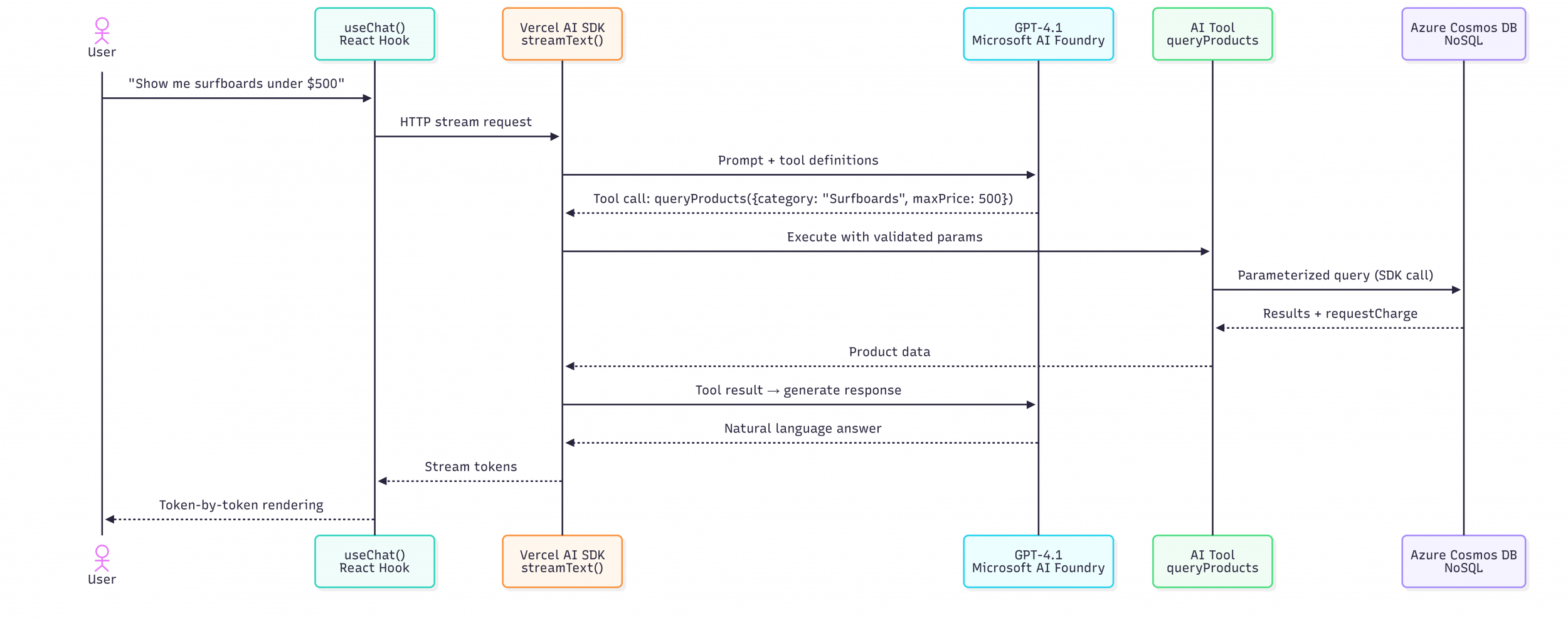
The Azure Cosmos DB SDK is your data engine. The Vercel AI SDK is your AI engine. Together, they turn a database into a conversational experience.
Prerequisites
- Nodejs 20+
- An Azure Cosmos DB NoSQL account (free tier available)
- An Azure OpenAI resource in Microsoft Foundry with a GPT-4.1 deployment (or any AI SDK-compatible provider)
- The Azure Cosmos DB Agent Kit installed in your IDE
npx skills add AzureCosmosDB/cosmosdb-agent-kit
Step 1: Project Setup
git clone https://github.com/sajeetharan/cosmos-ai-vercel-app.gitcd cosmos-ai-vercel-app
npm installCopy the environment template and fill in your credentials:
cp .env.example .env.localYou will need your Azure Cosmos DB endpoint and key, along with your Azure OpenAI endpoint, key, and deployment name. Refer to the for full setup instructions.
Step 2: The Azure Cosmos DB Service — Agent Kit Best Practices in Action
The heart of the app is the Azure Cosmos DB service layer. The Azure Cosmos DB Agent Kit guided every function in this module to follow production best practices:
- Singleton client (sdk-singleton-client) — One CosmosClient instance reused across all requests, with retry policies for 429 rate limiting (sdk-retry-429)
- Parameterized queries (query-parameterize) — All user input goes through query parameters, never string concatenation
- Field projection (query-use-projections) — SELECT only the fields needed to minimize RU consumption
- Point reads (query-avoid-cross-partition) — When both id and partition key are known, use a direct point read instead of a query
- RU monitoring (monitoring-ru-consumption) — Every operation logs its requestCharge for observability
Agent Kit Highlight: With the Agent Kit installed, your AI coding assistant will automatically suggest these patterns as you write Azure Cosmos DB code.
Step 3: Define AI Tools with the Vercel AI SDK
The Vercel AI SDK’s tool() abstraction lets you define typed, Zod-validated functions that the LLM can call. We expose four tools:
| Tool | Purpose |
| queryProducts | Filter by category, price range; returns rated results |
| getProduct | Point read for a specific product by ID + category |
| getCatalogInsights | Aggregations — avg price, inventory, counts by category |
| searchCatalog | Full-text search across names, descriptions, and tags |
The SDK handles schema generation, input validation, and multi-step orchestration automatically.
Step 4: The API Route — Streaming AI Responses
The API route wires everything together:
- streamText() sends the conversation to GPT-4.1 with our tool definitions
- When the model calls a tool (e.g., queryProducts), the SDK automatically executes it and feeds results back
- stopWhen: stepCountIs(5) allows multi-step reasoning — the AI can chain tool calls
- Results stream back to the client token-by-token via toUIMessageStreamResponse()
Step 5: The Chat UI
The frontend uses the AI SDK’s useChat() hook for real-time streaming. It includes a welcome screen with suggested prompts and a polished dark-themed chat interface.
Step 6: Seed and Run
Seed sample product data into your Azure Cosmos DB, then start the dev server:
npx tsx scripts/seed.tsnpm run devOpen http://localhost:3000 and try these prompts:
| Prompt | What Happens |
| “Show me all surfboards” | Calls queryProducts with category filter |
| “What’s the cheapest item in outdoor gear?” | Calls queryProducts + filters by price |
| “Give me a catalog overview” | Calls getCatalogInsights for aggregations |
| “Find waterproof products” | Calls searchCatalog with keyword search |
| “Tell me about the StormShield tent” | Calls getProduct for a point read |
| “Compare surfboards and paddleboards under $500” | Multi-step: calls queryProducts twice and synthesizes |
What the Azure Cosmos DB Agent Kit Does Behind the Scenes
With the Agent Kit installed (npx skills add AzureCosmosDB/cosmosdb-agent-kit), your AI coding assistant automatically applies 45+ best practices while you code. Here’s what it caught and guided during the development of this project:
| Rule | What It Taught Us |
| sdk-singleton-client | Create one CosmosClient and reuse it |
| query-parameterize | Never concatenate user input into queries |
| query-use-projections | SELECT only the fields you need |
| query-avoid-cross-partition | Use point reads when you have id + partition key |
| monitoring-ru-consumption | Log requestCharge from every operation |
| sdk-retry-429 | Configure retry policies for rate limiting |
| partition-high-cardinality | Choose /category for good distribution |
| model-embed-related | Embed tags inside the product document |
The Agent Kit doesn’t just enforce rules — it teaches you patterns that scale.
Deploy to Vercel
npm i -g vercelvercel --prodSet your environment variables in the Vercel dashboard and you’re live.
Learn Azure Cosmos DB Visually
Prefer learning through visuals? Check out the Azure Cosmos DB Visual Storybook an interactive collection of infographics covering everything from the basics to advanced AI integration. It’s a great companion to the agent-kit, helping you understand why the best practices exist before Copilot applies them to your code.
Leave a Review
Tell us about your Azure Cosmos DB experience! Leave a review on PeerSpot and get a $50 gift. Get started here.
About Azure Cosmos DB
Azure Cosmos DB is a fully managed and serverless NoSQL and vector database for modern app development, including AI applications. With its SLA-backed speed and availability as well as instant dynamic scalability, it is ideal for real-time NoSQL and MongoDB applications that require high performance and distributed computing over massive volumes of NoSQL and vector data.
To stay in the loop on Azure Cosmos DB updates, follow us on X, YouTube, and LinkedIn.


0 comments
Be the first to start the discussion.