


In Episode 110 of Azure Cosmos DB TV, host Mark Brown is joined by Sajeetharan Sinnathurai to explore how the Azure Cosmos DB MCP Toolkit is changing the way developers build, deploy, and scale AI agents using real application data.
As agentic AI systems evolve, one challenge continues to surface: securely and consistently connecting AI agents to operational data—without rewriting integration logic for every platform. This episode takes a deep dive into how the Model Context Protocol (MCP), along with Azure Azure Cosmos DB’s implementation, addresses that challenge.
Why MCP Matters for AI Agents
At its core, MCP provides a standard way for AI agents to discover, understand, and interact with external systems. Instead of hard-coding integrations for each AI framework, developers can expose data sources once through an MCP server and reuse them across multiple tools and platforms.
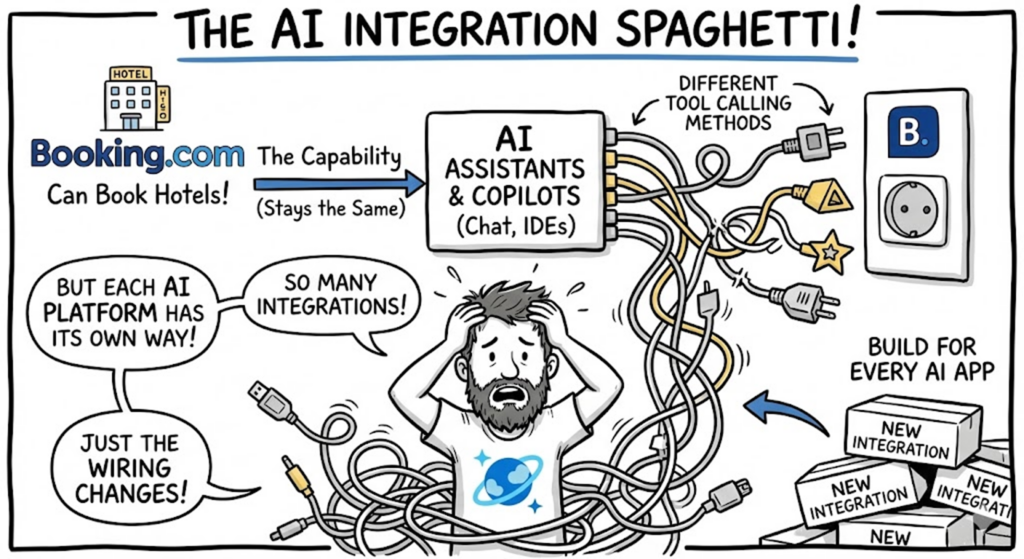
In the episode, Sajee explains how MCP shifts AI integrations away from brittle, one-off wiring toward a predictable, reusable pattern—similar to what OpenAPI did for REST APIs. With MCP, tools describe themselves, agents understand what actions are available, and integration complexity fades behind a consistent protocol.
Inside the Azure Cosmos DB MCP Toolkit
The Azure Cosmos DB MCP Toolkit builds on this standard by providing an official, open-source MCP server tailored specifically for Azure Cosmos DB workloads.
During the walkthrough, Sajee highlights key capabilities included in the toolkit:
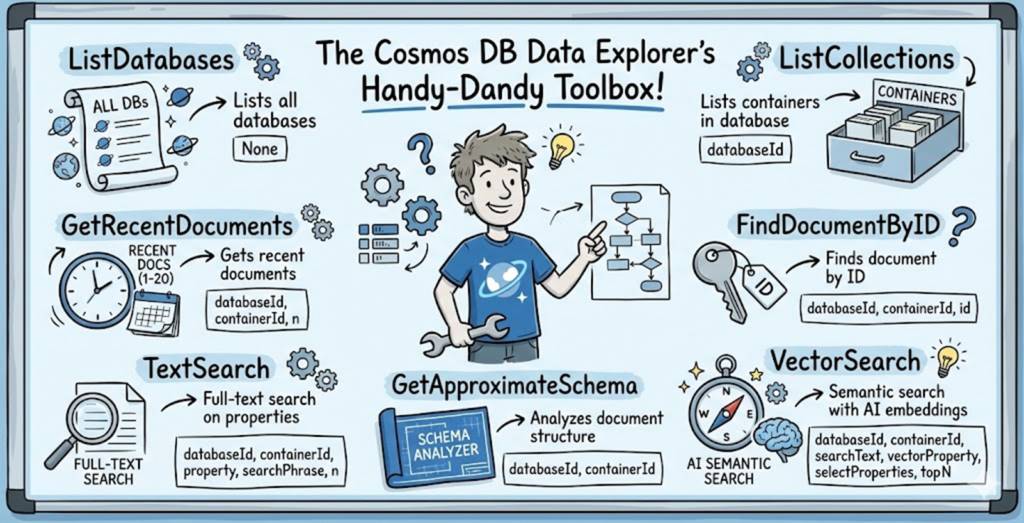
- Control-plane operations, such as listing databases and containers
- Data query tools, including read operations and recent document retrieval
- Schema discovery, using intelligent sampling to infer structure
- Text and vector search, enabling semantic and hybrid retrieval scenarios
- Enterprise-grade security, powered by Entra ID and managed identity
Because the toolkit is open source, developers can extend it with custom tools, add monitoring features, or adapt it to their own environments—all without breaking the MCP contract.
From Local Development to Production Agents
One of the most compelling parts of the episode is the end-to-end flow—from local development to production deployment.
Sajee demonstrates how developers can:
- Deploy the MCP Toolkit using a one-click Azure template
- Run it locally or host it in Azure Container Apps
- Authenticate securely using Entra ID
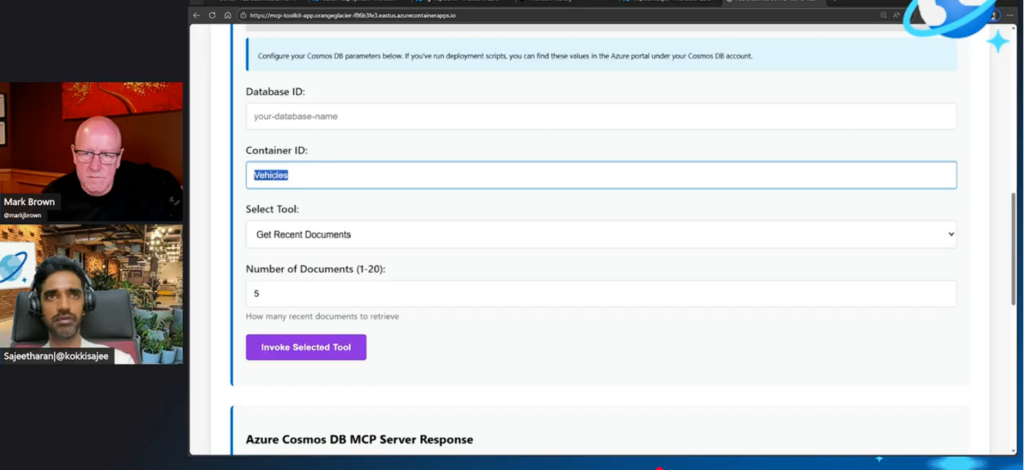
- Interact with the MCP server through a built-in visual playground
This makes it easy to experiment, validate tools, and iterate quickly before integrating the MCP server into real AI applications.

Seamless Integration with Microsoft Azure AI Foundry
The episode also shows how the Azure Cosmos DB MCP Toolkit integrates with Microsoft Azure AI Foundry, enabling developers to build production-ready AI agents that reason over live application data.
Rather than embedding database logic directly inside an agent, the agent simply calls MCP tools exposed by Azure Cosmos DB. Azure handles authentication, permissions, and connectivity, allowing agents to focus on reasoning and decision-making instead of infrastructure.
The result is a clean separation of concerns:
- Agents think
- MCP servers expose capabilities
- Azure handles security and scale
Demo Walkthrough:
1. Hands-on with the Azure Cosmos DB MCP Toolkit
- Sajee switch from high-level discussion to a live demo of the Model Context Protocol (MCP) Toolkit for Azure Cosmos DB.
- Sajee connect the toolkit to an existing Azure Cosmos DB instance to show how AI agents can directly interact with database data using MCP commands.
- This includes executing various MCP “tools” like:
- list_databases
- list_collections
- get_recent_documents
- find_document_by_id
- text_search
- vector_search — demonstrating semantic search over stored embeddings.
2. Authenticating and Invoking Tools
- A quick demonstration of enterprise-grade authentication: signing in with Microsoft Entra ID (Azure AD), getting a token, and using it to authorize MCP calls against Azure Cosmos DB securely.
- Sajee show the toolkit’s web-based test UI where commands can be invoked interactively — great for debugging or exploring Azure Cosmos DB content without writing code.
3. Vector and Text Search in Actiona
- The demo includes search queries where natural language input (like “find recent support tickets about login issues”) gets executed:
- First as a keyword/text search.
- Then as a semantic vector search using stored embeddings (if OpenAI service is configured).
- Results from the vector search are shown in real-time, illustrating how AI can pull back contextually relevant records.
4. Integration with AI Agents
- Sajee shows how the MCP Toolkit integrates with an AI agent (e.g., via Azure AI Foundry ):
- The agent sends natural language requests (“give me the recently manufacture vehicles”), which internally translate to MCP calls.
- Cosmos DB returns the structured data — demonstrating the “agent reads from DB and reasons over it.”
5. Wrapping Up Demo
- The segment concludes by combining a couple of operations: reading schema, doing semantic search, and returning structured results all within one interactive session, showing how developers can build AI-driven apps grounded in actual database contents without boilerplate code
What’s Next for the MCP Toolkit
As discussed toward the end of the episode, the team is actively incorporating customer feedback, expanding tool coverage, and preparing the Azure Cosmos DB MCP Toolkit for general availability. Additional monitoring capabilities and broader ecosystem integration are already on the roadmap.
Watch the Full Episode
If you’re building AI agents, exploring RAG architectures, or looking for a cleaner way to connect AI systems to real data, this episode is a must-watch. You can find the video at the top of this post or using this link to YouTube.
Useful links:
- MCP Toolkit GitHub Repository:
- Introducing the Azure Cosmos DB Agent Kit: Your AI Pair Programmer Just Got Smarter (blog)
- Azure Cosmos DB TV
- Subscribe to Azure Cosmos DB on YouTube
- Follow Azure Cosmos DB on X
- Follow Azure Cosmos DB on LinkedIn
Subscribe to Azure Cosmos DB TV for more deep dives into building scalable, intelligent applications with Azure Cosmos DB.
Leave a Review
Tell us about your Azure Cosmos DB experience! Leave a review on PeerSpot and get a $50 gift. Get started here.
About Azure Cosmos DB
Azure Cosmos DB is a fully managed and serverless NoSQL and vector database for modern app development, including AI applications. With its SLA-backed speed and availability as well as instant dynamic scalability, it is ideal for real-time NoSQL and MongoDB applications that require high performance and distributed computing over massive volumes of NoSQL and vector data.
To stay in the loop on Azure Cosmos DB updates, follow us on X, YouTube, and LinkedIn.


0 comments
Be the first to start the discussion.