

We are excited to announce the preview of Online Copy Jobs, a powerful new feature designed to make data migration between containers seamless and efficient with minimal downtime. With this feature, you can replicate data from a source to a destination container in real time without disrupting your applications.
What is an online copy job?
Online Copy Jobs allow you to copy data from a source container to a destination container while your applications continue to run on the source. All data including incremental updates is automatically replicated, ensuring the destination container becomes an up-to-date replica.
Once the copy is complete, you simply stop updates to the source, point your applications to the destination, and call the completion API. This final step applies any remaining changes and deallocates resources, wrapping up migration with minimal downtime during switchover.
How does it work?
1. Automated Server-Side Resources: Azure Cosmos DB allocates compute resources to run copy jobs.
2. Change Feed Replication: Online Copy Jobs use the “all version and delete change feed mode” to capture and replicate every update from the source container.
3. Smart Resource Management: After completion, resources are automatically deallocated to optimize costs.
Getting started with online copy
Before you begin, make sure your environment meets these prerequisites:
- Use the latest version of Azure CLI to manage and monitor copy jobs.
- Enable continuous backup on the source account.
- Enable All version and delete change feed mode (preview) preview feature on the source account.
- Enable Online container copy using Azure CLI.
# Set shell variables.
$resourceGroupName = <azure_resource_group>
$accountName = <azure_cosmos_db_account_name>
$EnableOnlineContainerCopy = "EnableOnlineContainerCopy"

# List down existing capabilities of your account.
$cosmosdb = az cosmosdb show \
--resource-group $resourceGroupName \
--name $accountName
$capabilities = (($cosmosdb | ConvertFrom-Json).capabilities)

# Append EnableOnlineContainerCopy capability in the list of capabilities.
$capabilitiesToAdd = @()
foreach ($item in $capabilities) {
$capabilitiesToAdd += $item.name
}
$capabilitiesToAdd += $EnableOnlineContainerCopy

# Update Cosmos DB account
az cosmosdb update --capabilities $capabilitiesToAdd \
-n $accountName -g $resourceGroupName
Running an online copy job
Using Azure CLI
- Set Up Environment Variables: Define source and destination parameters.
$sourceSubId = "<source-subscription-id>"
$destinationSubId = "<destination-subscription-id>"
$sourceAccountRG = "<source-resource-group-name>"
2. Assign Permissions: Grant read permissions on the source account using a managed identity.
3. Create the Copy Job: Run the following command to create the copy job
az cosmosdb copy create --resource-group $destinationAccountRG --job-name $jobName --dest-account $destinationAccount4. Monitor Job Progress: Use Azure CLI or the portal to track status.
az cosmosdb copy show --resource-group $destinationAccountRG --job-name $jobName --dest-account $destinationAccountKey metrics:
- Total Count: Total documents in source.
- Processed Count: Changes processed from the change feed.
5. Complete the Job: Once all data is copied to the destination container, update your applications to use the destination container and then call the completion API. This crucial step ensures any remaining changes are drained from the source to the destination and deallocates resources, concluding the migration process with minimal downtime.
az cosmosdb copy complete --resource-group $destinationAccountRG --account-name $destinationAccount --job-name $jobNameMonitor with Ease
In the Azure portal, view progress in the Copy Job listing page with completion percentage.
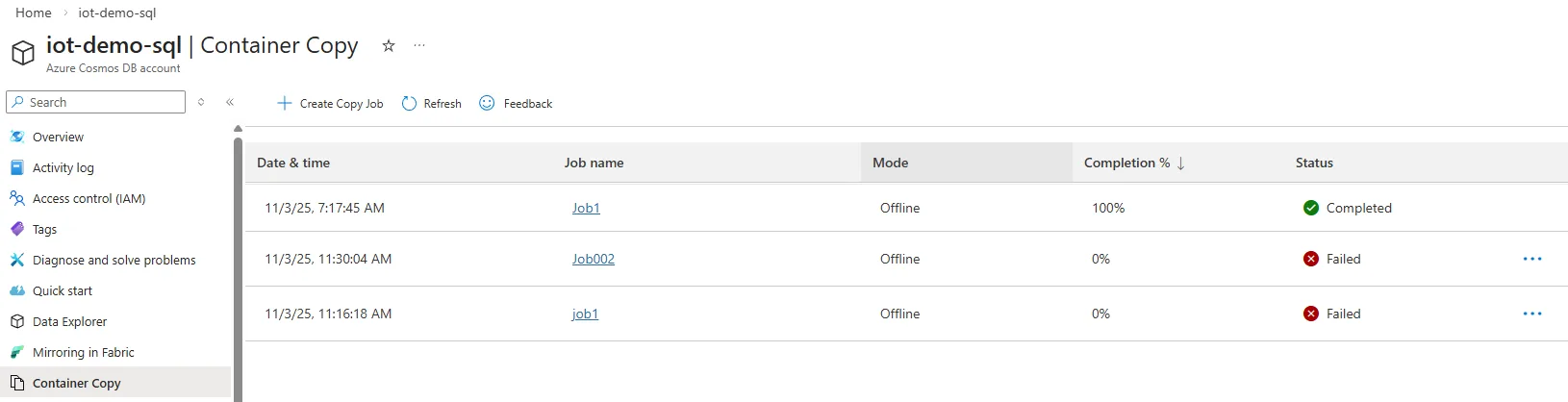
Using CLI, the show command provides real-time updates.
az cosmosdb copy show --resource-group $destinationAccountRG --account-name $destinationAccount --job-name $jobNameGet Started Today
Start leveraging the power of Online Copy Jobs in Azure Cosmos DB to seamlessly scale, optimize, and manage your data with minimal downtime. Whether expanding your data strategy, improving disaster recovery, or creating an isolated analytics container, Online Copy Jobs will help you achieve it efficiently.
For more information, explore the Azure Cosmos DB documentation on Online Container Copy and start your journey toward hassle-free data migration today!
Leave a review
Tell us about your Azure Cosmos DB experience! Leave a review on PeerSpot and we’ll gift you $50. Get started here.
About Azure Cosmos DB
Azure Cosmos DB is a fully managed and serverless NoSQL and vector database for modern app development, including AI applications. With its SLA-backed speed and availability as well as instant dynamic scalability, it is ideal for real-time NoSQL and MongoDB applications that require high performance and distributed computing over massive volumes of NoSQL and vector data.
To stay in the loop on Azure Cosmos DB updates, follow us on X, YouTube, and LinkedIn.

![Hans Wieser [MS]](https://devblogs.microsoft.com/cosmosdb/wp-content/uploads/sites/52/2025/12/Hans_Wieser_173-small-96x96.png)


0 comments