


We briefly paused our quarterly release cycle to focus on reliability and performance, but now we’re back with Windows Terminal 1.25!
We are also updating Windows Terminal stable to version 1.24, which will include all of the features from this previous blog post. Some notable features to call out are:
🌟 Additional language support in Command Palette, which will now additionally suggest features using English keywords if you natively speak another language.
🌟 A new Settings page dedicated to Extensions, which allows you to see what profiles, color schemes and actions have been added to your Terminal
🌟 Support for the “Synchronized Output” DEC private mode, which applications can use to reduce flickering and tearing.
You can install Windows Terminal and Windows Terminal Preview from the Microsoft Store, from the GitHub releases page, or by using WinGet. If you are interested in being at the forefront of our new features, you can also download Windows Terminal Canary from our GitHub repo.
Now, what’s 1.25 about?
Searching your Settings
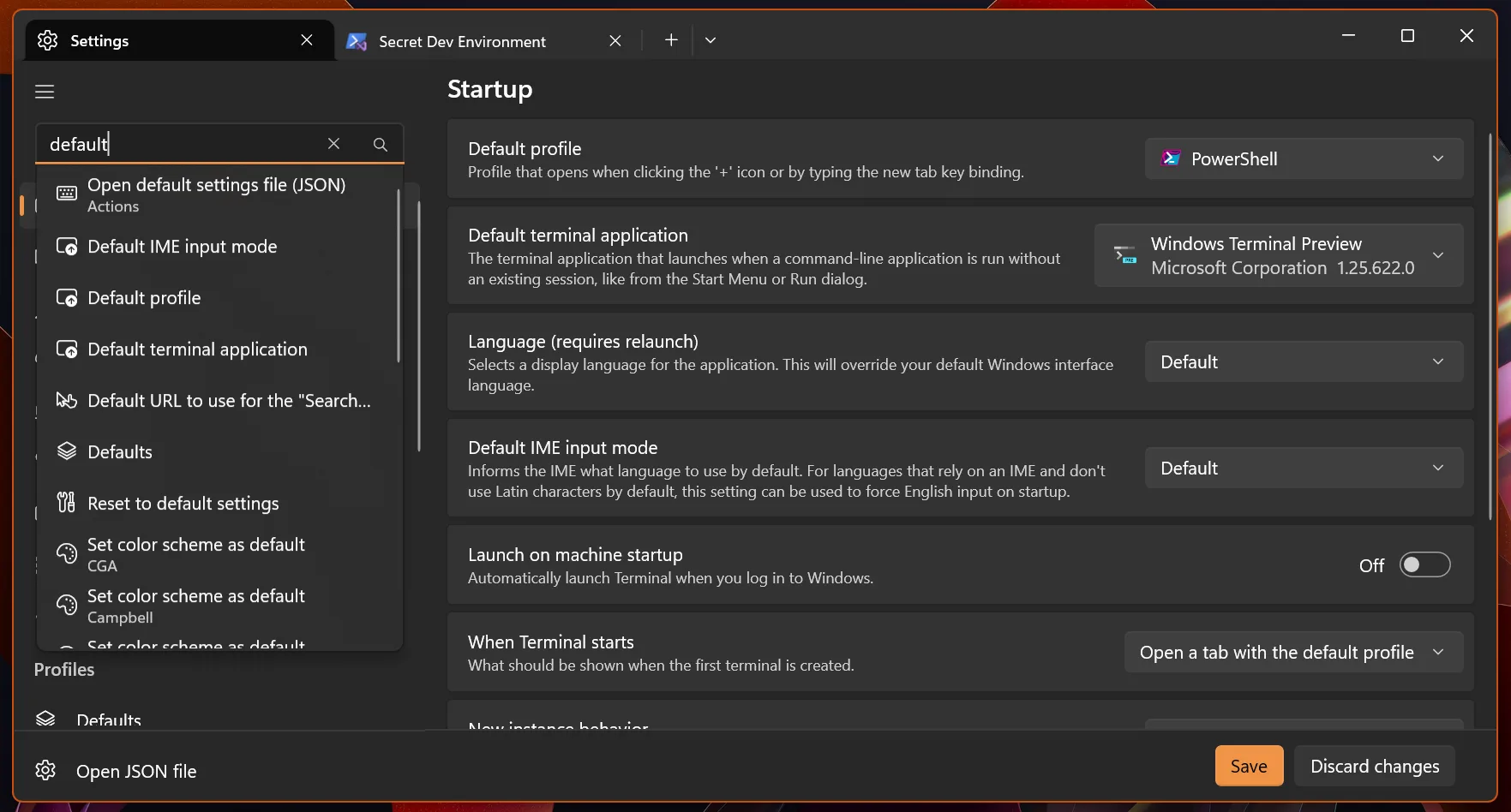
We’re rolling out a new feature that allows you to search your settings! It includes all built-in settings, as well as any color schemes, profiles, extensions, items in the New Tab menu, Actions and more. Note that for some settings that can apply to any profile, those settings may appear more than once in the results.
Editing your Key Bindings
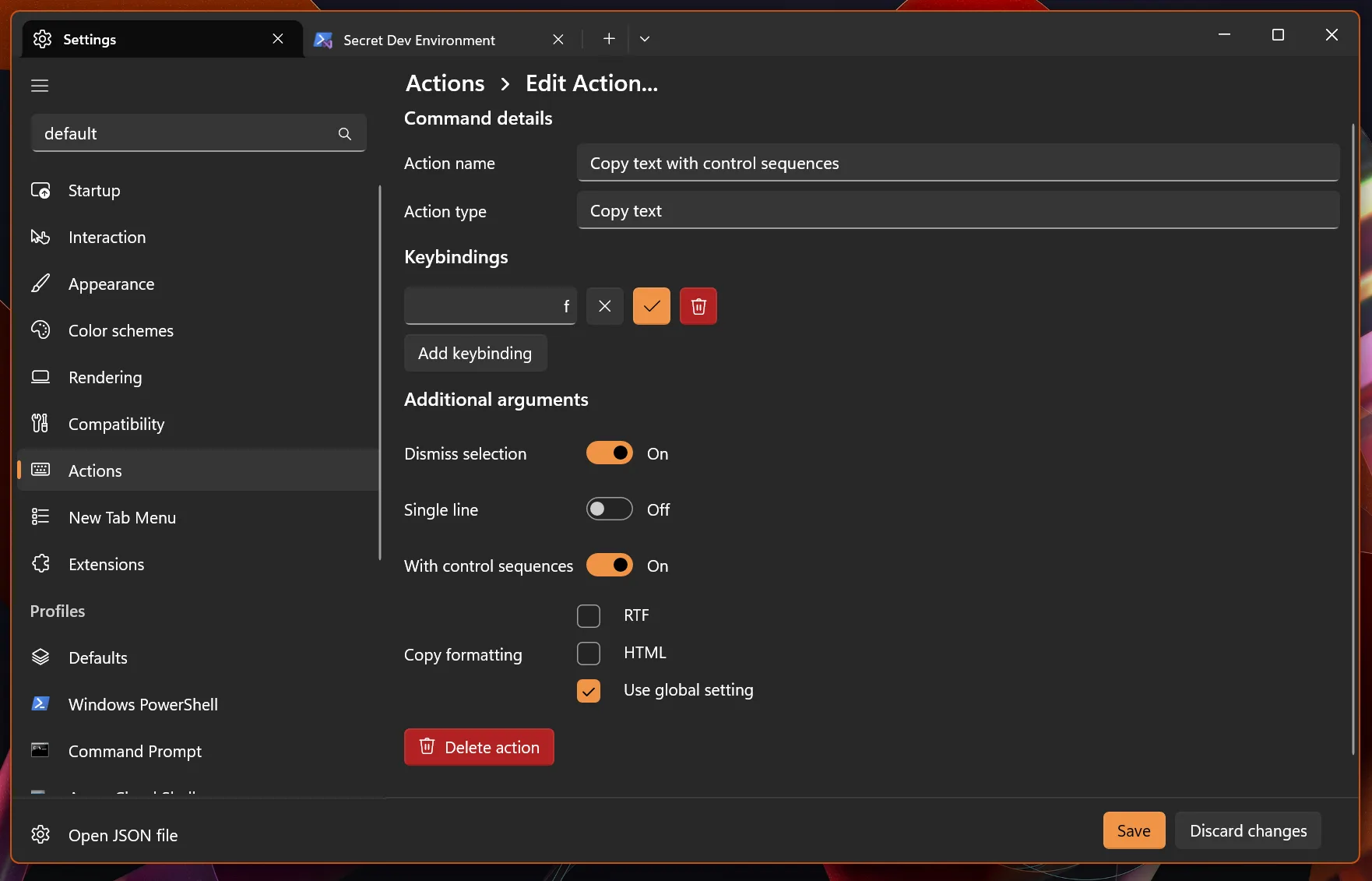
In our quest to bring more of the settings out of the JSON file and into the Settings UI, we’ve added a new editor for actions. You can configure exactly what “New Tab” does and create your new favorite, “Split Pane: WSL, Up, Down, Left, Right”.
Inputting your Inputs (better)
Windows Terminal now ships with built-in support for Kitty‘s Keyboard protocol, which allows commandline applications to disambiguate keys such as Esc from Ctrl+[ and receive information about which modifiers were pressed. This allows applications to receive Shift+Enter among other things, which should improve your interaction with some modern “agentic” command line tools.
Community Translations
Windows Terminal now comes with two community translations, Serbian (Cyrillic) and Ukrainian, thanks to @eevan78 and @psnet.


Miscellaneous improvements
🛠️ You can now configure exactly how wide (okay, well, between one and two columns) Unicode characters marked as “Ambiguous” are. This will not change how they look, but it will change how much space they take up. Please note that this is a compatibility setting for applications written to run in a Chinese, Japanese or Korean console and may result in graphical artifacts for other applications. (Thanks @unagi!)
🛠️ You can now configure Terminal to persist only the layout of your windows and none of the content
🛠️ We have re-enabled build-time “guided” optimization, which should result in a 10-20% increase in I/O throughput!
🛠️ Terminal now ships with the VS Code Modern Dark and Light color schemes, increasing consistency across our different projects.
🛠️ wt -pos now supports single-argument inputs for position the window at a nice perfect square location (Thanks @KavishaHaswani!)
Bug fixes
🐛 Elevated and non-elevated Terminal windows will no longer blow away eachothers’ sessions
🐛 Terminal should no longer jump around frantically while you have an active search while printing output
🐛 The command palette entries “Move tab forward” and “… backward” now indicate whether that means left or right (Thanks @vamsiikrishnaak!)
🐛 Underlines will no longer render in the wrong color when you have an active text selection
🐛 When you enter “Mark Mode” while a search is active, we will now start with that result marked
🐛 When you enter “Mark Mode”, we will now start marking at the top of your scroll area rather than the top of the active viewport
Special thanks goes out to @fab-c14, @pszlazak, @stynixkis, @04suriya07-spec, @benediktjohannes and @Musaddiq625 for build fixes, code hygiene improvements, spell checking and more.
Top contributors
Terminal continues to improve with the help of our community. Here’s who especially made an impact in this release:
Contributors who opened the most non-duplicate issues
🏆 0wwafa
Contributors who created the most merged pull requests
Contributors who provided the most comments on pull requests
🏆 j4james
🏆 psnet
Cheers
We hope you enjoy the latest release of Windows Terminal! More information on these new features can be found on our docs site and if you find any bugs or have feature requests, feel free to file them on GitHub. If you have any questions you can reach out to Dustin (@DHowett) on Mastodon or your favorite fediverse client. See you next time!


WindowsTerminal still crashes way too often, it’s just frustrating… today I moved one tab from one window to another to combine them… and boom… all terminals gone and the processes still alive, multiple hours of work vaporized when the ssh connections are “unreachable” anymore (UI disappeared) and only a tedious process-by-process kill will do…
It’s just a toy and I like the fancy deep-ANSI output capabilities, … but – for anything important it’s an absolute no-go. Oh, the double meaning of terminal …