


We’re back with Intelligent Terminal v0.2.2572, and this one is all about making things faster, easier to use, more reliable, and more polished. This release lands over 60 fixes and improvements as well as API key support for local models, automatic approval for supported agents, and native slash commands your agent brings with it.
You can grab the update from the Microsoft Store, via winget install Microsoft.IntelligentTerminal, or by heading to the release page on GitHub. Let’s dive in!
Faster, lighter, snappier
We went after the parts of the product you feel every day:
- Faster agent startup. Agents come up quicker. Median time from connection to a ready agent dropped by 56% for a single tab and 47% for the fifth helper in a five-tab burst (debug benchmarks, depends on workload).
- Lighter context collection. Autofix and the planner gather what they need from your pane with far less overhead, cutting median collection time by roughly 48% to 89% (debug benchmarks, depends on workload).
- Smoother long conversations. Scrolling back through a long transcript stays fast and responsive, even as the chat grows.
API key support for local models
Plenty of endpoints need an API key, and until now that meant keyless providers only. You can now add an API key for your local and OpenAI-compatible models under Settings > Agents. Keys are stored in Windows Credential Manager, not a settings file. The add flow is cleaner too, with clearer Base URL, Model ID, and API-key fields and a new Add and Select.
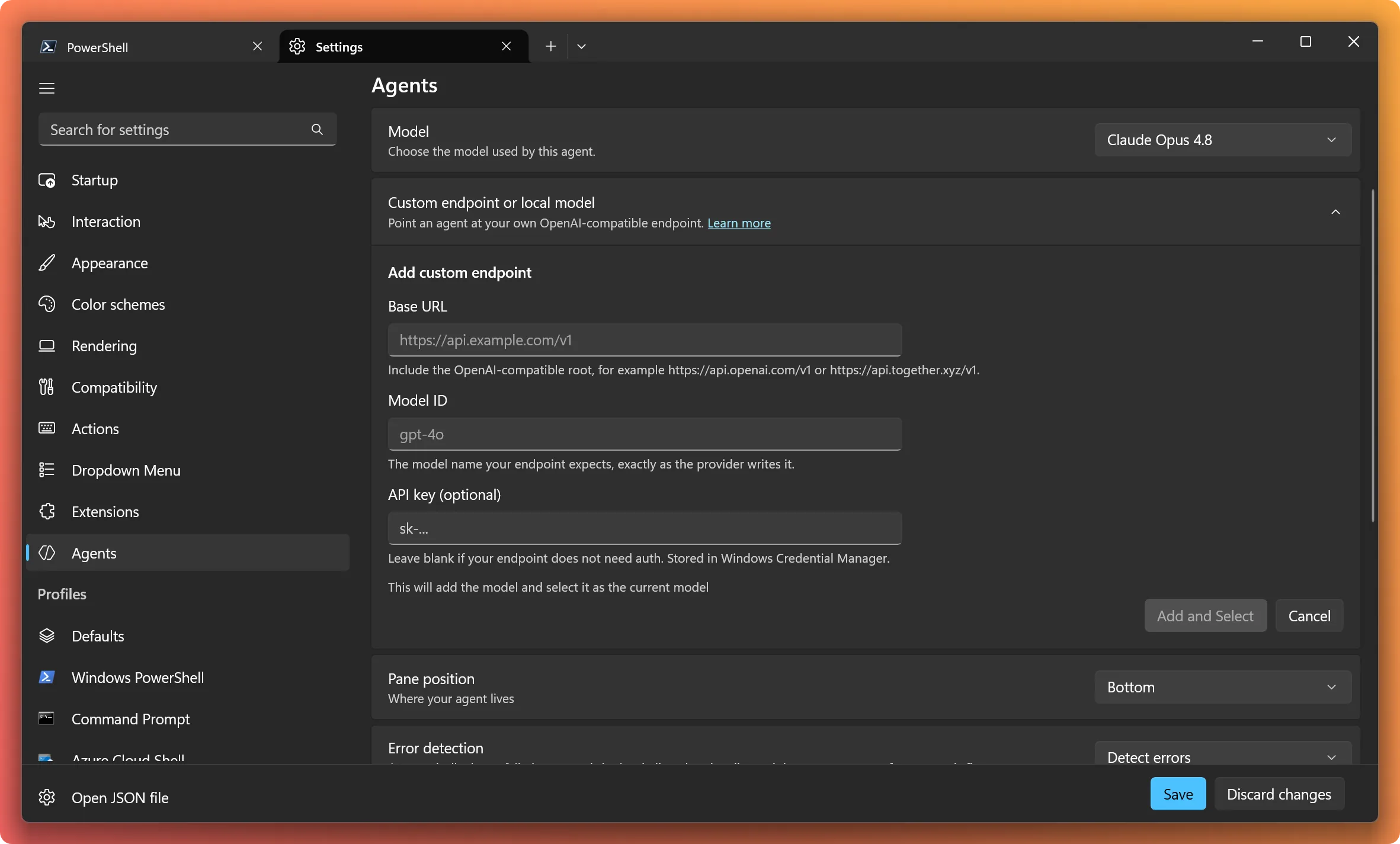
Turn on automatic approval for agents
Tired of confirming every step? Flip on automatic approval and your agent runs in allow-all mode right in the agent pane. It’s opt-in, works with Copilot, Claude, Codex, and Gemini through their native approval modes, and administrator policy can control it as-needed.

Slash commands your agent brings with it
Commands your agent provides now appear alongside built-in slash commands in the same searchable menu, including commands that take additional text.
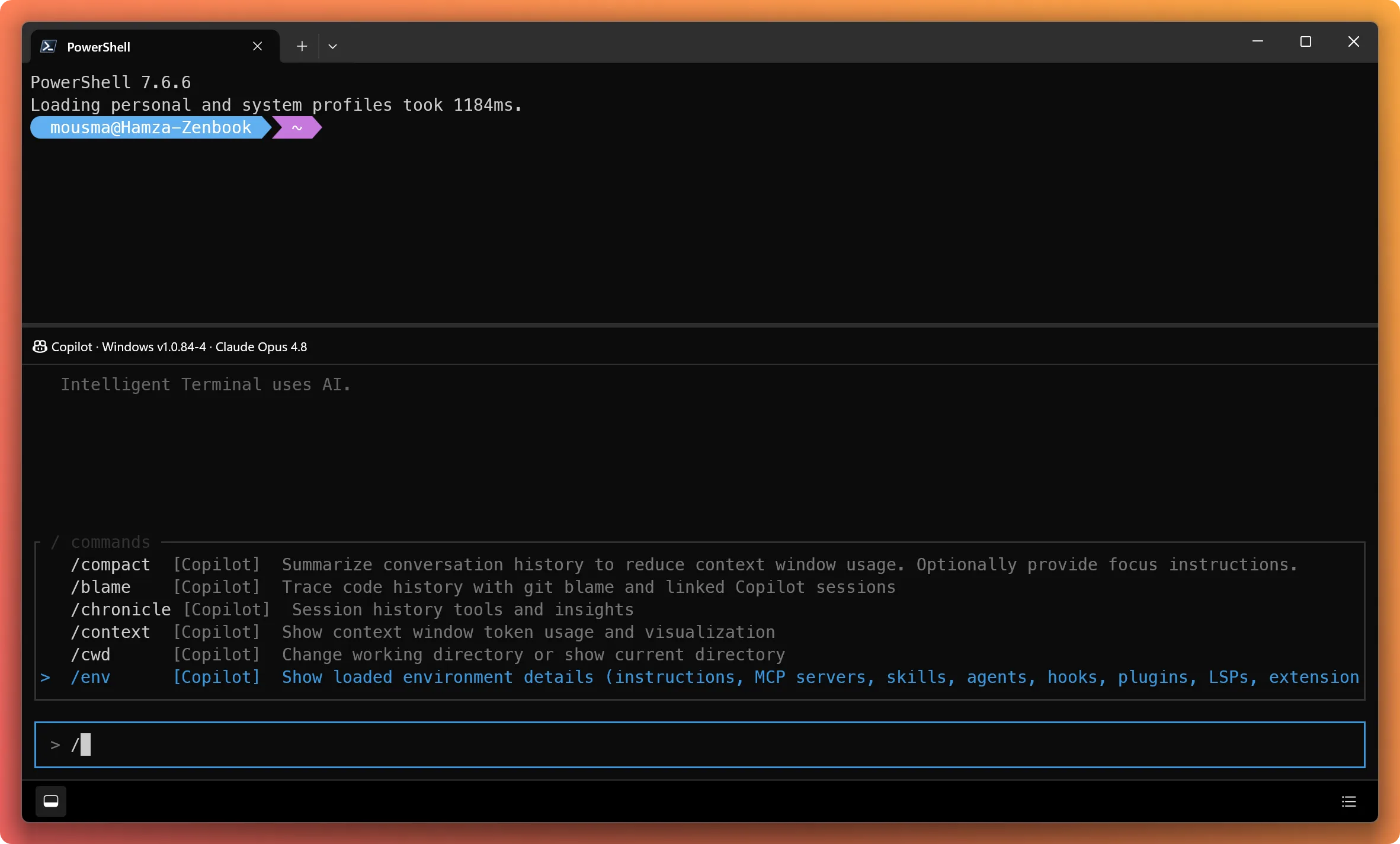
The brain behind the terminal gets smarter
Autofix now works toward what you were actually trying to do instead of just rewriting the command that failed. It can clarify your goal, diagnose multi-step failures, ask for permissions, and route the fix back to the pane where the failure happened. We also fixed routing bugs, so clicking a tab’s Detected action runs autofix for that tab’s pane, not another one.
Follow every agent action clearly
Commands, working directories, output previews, exit codes, file changes, and permission requests all show up in order, and this release makes that view more readable:
- Compact tool summaries. Successful tool calls collapse into a one-line summary, and consecutive reads, searches, edits, and deletes group together. Press
Ctrl+Oto inspect. - Line-level edit previews. Edits show the actual additions, removals, and nearby context instead of whole files.
- Collapsible thinking. The agent’s thinking expands while it works and tucks away when it’s done.
- Live search details. Inspect an agent’s searches and results while it’s still working.
We heard you: polish and improvements
Plenty of smaller improvements and fixes landed too, many straight from your feedback:
- Layout restore brings your agent along. If you use Terminal’s window layout restore setting (Settings > Startup > When Terminal starts), your agent panes and supported CLI conversations now come back with their panes and working directories, not just your terminals.
- Natural keyboard editing. Up and Down move through newlines and wrapped rows while keeping your column, and freeform clarification answers support word navigation, Home/End, and deletion.
- Better draft selection. With text in the input,
Ctrl+Aselects your draft to copy, cut, delete, or replace, and copying it won’t cancel a running response. - Clearer focus and targeting. The input border highlights keyboard focus, and redundant target labels disappear when there’s only one terminal to target.
Ctrl+wheelzoom is back in agent panes, while plain scrolling keeps scrolling.- Refreshed Agents settings with consistent styling, and you can save multiple custom agents across restarts.
- Resumed and restored sessions keep their status instead of getting stuck at Ended or Idle.
/restartno longer hangs after an agent fails to start, and agent switches no longer get stuck on Connecting.- Cancelled turns stay cancelled, so leftover output can’t leak into your next prompt.
- Cross-window moves are safer. Dragging a tab keeps its sessions, and a rejected move rolls back cleanly.
- Fewer duplicate and ghost sessions, and fewer repeat permission prompts for actions you’ve already approved.
- PowerShell shell integration recovers after prompt customizations like Oh My Posh replace your prompt.
- Terminal transparency and pane spacing are back to normal.
For everything else, see the full release notes on GitHub.
What’s coming up?
We’re staying focused on making agent CLIs faster, smoother, and easier to use inside Intelligent Terminal. As you run more agents across more tabs, keeping track of them gets harder, and we’re exploring ways to make that easier: a single place to see what your agents are up to and jump to whatever needs you.
Tell us what would make your agent workflows better: submit an issue and help shape where we go next.
We’ll keep iterating rapidly on bugs and feature requests while Intelligent Terminal is in this experimental stage. If you have a feature request or find a bug, submit an issue or visit our GitHub repository. Thank you!


Hi,
I configured mi Hermes agent acp but if I type the slash command I can’t see many of the Hermes tools I have, and none of the skills configured. is this something you still working on?
trst
qweqwe