

SQL code analysis has been part of the SSDT workflow for a long time. Before deploying a schema change, you could run a set of static analysis rules against your project to catch potential issues, things like missing primary keys, deprecated syntax, or objects that could break under certain compatibility levels. It was one of those SSDT features that teams quietly relied on without thinking much about it.
When developers started moving their SQL Database Projects workflow to VS Code, code analysis came with them. But configuring which rules to enable or disable required editing the .sqlproj file directly, not a deal breaker, but not exactly intuitive either.
That changes with the March 2026 release of the SQL Database Projects extension for VS Code.
Code Analysis Settings Dialog
The SQL Database Projects extension now includes a settings dialog to configure code analysis rules without touching the .sqlproj file.
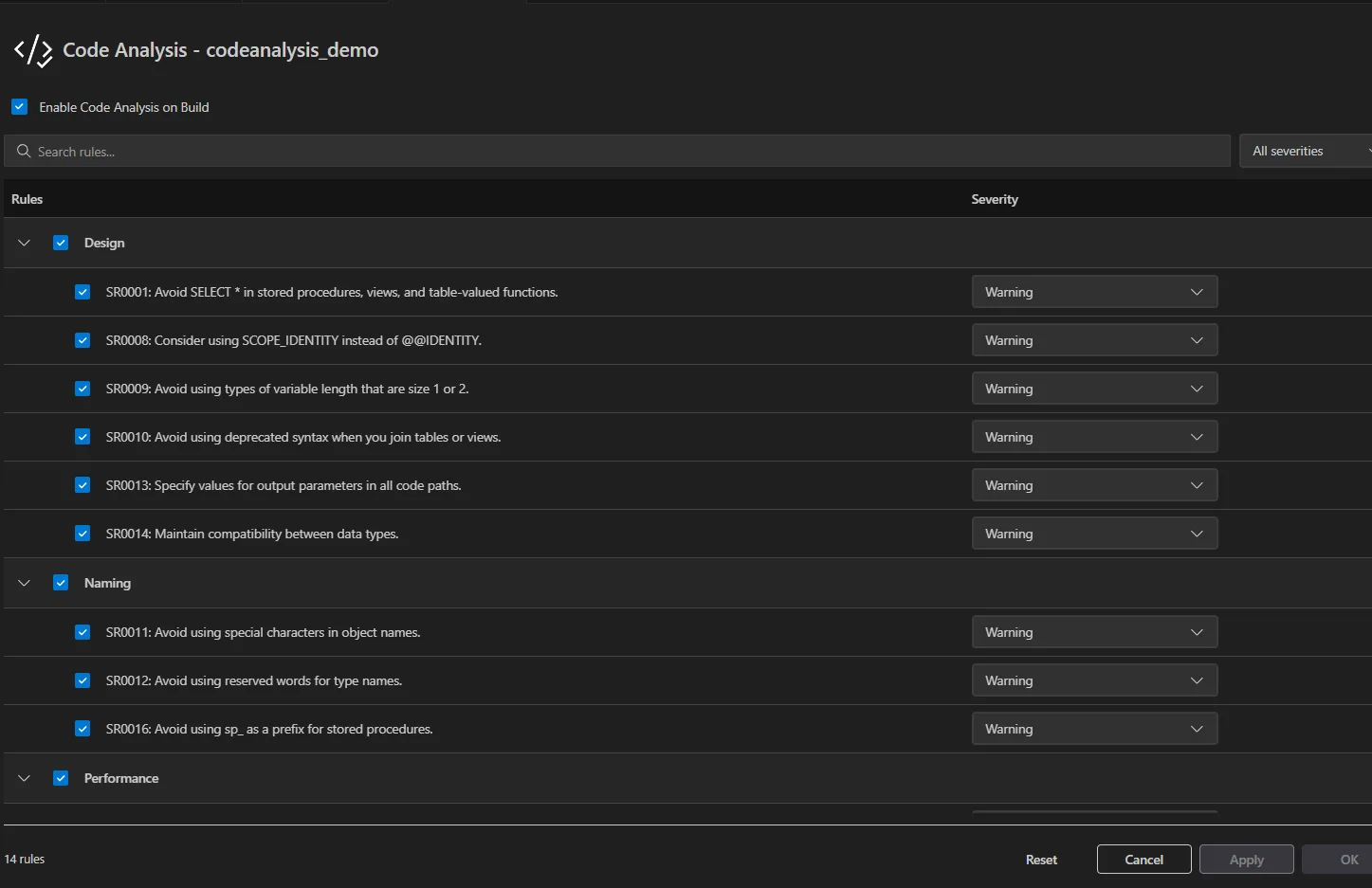
To open it: right-click your project in the Database Projects view → Code Analysis Settings.
From the dialog you can:
- Enable or disable code analysis on build — a toggle at the top controls whether analysis runs as part of your build at all
- Enable or disable rule categories — rules are grouped by category (Design, Naming, Performance); you can toggle an entire category at once
- Change rule severity — set individual rules to Warning, Error, or None
- Search for a rule using the search bar
- Filter by severity to quickly see which rules are configured as errors vs. warnings
Select OK to save your changes and close the dialog, or Apply to save without closing. Select Reset to revert to defaults.
Why this matters
For teams migrating from SSDT, this closes a usability gap. In Visual Studio, code analysis settings lived in a properties pane — something you could find and change without knowing the underlying XML. That same experience is now in VS Code.
For teams already working in VS Code, it’s one less reason to dig into the project file for routine configuration.
Code analysis works with SQL Database Projects targeting SQL Server, Azure SQL, and Azure SQL Database. If your project targets Fabric SQL database, the same rules apply.
Get started
Official Docs: SQL Code Analysis – SQL Server | Microsoft Learn
Install or update the SQL Database Projects extension for VS Code. Code analysis is available for any existing .sqlproj , no migration or project changes needed.
Share feedback or file issues at microsoft/vscode-mssql.


There is some fundamental disconnect here.
“Migrating from SSDT”?
I should be able to open the database project VSCode or VS2026 and expect it to be supported. “Migration” concept need not apply
You don’t have to choose one or other, as developers have difference preferences.
Good point! To clarify, existing `.sqlproj` files work in VS Code as is, no conversion needed. When I said migrating from SSDT I meant developers moving their day-to-day workflow to VS Code, not any change to the project format itself. You can absolutely use both editors depending on what you prefer. Appreciate the feedback.