


Data API builder (DAB) supports multi-source configurations
Data API builder (DAB) connects to your database with a safe REST or GraphQL endpoint. But DAB is not limited to just one database. Using a multi-source configuration, you can connect to more than one database simultaneously.
Learn more about Data API builder: https://aka.ms/dab/docs
Multi-source configuration
A multi-source configuration is one of DAB’s most powerful features. There is no special requirement other than a valid connection string. This lets multiple databases take advantage of a single instance of DAB with REST and GraphQL, but also its new MCP endpoint for agentic applications.

Just like Data API builder’s single-source configuration, multi-source config isn’t code generation and doesn’t require writing any code. It’s a dynamic engine you control with JSON files that gives you the feature-rich API experience most development teams demand but budgets and timelines often can’t deliver. Build for developer velocity and convenience, Data API builder can deliver secure, robust endpoints by the end of lunch.
Working demo: https://github.com
One config to rule them all
Data API builder uses a JSON-formatted configuration file, often named dab-config.json though the name doesn’t matter, to connect to your database. In a multi-source scenario, Data API builder uses one configuration file for each database.
There is only one DAB configuration format. Every configuration will be basically the same except for a specific connection string and entity settings. See the DAB configuration schema: https://github.com
You only give Data API builder a single configuration file. This file is the parent configuration, and it points to the child configurations with the data-source-files property. The engine merges them together at runtime to create a single API surface across all databases.
Example use of data-source-files:
{
  "data-source-files": [
    "dab-config-catalog.json",
    "dab-config-inventory.json",
    "dab-config-recommendations.json"
  ]
}
Read Data API builder’s documentation: MS Learn
Just one runtime
The parent configuration file can include entity definitions, but that is optional. What is required, however, is runtime. The parent configuration file’s runtime settings are the only runtime settings the engine obeys. This means settings like authentication, authorization, and caching are global across all data sources.
If a child configuration file includes a
runtimesection, the engine ignores it and logs a warning. Only the parent configuration file’sruntimesection is used.
As many as you need
There is no limit to the number of child configuration files you can have, and there is no requirement for how many entities each one defines. You can have one child configuration with 50 entities and another with just one entity. The engine doesn’t care.
Any type you need
Multi-source config is not limited to SQL Server. You can connect to any supported database in any combination. For example, you could have one child config connecting to SQL Server and another connecting to Cosmos DB, and the API would serve them both seamlessly.

Important limits
However, across data sources, entity names must be unique. You can’t have a products entity in two different child configuration files. If you do, the engine throws an error at startup and doesn’t run. This is also true with GraphQL type names and REST paths. For a single DAB instance to serve multiple databases, it needs a single unified namespace.
Learn more about multi-source config: https://aka.ms/dab/docs
Try it out
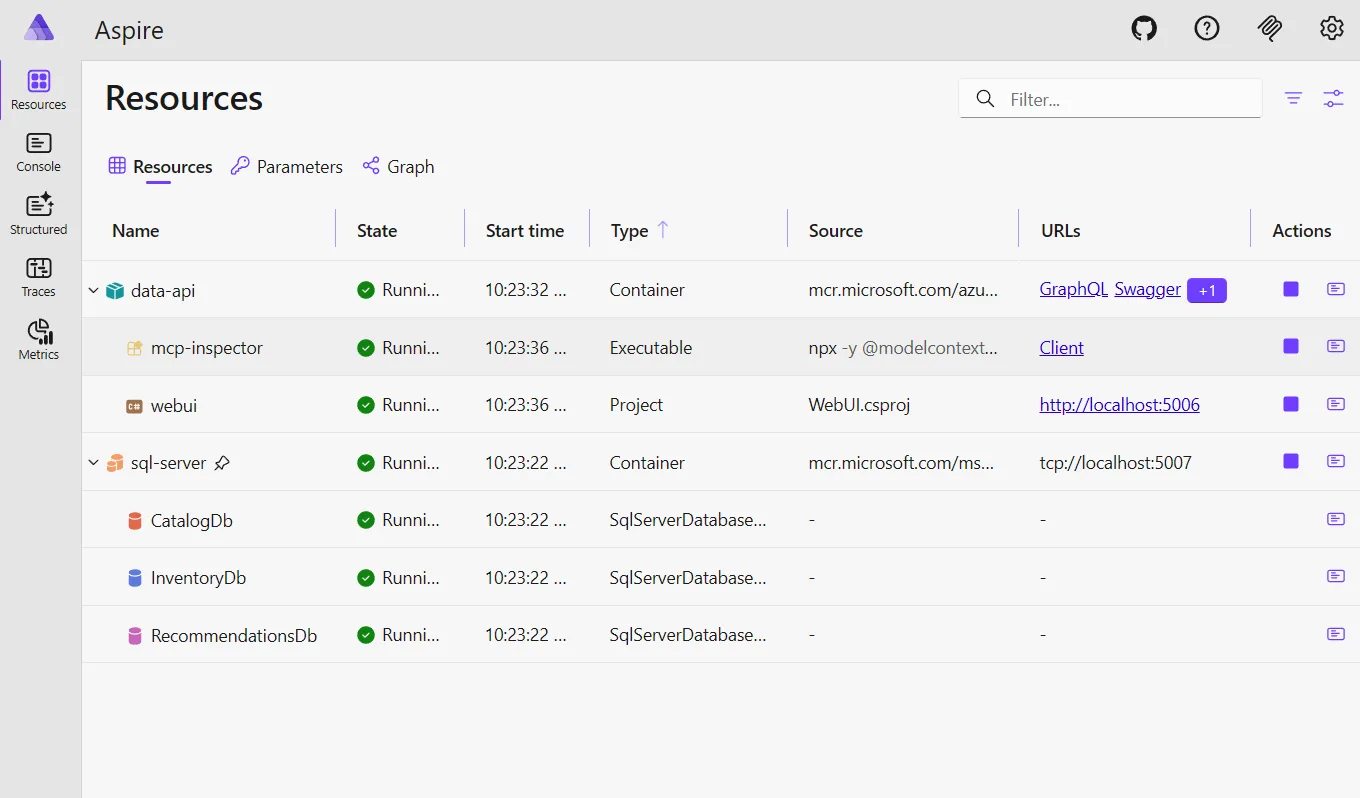
The demo associated to this blog post uses a retail scenario spread across three SQL Server databases. The first database has product catalog information, the second has inventory information, and the third has user-specific recommendations.
CatalogDb → Products and Pricing
InventoryDb → Inventory and Warehouse
RecommendationsDb → Recommendations and Ratings
GraphQL special behavior
The API merges each data source together so the client can get a product’s details, availability, and personalized recommendation in one API surface. However, there is magic when the developer uses GraphQL, in a single request, they can get all three databases’ information merged together in one response.
An example of a unifying GraphQL request/query:
{
  products { items { ProductId Name Category Price } }
  inventories { items { ProductId StockCount Warehouse } }
  recommendations { items { UserId ProductId Score } }
}
An example of a unifying GraphQL response:
{
  "data": {
    "products": {
      "items": [
        { "ProductId": 1, "Name": "Widget", "Category": "Gadgets", "Price": 19.99 },
        { "ProductId": 2, "Name": "Gizmo", "Category": "Gadgets", "Price": 29.99 }
      ]
    },
    "inventories": {
      "items": [
        { "ProductId": 1, "StockCount": 100, "Warehouse": "A" },
        { "ProductId": 2, "StockCount": 50, "Warehouse": "B" }
      ]
    },
    "recommendations": {
      "items": [
        { "UserId": 123, "ProductId": 1, "Score": 4.5 },
        { "UserId": 123, "ProductId": 2, "Score": 3.8 }
      ]
    }
  }
}
Agentic applications
In addition to REST and GraphQL, the same multi-source configuration also feeds DAB’s new MCP endpoint. This means agents can access all three databases through a single surface without needing custom middleware or a custom server.
Learn more about Aspire: https://aspire.dev
The demo includes the MCP Inspector wired into Aspire, so you can see it in action. You can also connect an actual agent to it, like Copilot or Claude, to see it work in a real-world scenario.
Conclusion
Multi-source configuration makes what could be a complicated solution, a simple one. It transforms a single instance of Data API builder in to a pwoerful Data API. Consider the engineering cost and time to build this yourself. Data API builder gives developers the pre-built solutions that both save them time and let them delete huge swaths of code from their codebases. Especially with multi-source config, you get a lot without writing a single line of code.


Great article on Data API Builder — it really feels like a key enabler for agentic AI interacting with on-prem SQL data. The ability to expose secure APIs without heavy middleware could be a big shift for enterprise architectures.
Curious though — how stable is DAB today, and is it a long-term Microsoft investment?
This is a great question. We have released a new, stable version of Data API builder every two months since it went generally available about two years ago. That said, release 1.7 is our MCP version and has taken about four months to prepare and release. We are also relying on several internal MCP libraries that are still in preview, so we are waiting on those as well.
The point is that our investment in Data API builder is a long running commitment. Even numbered releases of DAB are feature releases, while odd numbered releases are stability releases. Every three weeks,...
This is so reassuring! Knowing it’s tested and maintained like a true Microsoft product — security audits, consistent releases, powering Fabric internally — makes it an easy sell to the team. DAB isn’t going anywhere and that’s all I needed to hear. Time to build! 🚀
this comment has been deleted.