


Application developers already know what happens when one method does everything: it becomes difficult to read, test, reason over, and safely change. We use patterns like decomposition, encapsulation, and explicit dependencies because they solve those problems.
T-SQL does not give us classes, inheritance, interfaces, or polymorphism in the same way C# does, but that does not mean good software practices stop applying when logic moves into the database.
Decomposition is a good example. Breaking complex database logic into sensible, well-defined components can reduce complexity, improve readability and maintainability, and make individual pieces easier to test. These are established, respected, and proven techniques for building great software, whether the code runs in an application or inside the database.
For example: Hybrid search
In case you don't know
Hybrid search combines multiple retrieval techniques, usually full-text search and vector search, to improve the quality of search results. Rather than trusting a single ranking strategy, it retrieves candidates in different ways and then combines those results into a final ranking.A complete hybrid search solution may involve query rewriting, embedding generation, full-text search, vector search, fusion, reranking, and response generation. Each step contributes to the overall result, but each is also naturally separable. Full-text search should be able to run without vector search. Vector search should be testable without fusion. Fusion should operate on results without needing to understand how those results were produced.
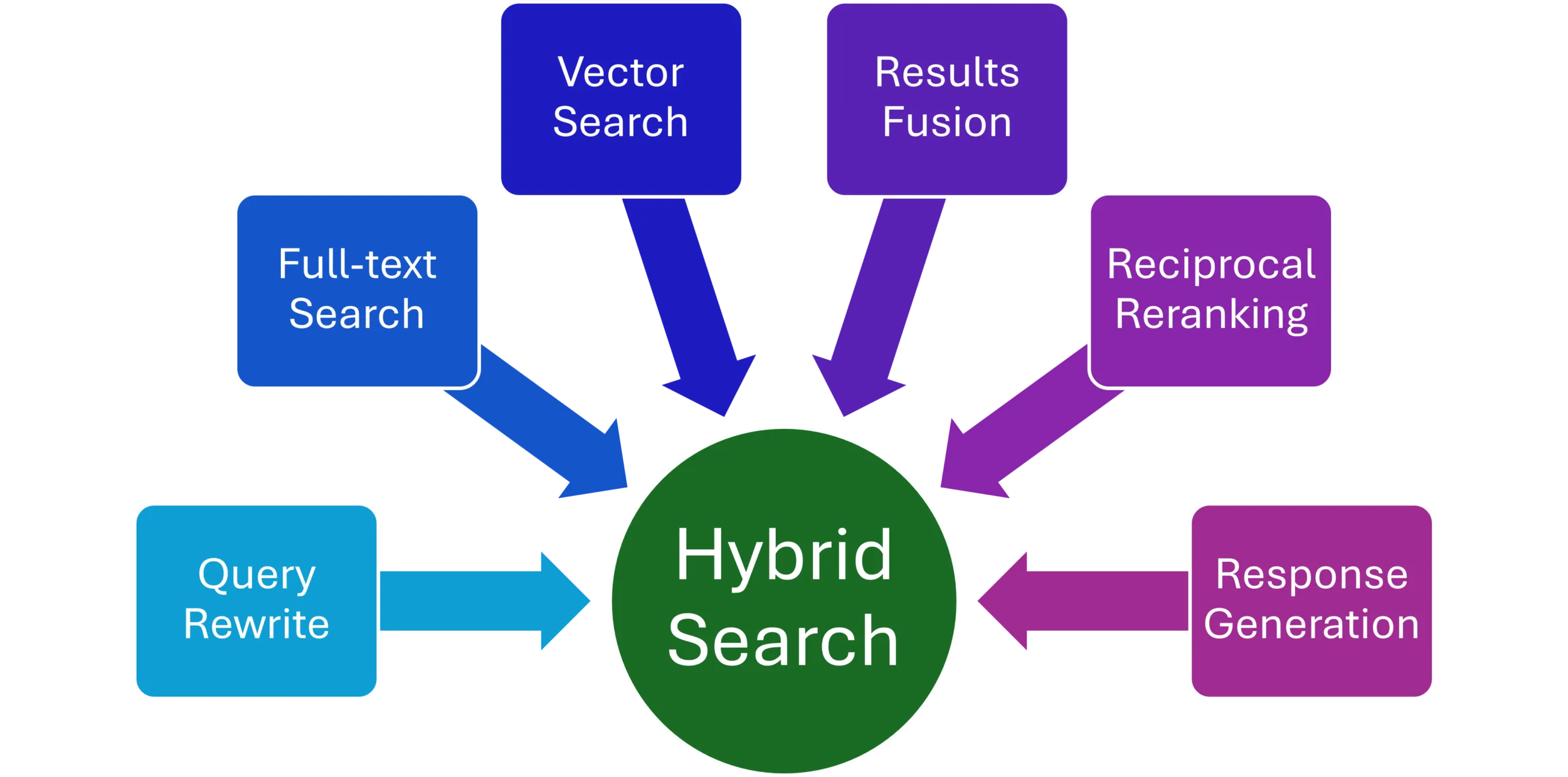
Introducing separate components adds a little structural sophistication, but it can reduce the complexity of the system as a whole. That sounds contradictory, but it is not. We can measure the benefit through smaller units of code, clearer responsibilities, simpler tests, easier diagnostics, and safer changes. Decomposition adds boundaries so each part becomes easier to reason over.
What decomposition solves
Complex database logic becomes difficult to reason over when too many responsibilities accumulate in one place. A single stored procedure may begin as a straightforward query and slowly grow to validate inputs, search, rank, transform results, handle errors, and orchestrate other operations. At some point, the procedure simply understands too much.
Decomposition introduces boundaries.
Instead of asking one procedure to understand the entire architecture, divide the work into smaller units with narrower responsibilities. A procedure such asProductSearch_FullText can focus only on full-text retrieval while another handles vector search and another handles fusion.The result is not less capability. It is less complexity per component. Smaller units are easier to read, easier to test, easier to change, and easier to reason over. Good decomposition simplifies the design without simplifying what the system can do.
EXEC dbo.ProductSearch_FullText
    @Query = @Query,
    @TopN = @TopN;

EXEC dbo.ProductSearch_Vector
    @QueryVector = @QueryVector,
    @TopN = @TopN;
These components may eventually participate in the same hybrid search operation, but neither needs to understand how the other works.
What encapsulation solves
Decomposition creates boundaries; encapsulation makes those boundaries useful. If you are coming from application development, think about calling a method. You care about its inputs, its output, and its expected behavior. You should not need to understand every line inside it.
The same principle applies here. The caller of ProductSearch_FullText should not need to understand every FREETEXTTABLE operation, validation rule, ranking calculation, or internal implementation detail. It should understand the contract.
CREATE PROC dbo.ProductSearch_FullText
    @Query nvarchar(4000),
    @TopN int = 20
AS
BEGIN
    SELECT TOP (@TopN)
        ft.[KEY] AS ProductId,
        CAST(ROW_NUMBER() OVER (
            ORDER BY ft.[RANK] DESC
        ) AS int) AS Rank
    FROM FREETEXTTABLE(dbo.Product, *, @Query) AS ft
    ORDER BY ft.[RANK] DESC;
END;
A query goes in. Ranked products come out. How those products were found stays behind the boundary. That separation improves readability and maintainability because changes inside the boundary do not necessarily require changes outside it. We can improve the full-text implementation, add validation, or change its internal query without forcing the orchestrating procedure to change.
What statelessness solves
Statelessness makes those components easier to isolate. Here, stateless does not mean ignoring database state. Reading data is the entire point. It means avoiding hidden execution state: global temporary tables, session context, values established by a previous call, or assumptions about what another component already did.
Instead, relevant state crosses the boundary explicitly as parameters.
CREATE PROC dbo.ProductSearch_Vector
    @QueryVector vector(1536),
    @TopN int = 20
AS
BEGIN
    SELECT TOP (@TopN)
        ProductId,
        CAST(ROW_NUMBER() OVER (
            ORDER BY d.Distance
        ) AS int) AS Rank
    FROM dbo.ProductEmbedding
    CROSS APPLY
    (
        VALUES (
            VECTOR_DISTANCE(
                'cosine',
                Embedding,
                @QueryVector
            )
        )
    ) AS d(Distance)
    ORDER BY d.Distance;
END;
Everything specific to this search is explicit: the query vector and the number of candidates to return. This starts to feel a little like dependency injection in application development. Instead of a component reaching outward to discover everything it needs, its dependencies are supplied across the boundary. The benefit is not statelessness for its own sake. It is less hidden context. Dependencies become visible, executions become reproducible, failures become easier to investigate, and components become easier to test and reuse.
What does a SQL developer have?
SQL developers do not have exactly the same building blocks as application developers, but they are not without architectural tools. Stored procedures provide executable boundaries. User-defined table types provide reusable data shapes. Functions provide reusable logic. Schemas provide namespaces and security boundaries. THROW lets components define intentional failures.
Different tools, same design principles.
User-defined table types
As our hybrid search pipeline becomes decomposed, each component needs a predictable way to exchange data with the next. A user-defined table type gives that data a named, reusable shape. If you are coming from C#, think of it roughly like a small DTO for tabular data.
CREATE TYPE dbo.ProductSearchResult AS TABLE
(
    ProductId int NOT NULL,
    Rank      int NOT NULL
);
Now different parts of the pipeline can work with the same understood shape:
DECLARE @FullText dbo.ProductSearchResult;
DECLARE @Vector   dbo.ProductSearchResult;

INSERT INTO @FullText
EXEC dbo.ProductSearch_FullText @Query, @TopN;

INSERT INTO @Vector
EXEC dbo.ProductSearch_Vector @QueryVector, @TopN;
Full-text and vector search have completely different implementations, but the next stage can reason over their results in exactly the same way.
There is another subtle benefit here. FREETEXTTABLE produces its own ranking score, while vector search produces a distance. Those values mean different things and cannot sensibly be compared directly. Reciprocal Rank Fusion needs position, not the raw score, so both retrievers expose a simple 1..N rank instead.
One important distinction
A user-defined table type does not formally type a stored procedure’s result set. The procedures still need to return compatible columns. The type gives table variables and table-valued parameters a real, reusable contract inside the architecture.Table-valued parameters are also READONLY, and user-defined table types are best treated as relatively stable contracts because changing the type later is more involved than altering a table.
User-defined functions
As the pipeline is decomposed, some logic will naturally appear in more than one component. A user-defined function lets us give that logic a name and reuse it instead of copying the same expression throughout the solution. Reciprocal Rank Fusion, for example, repeatedly calculates a score from a rank:
CREATE FUNCTION dbo.ProductSearch_RrfScore ( @Rank int )
RETURNS TABLE AS
RETURN
(
    SELECT 1.0 / (60 + @Rank) AS Score
);
Now any component can reuse that calculation:
SELECT
    r.ProductId,
    s.Score
FROM @FullText AS r
CROSS APPLY dbo.ProductSearch_RrfScore(r.Rank) AS s;
Instead of duplicating the calculation, we define it once behind a meaningful name and boundary.
The goal is not to move every expression into a function. Use a function when the logic has meaning, reuse, or enough complexity to deserve its own boundary. Inline table-valued functions are particularly useful for set-based logic because SQL Server can incorporate them into the surrounding query plan.
Schemas
Application developers use namespaces to organize related code. SQL Server schemas can serve a similar organizational purpose, but they also provide a security boundary. For example, a search architecture might eventually expose objects under a search schema. Permissions can then be granted to those capabilities without granting callers direct access to every underlying table. That is another form of encapsulation: expose what callers need while keeping implementation details behind the boundary.
Errors are part of the contract
A component’s contract includes failure too.
IF @TopN < 1
    THROW 51001, 'TopN must be greater than zero.', 1;
Custom error numbers and messages let a component fail intentionally instead of leaking an obscure error from somewhere deep inside its implementation. For an application developer, the idea should feel familiar: callers should know not only what success looks like, but which failures they are expected to handle.
Putting the pieces together
So far, each component has been independently useful. Now we can compose them.
Fusion receives the two result sets without knowing how either was generated:
CREATE PROC dbo.ProductSearch_Fuse
    @FullText dbo.ProductSearchResult READONLY,
    @Vector   dbo.ProductSearchResult READONLY,
    @TopN     int = 20
AS
BEGIN
    WITH Scores AS
    (
        SELECT r.ProductId, s.Score
        FROM @FullText AS r
        CROSS APPLY dbo.ProductSearch_RrfScore(r.Rank) AS s

        UNION ALL

        SELECT r.ProductId, s.Score
        FROM @Vector AS r
        CROSS APPLY dbo.ProductSearch_RrfScore(r.Rank) AS s
    ),
    Fused AS
    (
        SELECT
            ProductId,
            SUM(Score) AS FusionScore
        FROM Scores
        GROUP BY ProductId
    )
    SELECT TOP (@TopN)
        ProductId,
        FusionScore
    FROM Fused
    ORDER BY FusionScore DESC;
END;
UNION ALL is intentional. If a product appears in only one retriever, it still participates in fusion. If it appears in both, its two reciprocal-rank contributions are added together. Fusion is the terminal stage in this small example, so it returns FusionScore rather than the intermediate ProductSearchResult shape. Then a thin orchestration procedure describes the workflow:
CREATE PROC dbo.ProductSearch
    @Query nvarchar(4000),
    @QueryVector vector(1536),
    @TopN int = 20
AS
BEGIN
    DECLARE @FullText dbo.ProductSearchResult;
    DECLARE @Vector   dbo.ProductSearchResult;

    INSERT INTO @FullText
    EXEC dbo.ProductSearch_FullText @Query, @TopN;

    INSERT INTO @Vector
    EXEC dbo.ProductSearch_Vector @QueryVector, @TopN;

    EXEC dbo.ProductSearch_Fuse
        @FullText = @FullText,
        @Vector   = @Vector,
        @TopN     = @TopN;
END;
This is where the value of decomposition becomes visible. The orchestrator orchestrates. Full-text search handles full-text search. Vector search handles vector search. Fusion handles fusion. Each component can evolve without requiring every other component to understand how it changed.
SQL still has SQL-specific costs
This is where application patterns and database development part ways a little. A stored procedure call is not simply a C# method call, and database boundaries have engine-level costs and limitations.
INSERT...EXEC, for example, cannot be nested. If ProductSearch_FullText itself used INSERT...EXEC, the orchestrator above could not capture its result the same way. One alternative for more composable pipelines is to implement suitable leaf operations as inline table-valued functions instead of procedures.
The vector example uses VECTOR_DISTANCE because exact distance makes the example easy to understand. On larger datasets, VECTOR_SEARCH with a vector index may be the better production implementation when approximate search is acceptable.
And that is precisely why the boundary matters. We can change the implementation of vector retrieval without redesigning fusion or the rest of the pipeline. These are not arguments against decomposition. They are reminders that good software design still has to respect the database engine.
Testing becomes simpler
The payoff becomes obvious when something goes wrong.
We can execute full-text search by itself:
EXEC dbo.ProductSearch_FullText
    @Query = N'running shoes',
    @TopN = 10;
No embedding generation. No vector search. No fusion. No final response generation. We can test each capability independently, which also makes debugging easier. When a hybrid result looks wrong, inspect the full-text results, inspect the vector results, test fusion independently, and find the boundary where behavior stopped matching expectations. That is much easier than reasoning over one giant stored procedure.
Don’t decompose everything
Decomposition has a cost. More components mean more objects, more contracts, and more architecture to understand. A three-line lookup does not need three stored procedures, a table type, and a function. The objective is not more components. The objective is meaningful boundaries. Decompose where responsibilities are genuinely independent, where logic deserves reuse, where testing benefits from isolation, or where one component should be free to evolve without forcing changes throughout the system.
⭐ Keep simple things simple.
The point is simpler code
Good database design is not about making SQL look like C#. It is about applying the same proven engineering principles where they make sense. Decomposition gives complex logic meaningful boundaries. Encapsulation keeps implementation details behind those boundaries. Statelessness makes dependencies explicit. SQL Server gives us stored procedures, types, functions, schemas, and intentional errors to put those ideas into practice.
The architecture may become a little more sophisticated, but each individual component becomes less complex. That is the trade. Great software is easier to read, easier to test, easier to maintain, and safer to change, whether it runs in an application or inside the database.


0 comments
Be the first to start the discussion.