


Blue-green deployment in Azure Container Apps using Azure Developer CLI
If you follow the Azure Developer CLI blog posts, you already know that Azure Container Apps (ACA) support in Azure Developer CLI (azd) is GA. We want azd to be production-ready—you should be able to plug in the Bicep code your team uses and just run azd up. While getting the support GA-ready, one of the improvements we made was revision-based deployment support, which means azd can now handle advanced rollout patterns like blue-green deployment.
Blue-green deployment brings back fond memories. One of the first Jenkins blog posts I worked on was about blue-green deployment for Azure Kubernetes Service (AKS). I remember how much effort the engineer put into creating that quickstart—and how much longer I spent trying to understand what was going on. It’s great to see something that complex become almost trivial now.
For this demo, I asked Copilot to help generate a Python app to illustrate the workflow. No code changes needed—you can clearly see whether you’re using the blue or green revision. The Bicep is based on Blue-green deployment in ACA and the workflow on the containerapps-blue-green sample.
To run locally
Note: The commit IDs in this demo (
fb699ef,c6f1515) are just examples. You can use any identifiers you want—likeblue-v1,12345, or actual git commit hashes (as shown in the CI/CD workflowazure-dev.yml).
- In an empty folder, run
azd init -t puichan/aca-blue-green. - To deploy BLUE:
azd env set BLUE_COMMIT_ID fb699ef azd env set LATEST_COMMIT_ID fb699ef - Run
azd upNote: On first deployment, only the blue revision is created since
GREEN_COMMIT_IDisn’t set. The Bicep logic (!empty(blueCommitId) && !empty(greenCommitId)) skips traffic splitting until both revisions exist.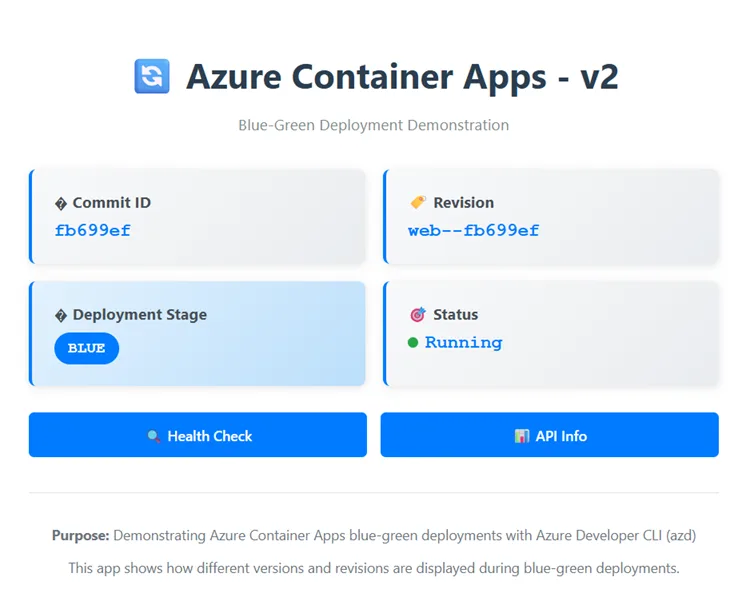
- To deploy GREEN, but keep traffic on BLUE:
// Create green revision
azd env set GREEN_COMMIT_ID c6f1515
azd env set LATEST_COMMIT_ID c6f1515

// keep traffic on BLUE
azd env set PRODUCTION_LABEL blue
Note:
LATEST_COMMIT_IDtells Bicep which revision to deploy. When you change it, a new revision is created. When you keep it the same and only changePRODUCTION_LABEL(as shown later), traffic just switches between existing revisions.And then run
azd deployIf you click the app endpoint, you still see the blue deployment. You see the blue deployment because
PRODUCTION_LABELis set to “blue”—traffic stays on blue. You can see the traffic logic inweb.bicep:traffic: !empty(blueCommitId) && !empty(greenCommitId) ? [ { revisionName: '${containerAppName}--${blueCommitId}' weight: productionLabel == 'blue' ? 100 : 0 label: 'blue' } { revisionName: '${containerAppName}--${greenCommitId}' weight: productionLabel == 'green' ? 100 : 0 label: 'green' }To test, run this command to get all three fully qualified domain names (FQDNs):
$uri = azd env get-value "SERVICE_WEB_URI"; $domain = ([System.Uri]$uri).Host.Split('.', 2)[1]; Write-Host "Production FQDN: $uri"; Write-Host "Blue label FQDN: https://web---blue.$domain"; Write-Host "Green label FQDN: https://web---green.$domain"Click the links in the output to see the production, blue and green label FQDN.
Production FQDN: https://web.purplerock-d77264b4.westus.azurecontainerapps.io
Blue label FQDN: https://web---blue.purplerock-d77264b4.westus.azurecontainerapps.io
Green label FQDN: https://web---green.purplerock-d77264b4.westus.azurecontainerapps.io
You can also run
az containerapp ingress traffic show --name web --resource-group <your-resource-group> -o table. Output:Label RevisionName Weight ------- -------------- -------- blue web--fb699ef 100 green web--c6f1515 0 - To send production traffic to the green revision, set
PRODUCTION_LABELto “green” and then runazd deployagain:azd env set PRODUCTION_LABEL green azd deployClick the endpoint—ta-da, green!
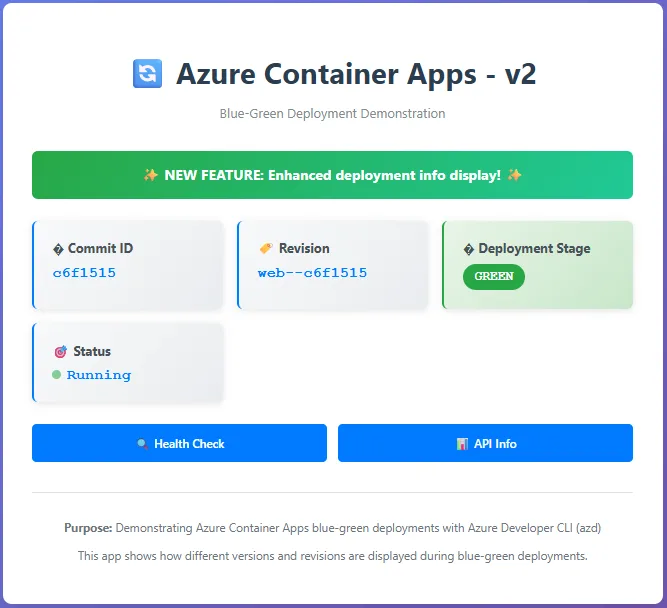
Again, you can check:
az containerapp ingress traffic show --name web --resource-group <your-resource-group> -o table - To roll back to BLUE:
azd env set PRODUCTION_LABEL blue
azd deploy
CI/CD with GitHub Actions
To set up the GitHub workflow, the sample repo contains a customized azure-dev.yml. Run the azd pipeline config command and you’re done.
Things to know
- In revision-based strategy,
azd deploydeploys both the container app definition and image together based onweb.bicep. The revision-based approach means changes to environment variables, images, resources, and load-balancing settings all roll out as a single revision. For more information, see the official doc. - I override the default Docker image name and tag in
azure.yamlto specify my custom repository name and image instead of using azd’s defaults. Environment variables flow to Bicep throughweb.parameters.json—when you setBLUE_COMMIT_IDviaazd env set, it maps to theblueCommitIdBicep parameter automatically. The environment variable mapping is why both manual commands and the GitHub workflow can control the same deployment logic.# Define the services services: web: project: . language: python host: containerapp docker: image: aca-blue-green/svc tag: web-${LATEST_COMMIT_ID} - The GitHub workflow (
azure-dev.yml) automates the blue-green deployment:- It uses the current commit ID as part of the revision label:
- name: Get current commit ID id: commit run: echo "commit_id=${GITHUB_SHA::7}" >> $GITHUB_OUTPUT - It handles blue-green rotation automatically: checks whether blue or green is currently production, deploys the opposite color as the new version, and switches traffic over once everything looks good. Each deployment alternates between blue and green.
- It uses ACA tags to remember state between deployments. It reads the tags to figure out which revision is currently production, then deploys to the opposite color. The tag-based state management is how it alternates automatically without hardcoding anything.
- It uses the current commit ID as part of the revision label:
- ACA automatically cleans up old revisions. The configuration sets
maxInactiveRevisions: 10inweb.bicep, so Azure keeps up to 10 inactive revisions before removing the oldest ones. You can also explicitly deactivate revisions manually if needed—see the containerapps-blue-green sample for examples.
Wrapping Up
Working through this blue-green deployment with azd shows how much simpler things are now. What used to take pages of Jenkins pipeline configuration now fits in a few environment variables and Bicep files. The real learning here is understanding that ACA revisions are immutable—you can’t change them once created. This immutability makes the blue-green pattern cleaner because each deployment creates a fresh revision, you point a label at it, and manage traffic weights. No confusion about which version is running.
The azd revision-based deployment support gives you production-grade control without losing the simplicity of azd up. You get to keep your team’s Bicep patterns while adding sophisticated rollout strategies on top.
If you try out ACA revision-based deployment, we’d love to hear how it goes. Use this form to share your feedback. The full sample is on GitHub if you want to poke around. And if something breaks or you have questions, drop a comment. I’m probably still figuring out things too.


0 comments