


With the release of Aspire 13, Python has been elevated to a first-class citizen alongside .NET and JavaScript, transforming Aspire into a truly polyglot application platform. The new Aspire.Hosting.Python package provides comprehensive support for developing, debugging, and deploying Python applications within distributed systems, whether you’re building microservices with FastAPI, data processing pipelines, or machine learning workloads.
Adding Python Applications to Aspire
Aspire 13 offers three flexible ways to run Python code, each designed for specific use cases:
Python Scripts
Use AddPythonApp() to execute Python script files directly:
var builder = DistributedApplication.CreateBuilder(args);

var scriptApp = builder.AddPythonApp("data-processor",
    appDirectory: "../scripts",
    scriptPath: "process_data.py");
This is perfect for standalone Python scripts that process data, perform batch operations, or run background tasks.
Python Modules
Use AddPythonModule() to run Python modules using the python -m pattern. This is ideal for running Python packages:
var pythonModule = builder.AddPythonModule("ml-service",
    appDirectory: "../ml-service",
    module: "inference.server");
Python Executables
Use AddPythonExecutable() to launch executables from virtual environments or Python-based command-line tools:
var pythonApp = builder.AddPythonExecutable("cli-tool",
    appDirectory: "../tools",
    executableName: "mytool");
ASGI Web Applications with Uvicorn
For modern Python web applications using FastAPI, Starlette, or Quart, use AddUvicornApp():
var api = builder.AddUvicornApp("fastapi-service", "../python-api", "main:app")
    .WithExternalHttpEndpoints()
    .WithHttpHealthCheck("/health");
This method provides several powerful features automatically:
- Configures HTTP endpoints for service discovery
- Sets up appropriate Uvicorn command-line arguments
- Supports hot-reload during development for rapid iteration
- Integrates with Aspire’s health check system to monitor application health
Virtual Environment Support
Python applications typically use virtual environments to manage dependencies. Aspire automatically manages virtual environments when you add a Python resource with a requirements.txt or pyproject.toml file. By default, python -m venv is called to create a virtual environment in the .venv folder. You can customize where the virtual environment directory is created with the WithVirtualEnvironment() method:
var pythonApp = builder.AddPythonModule("ml-service", "../ml-service", "inference")
    .WithVirtualEnvironment("myenv", createIfNotExists: true);
You can control whether the virtual environment should be automatically created if it doesn’t exist, ensuring a consistent development and deployment experience across your team.
Package Management
Aspire 13 supports flexible, auto-detected package management with both traditional and modern Python package managers. The system automatically detects and configures package management when you add a Python application, requiring minimal manual configuration.
Using uv (Recommended)
uv is a modern, high-performance Python package manager that offers significant speed improvements over traditional tools:
var pythonApp = builder.AddPythonApp("data-processor", "./scripts", "process_data.py")
    .WithUv();
Calling .WithUv() will ensure that uv sync is executed before your application is started, ensuring any dependencies are installed and up to date in the project’s virtual environment before the app runs.
Using pip
For projects using traditional pip-based workflows. By default, pip install -r requirements.txt is executed when a requirements.txt file is detected. You can pass customized arguments by calling .WithPip:
var pythonApp = builder.AddPythonApp("data-processor", "./scripts", "process_data.py")
    .WithPip(installArgs: ["--cache-dir", "my-cache"]);
Aspire also supports standard Python venv for virtual environment creation and management, giving you the flexibility to use the tools your team prefers.
Development Experience
VS Code Debugging
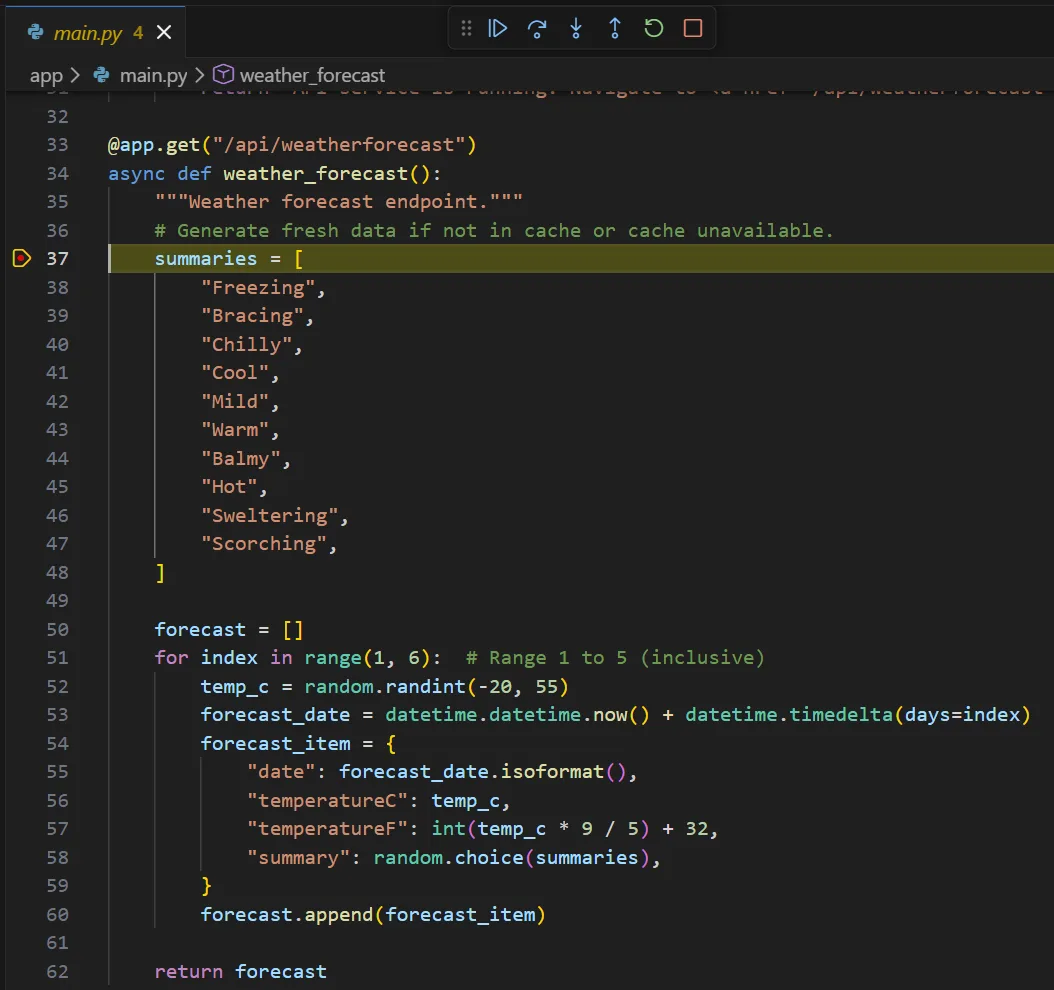
Python applications in Aspire support full breakpoint debugging in Visual Studio Code with no additional configuration required. The Aspire VS Code extension automatically recognizes the Python Debugger VS Code extension and generates launch configurations for your Python services. Simply set breakpoints in your Python code and start debugging.
Aspire configures the Python runtime for debugging, allowing you to step through your code, inspect variables, and diagnose issues just as easily as you would with .NET applications.
Certificate Trust for Local Development
Aspire automatically configures a developer certificate for you and trusts it for Python applications through environment variables like SSL_CERT_FILE and REQUESTS_CA_BUNDLE. This enables secure HTTPS connections during local development without manual certificate configuration, making it seamless to test secure communication between services.
Service Discovery and Integration
Python applications registered with Aspire automatically participate in service discovery. When you reference a service, Aspire provides simplified environment variables:
var service1 = builder.AddUvicornApp("service1", "../service1", "main:app");

var service2 = builder.AddUvicornApp("service2", "../service2", "main:app")
    .WithReference(service1);
Python applications receive environment variables like SERVICE1_HTTP and SERVICE1_HTTPS instead of complex service discovery formats. This makes service location simple and accessible:
import os
import httpx

# Easy access to referenced services
service1_url = os.environ["SERVICE1_HTTP"]
response = httpx.get(f"{service1_url}/health")
Polyglot Database Connections
When working with databases, Aspire automatically exposes connection information in multiple formats to accommodate different Python libraries and conventions:
var postgres = builder.AddPostgres("postgres")
    .AddDatabase("appdb");

var pythonService = builder.AddPythonModule("data-service", "../service", "app")
    .WithReference(postgres);
Your Python application receives both URI format and individual connection properties:
import os
import asyncpg

# Option 1: Use URI format (e.g., for SQLAlchemy)
database_url = os.environ["APPDB_URI"]  # postgresql://user:pass@host:port/dbname
db_pool = await asyncpg.create_pool(database_url)

# Option 2: Use individual properties
db_pool = await asyncpg.create_pool(
    host=os.environ["APPDB_HOST"],
    port=os.environ["APPDB_PORT"],
    user=os.environ["APPDB_USERNAME"],
    password=os.environ["APPDB_PASSWORD"],
    database=os.environ["APPDB_DATABASE"]
)
This flexibility ensures you can use your preferred Python database library without adapting to Aspire-specific connection patterns.
Production Deployment
Aspire takes the complexity out of deploying Python applications to production. When you publish your Aspire project, the system automatically generates production-ready Dockerfiles for your Python applications. These Dockerfiles are intelligently adapted based on:
- Your chosen package manager (uv or pip)
- Python version detection from
.python-version,pyproject.toml, or your virtual environment - Your application’s dependency requirements
This means you get optimized container images without writing Docker configuration manually. The generated Dockerfiles follow best practices for security and performance, ensuring your Python applications are production-ready.
Getting Started with the Aspire Python Starter Template
Want to jump right in? The new aspire-py-starter template provides a complete full-stack application demonstrating Python’s integration with Aspire:
aspire new aspire-py-starterThe starter template includes:
- FastAPI backend – A modern, fast Python web framework
- Vite + React frontend – A responsive single-page application
- OpenTelemetry integration – Built-in distributed tracing and metrics
- Redis caching – Demonstrates integration with Aspire’s Redis support
- Container files – Ready-to-deploy Docker container containing both the backend and frontend
This template is the perfect starting point for understanding how Python applications work within Aspire’s ecosystem.
Summary
Aspire 13 marks a significant milestone in cloud-native development by elevating Python to a first-class citizen alongside .NET and JavaScript. This transformation demonstrates Aspire’s evolution into a truly polyglot application platform.
Python developers now enjoy a deep, first-class Aspire integration, including:
- Multiple flexible ways to run Python code (scripts, modules, executables, and ASGI apps)
- Automatic package management with uv and pip support
- Full debugging support in VS Code with zero configuration
- Simplified service discovery with intuitive environment variables
- Polyglot database connection formats compatible with popular Python libraries
- Automatic production-ready Dockerfile generation
- Built-in OpenTelemetry integration for observability
Whether you’re building microservices with FastAPI, data processing pipelines, machine learning inference services, or full-stack applications, Aspire provides a consistent, productive development experience from local development to production deployment.
Get started today by trying the aspire-py-starter template or add the Aspire.Hosting.Python NuGet package to your existing app host project. For more details, check out the Python support documentation on aspire.dev.


All the examples seem to imply that Python developers are still required to learn C# for the Host orchestration code, the last step for proper first class support seems to be missing.
You are correct. As of today the AppHost is still written in C#, but it is minimal code – much smaller than the amount of code that will be written in your app.
We are experimenting with how to make the AppHost cross-language as well. You can see more ideas for our roadmap at https://github.com/dotnet/aspire/discussions/10644.
This is interesting. Does the debug also work in Visual Studio?
No, not at the same level as VS Code. In VS Code you can start the AppHost, and it will attach a debugger to the Python processes. This doesn’t currently supported in Visual Studio.