


Aspire 13.2 brings TypeScript AppHost support to the same application model that existing Aspire users already know. You still define resources, references, startup dependencies, endpoints, and deployment intent in code. You still get the same dashboard, service discovery behavior, health checks, and deployment artifacts. The difference is the authoring surface: you can now write the AppHost in TypeScript and run it with Node.js.
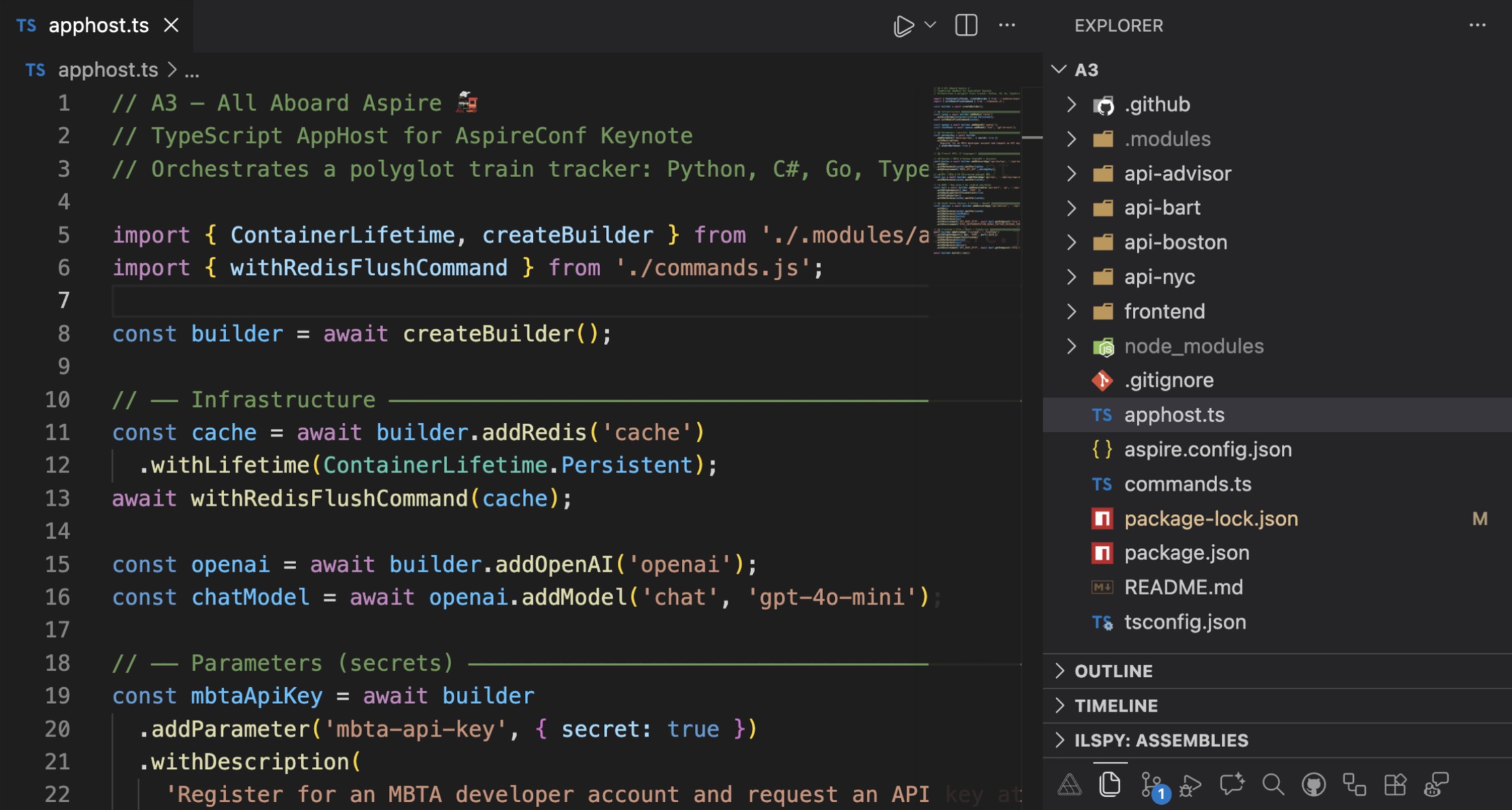
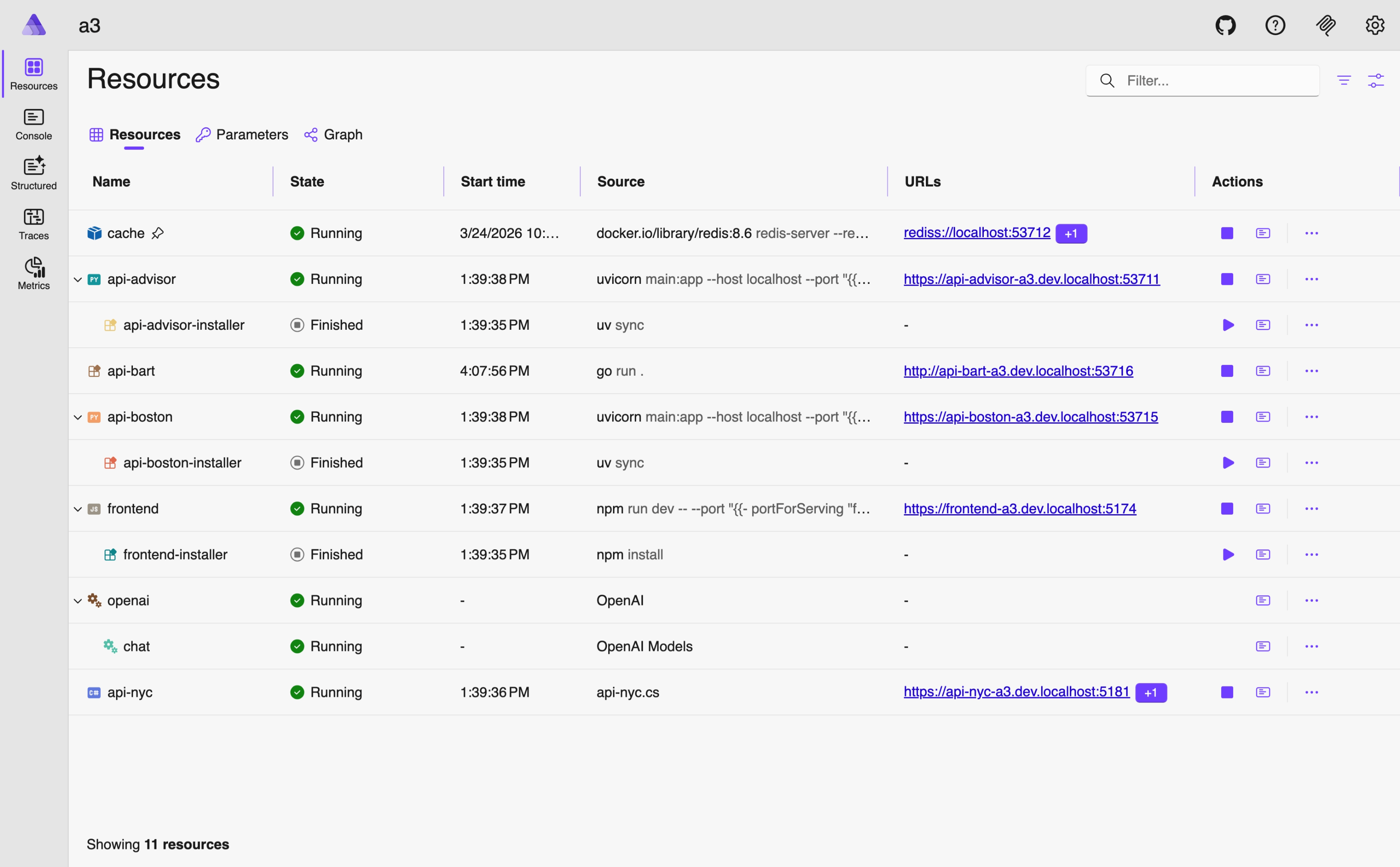
This makes Aspire a natural fit for TypeScript developers. Teams that already live in JavaScript and TypeScript can adopt Aspire without moving AppHost authoring into C#.
Prerequisites
- Node.js 20 or later — runtime for the TypeScript AppHost
- An OCI-compatible container runtime — Docker Desktop or Podman
- Aspire CLI — installed via the commands below
The .NET 10 SDK is only required when the AppHost is written in C# or when the application graph includes .NET projects
Get started in a few commands
Install the Aspire CLI, then verify the installation:
macOS / Linux
curl -sSL https://aspire.dev/install.sh | bash
aspire --version
Windows PowerShell
irm https://aspire.dev/install.ps1 | iex
aspire --version
The CLI installs as a standalone aspire executable. Running aspire --version returns the installed build, for example 13.2.0+{commitSHA}.
The template set includes two TypeScript examples: aspire-ts-empty for an empty TypeScript AppHost, and aspire-ts-starter for an Express/React starter.
Create a new empty TypeScript AppHost:
aspire new aspire-ts-empty --name my-app --output ./my-app --non-interactive
cd my-app
aspire run
Create the TypeScript starter app:
aspire new aspire-ts-starter --name aspire-app --output ./aspire-app --non-interactive
cd aspire-app
aspire run
You can also simply use aspire new and let yourself be guided by the interactive experience.
To add Aspire to an existing codebase with a TypeScript AppHost:
cd /path/to/your-workspace
aspire init --language typescript
aspire run
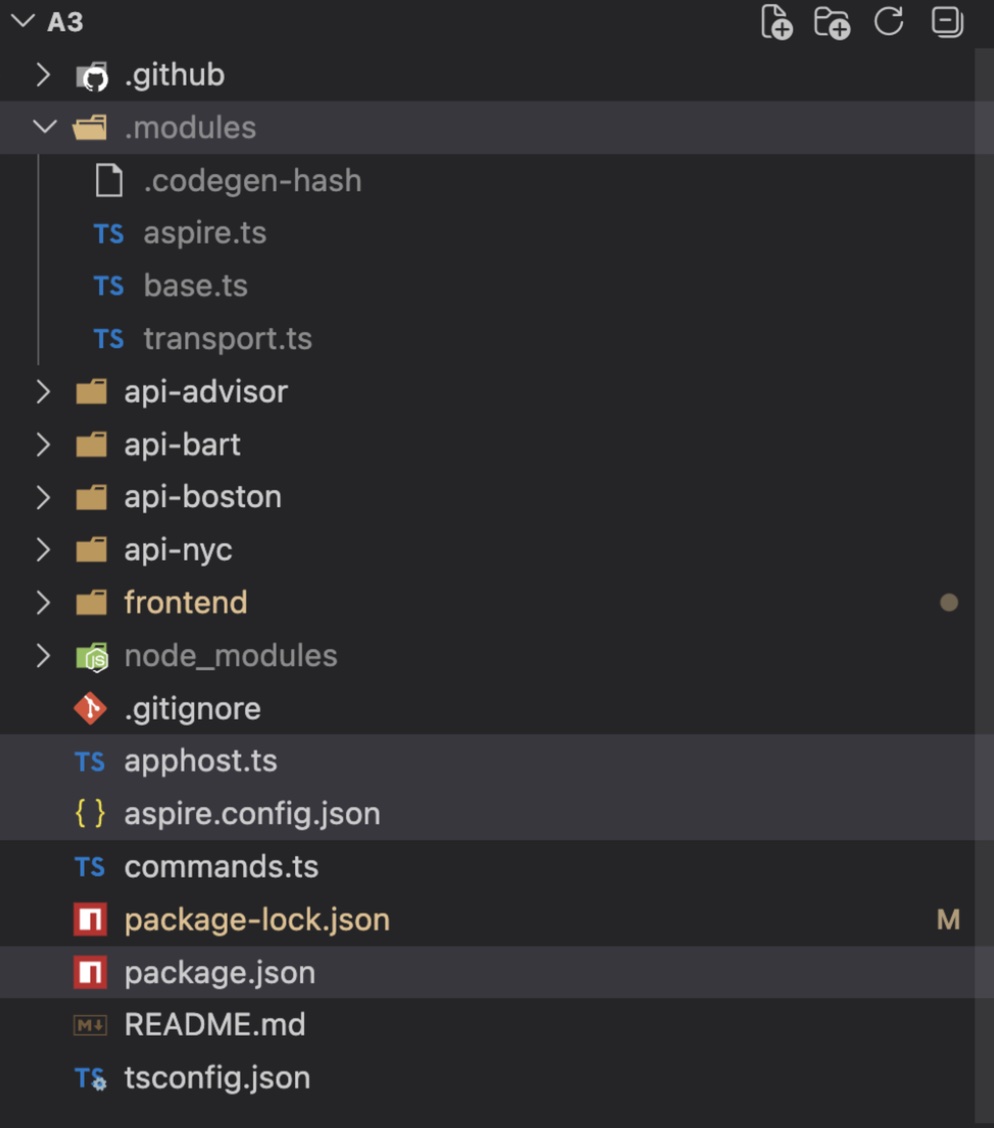
This creates apphost.ts, .modules/, aspire.config.json, package.json, and tsconfig.json, while leaving th rest of the workspace in its current languages and structure.
The model stays the same
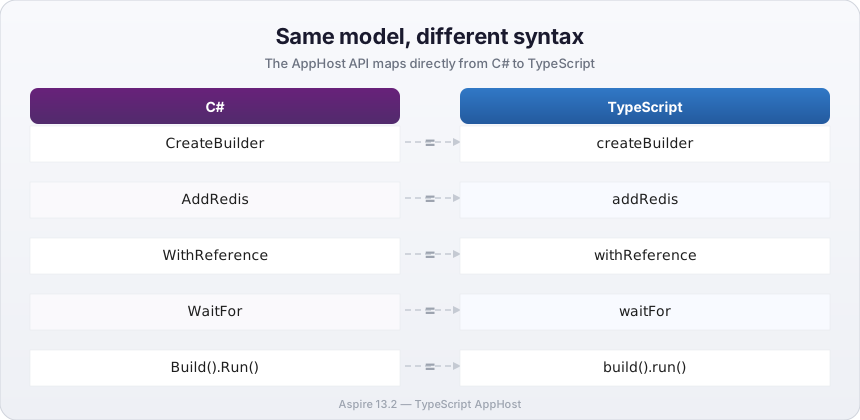
A TypeScript AppHost uses the same core AppHost concepts as C#. The builder creates the application model, resource methods add services and infrastructure, reference methods connect resources, and build/run starts the application. The mapping is direct:
DistributedApplication.CreateBuilder(args)becomesawait createBuilder()AddRedis("cache")becomesawait builder.addRedis("cache").WithReference(db)becomes.withReference(db).WaitFor(api)becomes.waitFor(api)Build().Run()becomesawait builder.build().run()
That continuity is the most important design choice in TypeScript AppHost support. The goal is not to introduce a second orchestration platform with similar ideas. The goal is to let you use the same Aspire model through a TypeScript-native API surface.
A minimal side-by-side sample
The smallest example already shows how familiar the model feels.
C#
var builder = DistributedApplication.CreateBuilder(args);

var cache = builder.AddRedis("cache");

builder.Build().Run();
TypeScript
import { createBuilder } from './.modules/aspire.js';

const builder = await createBuilder();

const cache = await builder.addRedis("cache");

await builder.build().run();
A TypeScript AppHost can also reference .NET projects with addProject alongside Node.js resources. The orchestration engine resolves dependencies across runtimes — a TypeScript-authored AppHost can manage services built with any language, containers, JavaScript or any other workloads in the same graph.
What the TypeScript starter looks like
The TypeScript starter uses JavaScript-native resource types such as addNodeApp and addViteApp. The generated project structure is centered on apphost.ts, aspire.config.json, and the .modules/ SDK directory.
import { createBuilder } from './.modules/aspire.js';

const builder = await createBuilder();

const cache = await builder.addRedis("cache");

const api = await builder
    .addNodeApp("api", "./api", "src/index.ts")
    .withHttpEndpoint({ env: "PORT" })
    .withReference(cache);

await builder
    .addViteApp("frontend", "./frontend")
    .withReference(api)
    .waitFor(api);

await builder.build().run();
The practical win for TypeScript teams
A TypeScript AppHost lets teams stay in the TypeScript toolchain for AppHost authoring. Install Node.js 20 or later, use your existing package manager, edit apphost.ts, and run the application with the Aspire CLI. Aspire remains the control plane for the application graph. TypeScript simply becomes another first-class way to declare that graph.
Under the hood: guest and host
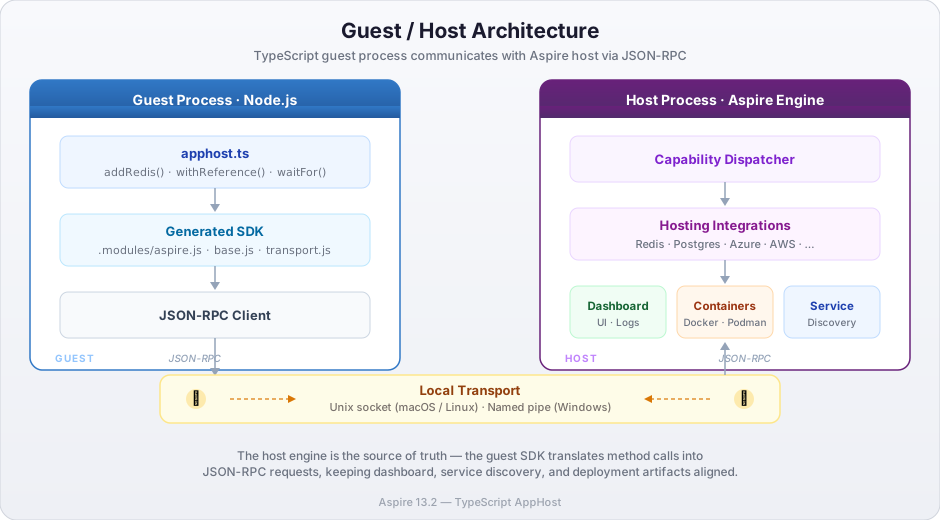
The TypeScript AppHost uses a guest/host architecture. apphost.ts runs in Node.js as the guest process. The Aspire orchestration engine runs as the host process. The generated SDK bridges the two. When your TypeScript code calls methods such as addRedis() or withReference(), the SDK translates those calls into JSON-RPC requests and sends them to the host over a local transport: Unix sockets on macOS and Linux, named pipes on Windows.
The important point is not the transport itself. The important point is that the host-side engine remains the source of truth for orchestration. That is why the resulting dashboard, service discovery behavior, health checks, and deployment artifacts stay aligned across languages.
ATS makes the TypeScript surface possible
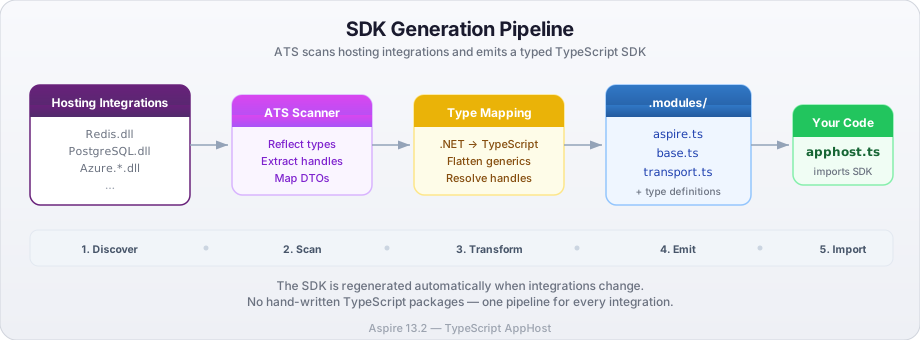
The Aspire Type System, or ATS, is the contract between the host and guest languages. It maps exported .NET concepts into guest-language shapes that fit naturally in TypeScript. Resource instances are passed by handle, DTOs serialize as JSON data, and the guest SDK exposes typed fluent methods over those handles.
That is why TypeScript AppHost support scales with Aspire’s integration ecosystem. The generated SDK is produced from the same host-side implementation and integration metadata instead of relying on a separate hand-written TypeScript package for each integration. The .modules/ folder is regenerated when you add or update integrations, and the resulting API surface stays aligned with the AppHost model you already use in C#.
Day-to-day workflow
The daily workflow stays simple:
aspire add redis
aspire restore
aspire run
Running aspire add updates the packages section in aspire.config.json and regenerates the TypeScript SDK. aspire restore regenerates SDK content manually, and aspire run or aspire start also refreshes generated content when the package list changes. The scaffolded package.json includes a start script mapped to aspire run, so the TypeScript AppHost workflow fits naturally into an existing Node.js development loop.
A typical aspire.config.json looks like this:
{
  "appHost": {
    "path": "apphost.ts",
    "language": "typescript/nodejs"
  },
  "sdk": {
    "version": "13.2.0"
  },
  "packages": {
    "Aspire.Hosting.PostgreSQL": "13.2.0",
    "Aspire.Hosting.Redis": "13.2.0",
  }
}
The packages object lists the hosting integrations your AppHost uses. Running aspire add postgres appends Aspire.Hosting.PostgreSQL to the list and regenerates the SDK. The full catalog of available integrations is listed in the Aspire Integrations Gallery.
Deployment
TypeScript AppHosts produce the same deployment artifacts as C# AppHosts. Running aspire publish generates a deployment manifest that can target Azure Container Apps, Kubernetes, or other supported environments:
aspire publishThe generated manifest captures the full application graph — resources, references, endpoints, and configuration — regardless of the language used to author the AppHost.
Debugging with the Aspire VS Code extension
The Aspire extension for VS Code brings first-class debugging support to TypeScript AppHosts. You can set breakpoints in your apphost.ts, step through the builder pipeline, and inspect the application model as it is constructed — all inside VS Code.
The same extension also attaches seamlessly to the Node.js services in your application graph. When you launch your AppHost through the extension, it automatically wires up the debugger for any addNodeApp resource, so you can step from AppHost orchestration code straight into your Express or Fastify handlers without manually configuring launch profiles. The result is a single F5 experience that covers both the AppHost and the services it manages.
Why this matters
TypeScript AppHost proves that the AppHost model is bigger than any single language surface. Teams that already build in JavaScript and TypeScript can adopt Aspire without changing the way they think about their stack. The same application model stays in place no matter the language.
The short version is: same app model, different syntax.


0 comments