


The Azure Agent Hosting Landscape
When deploying AI agents to production, you have several Azure options to consider like Azure Container Apps, Azure Kubernetes Service, Azure App Service, Azure Functions, Microsoft Foundry Agents and Microsoft Foundry Hosted Agents. Let’s examine each option before diving deep into Hosted Agents.
| Hosting Option | Control | Complexity | Best For | Strengths | Considerations |
|---|---|---|---|---|---|
| Azure Container Apps | High | Medium | General containerized workloads, custom orchestration, full control over your container runtime while avoiding Kubernetes complexity. | Container control, KEDA autoscaling, VNet/Dapr | Manual observability, self-managed conversation state |
| Azure Kubernetes Service | Very High | High | Enterprise-scale, strict compliance,multi-cluster deployment, or complex networking | Max flexibility, multi-cluster, GitOps | High operational overhead, K8s expertise required |
| Azure App Service | Medium | Low | Simple web-based agents, PaaS deployment model with no container orchestration | Managed PaaS, CI/CD slots, Entra Auth | Instance-based scaling, no agent abstractions |
| Azure Functions | Low | Low | Event-driven agents, serverless triggers, | Pay-per-execution, rich built-in triggers | Execution time limits, cold starts |
| Microsoft Foundry Agents | Low | Very Low | Prompt-based agents, built-in tools, managed, code-optional agent configured through the portal or SDK—no containers, no infrastructure. | Zero infra, built-in tools, portal-driven | No custom framework, limited to model + tools |
| Microsoft Foundry Hosted Agents | Medium | Very Low | Custom frameworks, agent-native deployment, simplicity of managed infrastructure with the flexibility of custom agent code, | BYO framework, built-in OTel, scale-to-zero | Preview SLAs, no private networking yet |
Deep Dive: Microsoft Foundry Hosted Agents
For teams that want the simplicity of managed infrastructure with the flexibility of custom agent code, Hosted Agents in Microsoft Foundry represent the sweet spot. This is where Azure meets agent-native deployment.
What Are Hosted Agents?
Hosted Agents are containerized agentic AI applications that run on Foundry Agent Service—Microsoft’s managed platform for AI agents. Unlike traditional container hosting, Hosted Agents provide:
- Agent-native abstractions: Conversations, responses, and tool calls are first-class concepts
- Managed lifecycle: Create, start, update, stop, and delete with simple API calls
- Built-in observability: OpenTelemetry traces, metrics, and logs out of the box
- Framework support: Bring LangGraph, Microsoft Agent Framework, or custom code
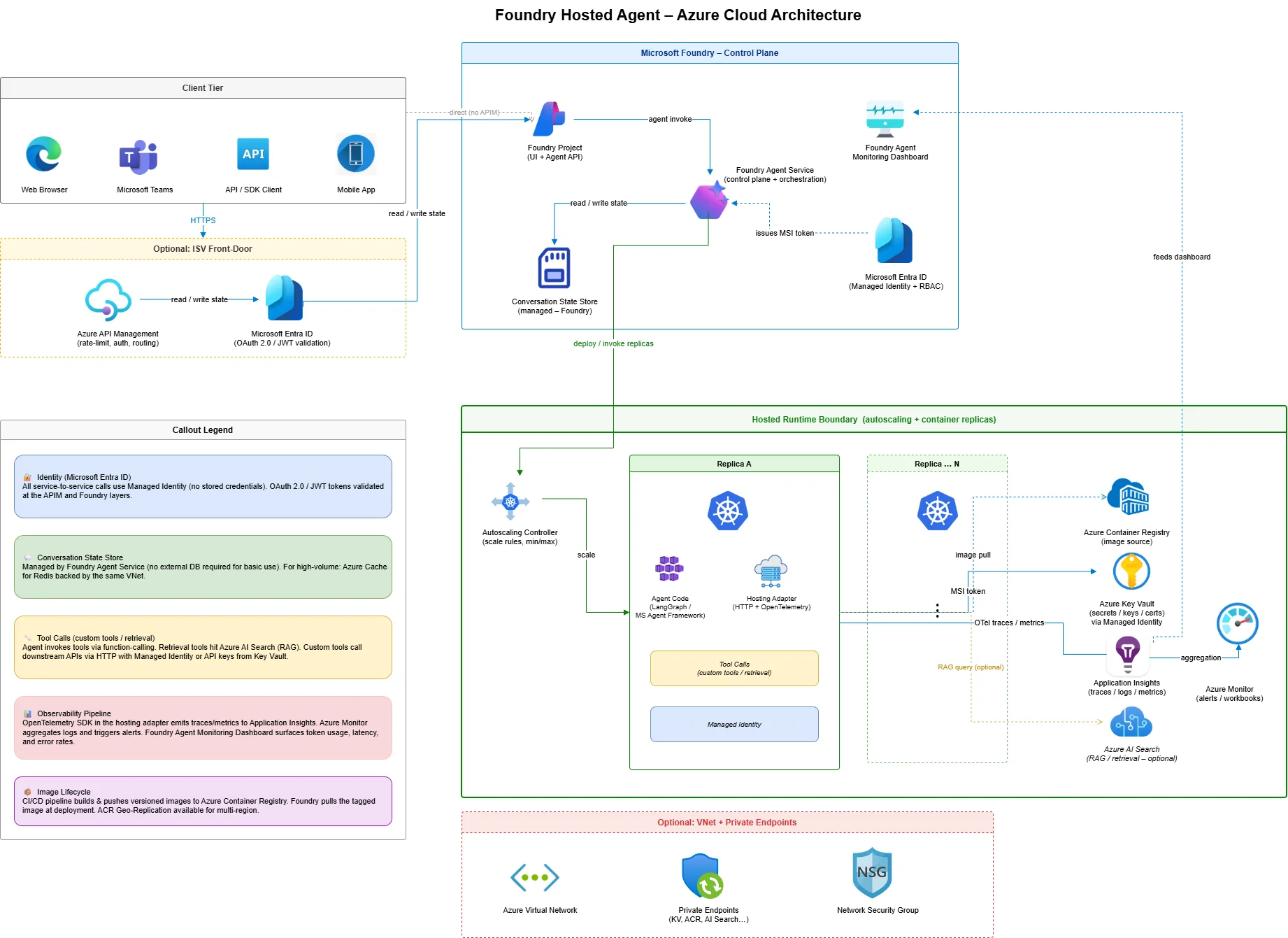
The Hosting Adapter: Bridging Frameworks to Foundry
The secret sauce of Hosted Agents is the Hosting Adapter—a framework abstraction layer that exposes your agent as an HTTP service with built-in Foundry integration.
For LangGraph agents, you simply wrap your graph with the adapter:
from azure.ai.agentserver.langgraph import from_langgraph
# Your LangGraph agent
graph = StateGraph(MessagesState)
graph.add_node("agent", call_model)
graph.add_node("tools", tool_node)
# ... build your graph

app = graph.compile()

# Wrap with the hosting adapter - that's it!
if __name__ == "__main__":
    from_langgraph(app).run()
For Microsoft Agent Framework:
from azure.ai.agentserver.agentframework import from_agent_framework

agent = ChatAgent(
    chat_client=AzureAIAgentClient(...),
    instructions="You are a helpful assistant.",
    tools=[get_local_time],
)

if __name__ == "__main__":
    from_agent_framework(agent).run()
The hosting adapter automatically provides:
| Capability | What It Handles |
| Protocol Translation | Converts Foundry Responses API ↔ your framework’s format |
| Conversation Management | Message serialization, history management |
| Streaming | Server-sent events for real-time responses |
| Observability | TracerProvider, MeterProvider, LoggerProvider via OpenTelemetry |
| Local Testing | Runs on localhost:8088 for local development |
Building and Deploying a Hosted Agent
Let’s walk through deploying a LangGraph calculator agent to Microsoft Foundry.
Step 1: Define Your Agent Code
Create main.py with your LangGraph agent:
from langchain_core.tools import tool
from langgraph.graph import MessagesState, StateGraph, START, END
from azure.ai.agentserver.langgraph import from_langgraph

@tool
def multiply(a: int, b: int) -> int:
    """Multiply two numbers."""
    return a * b

@tool
def add(a: int, b: int) -> int:
    """Add two numbers."""
    return a + b

# Build the graph
tools = [multiply, add]
# ... graph construction ...

app = graph.compile()

if __name__ == "__main__":
    from_langgraph(app).run()
Step 2: Create the Agent Manifest
Define agent.yaml to describe your agent:
name: CalculatorAgent
description: A LangGraph agent that performs arithmetic calculations.
metadata:
  tags:
    - calculator
    - math
template:
  name: CalculatorAgentLG
  kind: hosted                    # This makes it a Hosted Agent
  protocols:
    - protocol: responses
      version: v1
  environment_variables:
    - name: AZURE_OPENAI_ENDPOINT
      value: ${AZURE_OPENAI_ENDPOINT}
    - name: AZURE_AI_MODEL_DEPLOYMENT_NAME
      value: "{{chat}}"           # Resolved at runtime
resources:
  - kind: model
    id: gpt-4o
    name: chat
Step 3: Containerize with Docker
FROM python:3.11-slim

WORKDIR /app
COPY requirements.txt .
RUN pip install --no-cache-dir -r requirements.txt

COPY . .

# The hosting adapter listens on port 8088
EXPOSE 8088

CMD ["python", "main.py"]
Step 4: Deploy with Azure Developer CLI
The azd ai agent extension streamlines deployment:
# Install the extension
azd ext install azure.ai.agents

# Initialize your project
azd ai agent init

# Build, push, and deploy in one command
azd up
This single command: 1. Builds your container image 2. Pushes to Azure Container Registry 3. Creates the Foundry project (if needed) 4. Deploys model endpoints 5. Creates and starts your Hosted Agent
Managing Hosted Agent Lifecycle
Once deployed, manage your agent with the Azure CLI:
# Start an agent (with scale-to-zero support)
az cognitiveservices agent start \
    --account-name myFoundry \
    --project-name myProject \
    --name CalculatorAgent \
    --agent-version 1 \
    --min-replicas 0 \
    --max-replicas 3

# Update replicas without creating a new version
az cognitiveservices agent update \
    --min-replicas 1 \
    --max-replicas 5

# Stop the agent
az cognitiveservices agent stop \
    --account-name myFoundry \
    --project-name myProject \
    --name CalculatorAgent \
    --agent-version 1
Invoking Your Hosted Agent
Use the Azure AI Projects SDK to invoke your agent:
from azure.ai.projects import AIProjectClient
from azure.identity import DefaultAzureCredential

client = AIProjectClient(
    endpoint="https://your-project.services.ai.azure.com/api/projects/your-project",
    credential=DefaultAzureCredential(),
    allow_preview=True,
)

# Get the OpenAI-compatible client
openai_client = client.get_openai_client()

# Invoke the agent
response = openai_client.responses.create(
    input=[{"role": "user", "content": "What is 25 * 17 + 42?"}],
    extra_body={
        "agent_reference": {
            "name": "CalculatorAgent",
            "type": "agent_reference"
        }
    }
)

print(response.output_text)
# Output: 25 * 17 = 425, then 425 + 42 = 467
Built-in Observability
Hosted Agents automatically export telemetry to Application Insights (or any OpenTelemetry collector):
# Traces are exported automatically - no code changes needed!
# View in Azure Portal → Application Insights → Transaction Search
You can also stream container logs for debugging:
curl -N "https://{endpoint}/api/projects/{project}/agents/{agent}/versions/1/containers/default:logstream?kind=console&tail=100" \
  -H "Authorization: Bearer $(az account get-access-token --resource https://ai.azure.com --query accessToken -o tsv)"
Conversation Management
Unlike raw container deployments where you manage state yourself, Hosted Agents integrate with Foundry’s conversation system:
# Create a persistent conversation
conversation = openai_client.conversations.create()

# First turn
response1 = openai_client.responses.create(
    conversation=conversation.id,
    extra_body={"agent_reference": {"name": "CalculatorAgent", "type": "agent_reference"}},
    input="Remember: my favorite number is 42.",
)

# Later turn - agent has context
response2 = openai_client.responses.create(
    conversation=conversation.id,
    extra_body={"agent_reference": {"name": "CalculatorAgent", "type": "agent_reference"}},
    input="Multiply my favorite number by 10.",
)
# Agent knows 42 from the previous turn
Resource Scaling Options
Hosted Agents support flexible resource allocation:
| CPU | Memory |
| 0.25 | 0.5 Gi |
| 0.5 | 1.0 Gi |
| 1.0 | 2.0 Gi |
| 2.0 | 4.0 Gi |
| 4.0 | 8.0 Gi |
And horizontal scaling with replica configuration:
| Setting | Description |
| min-replicas: 0 | Scale to zero when idle (cost savings, cold start on first request) |
| min-replicas: 1 | Always warm (no cold starts, steady cost) |
| max-replicas: 5 | Maximum horizontal scale (preview limit) |
Publishing to Channels
Once your agent is production-ready, publish it to multiple channels:
- Web Application Preview: Shareable demo interface
- Microsoft 365 Copilot & Teams: Appear in the agent store
- Stable API Endpoint: Consistent REST API for custom apps
# Publishing creates a dedicated agent identity
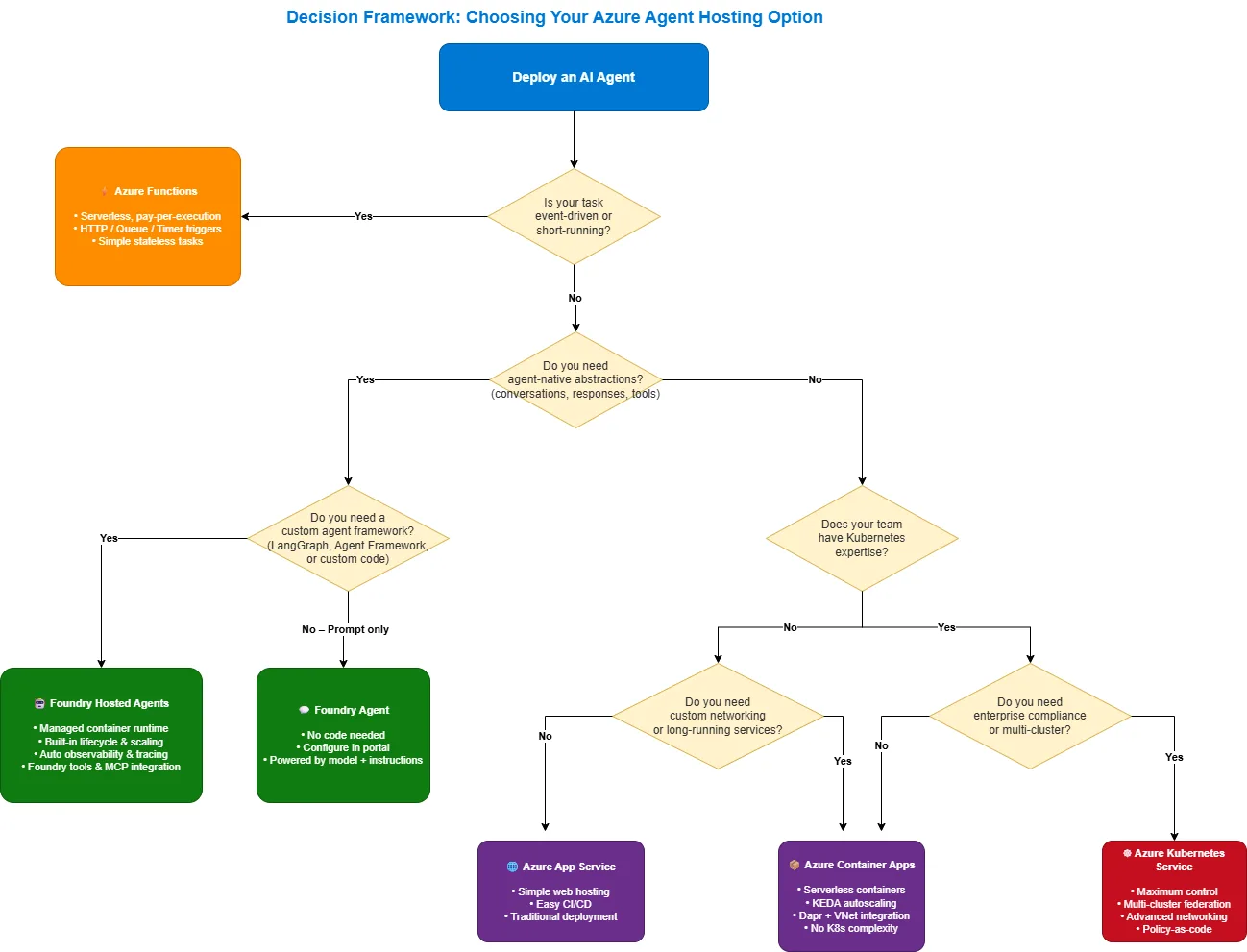
# (separate from the project managed identity)Decision Framework: Choosing Your Hosting Option
Use this flowchart to select the right option:
What’s Next
Ready to start building? Check out the Foundry Samples repository for complete working examples, deploy a Hosted Agent, and experience what agent‑native hosting on Azure looks like in practice.
Resources:


0 comments
Be the first to start the discussion.