


Code will be generated, not written. Most enterprise AI workloads are net-new microservices. Modular, greenfield work. Perfect for coding agents.
The catch? Out-of-the-box agents lack domain knowledge about your SDKs and patterns. But frontier LLMs are extraordinarily sample efficient. The patterns you need are already encoded in their latent space from pretraining. All you need is the right activation context. That is what skills do, and Agent Skills ships 126 of them for Azure and Microsoft Foundry development.
New: Browse all skills, agents, and documentation at microsoft.github.io/skills.
What’s in Agent Skills?
github.com/microsoft/skills is a collection of skills, prompts, agents, and MCP configurations that provide the activation context to specialize coding agents for Microsoft Foundry and Azure development.
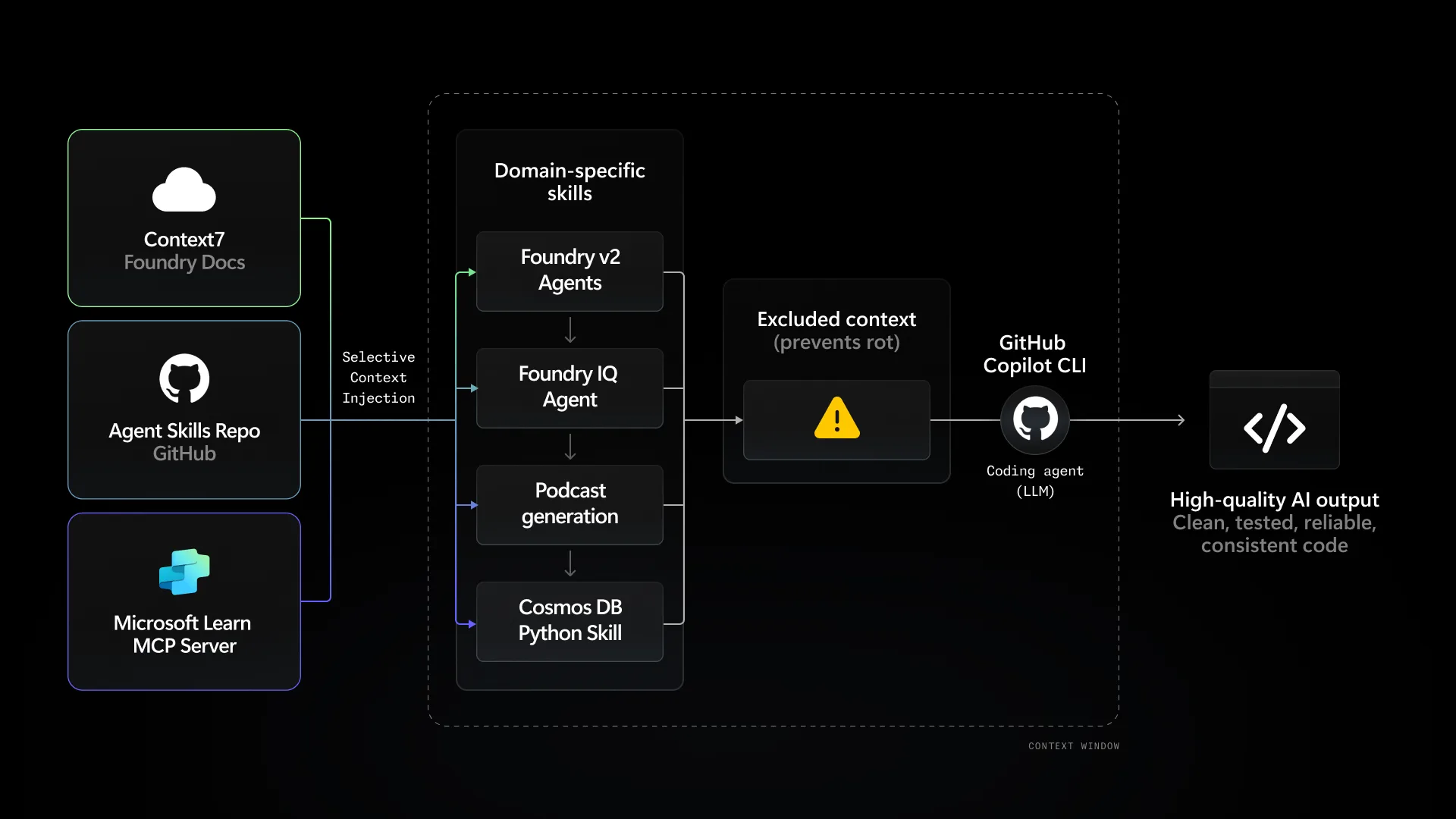
The repo contains:
- Skills: 126 modular knowledge packages for specific domains (Cosmos DB, Foundry IQ, AZD Deployment, Voice Live, etc.)
- Prompts: Reusable templates for code reviews, component creation, endpoints
- Agents: Persona definitions (backend, frontend, infrastructure, planner, presenter, scaffolder)
- MCP Servers: Pre-configured servers for GitHub, Playwright, Microsoft Docs, Context7
- Context7 Integration: Indexed Foundry documentation at Context7, updated daily via GitHub Actions
Browse and copy all of them at microsoft.github.io/skills
Systems Thinking First, Then Skills
Before loading skills into your agent, you need a mental model of what you are building, reducing your unknown-unknowns. Skills amplify your direction, they do not replace it.
My recommendation: do the basic hello world for each SDK you plan to use. For example, for Foundry IQ, walk through the agentic retrieval pipeline quickstart. Understand the abstractions at a high level. Know what Cosmos DB containers are, how Azure AI Search indexes work, what a Foundry agent does. You need this picture to prompt and steer the agent effectively.
Beyond that high-level understanding? You probably will not be hand-coding the idiomatic patterns for how you consume these services. The model already has these patterns encoded. Skills surface them. You bring the architecture and intent. The agent brings the implementation details that are already latent in its weights.
Avoiding Context Rot
Do not load all skills at once. Context rot occurs when your agent’s context window gets cluttered with irrelevant information, degrading output quality.
Loading everything will:
- Dilute the agent’s attention across unrelated domains
- Waste precious context window tokens
- Cause the agent to conflate patterns from different frameworks
Only copy the specific skills essential for your current project. High signal-to-noise ratio is everything.
The same principle applies to MCP servers. Do not enable every server in your config. Too many tools create the same dilution problem. Pick the servers relevant to your current task.
Quick Start
Option 1: Install via skills.sh
The easiest way to add skills is through skills.sh:
npx skills add microsoft/skills
You can also browse and install individual skills from skillsmp.com.
Option 2: Copy Only the Skills You Need
Browse available skills and copy relevant ones to your project:
# Clone the repo
git clone https://github.com/microsoft/skills.git

# Copy specific skills to your project
cp -r skills/.github/skills/cosmos-db-python-skill your-project/.github/skills/
cp -r skills/.github/skills/foundry-iq-python your-project/.github/skills/
Or use symlinks. For multi-project setups:
# macOS/Linux
ln -s /path/to/skills/.github/skills/mcp-builder /path/to/your-project/.github/skills/mcp-builder

# Windows (PowerShell as Admin)
New-Item -ItemType SymbolicLink -Path ".github\skills\mcp-builder" -Target "C:\skills\.github\skills\mcp-builder"
For sharing skills across different coding agents in the same repo:
# Symlink to multiple agent config directories
ln -s ../.github/skills .opencode/skills
ln -s ../.github/skills .claude/skills
Configure Your Agent
GitHub Copilot: Skills are auto-discovered from .github/skills/
Claude Code: Reference SKILL.md files in your project instructions or CLAUDE.md
GitHub Copilot CLI: Works with the same skill structure
Add MCP Servers
Copy the MCP configuration to your project:
cp skills/.vscode/mcp.json your-project/.vscode/
Then remove the servers you do not need. This gives your agent access to:
- Microsoft Learn MCP: Ground agents in official docs
- Context7: Indexed Foundry documentation
- GitHub, Playwright, Terraform servers
- Sequential Thinking, Memory tools
(Optional) Use Context7 for Foundry Docs
For real-time Foundry documentation access, add the Context7 MCP server or use directly:
Context7 URL: context7.com/llmstxt/microsoft_github_io_skills_llms-full_txt
A GitHub workflow runs daily to sync the latest Foundry documentation updates automatically.
Available Skills
126 skills total — 5 core + 121 language-specific (Python, .NET, TypeScript, Java).
Browse all skills with install commands at microsoft.github.io/skills.
Core Skills
Language-agnostic tooling and infrastructure:
| Skill | Description |
|---|---|
azd-deployment |
Deploy to Azure Container Apps with Azure Developer CLI, Bicep infrastructure |
mcp-builder |
Build MCP servers for LLM tool integration (Python, Node, C#) |
skill-creator |
Guide for creating effective skills for AI coding agents |
github-issue-creator |
Convert notes, error logs, or screenshots into structured GitHub issues |
podcast-generation |
Generate podcast-style audio with Azure OpenAI Realtime API |
Language-Specific Skills
| Language | Count | Coverage |
|---|---|---|
| Python | 42 | Foundry agents, AI services, Cosmos DB, Search, Storage, Messaging, Monitoring |
| .NET | 29 | Foundry, AI, ARM resource management, Messaging, Identity, Security |
| TypeScript | 24 | Foundry, AI, React Flow, Zustand, Storage, Messaging, Frontend patterns |
| Java | 26 | Foundry, AI, Communication Services, Cosmos, Messaging, Monitoring |
Featured Skills by Category
| Category | Skills |
|---|---|
| AI Foundry | azure-ai-projects-py, agent-framework-azure-ai-py, foundry-iq-py, hosted-agents-v2-py |
| AI Services | azure-search-documents-py, azure-ai-voicelive-py, azure-ai-contentsafety-py, azure-ai-evaluation-py |
| Backend | fastapi-router-py, pydantic-models-py, azure-cosmos-db-py |
| Frontend | frontend-ui-dark-ts, react-flow-node-ts, zustand-store-ts |
| Infrastructure | azd-deployment, azure-identity-py, azure-monitor-opentelemetry-py |
Scaling Beyond Static Skills
For larger codebases where static skills are not enough:
- AST-based Memory Systems: Hierarchical graph representation of code structure
- Context Graph: Knowledge graphs tracking component relationships and dependencies
These help agents maintain understanding without cramming everything into the context window.
What’s Next
This is v1. I will be adding more idiomatic skills for Microsoft SDKs, covering the cloud services and frameworks teams actually use.
I am also testing agent skills with copilot-sdk to validate skill quality programmatically. You can see a sample test harness at copilot-sdk-samples/skill-testing.
For now, start with github.com/microsoft/skills, pick only what you need, and keep that signal-to-noise ratio high.


0 comments
Be the first to start the discussion.