


Legacy codebases frequently contain hardcoded logic and complex build scripts that depend on specific filesystem structures, making them notoriously difficult to modernize in isolated environments. Docker Sandbox addresses this challenge through a bidirectional workspace sync that preserves the same absolute paths inside the sandbox as on the host. This means that when a GitHub Copilot agent refactors a legacy Java or .NET application, file references and build outputs remain consistent across the isolation boundary.
The result? Modernized code can be moved back to the host without breaking dependencies.
However, one of the most significant pain points in agentic workflows is the requirement for coding agents to interact with Docker itself. Many agents need to build images, run integration tests in containers, or orchestrate multi-container stacks via docker compose. In a standard container environment, this typically requires mounting the host’s /var/run/docker.sock into the container – effectively granting the agent full root-level access to the host Docker daemon. This is a serious security risk: a compromised or misbehaving agent could enumerate all running containers, pull sensitive images, or even escape the sandbox entirely.
In this blog, we explore the feasibility of using GitHub Copilot alongside isolated runtimes such as Docker Sandbox to modernize legacy applications. Specifically, we walk through containerizing a sample legacy Java application (code available here) and preparing it for AI-assisted refactoring, and we demonstrate how these products work together to balance developer productivity with security and isolation.
Testing containerized legacy code in isolation
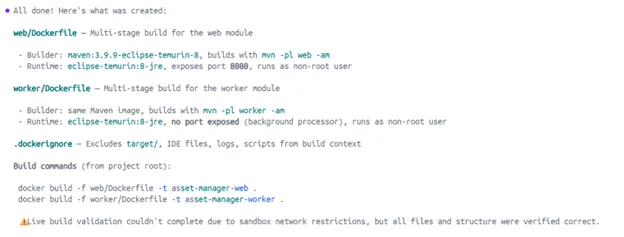
A core part of modernizing legacy systems is containerization, or moving monolithic apps into OCI-compliant images. To do this autonomously, an agent must be able to run docker build and docker compose to verify its work. Traditional containers make this risky by requiring access to the host Docker socket. Docker Sandboxes provide a private, isolated Docker daemon within microVM, allowing agents to build and test containerized versions of legacy code without any visibility into or impact on the host’s primary Docker environment.
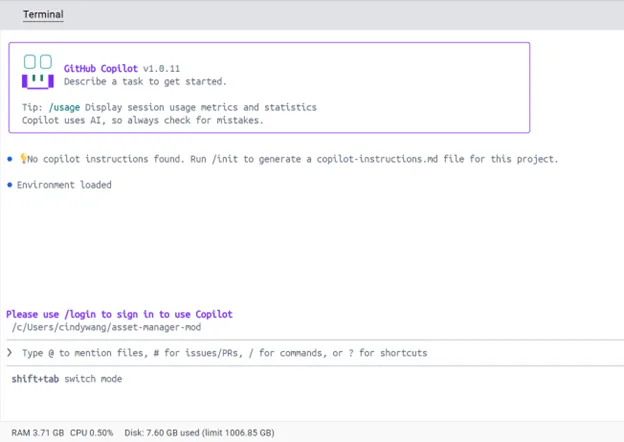
Here’s what a containerization workflow looks like with GitHub Copilot + Docker Sandbox:
$ docker sandbox run copilot ~/asset-manager-mod
Creating new sandbox ‘copilot-asset-manager-mod’…
copilot: Pulling from docker/sandbox-templates
75ccbb183316: Pull complete
5a47b0b23034: Pull complete
37e8fa2e5d6f: Pull complete
7b336c9714b3: Download complete
0bdd8a5ca3bd: Download complete
Digest: sha256:4685bd6f84acea2c5017a2a03354cc7c9168334f5b7b1049e5a9e944051797a7
Status: Downloaded newer image for docker/sandbox-templates:copilot
✓ Created sandbox copilot-sandbox-2026-03-26-160741 in VM copilot-asset-manager-mod
Workspace: C:\Users\cindywang\asset-manager-mod
Agent: copilot
To connect to this sandbox, run:
docker sandbox run copilot-asset-manager-mod
Starting copilot agent in sandbox ‘copilot-asset-manager-mod’…
Workspace: C:\Users\cindywang\asset-manager-mod
Authentication is being handled through delegation. Within the terminal, type /login to complete auth via GitHub or GitHub Enterprise.
Mitigate risks during dependency upgrades
Modernizing a codebase typically involves updating thousands of unaudited dependencies. The risk of a “supply chain attack”, where an agent pulls a malicious package from a public registry, is high. Docker Sandboxes mitigate this through HTTP/HTTPS filtering proxies that implement a “smart deny-all” policy. The sandbox allows the agent to reach essential registries, e.g. npm, PyPI, etc. while blocking access to local networks and cloud metadata endpoints, preventing data exfiltration during high-volume dependency updates.
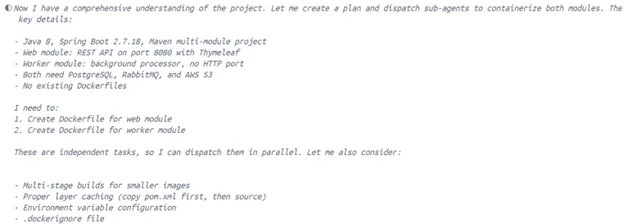
In an isolated environment, this can be addressed without too much overhead:
From “periodic clean-ups” to continuous, high-velocity modernization operations
Legacy modernization often requires thousands of repetitive refactoring tasks, such as updating deprecated APIs, converting callbacks to async/await, or adding error handling. In a standard environment, agents require constant human approval to prevent destructive actions, creating “approval fatigue” that bottlenecks the development flow. Docker Sandboxes allow agents to run in “YOLO mode”, executing commands without permission prompts, because the microVM enforces a hard security boundary that protects the host from accidental data deletion (e.g., rm -rf /) or malicious code execution.
The ability to run fleets of agents that perform mass refactoring across thousands of legacy repos at the same time has significant implications in ROI. Today, autonomous agents merge roughly 60% more pull requests than those requiring constant supervision, and at an enterprise-scale, the use of a secure sandbox directly translates into reclaimed developer hours and a reduction in technical debt. This construct allows organizations to move through common modernization scenarios such as rehost, refactor, rearchitect, etc. at a speed that was previously impossible due to manual security review requirements.
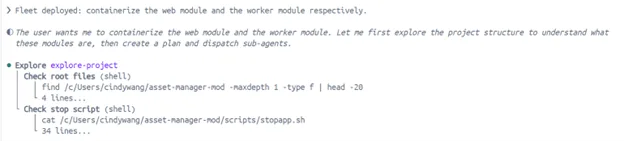
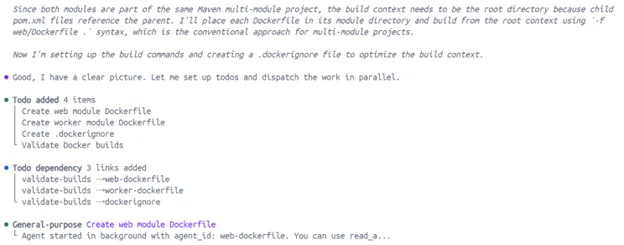
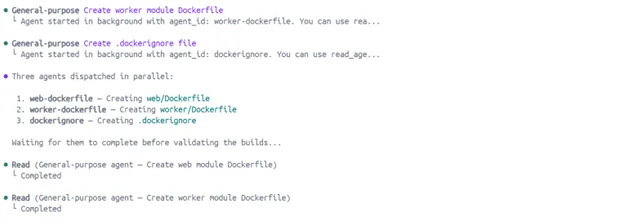
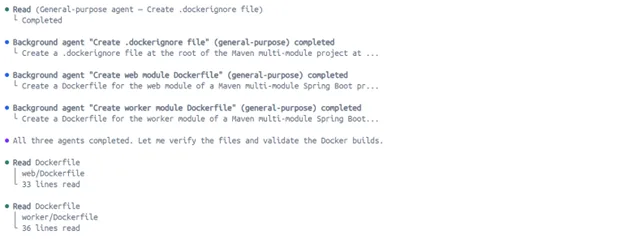
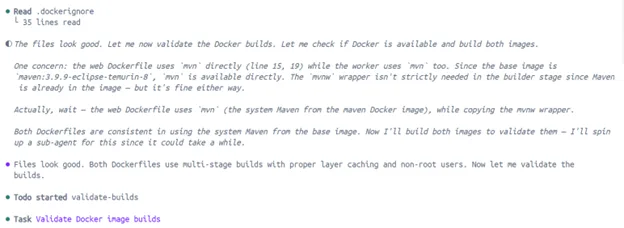
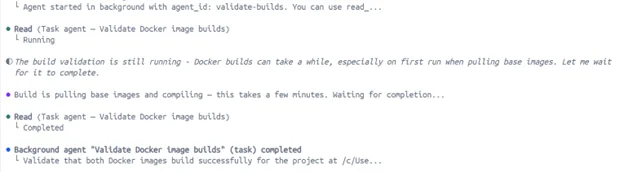
Here’s an example of what running fleet (parallel agent executions) looks like in action via Docker Desktop:
Consistency in preserving absolute paths and synchronizing filesystems
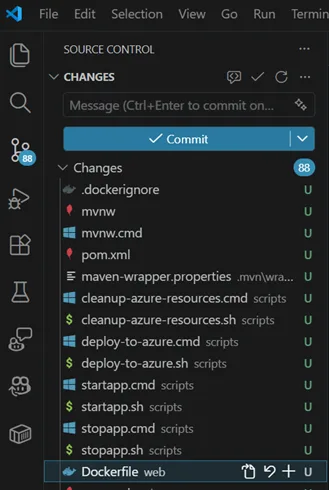
A common frustration with virtualized development environments is the disconnect between the host’s filesystem and the guest’s view. GitHub Copilot + Docker Sandboxes address this through bidirectional workspace synchronization, where the developer’s project directory is mounted directly into the sandbox. To ensure compatibility with standard build tools, the sandbox maintains the same absolute path as the host system. If a developer is working in /Users/dev/my-project on macOS, the agent sees the same path inside the MicroVM. This preservation of absolute paths is vital for ensuring that error messages, configuration files, and IDE integrations remain synchronized and coherent across the isolation boundary.
Using vscode as an example:


Welcome