


Part 1 of the Azure Skills Plugin series
Coding agents like GitHub Copilot and Claude Code are great at code, but getting your app to production on Azure is not just about writing code.
Really, it is about making the right calls. Which service fits this app? Which SKU fits this workload? Should this be App Service, Container Apps, Functions, AKS, or something else entirely? What needs to be validated before deploy? Which permissions, quotas, and guardrails matter?
That is exactly why skills are taking off: they give agents practical knowledge on demand instead of forcing them to guess.
Want to try this right now instead of reading the whole post first?
The Azure Skills Plugin brings that idea to Azure work. It bundles curated Azure skills, the Azure MCP Server, and the Foundry MCP Server in one install so a coding agent can do more than explain Azure. It can reason about Azure workflows and then execute them with real tools.
GitHub Copilot in VS Code is an obvious place to use the Azure skills plugin. So is Copilot CLI. But the bigger story is portability: because this is built around open skills and plugin patterns, the same package can also light up experiences in Claude Code and other tools that support plugins and skills.
Why This Hits Different
This is not another prompt pack.
It is not a folder full of clever one-liners. It is a carefully curated set of detailed Azure instructions:
- Skills package Azure expertise as reusable workflows, decision trees, and guardrails.
- MCP servers give the agent tools to act on Azure and Foundry.
- The plugin ships both together so the guidance and the execution layer stay aligned.
If you’ve been following the broader agent world, this pattern should feel familiar. Skills are becoming the way teams turn tribal knowledge into something reusable. The Azure Skills Plugin follows that pattern and applies it to real Azure work across modern coding agents.
Works Across Agent Hosts
The Azure Skills Plugin is super useful in any one host on its own. But what makes it especially powerful is that the same Azure knowledge and tooling can travel across hosts.
- GitHub Copilot in VS Code gives you the in-editor experience most developers will see first.
- Copilot CLI gives you the same skills in a terminal-first workflow that is becoming very popular.
- Claude Code can use the same plugin and skills for Azure-capable coding workflows.
- Other tools that support skills and plugins can benefit from the same packaged Azure expertise.
Developers already have their preferred tools and workflows, and Azure should meet them where they already build.
One Install, Three Layers of Capability
19+ Azure Skills – The Brain
Skills teach the agent how Azure work gets done.
They do not just list tools, but instead tell the agent when to use them, in what order, and what to avoid. The skills capture how an Azure expert would approach the job:
azure-prepareanalyzes your project and generates infrastructure code, Dockerfiles, andazure.yamlazure-validateruns pre-flight checks before you burn time on a failed deploymentazure-deployorchestrates the actual deployment pipeline viaazdazure-cost-optimizationfinds waste and produces concrete savings recommendationsazure-diagnosticstroubleshoots real failures with logs, metrics, and KQL
There are 19+ skills covering compute, observability, AI, compliance, storage, migration, RBAC, messaging, and more.
Azure MCP Server – The Hands
The Azure MCP (Model Context Protocol) Server provides over 200 structured tools across 40+ Azure services.
Here are the actual operations the agent can perform: listing resources, checking prices, querying logs, running diagnostics, provisioning infrastructure, and driving deployment workflows.
If you have seen my earlier Azure MCP content, you already know how powerful this tools layer is. The plugin brings the missing orchestration layer on top of it.
Foundry MCP Server – The AI Specialist
The Foundry MCP Server connects the agent to Microsoft Foundry for model deployment, agent management, and model catalog workflows.
If you are building AI-powered apps on Azure, this is the part that lights up model and agent scenarios instead of stopping at generic cloud guidance.
See the Flow
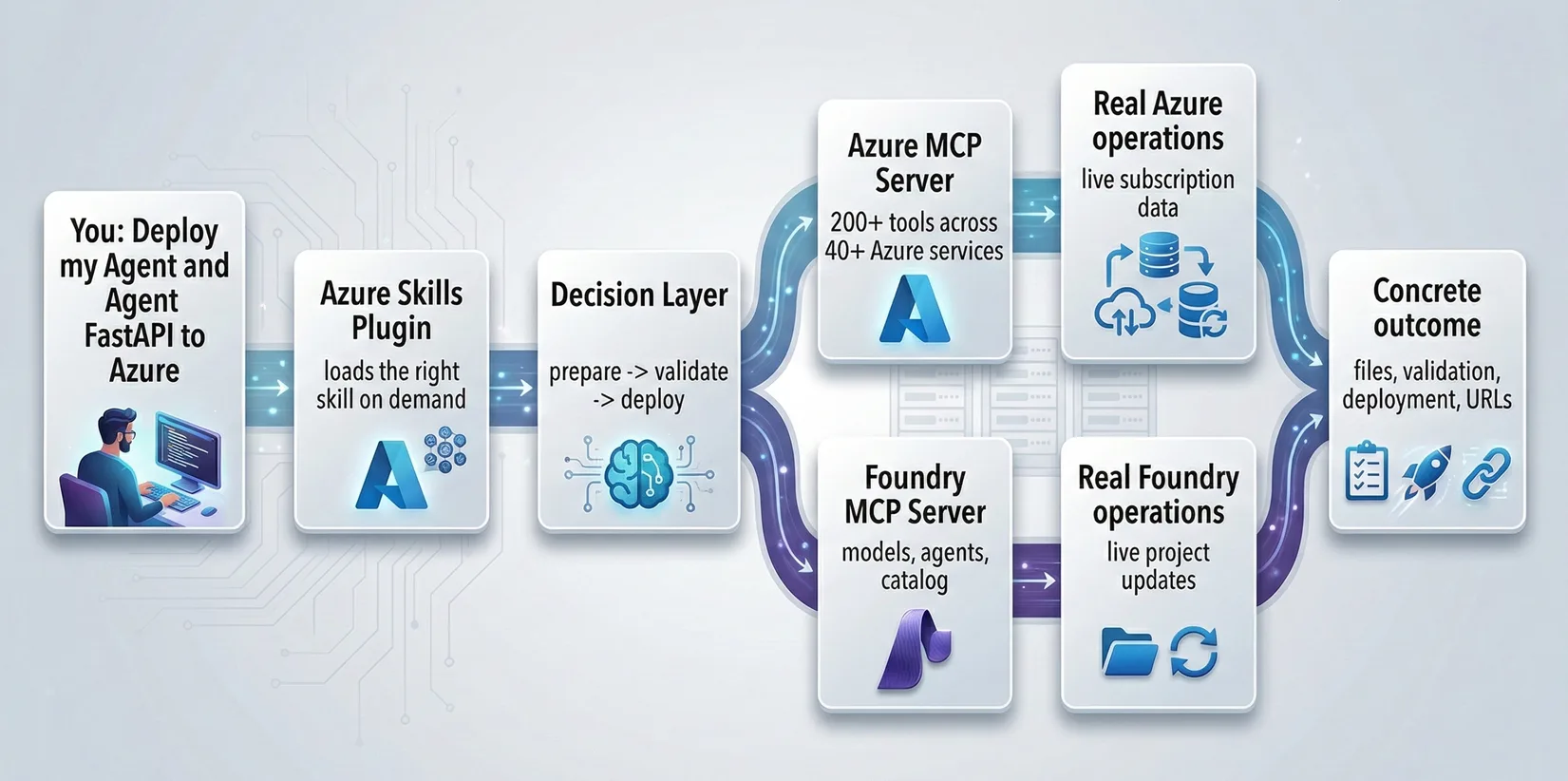
That is the core value proposition:
- Skills guide.
- MCP executes.
- The plugin packages both.
Before and After
Here is what the same prompt looks like with and without the plugin.
| Scenario | Without the plugin | With the plugin |
|---|---|---|
| Prompt | “Deploy my Python Flask API to Azure” | “Deploy my Python Flask API to Azure” |
| Copilot behavior | Generic tutorial, maybe some az commands, maybe a docs link |
Activates azure-prepare, azure-validate, and azure-deploy in sequence |
| Who makes the decisions? | You | Copilot follows an Azure workflow encoded by the skills |
| What gets produced? | Advice | Dockerfile, infrastructure files, azure.yaml, validation output, deployment actions |
| What actually runs? | Usually nothing | Real MCP tool calls against Azure and Foundry |
Same prompt. Completely different outcome.
Without the plugin, Copilot gives you directions.
But with the plugin, Copilot gets an Azure playbook and the tools to follow it.
Why Skills Matter Right Now
Skills solve a very specific problem: agents are smart, but they are often missing the situational knowledge required to do real work reliably.
That is why the skills model is resonating:
- They load on demand. You can install a large capability set without dragging every workflow into every prompt.
- They are auditable. Skills are plain text, version-controlled, reviewable, and easy to improve.
- They scale expertise. One team can package hard-won Azure knowledge once and reuse it over and over.
- They pair naturally with MCP. Skills provide the workflow. MCP provides the execution layer.
The Azure Skills Plugin matters because it turns that general idea into something concrete for developers shipping on Azure today.
Real Tools, Real Guardrails
The plugin uses real tools against real Azure resources. That is the point. It also means the right model is not blind trust. The right model is curated skills, trusted plugin sources, tool approvals, and least-privilege access.
That is a strength, not a weakness. Ultimately, the whole value of this approach is that Copilot is grounded in real workflows and real operations instead of hallucinated cloud advice.
What’s in the Box
When you install the Azure Skills Plugin, you get:
| Component | What It Does | How Many |
|---|---|---|
| Azure Skills | Azure expertise, workflows, and guardrails | 19+ skills |
| Azure MCP Server | Azure service tools | ~200 tools, 40+ services |
| Foundry MCP Server | AI model and agent workflows | AI Foundry integration |
Skills install into .github/plugins/azure-skills in your workspace. The MCP servers are configured via a .mcp.json file that the plugin sets up for you.
Who Is This For?
- Startups and AI founders that want to focus on shipping solutions, models, agents, and user experience instead of building and managing cloud infrastructure by hand
- Agent builders who want Azure + Foundry workflows in the same toolchain
- Developers who want to stop bouncing between docs, portal tabs, and complicated CLI commands
- Cloud engineers who want a faster path from request to execution
- DevOps teams who want repeatable infrastructure-as-code instead of ad hoc chat answers
- Anyone who has ever stared at Azure’s service catalog and thought, “which one do I actually need?”
You do not need to be an Azure expert. That is the whole point. The expertise comes with the plugin.
Where to Get It
Install the Azure Skills Plugin: https://aka.ms/azure-plugin
One link. One install. A much smarter Azure experience across the coding agents that support it.
Get Started in 60 Seconds
If you want the short version, here it is.
Prerequisites
- A compatible host such as GitHub Copilot in VS Code, Copilot CLI, or Claude Code
- Node.js 18+ on your PATH (the MCP servers use
npx) - An Azure account if you want to do real Azure operations
- Azure CLI (
az) installed and signed in withaz login - Azure Developer CLI (
azd) installed and signed in withazd auth loginif you want to use deployment workflows
Install
- Go to aka.ms/azure-plugin
- Follow the install flow for your host
- Let it add the Azure skills plus the Azure and Foundry MCP server configuration
For host-specific install commands and troubleshooting, see the Azure Skills Plugin README.
Verify
After install, confirm three things:
- The Azure skills package is available
- The Azure MCP Server is configured and running
- The Foundry MCP Server is configured and running
In VS Code-style hosts, this usually means you should see skills available to the agent and a .mcp.json with azure and foundry configured.
Smoke Test
Try one prompt in your host of choice:
“What Azure services would I need to deploy this project?”
Then try one tool-backed prompt:
“List my Azure resource groups”
If the first prompt gives you structured Azure guidance and the second returns real resources from your subscription, you are up and running.
What’s Next in This Series
This post is the kickoff. Here is what is coming next:
- Install Guide – Step-by-step setup with screenshots
- How Skills + MCP Work Together – The architecture under the hood
- The Core Workflow – Prepare → validate → deploy
- Skills That Save You Hours – Cost optimization, diagnostics, compute, and more
- Inside a SKILL.md – How skills actually work
- Real-World Walkthrough – Full-stack app to production, entirely through Copilot
- What’s Next – Where Azure skills, agents, and MCP go from here
Try It Yourself
- Install the plugin: aka.ms/azure-plugin
- Open your preferred compatible host with a project you would like to deploy to Azure
- Try: “What Azure services would I need to deploy this project?”
- Then try: “List my Azure resource groups”
- Then try: “Prepare this app for Azure”
- Watch the skills kick in
If you have seen Azure MCP before, this is the next step: the same hands, now with a brain and a plan.
Next up: How to Install the Azure Skills Plugin


Продуманный внешний вид имеет большое значение в создании первого впечатления.
Она помогает передать личный стиль и ощущать внутренний комфорт.
Современный стиль формирует мнение окружающих.
В повседневной жизни одежда может повышать самооценку.
https://www.senscritique.com/LePodium
Хорошо подобранная одежда облегчает деловое общение.
При выборе одежды важно учитывать личные предпочтения и уместность ситуации.
Мода дают возможность обновлять образ.
В целом, умение стильно одеваться помогает чувствовать себя увереннее.
Hi Chris,
Thanks for sharing the coupler with skills and MCP. I have posted a detailed anatomy of how skills.md can be configured. Possibly one of your upcoming series candidates.
techcommunity.microsoft.com/blog/azuredevcommunityblog/supercharge-your-dev-workflows-with-github-copilot-custom-skills/4510012
Regards,
Sayantan
obci1m
hcuno1
Excited to see new Azure tools for developers! As a tech reviewer, I love seeing innovation in this space. We review developer hardware – our MacBook Pro M1 Max review: https://petsonlypets.com/2021-macbook-pro-m1-max-review-game-changing-for-pros/ has been very popular among devs. More tech reviews at PetsOnlyPets.com
6nxxei
phnn5q
xnv8lw
Truly amazing article. Very crisp, clear and practical.
Thanks Chris.
Mahendra
Thank you Mahendra!
Thank You Chris.
Using and loving it.
Thank you Jairo!
I’d love to hear what’s working well for you!
You can reach me on Linked In if you’d like to chat – http://www.linkedin.com/in/christopherjharris
-Chris
This is fantastic! Tested it out this morning and can already see me using it for a lot of our work (I work for a Managed Microsoft Partner in the UK).
Would love to see my azure diagram skill as part of this! https://github.com/cmb211087/azure-diagrams-skill
Thanks Carl!
Please reach out to me about your diagram skill. We’ve been looking at adding something like that, though dependencies can be challenging.
-Chris – http://www.linkedin.com/in/christopherjharris
Wow Chris. I have to say I really enjoyed your writings especially when you explain what is next for coding agents! Can’t wait for the next series to come and definitely will try out this Azure Plugin since I’ve been working around with the Azure MCP quite a while.
Seems like things like skills/plugins are getting popular and improving especially what I read about this blog: ecc.tools
Thanks for sharing and definitely will look forward on what is coming next!
Thank you Oliver!
The great team I work with has been working incredibly hard on this and it’s wonderful to see people getting excited about it!
Please don’t hesitate to share any feedback with us!
-Chris
I really appreciate this update. I’m still learning Azure, and the biggest challenge for me has always been understanding the right workflow and knowing which services to use. This plugin finally makes that feel achievable. It’s not just guidance, it will hopefully help me learn by doing, step by step. Thanks to this, I feel like I can finally build, deploy, and understand Azure in a much more practical way. 🙂
Thank you @Niel!
I will share your kind words with the team right now! They will really appreciate hearing from you!!