


We’ve talked about the human scale problem and what happens when infrastructure scales but understanding doesn’t. If you’ve been following along, you know the thesis: our tools have outpaced our ability to operate them, and platform engineering is how we’re fighting back.
But here’s the thing – we’ve been fighting with one hand tied behind our backs. We’ve been encoding knowledge into runbooks that go stale, documentation that drifts, and tribal expertise that walks out the door when someone takes a new job. What if the platform itself could think alongside us?
That’s what we mean by agentic platform engineering: not replacing the humans, but giving the platform the ability to observe, reason, and act – with humans still firmly in the pilot seat.
Everything we cover in this post has a companion repository you can clone, fork, and run yourself: microsoftgbb/agentic-platform-engineering.
You can also follow along Ray’s walkthrough on YouTube:
It’s organized into three acts that mirror the evolution we’ll walk through below, complete with agent definitions, GitHub Actions workflows, MCP configurations, and sample Argo CD manifests.
The Paradox of Choice
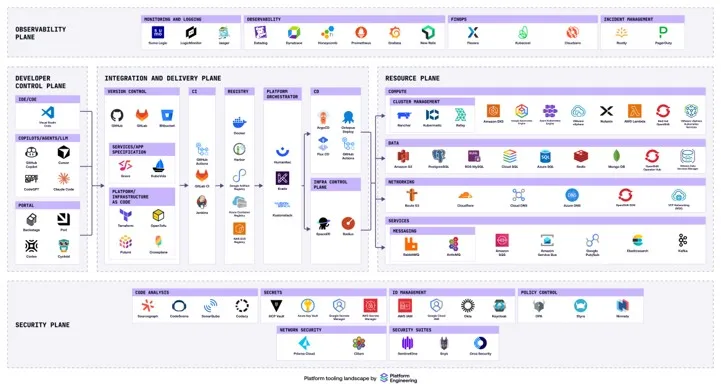
No platform engineering conversation is complete without the eye chart. It’s the paradox of choice made real. You have a thousand different tools. You might know they exist, but the granular details of how to use each one, when to reach for it, how to compose them together? There’s no way the human mind can hold all of that.
And yet, that’s exactly what we’re asking platform engineers to do. Case in point: Platform Engineering on AKS with GitOps, CAPZ and ASOv2.
Build a GitOps-Driven Platform on AKS with the App of Apps Pattern | AKS LABS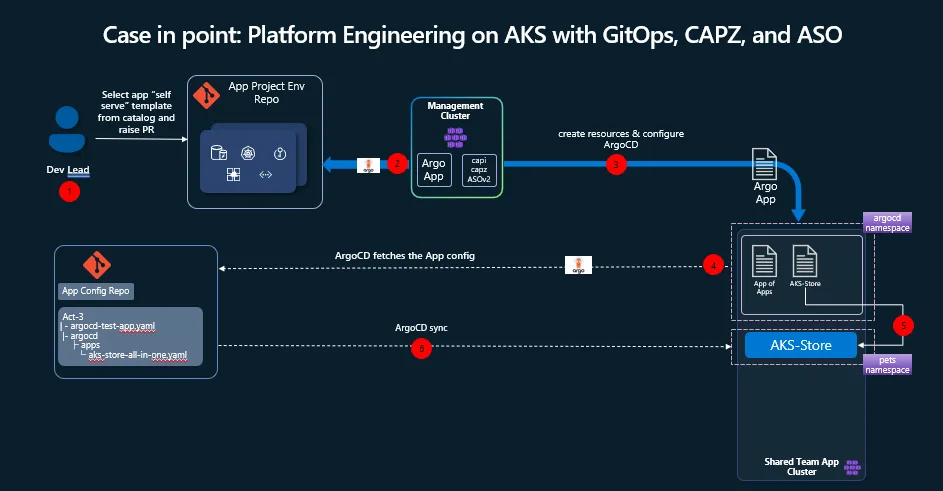
What we’ve found working with customers is that there are common patterns. Not the only patterns, but ones that keep showing up. Developer self-service through an internal developer portal. A management cluster running Cluster API for Azure (CAPZ) and Azure Service Operator (ASO). GitOps with Argo CD syncing application state from config repos. GitHub Actions handling CI/CD. It’s a well-trodden path-and it works.
If you want a concrete AKS-focused example of that pattern, the AKS platform engineering lab for CAPZ and ASO is a good reference architecture to study alongside this post.
But getting there isn’t easy. And operating it on day two? That’s where things get interesting.
A Story in Three Acts
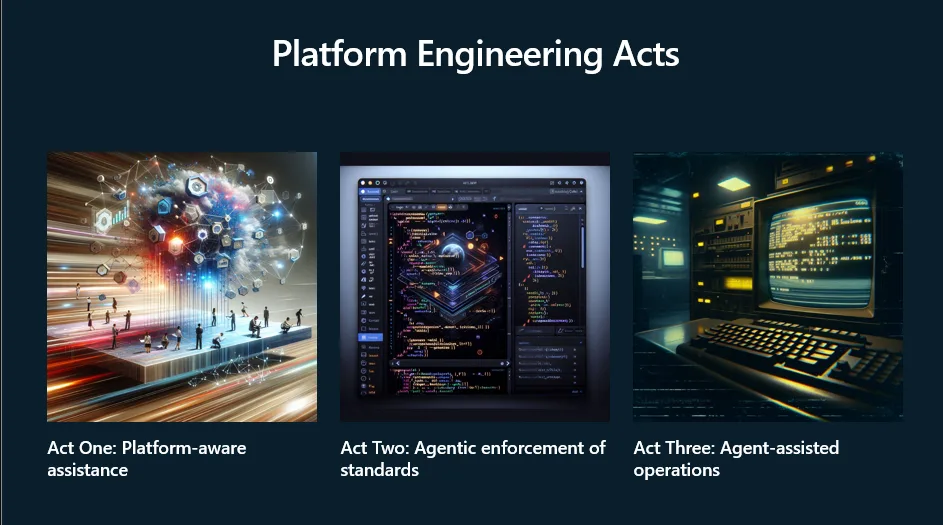
We think about the evolution of agentic platform engineering in three acts, each building on the last. They also roughly map to the waves of GitHub Copilot itself-from autocomplete on steroids, to contextual enforcement, to autonomous agents that can take meaningful action.
Act One: The Platform is growing faster than the Team
The first problem is deceptively simple: knowledge lives in people, and people don’t scale.
You’ve got tribal knowledge scattered across the team. Someone knows the migration path. Someone else knows the networking quirks. A third person wrote the Terraform modules three years ago and sort of remembers how they work. When you’re a small team, this is fine – you shout across the desk and get your answer. As the team grows, you don’t even know what everyone knows or doesn’t know. Documentation exists in a Word doc somewhere, maybe, if someone remembered to write it, and if it hasn’t drifted into irrelevance.
The result? The platform team becomes a bottleneck. Every question routes through the same few experts. Every onboarding is a manual knowledge transfer that never quite covers everything. It’s the high-toil, rinse-and-repeat cycle that the Phoenix Project book by Gene Kim, Kevin Behr and George Spafford warned us about.
The shift: we can now embed that knowledge directly into the platform. GitHub Copilot, aware of the source code, the infrastructure, and the conventions encoded in the repository itself, becomes the experienced colleague who’s always available. New developer needs to understand how the deployment pipeline works? Ask Copilot. Need to compose infrastructure from the service catalog? Copilot can navigate your Terraform module repository, understand what’s been vetted, and help you assemble what you need.
This extends to brownfield environments too. Already deployed infrastructure through the portal without templatizing it? An AI assistant can reverse-engineer that infrastructure, examine the resource group, catalog the deployed services, and generate the Terraform or Bicep templates you should have written in the first place. It’s not magic. It’s making the knowledge that already exists in your environment accessible through conversation.
For hands-on examples, the Act 1 workshop walks you through building your first platform agent-from defining a persona and codifying workflow rules to grounding the agent in your organization’s documentation. It also includes a starter prompt template you can adapt immediately. For reference implementations of IaC-aware agents, check out the IaC Module Catalog Agent and the Infrastructure Reverse Engineer Agent.
Act Two: Standards Exist, but They’re Not Enforced
Awareness gets you far, but it only gets you so far. The next question is: how do we enforce standards consistently without creating friction?
We rely on each other to know exactly what to do, when to do it, and exactly how to go about it. That’s a brittle process. People forget. People copy-paste from Stack Overflow without fully understanding what they’re deploying. People unknowingly violate compliance rules – especially in regulated industries where the number of requirements exceeds what anyone can memorize.
The pattern here is straightforward: every push to the repository triggers a GitHub Action. That action runs GitHub Copilot in the background with a standardized prompt – a template that tells it exactly what to check and what the expected outcome should be. Did documentation need to be updated? Were unit tests generated for the new code? Does the infrastructure configuration comply with your organization’s security policies?
This catches problems early, when the cost of fixing them is low, instead of discovering violations during a security review weeks later. And here’s what makes it fundamentally different from a static linting rule or a brittle if – statement: the AI assistant adapts. Update the rules in a markdown file and the guardrails update with it. New compliance requirement from your governance team? Add it to the instructions. No pipeline changes needed. No code rewrite. The enforcement mechanisms flex to new rules in a way that manual processes never could.
For organizations with knowledge scattered across SharePoint, databases, or external compliance providers, this is where Microsoft Foundry comes in. You can host custom models for security or anomaly detection inside Foundry, connect to data sources through Foundry IQ, and have GitHub Copilot pull that information in via MCP servers. The rules don’t have to live in the repo – they just have to be reachable.
The guardrails stop feeling like hurdles. They become the thing that frees you up-something else is carrying the burden of remembering all the rules so you don’t have to.
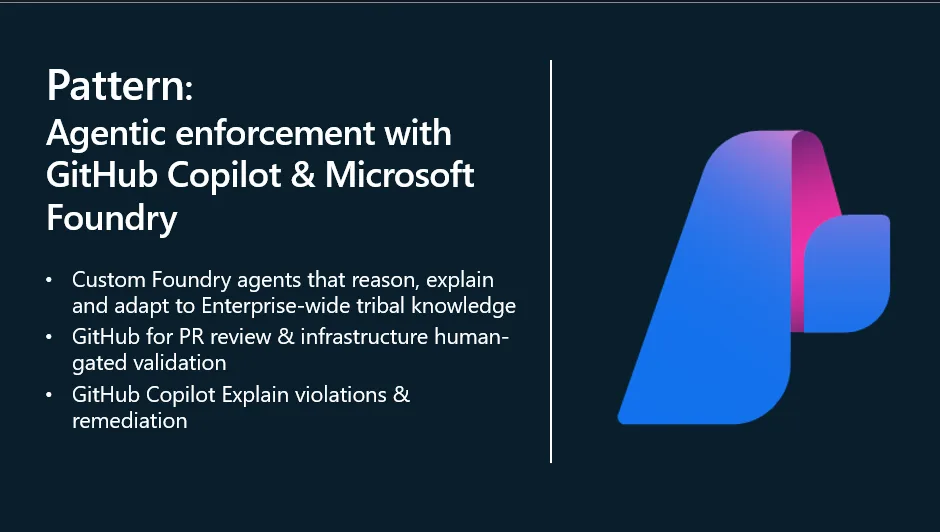
The Act 2 workshop walks through this crawl-walk-run progression in detail. It starts with reusable team prompts-stored as .prompt.md files in your .github/prompts/ directory-that any team member can invoke on-demand. The repo includes production-ready examples for AKS operations: aks-check-pods.prompt.md for diagnosing unhealthy pods, aks-check-nodes.prompt.md for node-level issues, and aks-remediation.prompt.md for generating specific fix steps. From there, it shows how to wire these into CI/CD with a documentation generator workflow that runs GitHub Copilot CLI on every push.
Act Three: Kubernetes Operations Don’t Scale Linearly
This is where it gets exciting. We’ve moved past the assistant that helps you write code and the enforcer that catches mistakes. Now we’re talking about agents that can observe, diagnose, and propose remediation autonomously.
The core issue on day two of platform operations is this: platform engineers spend their time firefighting instead of improving the platform. Misconfigurations, degraded services, mysterious latency spikes-these pull you into reactive mode. And the expertise to diagnose them doesn’t scale across teams. Runbooks are static. As much as we love them, they don’t map to every scenario. You need something softer on the edges, something that adapts to the specific failure in front of you.
The Cluster Doctor
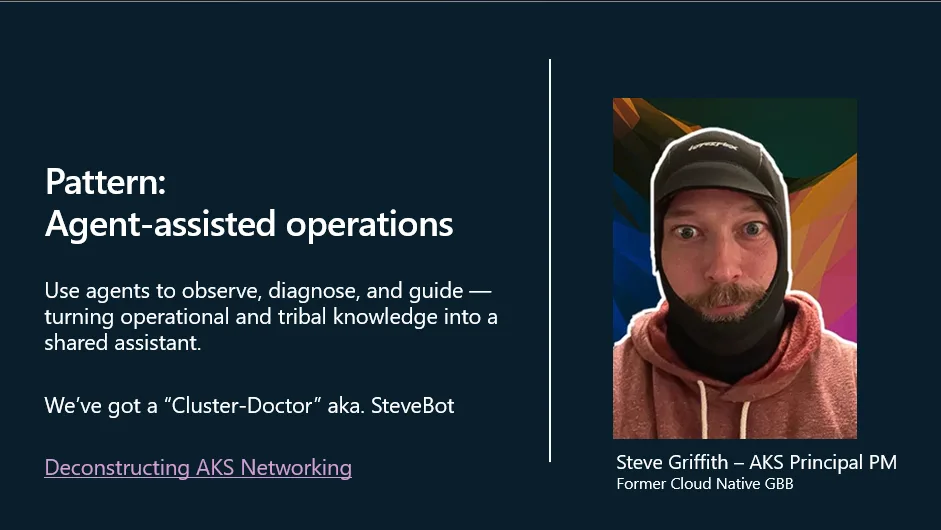
We built what we’re calling the Cluster Doctor-a custom GitHub Copilot agent configured with the diagnostic knowledge of an experienced platform engineer. Think of it as codifying the troubleshooting instincts of your best SRE into a system that’s always on. The full Act 3 workshop covers setup, configuration, and a live failure simulation you can run yourself.
The agent is defined in a single markdown file (cluster-doctor.agent.md) that gives it a persona (senior Kubernetes administrator and SRE), a systematic diagnostic workflow (collect, verify, diagnose, triage, remediate), and critical safety constraints (never attempt destructive changes without authorization, verify cluster identity before any write action).
Here’s how it works in practice:
Crawl: Start with prompt engineering. Your experienced engineers document their diagnostic steps – the kubectl commands they’d run, the things they’d check, the order they’d investigate. This lives in the repository as markdown files: agent definitions, instructions, and prompts that GitHub Copilot can follow.
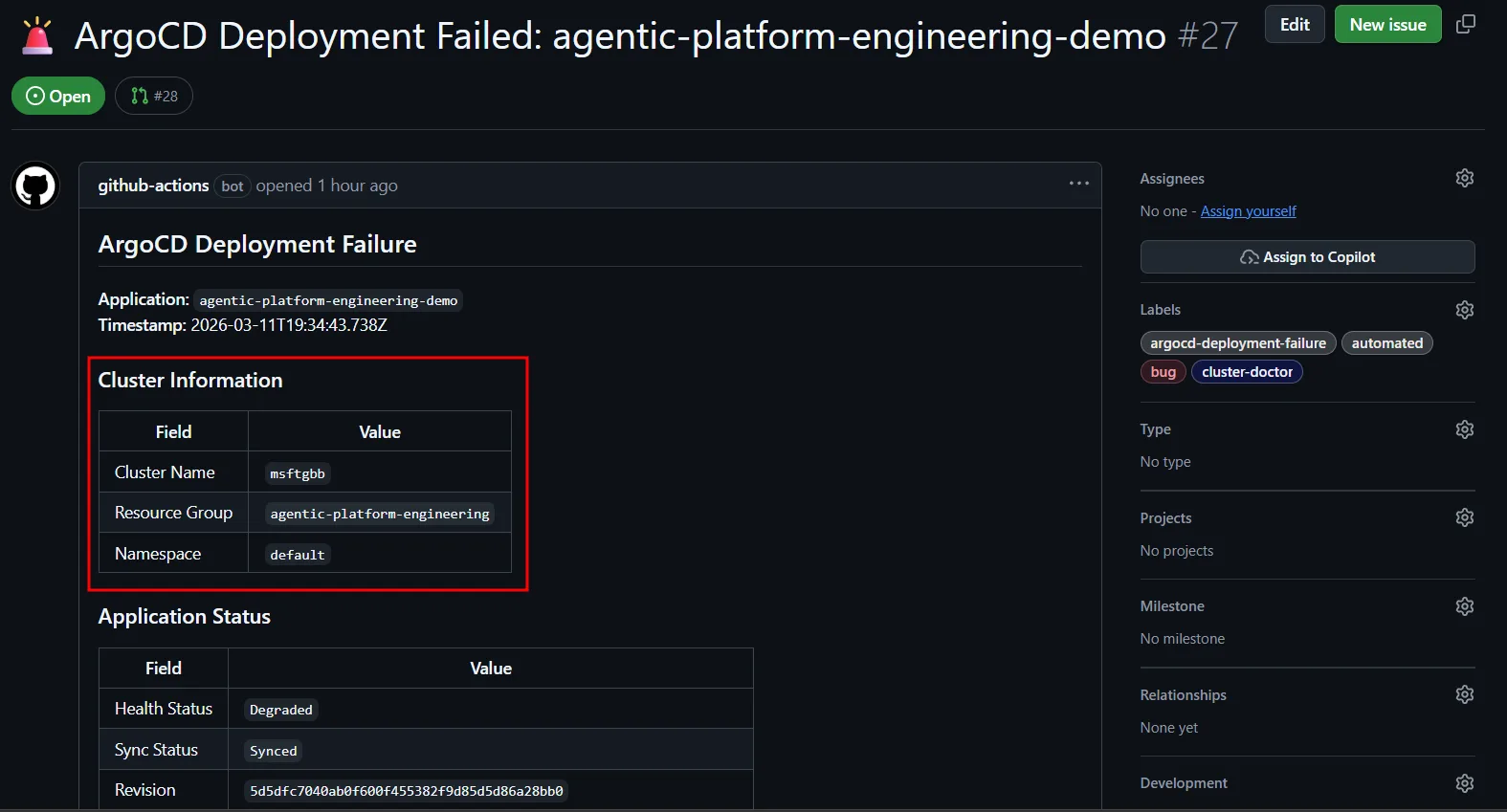
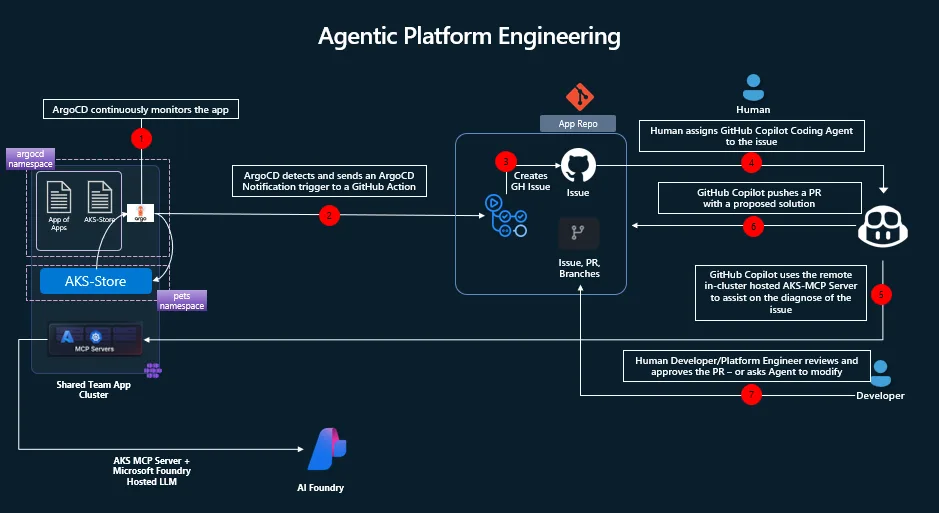
Walk: Wire it into your operational workflow. Argo CD monitors application health in the cluster. When a deployment degrades, Argo fires a webhook to GitHub Actions, which creates a GitHub issue with the failure details – cluster name, resource group, the initial telemetry. A human sees the issue, tags it with a label (say, cluster-doctor), and the agent spins up. It reads the issue, authenticates to Azure via Workload Identity Federation, runs kubectl commands against the affected cluster, queries the AKS MCP server for deeper telemetry, and even leverages eBPF tooling through Inspektor Gadget for hard-to-diagnose problems like latency or CoreDNS issues. Then it opens a pull request with the proposed fix.
Run: Remove the human trigger. When the issue lands in GitHub, the label is applied automatically. The Cluster Doctor starts its investigation immediately, walks through the diagnostic steps, and presents its findings-complete with a PR for the remediation and a summary of root cause analysis. A human reviews and approves. The agent did the detective work; you make the call.
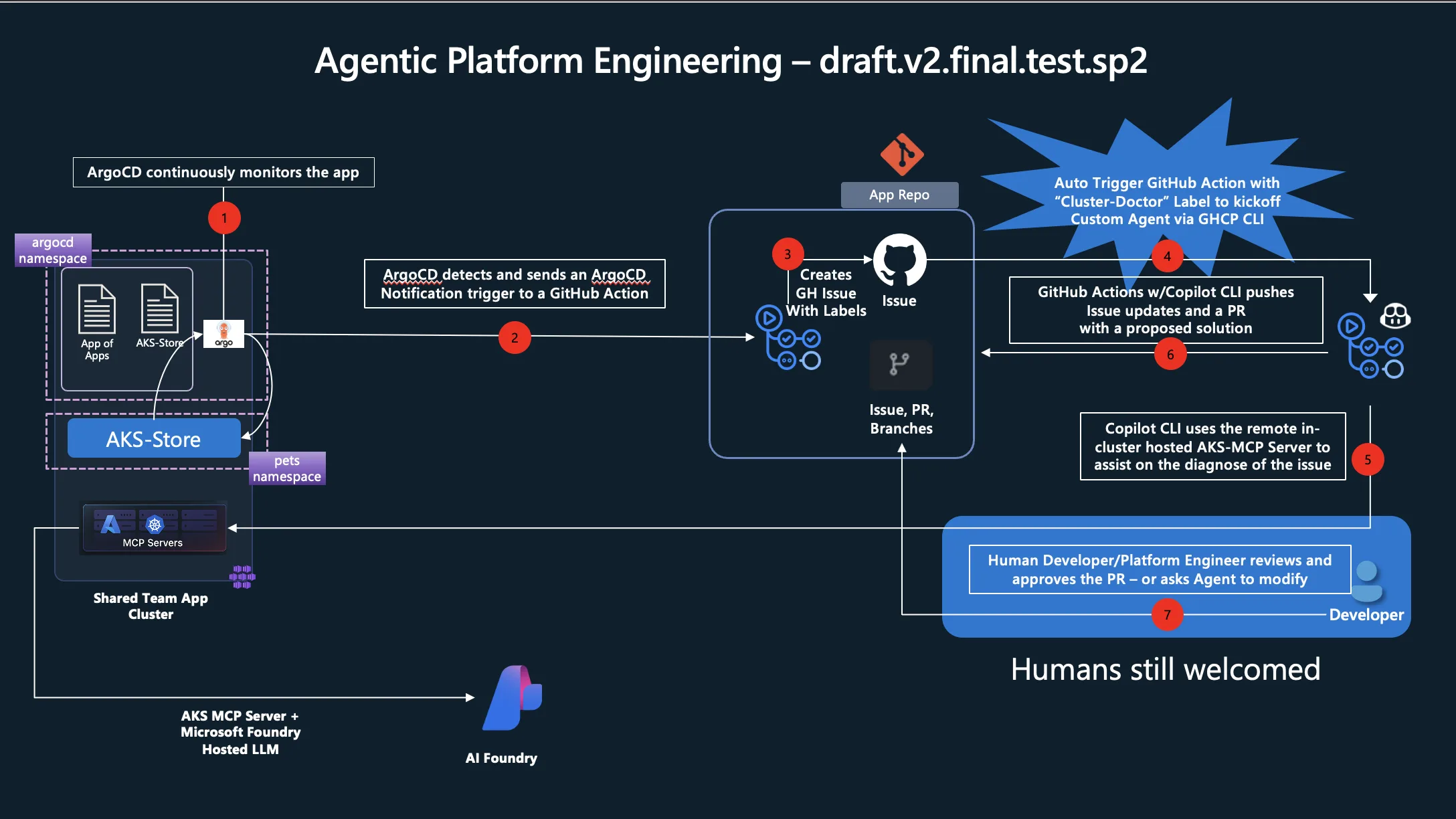
What used to take hours of expert time-connecting to the cluster, running commands, correlating logs, understanding the failure chain-now happens in the background while you’re doing something else.
The Wiring
The implementation is less exotic than it sounds. The first handoff is simply an event pipeline. Argo CD detects that a deployment has failed or become unhealthy. Argo CD Notifications then turns that signal into a fully customizable message, packages the app and cluster context into a payload, and sends it to GitHub using repository_dispatch. That GitHub event starts a workflow whose job is to create or update a GitHub issue with the right labels, troubleshooting context, and metadata for the agent.
Visually, the flow looks like this:
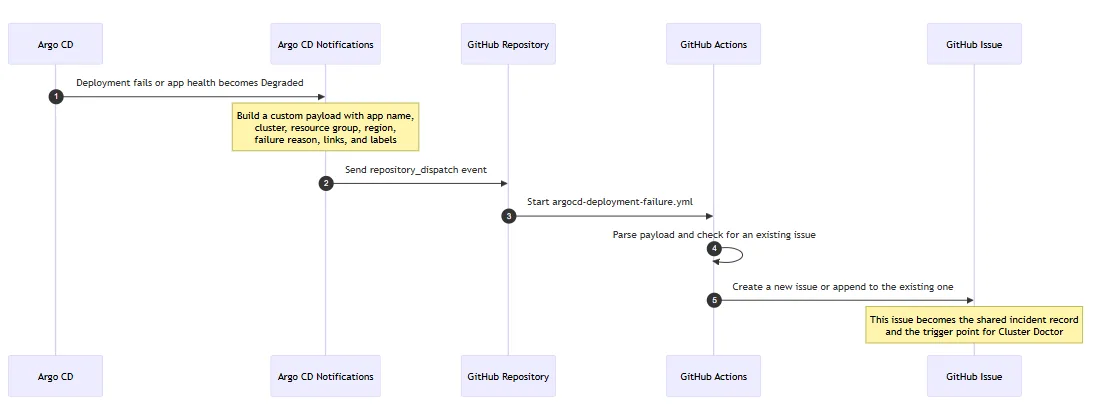
In plain terms: Argo CD detects the problem, Argo CD Notifications shapes that problem into a useful message, GitHub receives it as an event, and GitHub Actions turns that event into a durable issue that both humans and agents can work from.
That customization point in Argo CD Notifications is important. You are not limited to a generic alert. You can decide exactly what the downstream automation receives: application name, cluster name, Azure resource group, region, failure reason, links, suggested commands, and any other context that will help the next workflow or the responding engineer.
Two GitHub Action workflows do the heavy lifting:
- argocd-deployment-failure.yml – receives the Argo CD webhook via
repository_dispatch, parses the payload, creates a structured GitHub issue with labels, troubleshooting commands, and all the context the agent will need. It also deduplicates-if an issue already exists for the same app, it adds a comment instead of creating a new one. - copilot.trigger-cluster-doctor.yml – fires when the
cluster-doctorlabel is applied to an issue. It checks out the repo, installs GitHub Copilot CLI, authenticates to Azure via Workload Identity Federation, and invokes the Cluster Doctor agent with a prompt that points it at the triggering issue.
The complete Argo CD notification setup-including webhook service definitions, payload templates, and triggers-is documented in the ArgoCD GitHub Issue Creation Setup Guide.
Setting up permissions and tokens
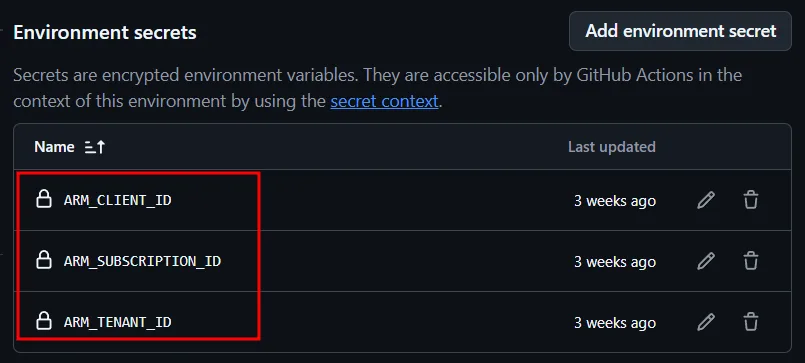
On the agentic-platform-engineering repo, we need to configure the copilot environment and also a PAT token that will be used to perform a few actions against the repo itself. Before you proceed, make sure you run the AKS side of this setup as described in the Deploy MCP Server on AKS with Workload Identity. From the AKS setup, we need to save the following information, which we will use here: ARM_CLIENT_ID, ARM_SUBSCRIPTION_ID and ARM_TENANT_ID.
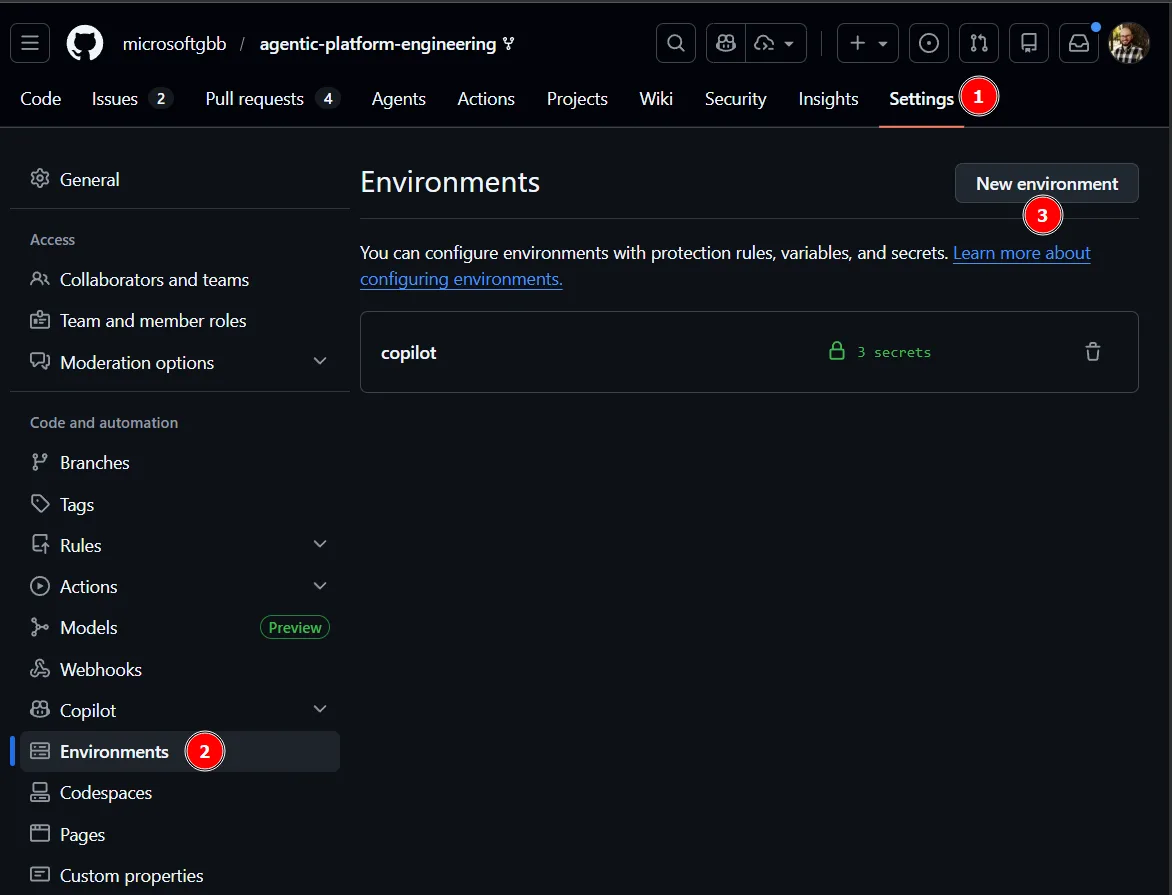
Back on GitHub, we need to setup the copilot environment. Go Settings, Environments and New Environment.
Next, create an environment named copilot and add the following secrets: ARM_CLIENT_ID, ARM_SUBSCRIPTION_ID and ARM_TENANT_ID.
Using MCP with GitHub Copilot
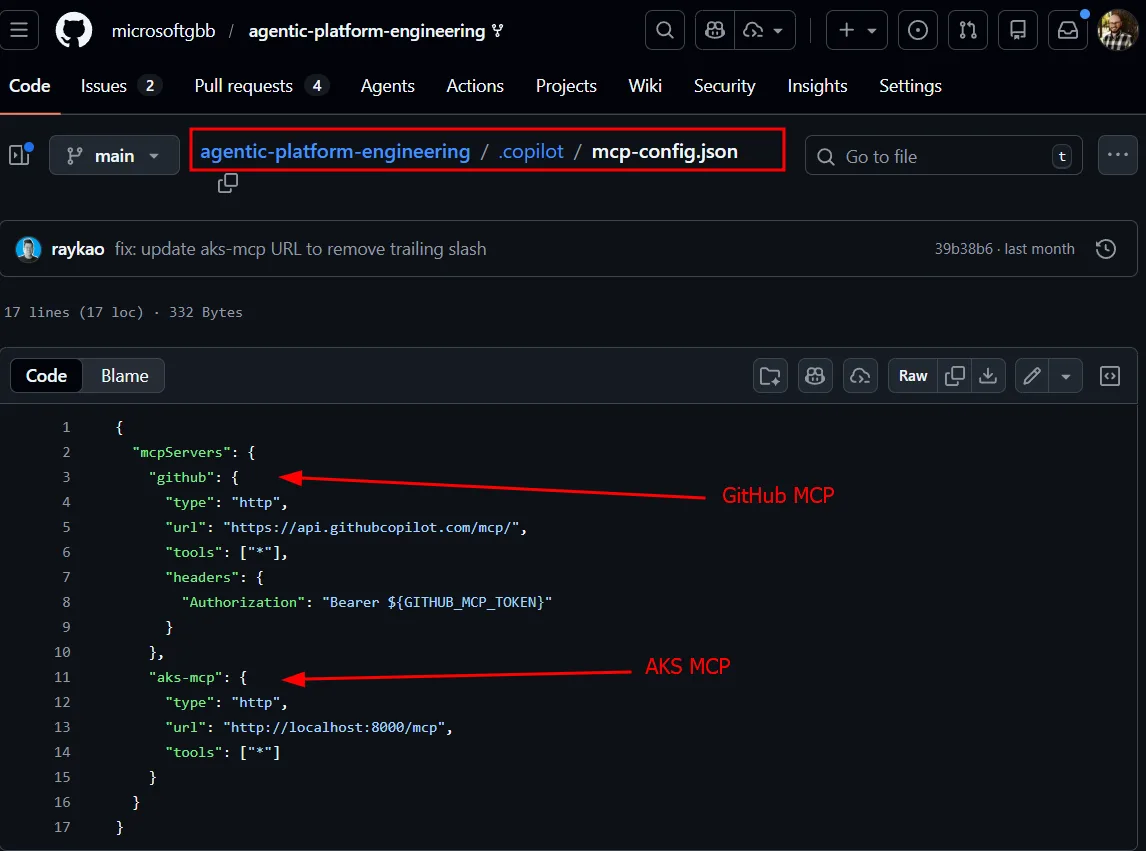
An MCP configuration file tells Copilot how to reach both the GitHub MCP server (for reading issues and creating PRs) and the AKS MCP server running inside the cluster (for kubectl and deeper diagnostics). The cluster itself embeds metadata in its Argo CD config map: resource group name, cluster name, region. When the agent picks up an issue, it knows exactly where to look. It can run kubectl, query MCP endpoints, and even use eBPF-based tooling for deep packet-level diagnostics-all from within a GitHub Actions runner.
From Reactive to Adaptive
The shift we’re describing isn’t just about automation. We’ve had automation for years. It’s about moving from brittle, static processes to adaptive, reasoning-capable systems.
| Before | After | |
|---|---|---|
| Knowledge | Tribal, in people’s heads | Encoded in repos, accessible via conversation |
| Standards | Manual enforcement, easily forgotten | Automatically applied on every push |
| Incident response | Reactive, expert-dependent | Agent-initiated, human-approved |
| Runbooks | Static documents | Dynamic agents that adapt to context |
| Onboarding | Weeks of knowledge transfer | Ask the platform, get answers immediately |
The tools underneath haven’t changed-source control, GitHub Actions, infrastructure as code, kubectl. These are battle-tested and they’re not going anywhere. What’s changed is the layer on top: AI agents that can reason across all of these tools simultaneously, connecting dots that would take a human hours to trace.
What This Means for Your Platform
If you’re already doing platform engineering-even if it feels incomplete – you have a foundation to build on. The patterns we’ve described layer onto what you already have:
- Start with awareness: Give GitHub Copilot access to your repos, your service catalogs, your infrastructure definitions. Let it become the knowledgeable colleague that’s always available.
- Add enforcement: Set up GitHub Actions that trigger on code pushes and run Copilot-powered checks against your standards. Start with documentation generation-it’s low risk and high impact.
- Enable agent operations: Wire Argo CD (or your monitoring tool of choice) to create GitHub issues on failures. Build a custom agent that can authenticate to your clusters and diagnose problems. Keep humans in the approval loop.
You don’t have to boil the ocean. Pick one act, implement it, and iterate. The crawl-walk-run model applies here as much as anywhere else-each step delivers value on its own while building toward something greater.
The full repository is at microsoftgbb/agentic-platform-engineering. Clone it, walk through the acts, break the sample app on purpose, and watch the Cluster Doctor figure out what went wrong.
For a shorter companion overview, the Platform Engineering: Creating Scalable and Resilient Systems | BRK188 on YouTube is also worth watching and also make sure you check the Platform Engineering for the Agentic AI era | All things Azure blog post, that provides a solid walkthrough of the current state of Platform Engineering and its future state.

0 comments
Be the first to start the discussion.