


This guide covers setting up Claude Code CLI and VS Code extension with Microsoft Foundry, configuring CLAUDE.md for project context, integrating Spec Kit for structured development, and running Claude Code in GitHub Actions.

Prerequisites
- Azure subscription with Foundry access
- Node.js 18+ (for Claude Code CLI)
- Optional: Azure CLI installed (
az logincompleted)
Step 1: Deploy Claude Models in Foundry
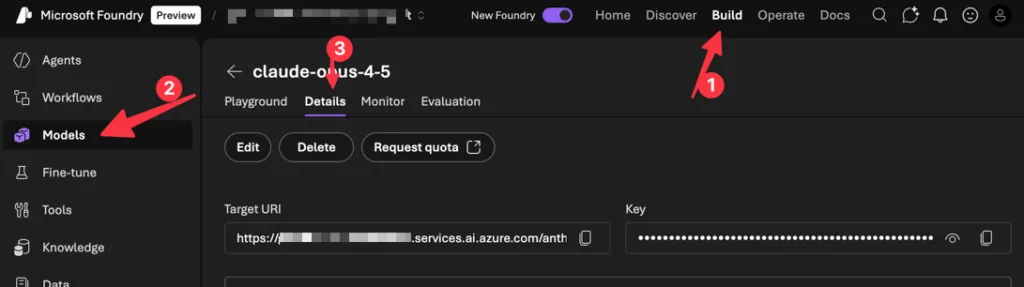
- Go to Discover → Models and search “Claude”
- Select your model (Opus 4.5, Sonnet 4.5, or Haiku 4.5)
- Click Deploy → choose Default settings
- Click on the Details tab and note your Target URI and Key
Alternative: Model Router
Model Router is a Foundry model that intelligently routes each prompt to the best underlying model based on query complexity, cost, and performance. Version 2025-11-18 supports Claude Haiku 4.5, Sonnet 4.5, and Opus 4.1 alongside GPT, DeepSeek, Llama, and Grok models.
For Claude Code users, this means:
- Automatic model selection: Simple prompts route to faster/cheaper models; complex coding tasks route to more capable models
- Cost optimization: Use routing profiles to balance quality vs. cost while maintaining baseline performance
- Single endpoint: One deployment handles all routing decisions across your model fleet
To use: First deploy the Claude models you want included, then deploy Model Router and enable them via model subset configuration.
Step 2: Install Claude Code CLI
npm install -g @anthropic-ai/claude-code
Verify installation:
claude --version
For more advanced installation options, visit Claude Code Docs.
Step 3: Configure for Foundry
Set these environment variables:
Bash / WSL:
# Required
export CLAUDE_CODE_USE_FOUNDRY=1

# Azure resource name (replace {resource} with your resource name)
export ANTHROPIC_FOUNDRY_RESOURCE={resource}
# Or provide the full base URL:
# export ANTHROPIC_FOUNDRY_BASE_URL=https://{resource}.services.ai.azure.com

# Optional: specify model deployment names, matching the deployment names in Foundry
export ANTHROPIC_DEFAULT_SONNET_MODEL="claude-sonnet-4-5"
export ANTHROPIC_DEFAULT_HAIKU_MODEL="claude-haiku-4-5"
export ANTHROPIC_DEFAULT_OPUS_MODEL="claude-opus-4-5"
PowerShell:
# Required
$env:CLAUDE_CODE_USE_FOUNDRY = "1"

# Azure resource name (replace {resource} with your resource name)
$env:ANTHROPIC_FOUNDRY_RESOURCE = "{resource}"
# Or provide the full base URL:
# $env:ANTHROPIC_FOUNDRY_BASE_URL = "https://{resource}.services.ai.azure.com"

# Optional: specify model deployment names, matching the deployment names in Foundry
$env:ANTHROPIC_DEFAULT_SONNET_MODEL = "claude-sonnet-4-5"
$env:ANTHROPIC_DEFAULT_HAIKU_MODEL = "claude-haiku-4-5"
$env:ANTHROPIC_DEFAULT_OPUS_MODEL = "claude-opus-4-5"
Authentication
Option A: Entra ID (recommended)
az login
Claude Code uses your Azure CLI credentials automatically.
Option B: API Key
Bash / WSL:
export ANTHROPIC_FOUNDRY_API_KEY="your-foundry-api-key"
PowerShell:
$env:ANTHROPIC_FOUNDRY_API_KEY = "your-foundry-api-key"
VS Code Extension Setup
The Claude Code VS Code extension provides a native graphical interface for Claude Code directly in your IDE.
- Install the extension from the VS Code Marketplace.
- Open VS Code settings (
Ctrl+,orCmd+,) and search for “Claude Code: Environment Variables”. - Click “Edit in settings.json” and add the following:
{ "Claude Code: Environment Variables": { "CLAUDE_CODE_USE_FOUNDRY": "1", "ANTHROPIC_FOUNDRY_RESOURCE": "{your-resource-name}", "ANTHROPIC_FOUNDRY_API_KEY": "<optional-for-non-entra-auth>" } } - Click the Spark icon in the sidebar to open the Claude Code panel.
- Claude Code will authenticate using your Azure credentials (run
az loginfirst if needed).
The extension supports auto-accept edits mode, plan mode, extended thinking, and file management with @-mentions—all while routing through your Microsoft Foundry deployment.
Step 4: Validate Configuration
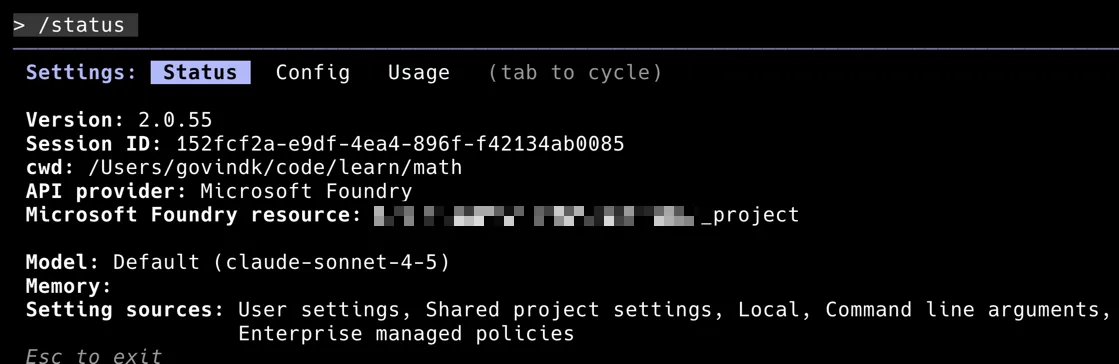
Verify that Claude Code is correctly configured to use Microsoft Foundry. Open a terminal, launch Claude Code, and run the /status command:
claude
> /status
Confirm that:
- API provider shows “Microsoft Foundry”
- Microsoft Foundry resource points to your Foundry project
- Model matches your deployed model (e.g., claude-sonnet-4-5)
Step 5: CLAUDE.md Project Memory
Claude Code reads CLAUDE.md files for project context. Files are loaded in order (later files override earlier):
~/.claude/CLAUDE.md– global defaults./CLAUDE.md– repo root./current-dir/CLAUDE.md– current directory
Example CLAUDE.md for a Microsoft Agent Framework project in Python:
# Project: Customer Service Agent

## Overview
Multi-agent system using Microsoft Agent Framework with Foundry Agent Service.

## Tech Stack
- Python 3.11+
- agent-framework (Microsoft Agent Framework Python SDK)
- Microsoft Foundry for hosted agents
- MCP tools for enterprise data access

## Architecture
- `src/agents/` - Agent definitions (triage, specialist, escalation)
- `src/tools/` - MCP tool implementations
- `src/workflows/` - Multi-agent orchestration
- `tests/` - pytest with async fixtures

## Commands
```bash
# Run locally
python -m src.main

# Test
pytest tests/ -v

# Deploy to Foundry Agent Service
az ai agent deploy --config deploy.yaml
```

## Code Patterns
Use `AzureAIAgentClient` with `AzureCliCredential`:
```python
async with AzureAIAgentClient(async_credential=AzureCliCredential()) as client:
    agent = client.create_agent(instructions="...", tools=[...])
```

## Current Sprint
- Implementing RAG grounding with Foundry IQ
- Adding Fabric connector for sales data
Step 6: Initialize and Explore
# Start Claude Code in your project
cd your-project
claude

# Or run a one-off command
claude "explain the agent orchestration in src/workflows/"
Claude Code will read your CLAUDE.md and understand your project context.
Step 7: Spec Kit Integration
Spec Kit provides structured commands for turning requirements into implementation. Install globally or for one-time use.
Workflow
| Command | Purpose | Output |
|---|---|---|
/speckit.constitution |
Define project principles | .speckit/constitution.md |
/speckit.specify |
Capture requirements (what/why) | .speckit/spec.md |
/speckit.plan |
Technical design (how) | .speckit/plan.md |
/speckit.tasks |
Break into actionable tasks | .speckit/tasks.md |
/speckit.implement |
Execute all tasks | Code changes |
Example: Building an Agent Framework Tool
# 1. Set project principles
claude /speckit.constitution
# Creates .speckit/constitution.md with coding standards, patterns

# 2. Define the feature
claude /speckit.specify
> "Add a SharePoint MCP tool that retrieves documents for RAG grounding"
# Creates .speckit/spec.md with requirements

# 3. Plan implementation
claude /speckit.plan
# Creates .speckit/plan.md with architecture, dependencies

# 4. Generate tasks
claude /speckit.tasks
# Creates .speckit/tasks.md with ordered task list

# 5. Implement
claude /speckit.implement
# Executes tasks, creates files, runs tests
Step 8: GitHub Actions
Unit Test Generation for Agent Framework
name: Generate Agent Tests
on:
  pull_request:
    paths:
      - 'src/agents/**'
      - 'src/tools/**'

jobs:
  generate-tests:
    runs-on: ubuntu-latest
    permissions:
      contents: write
      pull-requests: write
    steps:
      - uses: actions/checkout@v4

      - name: Run Claude Code
        uses: anthropic-ai/claude-code-action@v1
        with:
          prompt: |
            Review the changed agent files and generate pytest tests.
            Use async fixtures for AzureAIAgentClient mocking.
            Follow patterns in tests/conftest.py.
          allowed_tools: "edit,write,bash"
        env:
          CLAUDE_CODE_USE_FOUNDRY: "1"
          ANTHROPIC_FOUNDRY_RESOURCE: ${{ secrets.AZURE_FOUNDRY_RESOURCE }}
          ANTHROPIC_FOUNDRY_API_KEY: ${{ secrets.AZURE_FOUNDRY_API_KEY }}
PR Review with @claude
name: Claude PR Assistant
on:
  issue_comment:
    types: [created]

jobs:
  respond:
    if: contains(github.event.comment.body, '@claude')
    runs-on: ubuntu-latest
    permissions:
      contents: read
      pull-requests: write
    steps:
      - uses: actions/checkout@v4

      - name: Claude Review
        uses: anthropic-ai/claude-code-action@v1
        with:
          prompt: ${{ github.event.comment.body }}
          context: "PR #${{ github.event.issue.number }}"
        env:
          CLAUDE_CODE_USE_FOUNDRY: "1"
          ANTHROPIC_FOUNDRY_RESOURCE: ${{ secrets.AZURE_FOUNDRY_RESOURCE }}
          ANTHROPIC_FOUNDRY_API_KEY: ${{ secrets.AZURE_FOUNDRY_API_KEY }}
Step 9: Monitor Usage in Foundry Control Center
In Foundry portal → Operate:
- Token consumption by model
- Request latency
- Error rates and rate limit hits
Set token limits in Claude Code or from Foundry Control Center:
Bash / WSL:
export ANTHROPIC_MAX_TOKENS=100000 # per request
PowerShell:
$env:ANTHROPIC_MAX_TOKENS = "100000" # per request
Troubleshooting
| Issue | Solution |
|---|---|
| 401/403 errors | Run az login. Verify you have the Azure AI User role on the Foundry resource. |
| Model not found | Check that the deployment name matches ANTHROPIC_DEFAULT_*_MODEL env var. |
| Region errors | Claude models are only available in East US2 and Sweden Central. |
| VS Code not using Foundry | Add environment variables to VS Code settings under “Claude Code: Environment Variables”. Restart VS Code after changes. |
| Rate limit (429) | Default: 1K RPM, 1M TPM. Request an increase via Azure support. |


thanks to the author for taking his clock time on this one.
На этом веб-сайте легко отыскать массу практичной информации.
https://omskapteka.ru/info/514-v-severodvinske-vozrozhdaetsya-prostranstvo-dlya-yunykh-khudozhnikov-novyy-korpus-khudozhestvennoy-shkoly-2.htm
The setup flow is useful because it does not stop at installing the Claude Code CLI; it also covers Foundry deployment details, environment variables, Entra ID authentication, and even Model Router for balancing cost and capability. That same emphasis on using official sources and choosing the right path for each workflow is relevant to resources like SIR Form Download, where PDF downloads and online submission routes need to stay clearly separated.
На представленном сайте можно отыскать много полезной информации.
https://pilot-club.ru/info/2026-07-24-evolyutsiya-dizayna-krossovok-premiata-ot-pervykh-modeley-do-tekushchikh-kollektsiy/
Ağıllı oyun — bu oyunçunun qərarlarını nəzarət altında saxlaması və oyunun əyləncə olaraq davam etdirilməsi üçün prinsiplər toplusudur.
Bu sistem vaxt və maliyyə məbləğlərinə məhdudiyyətlər təyin etməyi, həmçinin mənfi oyun əlamətlərini anlamağı tələb edir.
Nəticə olaraq, məsuliyyətli oyun istifadəçilərə oyun üzərində nəzarəti qorumağa yardım edir və mümkün fəsadların qarşısını almağa yönəldir.
https://www.logocompany.in/country/rwanda.php
На представленном веб-сайте можно найти немало нужной знаний.
https://malemoda.ru
Здесь портале можно обнаружить много нужной информации.
https://vse4x4.ru/
На этом ресурсе вы сможете выбрать съемное жилье в Турции.
Здесь (аренда виллы в Турции) размещены лучшие предложения для аренды квартир в Турции.
Наш сайт поможет вам подобрать квартиру в Турции.
А generic drug is a medicine that is produced to be equivalent a original medicine in potency, purity, and performance.
It includes the exact active ingredient as the original product, but can vary in excipients and cost.
For approval, a generic drug must demonstrate pharmaceutical equivalence to the brand-name product, ensuring that it is as safe and efficacious.
zithromax antibiotic
На этом сайте есть возможность найти много ценной информации.
https://pilot-club.ru/info/2026-07-18-v-posyolke-krasnyy-poyavilsya-pervyy-v-smolenskoy-oblasti-detskiy-kulturno-prosvetitelskiy-tsentr-svetlyachok/
На данном сайте вы сможете отыскать много нужной информации.
https://dvery35.ru/article/4675-krupnyy-logisticheskiy-tsentr-v-ukraine-stal-mishenyu-raketnogo-udara-rekordnyy-shkval-ballisticheskikh-raket-nad-kievom.html
На этом портале можно обнаружить обилие ценной информации.
https://kart1na.ru/entry/353-tayna-ischeznoveniya-83-letnego-pensionera-v-sverdlovskoy-oblasti/
На этом ресурсе есть возможность найти обилие нужной информации.
https://labdiz.ru/full/536-tupaya-bol-v-poyasnitse-skrytyy-signal-raka-pochki.htm
На данном портале вы сможете обнаружить много полезной материалов.
https://sorrybabushka.ru/interesting/543-kak-pravilno-ukhazhivat-za-delikatnymi-tkanyami.html
На данном портале вы сможете обнаружить обилие ценной информации.
https://ipcfms.ru/read/409-littl-simz-litso-novogo-aromata-miu-miu-beauty-v-velikobritanii.html
На данном сайте есть возможность обнаружить много нужной информации.
https://online-festival.ru/detail/3472-tayny-ukrainskikh-dronov-chto-skryvali-obestochennye-ustroystva-v-rostovskom-sklade.html
Игровые автоматы — это одни из самых популярные развлечения в онлайн-казино.
https://joker.sofiamoda.ru/s9ubOplH4WGc/
На этом портале можно обнаружить много нужной материалов.
https://relax-spb.ru/read-info/3355-vliyanie-krossovok-na-zdorove-stopy-mify-i-realnost.html
Здоровый подход к азарту — это алгоритм, ориентированный на поддержание контроля в отношении собственными действиями и предотвращение потенциальных проблем.
https://megadomoz.ru/interior/703-neozhidannye-peripetii-pamyati-gendernyy-dissonans-zhirnoy-diety-i-pestitsida/
Онлайн-слоты — являются самые популярные игры в казино.
Их главное преимущество — несложные правила, красочная графика и разнообразие акционных режимов.
Игроки в состоянии выбирать автоматы по сюжету, числу барабанов и уровню риска.
https://b3.hypebeasts.ru/ejBYqy3WQc6X/
Правила осознанной игры — это комплекс мер, направленный на обеспечение дисциплины по отношению к финансовыми расходами и минимизацию потенциальных проблем.
https://beer-logic.ru/publication/1024-magistral-ekaterinburga-ozhila-v-neozhidannom-guise-a-voditeli-stali-zalozhnikami-uzkoy-polosy.html
האתר hasfaniyot.net מציע מבחר עשיר של שירותים המיועדים לקהל המקומי.
בפלטפורמה תוכלי לגלות תכנים ייחודיים בתחום למבוגרים ברמה מעולה.
הפלטפורמה מאפשר אפשרות קלה לחומרים אלה תוך שמירה על אנונימיות הגולש.
https://hasfaniyot.net/
Осознанный подход к гемблингу — это стиль поведения, при которой азарт служат способом отдыха, а не стремлением поправить финансовое положение.
Такой подход базируется на контроле временем и бюджетом, а также на осознании своих пределов.
https://nanmed.ru/read/4145-ukhod-za-krossovkami-dolce-andamp-gabbana-kak-sokhranit-vneshniy-vid-i-prodlit-srok-sluzhby/
Осознанный гемблинг — это стратегия к азартным сессиям, основанный на контроле и понимании рисков.
Эта концепция предполагает добровольное лимитирование времени и бюджета на игру.
Каждый игрок обязан заранее определять лимиты ставок и неукоснительно их придерживаться.
https://businessman.fashionvipclub.ru/WAOTFouYiNXE/
Кроссовки Dolce&Gabbana — это безупречный микс неповторимой классики и актуальных трендов.
Отличительной деталью данных кроссовок является запоминающийся внешний вид с применением дорогих сырья и культовой детализации.
Такие модели замечательно смотрятся для повседневной носки, добавляя в лук штрих гламура.
https://legicon-pravo.ru/data/3568-kak-gcds-prevratil-svoyu-vesenne-letnyuyu-kampaniyu-2026-v-memnyy-kvest-dlya-pokoleniya-z.html
Осознанный гемблинг — это подход к азартным сессиям, основанный на контроле и осознании рисков.
Она предполагает добровольное ограничение продолжительности и бюджета на процесс.
Любой участник обязан предварительно устанавливать лимиты потерь и неукоснительно их соблюдать.
https://a.balenciager.ru/EZdVSFwE0YAZ/
Hello, I think your site might be having browser compatibility issues. When I look at your blog site in Firefox, it looks fine but when opening in Internet Explorer, it has some overlapping. I just wanted to give you a quick heads up! Other then that, excellent blog!
Для учителей обучение крайне важны, поскольку такое обучение дают возможность внедрять современные подходы.
За счёт таким занятиям педагоги могут подстраиваться к меняющимся требованиям учебного процесса.
Как результат значительно улучшается качество педагогической работы, что благотворно сказывается на учениках и их результаты.
https://istoki.tv/news/company/kakie-navyki-mozhno-poluchit-na-kursakh-po-pervoy-meditsinskoy-pomoshchi/
Разумное отношение к азарту — это принцип к азартным сессиям, базирующийся на контроле и осознании рисков.
Эта концепция включает добровольное ограничение продолжительности и бюджета на процесс.
Любой участник должен заранее определять пределы потерь и неукоснительно их соблюдать.
https://cookblog.sneakero.ru/EM6kIOIfe15N/
Prudent betting is a collection of principles that ensure gambling stays a recreational activity instead of a means of stress or loss.
Key aspects include establishing individual boundaries on duration and money spent, as well as recognising the indicators of harmful behaviour.
In essence, this approach promotes informed decisions and supports users to keep balance over their gaming habits.
https://labdiz.ru/full/496-letnie-skidki-i-bonusy-1win-kak-igroki-novichki-mogut-prevratit-privetstvennoe-predlozhenie-v-stilnyy-vyigrysh.htm
Разумное отношение к азарту — это стратегия к игровым развлечениям, основанный на самоограничении и понимании последствий.
Она включает добровольное лимитирование времени и бюджета на игру.
Каждый участник должен предварительно определять пределы ставок и строго их соблюдать.
https://futuretech.moismi.ru/rtk5F8rGygu3/
Ответственная игра — это стиль поведения, при котором азарт являются способом досуга, а не средством заработать.
Такой подход строится на управлении длительностью и расходами, а ещё на осознании личных границ.
https://omskapteka.ru/info/475-platyozhnye-sistemy-v-randx-podderzhka-kriptovalyut-i-traditsionnykh-metodov.htm
Ответственная игра — это подход к азартным сессиям, базирующийся на самоограничении и осознании последствий.
Она подразумевает осознанное ограничение времени и бюджета на игру.
Любой игрок обязан заранее определять лимиты потерь и неукоснительно их придерживаться.
https://ipcfms.ru/read/374-svod-novinok-v-byuti-sfere-kollaboratsii-innovatsii-i-neozhidannye-sochetaniya.html
Mindful gaming is a set of principles that ensure betting remains a recreational activity instead of a means of financial strain.
Key aspects include setting individual boundaries on duration and money spent, as well as recognising the indicators of harmful behaviour.
In essence, responsible gambling encourages conscious choices and supports users to maintain balance over their gaming habits.
https://dvery35.ru/article/4211-how-to-spot-and-avoid-fraudulent-online-casinos.html
Разумное отношение к азарту — это стратегия к игровым развлечениям, основанный на самоограничении и понимании последствий.
Эта концепция предполагает добровольное ограничение продолжительности и денег на игру.
Любой игрок обязан заранее устанавливать пределы ставок и строго их придерживаться.
https://1-mk.ru/detail/462-v-makhachkale-zhenshchinu-oshtrafovali-za-ustanovku-skrytoy-kamery-v-kvartire-byvshego-vozlyublennogo/
Mindful gaming is a set of practices that guarantee betting remains a form of entertainment rather than a source of stress or loss.
Key aspects include establishing individual boundaries on duration and wagers, as well as recognising the signs of harmful behaviour.
In essence, responsible gambling encourages conscious choices and helps users to maintain control over their playing activities.
https://ipcfms.ru/read/376-the-history-of-rich-casino-and-its-evolution-in-the-online-gaming-industry.html
Разумное отношение к азарту — это стратегия к азартным сессиям, основанный на контроле и понимании рисков.
Она подразумевает добровольное ограничение продолжительности и расходов на процесс.
Любой игрок обязан предварительно устанавливать пределы ставок и неукоснительно их соблюдать.
https://pilot-club.ru/info/2026-07-08-rise-to-fame-the-secret-to-cashman-casino-s-success-in-the-virtual-casino-industry/
Ответственная игра — это принцип к азартным сессиям, основанный на самоограничении и осознании рисков.
Эта концепция включает добровольное ограничение времени и бюджета на процесс.
Каждый участник должен заранее устанавливать пределы потерь и строго их соблюдать.
https://pilot-club.ru/info/2026-07-08-podozrevaemyy-v-podzhoge-doma-ropsa-zaderzhan-v-peterburge/
Разумное отношение к азарту — это подход к игровым развлечениям, базирующийся на контроле и осознании рисков.
Эта концепция предполагает осознанное лимитирование времени и бюджета на процесс.
Любой игрок обязан предварительно определять лимиты потерь и неукоснительно их придерживаться.
https://kart1na.ru/entry/334-litsenzirovanie-i-bezopasnost-kak-randx-zashchishchaet-igrokov/
Ответственная игра — это выбор, при которой азарт служат способом отдыха, а не стремлением поправить финансовое положение.
Такой подход строится на управлении временем и расходами, а ещё на понимании личных пределов.
https://relax-spb.ru/read-info/3125-jelly-sandals-korol-letney-obuvi-2026-15-modeley-vyderzhivayushchikh-lyubuyu-pogodu.html
На данном ресурсе удастся отыскать немало ценной сведений.
Здесь собраны заметки и рекомендации для любого вкус.
Посетитель имеете возможность получить и общую информацию, так и углублённые материалы.
Наш ресурс поможет профессионалам в своей практике.
https://nanmed.ru/read/2017-krossovki-dolceandgabbana-v-stritstayl-obrazakh-s-chem-nosit/
Помимо этого на портале постоянно появляются актуальные статьи.
Советуем внимательно ознакомиться с размещённую здесь подборку.
Следовательно, этот сайт считается незаменимым источником полезностей.
Ответственная игра — это подход, при которой гемблинг воспринимается лишь как развлечение, а не инструмент обогащения.
Она предполагает установку лимитов по длительности и финансам до начала игры, а также умение прерваться.
Основные принципы — не гнаться за проигрышем, делать паузы и обращаться за помощью при появлении признаков проблемного поведения.
https://nanmed.ru/read/3953-psikhologiya-igry-v-aviator-upravlenie-bankrollom-i-emotsiyami/
Сайты для 18+ могут служить источником интимного образования, содействуя пользователям понимать свою природу.
Такие платформы позволяют изучать многообразие подходов в защищённом формате, снижая риск реальных осложнений.
В отношениях общий просмотр может укреплять взаимопонимание и становиться поводом для честного разговора о фантазиях и предпочтениях.
видео страпон
Осознанное участие в играх — это набор мер, направленных на поддержание контроля над своими действиями.
Её основная идея заключается в добровольном лимитировании времени и финансовых затрат на сессии.
Участнику рекомендуется заранее установить бюджет и не превышать этого порога.
https://nashipesni.ru/pub/2026-06-30-kak-popolnit-schet-i-vyvesti-vyigrysh-v-kazino-enomo-rukovodstvo-po-platezham/
Операторы обязаны предоставлять функции самоконтроля: тайм-ауты, лимиты депозитов и тесты на зависимость.
Важнейший принцип — воспринимать к процессу исключительно как к отдыху, а не методу заработка.
При возникновении признаков игромании (погоня за потерянным) необходимо активировать блокировку или обратиться к специалистам.
Соблюдение данных установок гарантирует безопасность психики и финансовую устойчивость, а самое важное — оставляет азарт в здоровых рамках.
Разумное отношение к азарту — это подход к азартным сессиям, основанный на контроле и понимании последствий.
Эта концепция включает добровольное ограничение времени и бюджета на процесс.
Любой участник обязан заранее устанавливать пределы ставок и строго их придерживаться.
https://u1.superpodium.com/sXhhEkBUBKRN/
Осознанный гемблинг — это стратегия к азартным сессиям, основанный на контроле и осознании последствий.
Эта концепция предполагает добровольное лимитирование продолжительности и расходов на игру.
Любой игрок обязан заранее устанавливать пределы ставок и строго их соблюдать.
https://online-festival.ru/detail/3197-bonusy-i-frispiny-v-slote-rocket-ot-1win.html
Ответственная игра — это принцип к казино, базирующийся на самоограничении и осознании последствий.
Эта концепция включает добровольное ограничение времени и денег на игру.
Любой участник обязан предварительно определять пределы ставок и неукоснительно их соблюдать.
https://kart1na.ru/entry/323-rich-casino-vs-competitors-a-comparative-analysis/
Разумный подход к азарту — это совокупность принципов, направленных на сохранение баланса над своими действиями.
Её основная идея состоит в сознательном лимитировании времени и денег на игру.
Участнику рекомендуется предварительно определить максимальную сумму и не превышать этого предела.
https://kart1na.ru/entry/307-lada-granta-perevernulas-na-trasse-r-132-v-kaluzhskoy-oblasti/
Операторы должны предлагать инструменты проверки: паузы, лимиты депозитов и тесты на зависимость.
Важнейший принцип — относиться к игре только как к досугу, а не методу заработка.
При появлении симптомов игромании (погоня за потерянным) стоит использовать блокировку или обратиться к психологам.
Следование данных правил гарантирует защиту личности и финансовую устойчивость, а самое важное — сохраняет интерес в здоровых границах.
Осознанный гемблинг — это стратегия к казино, базирующийся на самоограничении и осознании последствий.
Эта концепция подразумевает добровольное лимитирование продолжительности и расходов на игру.
Каждый участник обязан заранее определять пределы потерь и строго их соблюдать.
https://rosotels.ru/detail/2026-06-30-promotional-strategies-free-spins-i-bonusy-v-stimule-casino.htm
К признакам проблемной игры являются попытки отыграться и игнорирование повседневными обязанностями.
Ответственная игра помогает относиться к казино как к досугу, а не источнику дохода.
Соблюдение этих установок гарантирует психологическое благополучие и денежную стабильность пользователя.
3qm1g1