

A Tour of the Handoff Orchestration Pattern
Most multi-agent systems start out simple: a router agent receives a user request, picks the right specialist, and forwards the conversation. As long as each specialist can complete its task in one pass, that model works fine.
The first time it breaks is when an agent needs more: a follow-up question for the user, additional context from another specialist, or a realization mid-turn that the request belongs somewhere else entirely. At that point, a fixed pipeline or one-shot router isn’t enough. What you need is a small, bounded graph where agents themselves decide who should speak next, without losing conversation context or violating guardrails.
Handoff Orchestration in Microsoft Agent Framework is the pattern built for that case. The developer declares the participating agents and the directed edges between them, and the framework injects the tool calls each agent uses to transfer control along those edges. Routing decisions stay with the agents; topology and guardrails stay with the developer.
Handoff is a good fit when:
- Agents may need follow-up information before completing their work, and the response should go back to that agent—not a central router.
- Ownership can change mid-conversation. An agent may realize partway through that another agent should continue.
- Back-edges matter. Agents sometimes need to revisit earlier steps (for example, “I need more research” or “this should be a refund, not a replacement”) without restarting the flow.
- Conversation context must be shared. Each agent should see the full transcript, not operate in isolated threads.
- Routing decisions are conversational. The choice to hand off is fuzzy, contextual, and better made by the model than by typed predicates.
This post is a practical tour of the Handoff orchestration pattern. It explains how Handoff works, what shapes of agent topologies it enables, and how conversation flows, routing, and termination behave at runtime. Through progressively richer examples, it shows how Handoff supports shared context, asymmetric routing, and human‑in‑the‑loop interactions—and how it provides a natural evolution path from simple pipelines once a workflow grows beyond a fixed sequence.
What Handoff Actually Is
A handoff workflow is decentralized routing. The developer declares a graph of agents and the directed edges between them; the framework gives each agent a synthetic handoff tool per outbound edge so it can pass control by calling one. That single mechanic gives the authoring model three properties that matter day-to-day:
- The conversation is one shared transcript, not a fan-out of independent threads. The next agent sees what the previous agent said.
- The topology is enforced. An agent can only hand off to targets that have been declared. Misrouting is prevented at the workflow level rather than in prompts.
- The graph terminates naturally. When the active agent finishes a turn without invoking a handoff tool, the workflow yields control back to the user in the default loop, or to a downstream executor if one is wired in.
These three properties are what make Handoff a good fit for conversational, agent-driven topologies. The remainder of the post stays at the authoring level: what topology can be expressed, how user input flows, how termination works, and when to choose Handoff over Sequential or a workflow built with explicit branching.
The Smallest Possible Handoff
In .NET, the workflow is constructed from a static factory by adding edges. Agents are anything that implements AIAgent, typically created with IChatClient.AsAIAgent:
using Microsoft.Agents.AI;
using Microsoft.Agents.AI.Workflows;

AIAgent triage = chatClient.AsAIAgent(
    instructions: "You receive a user request and route it to the right specialist.",
    name: "Triage");

AIAgent billing = chatClient.AsAIAgent(
    instructions: "You handle billing questions.",
    name: "Billing");

AIAgent tech = chatClient.AsAIAgent(
    instructions: "You handle technical support questions.",
    name: "Tech");

Workflow workflow = AgentWorkflowBuilder
    .CreateHandoffBuilderWith(triage)
    .WithHandoff(triage, billing)
    .WithHandoff(triage, tech)
    .Build();
Build() returns a Workflow that can be driven with InProcessExecution.OpenStreamingAsync. Each user message is fed to triage, which sees two synthetic handoff tools (one per declared edge) whose descriptions tell the model what each target is for. If triage answers the user directly, the conversation pauses for the next user turn. If it calls a handoff tool, control moves to the target.
The same workflow in Python is shaped almost identically:
from agent_framework_orchestrations import HandoffBuilder

workflow = (
    HandoffBuilder(participants=[triage, billing, tech])
    .with_start_agent(triage)
    .add_handoff(triage, [billing, tech])
    .build()
)
Participants and the start agent are passed up front rather than threaded through a factory, but the resulting graph is the same.
Workshop: A Topology That Isn’t Just a Star
The canonical handoff diagram is a star: a single triage agent at the center with arrows out to specialists, optionally with arrows back. The next example is an e-commerce support workflow with four agents and asymmetric edges:
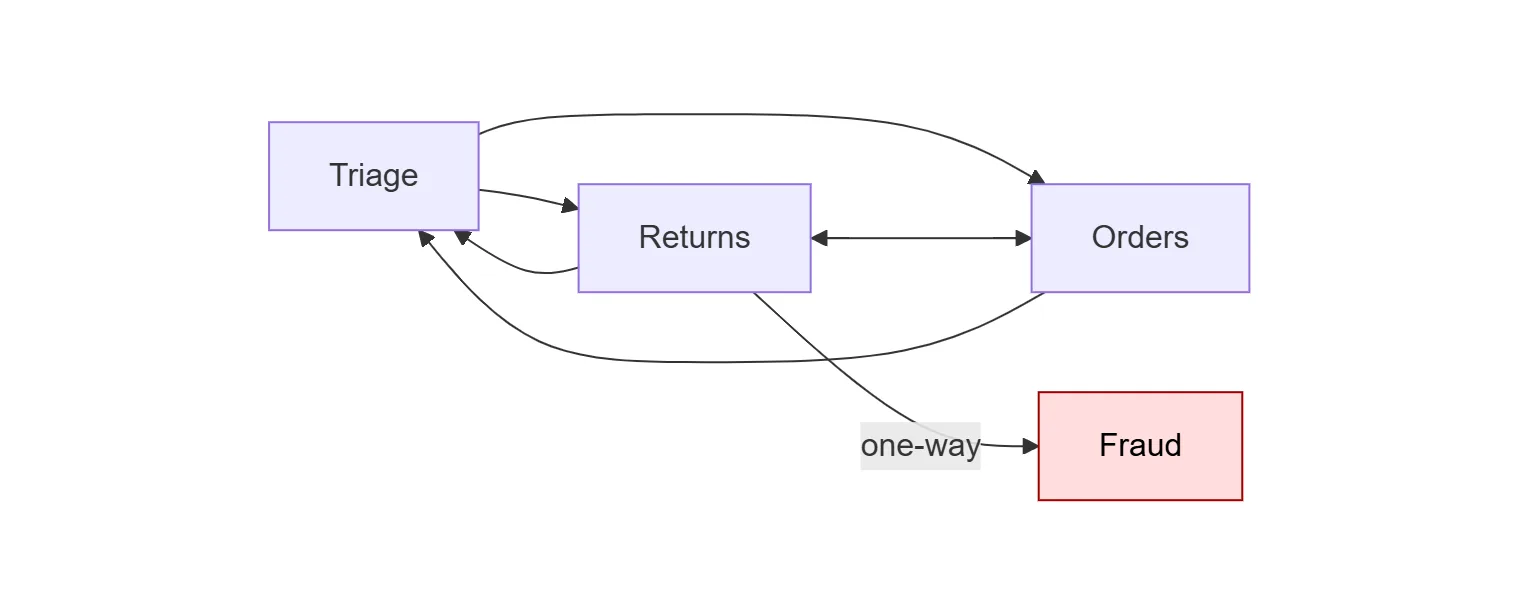
Two characteristics distinguish this topology from the simple star:
Returns↔Ordersis a side edge. A user who started with a return may need a replacement order, or a user who started with an order may want to convert it to a refund. Routing throughTriageagain would cost a turn and risk losing context.Returns → Fraudis one-way, andFraudis terminal. The returns specialist can escalate when a request looks suspicious, butFraudhas no outbound handoffs of its own. Once control rests there, the workflow stops routing and the conversation drains to output.
The .NET wiring is direct. WithHandoffs is used for the runs of edges that use default target-derived reasons, and the single WithHandoff call is reserved for the one edge that needs a custom reason:
HandoffWorkflowBuilder builder = AgentWorkflowBuilder
    .CreateHandoffBuilderWith(triage)
    .WithHandoffs(triage, [returns, orders])      // star
    .WithHandoffs(returns, [triage, orders])      // back-edge + side edge
    .WithHandoffs(orders, [triage, returns])      // back-edge + side edge
    .WithHandoff(returns, fraud,                  // one-way escalation
        handoffReason: "Suspected return fraud or abuse.")
    .EnableReturnToPrevious();                    // follow-ups go to last specialist

Workflow workflow = builder.Build();
Three behaviors are worth highlighting in this example:
- Per-edge handoff reasons matter because they become the tool descriptions the LLM reads when choosing whether to route. The reason on each
WithHandoff(from, to, handoffReason?)call is attached to the source-to-target edge: different sources can use different reasons for the same target. The default reason is the target agent’sDescription(or its name); the explicit reason onReturns → Fraudis what teaches the model when escalation is appropriate without putting that logic inReturns‘s system prompt. EnableReturnToPrevious()changes which agent receives the next user message. Without it, every user turn returns toTriage. With it, follow-up questions land on the specialist that was last speaking, which matches the user’s expectation mid-conversation.- Terminal agents are just agents with no outbound
WithHandoff. No special API is needed. The workflow’sHandoffEndExecutoryields aList<ChatMessage>as the workflow output onceFraudfinishes a turn.
The Python build of the same topology is the same set of declarations:
workflow = (
    HandoffBuilder(participants=[triage, returns, orders, fraud])
    .with_start_agent(triage)
    .add_handoff(triage, [returns, orders])
    .add_handoff(returns, [triage, orders])
    .add_handoff(orders, [triage, returns])
    .add_handoff(
        returns, [fraud],
        description="Suspected return fraud or abuse.",
    )
    .build()
)
Both definitions describe the same graph and the same terminal fraud node. Follow-up user turns are routed to the most recent specialist on both runtimes: in .NET this is enabled by EnableReturnToPrevious(), and in Python it is the default behavior once a start agent is set.
Workshop: From Sequential to Handoff for HITL
When does a Sequential workflow want to become a Handoff one? The most common trigger is “someone needs to ask the user a question.” Consider a content pipeline: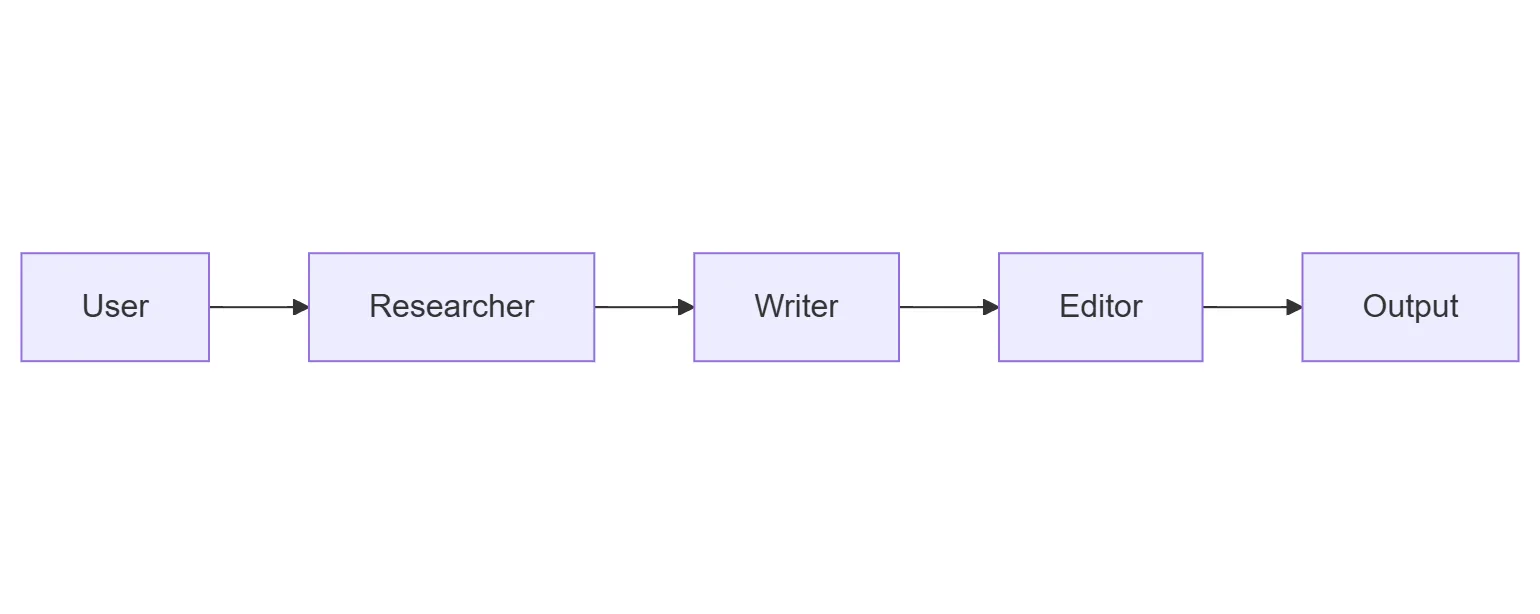 In .NET:
Workflow pipeline = AgentWorkflowBuilder.BuildSequential(researcher, writer, editor);
This works well when each agent can complete its step from the original input. But Sequential has no built-in pause: the Writer cannot ask the Researcher for an additional source, and the Editor cannot stop and ask the user “Did you want this in British or American English?” before publishing. To add either, there are two paths.
Path 1: build the routing yourself. Drop down to WorkflowBuilder and use typed conditional edges or AddSwitch, the same primitives Kinfey Lo’s Multi-Agent Orchestration post uses for the Conditional pattern. The decision executor, branch predicates, and owning agent are all chosen explicitly. The result is total control over routing at the cost of writing the bridging code, including the prompt engineering needed for the agent to format its decision in a way the predicate can read.
For the content-pipeline case, the wiring looks roughly like this (schematic; see note below):
Workflow pipeline = new WorkflowBuilder(researcher)
    .AddEdge(researcher, writer)
    .AddSwitch(writer, sw => sw
        .AddCase<DraftReview>(d => d.NeedsMoreSources, researcher)
        .WithDefault(editor))
    .Build();
This snippet is schematic because workflow agents speak chat protocol (List<ChatMessage> and TurnToken), not typed application payloads such as DraftReview. Adding a typed switch on the writer’s output requires inserting a custom executor (for example, one derived from ChatProtocolExecutor) that converts the writer’s chat output into a DraftReview before the switch can inspect it. The agents themselves are the same as in the Sequential pipeline; what differs is that the routing decision now lives in NeedsMoreSources (a typed predicate over the writer’s output) and in the adapter executor that produces the DraftReview payload. That is the tradeoff: explicit branch logic, typed edges, and the bridging code in the developer’s hands, instead of agent-driven routing.
Path 2: switch to Handoff. Promote the agents into a small graph and let them decide where to route:
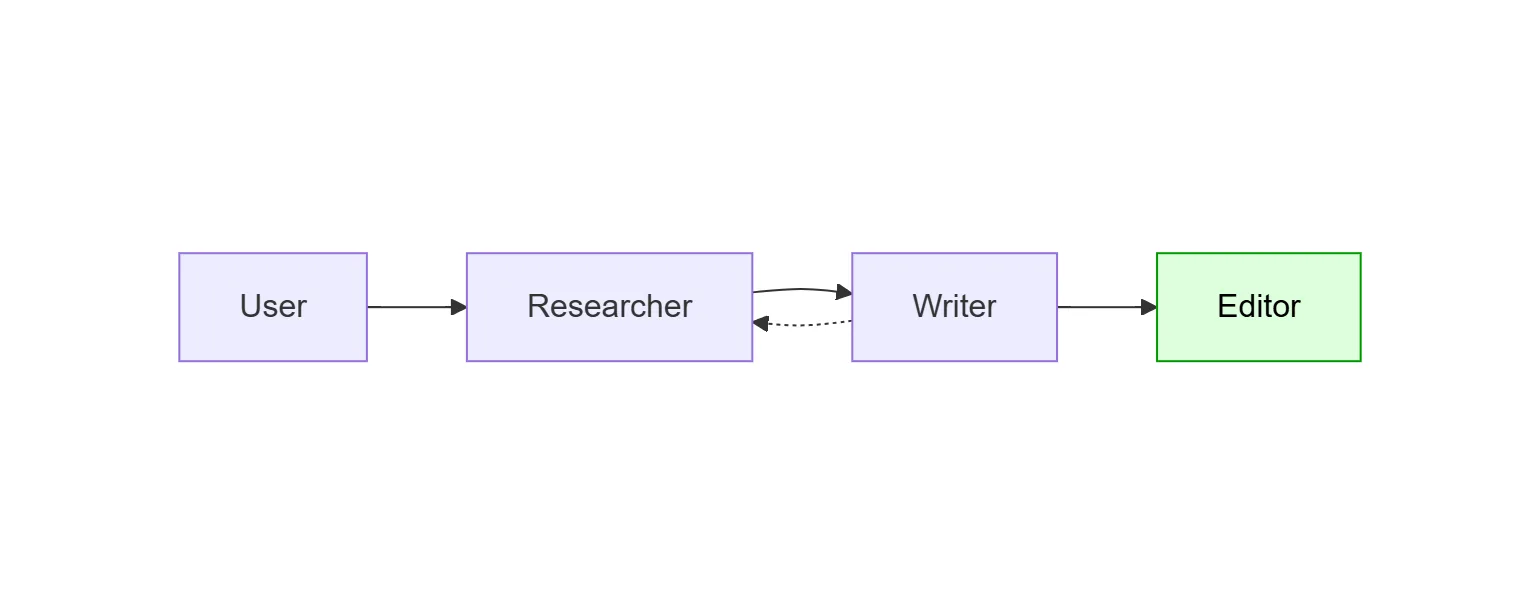
Workflow pipeline = AgentWorkflowBuilder
    .CreateHandoffBuilderWith(researcher)
    .WithHandoff(researcher, writer)
    .WithHandoff(writer, editor)
    .WithHandoff(writer, researcher,
        handoffReason: "Need additional research, sources, or fact-checking.")
    .EnableReturnToPrevious()
    .Build();
What changed:
Writer → Researcheris a back-edge with an explicit description. TheWritermodel now sees a synthetic handoff tool described as “Need additional research…” and can call it whenever it notices a gap. No decision executor is required.Editoris terminal (no outbound handoffs). When the editor finishes a turn, the workflow yields its conversation as output and pauses for the next user message.EnableReturnToPrevious()keeps the workflow HITL-friendly with no additional code. When the workflow pauses after the editor, the user’s next message (“Make it more formal”) goes to the editor rather than back to the researcher. Conversational follow-ups land where the user expects.
The Sequential version is shorter. The Handoff version is appropriate the first time the writer needs to revisit research, or the editor needs to consult the user before publishing. The structure is still declarative; the difference is that the graph contains a back-edge, and the routing decision along that edge is delegated to the agents.
Python callout. Python’s
SequentialBuilderalready exposes per-step HITL via.with_request_info(agents=[...]), which pauses the chain for user input between steps. That is a different shape of HITL than what Handoff provides: it is a fixed pause point, not a routing decision the agent makes. Use it when the human should always inspect the result before the next step; choose Handoff when the agent should decide whether the human (or another agent) needs to weigh in.
When to Pick Which
| If you want… | Use |
|---|---|
| Fixed pipeline, deterministic order | AgentWorkflowBuilder.BuildSequential (.NET) / SequentialBuilder (Python) |
| Same as above, with a guaranteed pause for review between steps | Sequential + Python’s .with_request_info, or insert a custom executor in .NET |
| Dynamic routing among a fixed cast of specialists, conversation-shaped flow | Handoff |
| Routing decisions that depend on non-agent logic, typed payloads, fan-out/fan-in | Drop down to WorkflowBuilder and use AddSwitch / conditional edges |
The mental model: Sequential covers pipelines whose shape is fixed in advance. Conditional workflows cover branches that the developer decides. Handoff covers branches that the agents decide, within boundaries set by the developer.
What This Demonstrates
Handoff keeps the topology in code and delegates routing decisions to the agents. This division of responsibility (declarative graph, agent-driven routing within it) is what enables the rest of the model: a shared conversation across specialists, asymmetric edges, terminal endpoints, return-to-previous follow-ups for HITL, and a clean migration path from Sequential the first time a workflow grows a back-edge.
Both .NET and Python expose the same set of capabilities. The next section covers the runtime differences worth knowing when authoring the same pattern in each language.
Runtime differences between .NET and Python
The two implementations agree on the model: shared conversation, auto-injected tools, per-edge natural-language descriptions, topology guardrails. They diverge on what is first-class versus what the developer composes.
| Capability | .NET | Python |
|---|---|---|
| Declare an edge | WithHandoff(from, to, handoffReason?); reason attached to the source-to-target edge, so different sources can use different reasons for the same target |
add_handoff(source, [targets], description=...); description per call, can vary by source |
| Default mesh | None; every edge is declared explicitly | If no add_handoff is called, every agent can hand off to every other |
| Autonomous mode | No first-class API; the same shape of behavior can be approximated through topology, for example by adding a handoff back to the starting agent from a specialist that would otherwise terminate | with_autonomous_mode(turn_limits={agent: N}) |
| Route follow-ups to the last specialist | One-line EnableReturnToPrevious() |
Default once a start agent is set; controlled via topology |
| Stop the conversation programmatically | Terminal node only | Terminal node, with_termination_condition(callable), or HandoffBuilder.terminate() from a user-input handler |
| Streaming events | Builder toggles EmitAgentResponseEvents / EmitAgentResponseUpdateEvents; consumers switch on WorkflowEvent subclasses |
Uniform WorkflowEvent stream including a typed HandoffSentEvent for source/target breadcrumbs |
Two of those rows materially change what a developer can express:
- Autonomous mode is a first-class API in Python. .NET does not expose a dedicated equivalent, but the same shape of behavior can be approximated through topology, for example by adding a handoff back to the coordinator from a specialist that would otherwise terminate, so control returns without requiring a user turn.
termination_conditionis Python-only. .NET’s idiom is to make the “we’re done” agent terminal, which works well when the topology has a clear endpoint and less well when termination depends on conversation content.
The other rows are surface differences. The runtimes share the same mental model, and most day-to-day authoring intent reads almost the same on both sides.
Learn More
- Microsoft Agent Framework documentation
HandoffWorkflowBuildersource- .NET Handoff sample
- Python
HandoffBuildersource - Python handoff samples:
handoff_simple.pyandhandoff_autonomous.py - Evan Mattson, Building a Real-Time Multi-Agent UI with AG-UI and MAF Workflows
- Kinfey Lo, Unlocking Enterprise AI Complexity: Multi-Agent Orchestration with the Microsoft Agent Framework


The “.NET Handoff sample” link is broken! This is the right one:
https://github.com/microsoft/agent-framework/blob/main/dotnet/samples/03-workflows/Orchestration/Handoff/Program.cs