


Agents are more useful when they can remember what matters beyond the current conversation. Today, we’re announcing a new preview integration that gives Microsoft Agent Framework agents durable, cross-session memory backed by Azure Cosmos DB.
The new Python package, agent-framework-azure-cosmos-memory, provides CosmosMemoryContextProvider. Attach it to an agent once and it can automatically store conversation turns, extract durable memories, and recall relevant facts, summaries, and user profiles in later conversations.
This integration was introduced by the Azure Cosmos DB team in Native Agent Memory for Microsoft Agent Framework, Powered by Azure Cosmos DB. Here, we’ll focus on what it means for Agent Framework developers and how naturally it fits the framework’s context-provider model.
Preview:
agent-framework-azure-cosmos-memoryis currently available for Python only. The package and its APIs may change before general availability.
Memory that participates in the agent lifecycle
In Agent Framework, a ContextProvider runs around every agent invocation. It can contribute information before the model runs and react to the completed run afterwards. That makes context providers a natural extension point for memory: the agent loop stays in Agent Framework, while a provider handles storage, retrieval, and memory processing.
CosmosMemoryContextProvider uses both sides of that lifecycle:
- Before a run, it searches for memories relevant to the incoming message and adds them to the model’s context.
- After a run, it stores the new conversation turns. The Azure Cosmos DB Agent Memory Toolkit then extracts facts, produces summaries, and updates the user’s profile in the background.
The agent doesn’t need to decide to call a memory tool, and your application doesn’t need to orchestrate a separate retrieval pipeline. Memory is part of every run.
How it fits together
Agent Framework owns the agent loop and invokes the provider. The provider adapts that lifecycle to the Azure Cosmos DB Agent Memory Toolkit, which owns the storage model and the processing pipeline. Azure Cosmos DB for NoSQL stores the turns and derived memories, then supports vector, full-text, and hybrid retrieval from the same database.
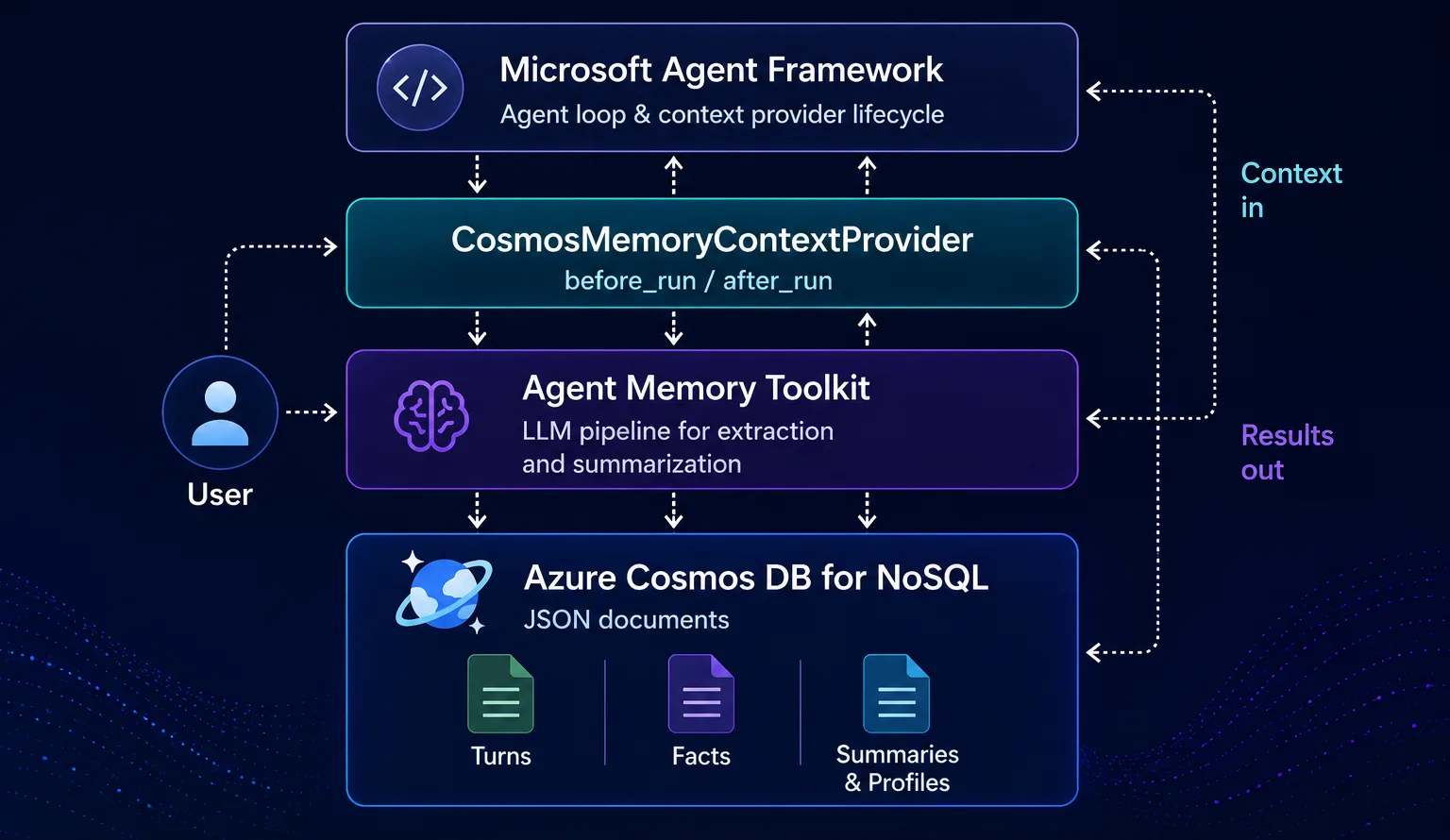
Architecture diagram courtesy of the Azure Cosmos DB team. See the original announcement for a deeper look at the memory pipeline.
Add durable memory to a Python agent
Install the preview integration alongside the Agent Framework Foundry provider:
pip install --pre agent-framework-azure-cosmos-memory agent-framework-foundrySet COSMOS_ENDPOINT, FOUNDRY_ENDPOINT, EMBEDDING_MODEL, and CHAT_MODEL for your Azure resources. Then create the provider and add it to the agent’s context_providers collection. A stable user_id lets a new session recall memories learned in an earlier one:
import asyncio
import os

from agent_framework import Agent
from agent_framework.foundry import FoundryChatClient
from agent_framework_azure_cosmos_memory import CosmosMemoryContextProvider
from azure.identity.aio import DefaultAzureCredential


async def main() -> None:
    credential = DefaultAzureCredential()
    memory = CosmosMemoryContextProvider(
        cosmos_endpoint=os.environ["COSMOS_ENDPOINT"],
        cosmos_database=os.getenv("COSMOS_DATABASE", "ai_memory"),
        foundry_endpoint=os.environ["FOUNDRY_ENDPOINT"],
        embedding_model=os.environ["EMBEDDING_MODEL"],
        chat_model=os.environ["CHAT_MODEL"],
        credential=credential,
    )

    agent = Agent(
        client=FoundryChatClient(
            project_endpoint=os.environ["FOUNDRY_ENDPOINT"],
            model=os.environ["CHAT_MODEL"],
            credential=credential,
        ),
        instructions="You are a helpful assistant with long-term memory.",
        context_providers=[memory],
    )

    async with credential, memory:
        first_session = agent.create_session()
        first_session.state.setdefault(memory.source_id, {})["user_id"] = "alice"
        await agent.run(
            "I love hiking and I'm allergic to peanuts.",
            session=first_session,
        )

        # Wait for background extraction so this immediate demo is deterministic.
        await memory.flush()

        # A new session for the same user can recall memories from the first one.
        second_session = agent.create_session()
        second_session.state.setdefault(memory.source_id, {})["user_id"] = "alice"
        reply = await agent.run(
            "What should I pack for a trail lunch?",
            session=second_session,
        )
        print(reply.text)


asyncio.run(main())
The provider’s async context drains in-flight background extraction before shutdown. In a real application, derive user_id from your authenticated user rather than accepting an arbitrary value from a request. If you don’t supply a stable user ID, the provider falls back to session-scoped memory instead of carrying knowledge across sessions.
The Foundry endpoint powers the toolkit’s extraction and embedding models as well as the chat agent in this example. DefaultAzureCredential supports local development through az login and production deployment through managed identity, so you don’t need to put keys in your code.
What your agent gains
This integration gives Agent Framework developers a single composable provider for:
- Cross-session recall scoped to a stable user.
- Derived memory, including facts, procedural and episodic memories, thread summaries, and user profiles.
- Hybrid retrieval using the vector and full-text capabilities built into Azure Cosmos DB.
- Background extraction, so memory processing doesn’t block the agent’s response path.
- Domain-specific extraction, using custom Prompty templates when the default memory rubric isn’t specific enough for your agent.
It also keeps responsibilities clean: Agent Framework runs the agent and composes its context; Azure Cosmos DB stores, processes, and retrieves the long-term memory.
Get started
- Read the Azure Cosmos DB team’s full announcement and walkthrough.
- Run the
basic_usage.pyorinteractive_chat.pysample. - Explore the
agent-framework-azure-cosmos-memorypackage and the Agent Memory Toolkit. - Learn more about context providers in Agent Framework and browse the available context-provider integrations.
With CosmosMemoryContextProvider, durable memory becomes another composable part of your Agent Framework agent: attach the provider, scope it to the user, and let the framework lifecycle do the rest.


0 comments
Be the first to start the discussion.