


Over a typical 2 day window, we record 10 times as many emulator sessions lasting more than 30 minutes for vNext as for the legacy emulator. Our bet is that agentic development is helping drive the difference!
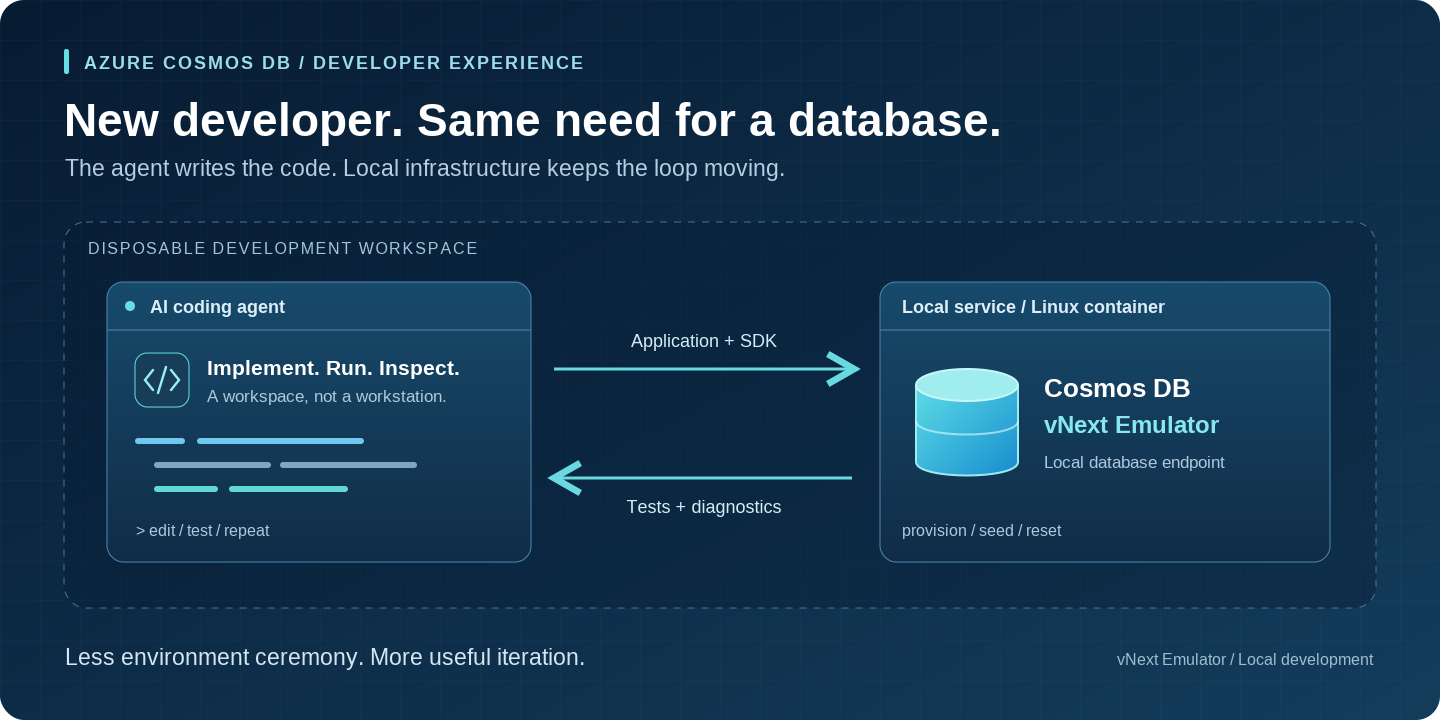
The appeal is straightforward: coding agents need a database they can run anywhere. They also need a database they can start, seed, test against and debug as they work. Our vNext emulator fits that workflow naturally.
A different kind of developer
With the vNext emulator, we’re building for a broader idea of the developer: a person at a keyboard, a coding agent, or the two working together. The original priorities of portability, lighter infrastructure and faster startup give us a strong foundation. Today, agentic workflows are explicitly part of how we think about the emulator’s evolution.
A coding agent doesn’t just need to write an SDK call. It needs to create the database, load test data, run the application, inspect what happened and repeat. Ideally, it can do that inside a workspace that disappears when the task ends.
Copilot’s hosted coding agent defaults to ephemeral Ubuntu; Codex Cloud creates isolated workspaces. Local tools such as Codex CLI, Claude Code and OpenClaw offer different execution and isolation options. Docker access isn’t universal, but portable local infrastructure fits many of these workflows.
Why “vNext” if it is already GA?
GA describes release status. vNext distinguishes two different emulator architectures.
The legacy emulator uses the Azure Cosmos DB service codebase and remains valuable for high-fidelity compatibility testing, particularly on Windows. Older Linux containers exist too, with platform limitations. Neither emulator reproduces every cloud-service capability.
The vNext emulator takes a lighter, portable approach to emulating common workflows on Azure Cosmos DB. Its Linux container supports Windows, macOS and Linux hosts on x64 and ARM64, with faster startup among its design goals. For short-lived jobs, startup and resource overhead are part of the developer experience, not background details.
Our longer-term direction is for vNext to replace our legacy emulator as its coverage matures. GA doesn’t mean that transition is complete. vnext-latest identifies the vNext image stream; pin a tested release or digest in CI.
Enhancements for coding agents
Recent vNext releases give agents more ways to act on a database, not just generate code for one.
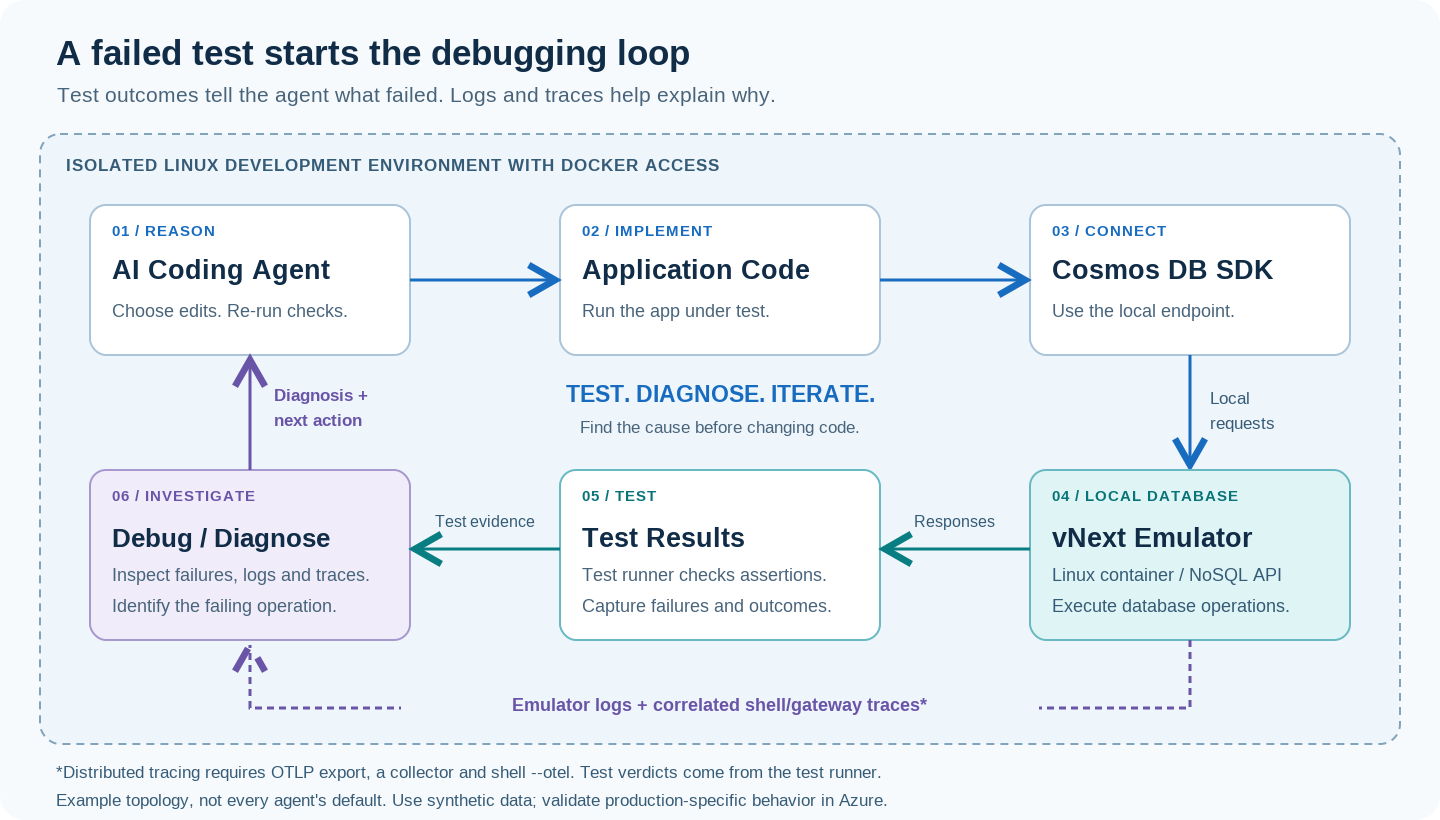
Prepare fixtures without a seeding application. The bundled shell and startup scripts let an agent create test data, then inspect it non-interactively with cosmoshell.sh -c. Mount .csh scripts at /init and set ENABLE_INIT_DATA=true; initialization runs on first startup, not before every test.
Diagnose before rewriting code. With OTLP export and a collector, shell --otel correlates client and gateway spans. An agent can inspect the failing operation alongside test assertions instead of guessing from an exception. Logs and traces feed Debug / Diagnose separately from test results.
Exercise the SDK’s negotiated protocol. October’s CosmosBinary support lets agents test binary request/response paths locally; JSON remains supported. The existing HTTP/2 thin-client gateway (GW 2.0) is separate from Nacelle’s HTTP/1.1 main gateway.
Check generated container definitions. October’s stricter indexing-metadata validation helps catch configuration mistakes before deployment. It is groundwork for indexing, not full index execution or performance parity.
Explore parallel test workloads. October’s experimental Nacelle gateway addresses some concurrency issues. Try --gateway-engine nacelle when test workers share an emulator; further improvements are planned, not measured gains promised here.
Test retrieval code locally. June added vector search. An agent can use synthetic embeddings and expected result IDs to test retrieval logic, not merely produce a plausible query.
Try it in your agent’s workflow
On a Linux host with Docker access, start a headless instance:
docker run --detach --rm --name cosmos-agent \
  --publish 127.0.0.1:8081:8081 \
  --publish 127.0.0.1:8080:8080 \
  --env ENABLE_CONSOLE_EXPORTER=true \
  mcr.microsoft.com/cosmosdb/linux/azure-cosmos-emulator:vnext-EN20261008 \
  --enable-explorer false
Use gateway mode and a bounded wait on http://localhost:8080/ready. HTTP is the default; .NET and Java need the documented HTTPS/certificate setup. Stop and remove the instance with docker stop cosmos-agent.
Run your existing integration suite first. Then evaluate Nacelle separately by appending --gateway-engine nacelle and comparing the same workload. Keep fixtures and configuration fixed.
Review the release’s compatibility warning before upgrading. Keep the emulator isolated: authentication isn’t enforced, and local tests don’t replace Azure validation.
Choose one approach for your next project:
- Guide your coding agent as you iterate: Azure Cosmos DB Agent Kit supplies Cosmos DB best-practice skills within your existing development workflow.
- Guide your coding agent with a specification: GitHub Spec Kit structures the work around a specification, plan and implementation tasks. The Cosmos DB extension (preview) adds database-specific commands and reviews. Read more about specification-driven development (SDD) for Cosmos DB.
Either way, try vNext as your local test database and share feedback.
About Azure Cosmos DB
Azure Cosmos DB is a fully managed NoSQL and vector database for modern applications, including AI. Ready to move beyond local testing? Try Azure Cosmos DB for free.
Follow us on X, YouTube and LinkedIn for product updates and developer walkthroughs.


0 comments
Be the first to start the discussion.